Omnivore
Omnivore is an open-source read-it-later tool for people who like text.
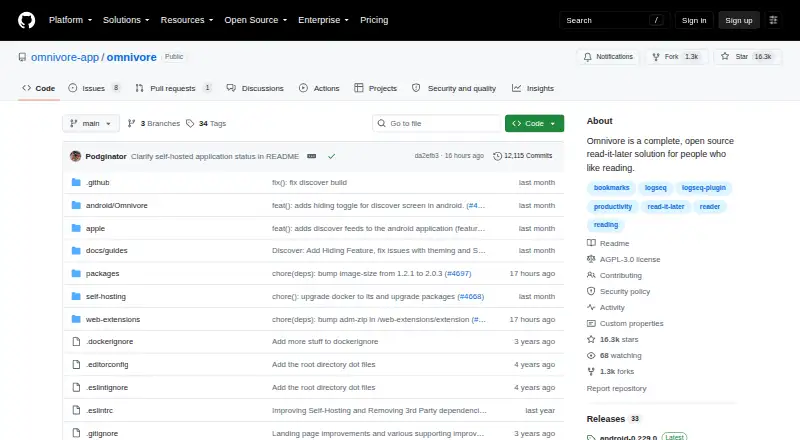
What Omnivore is
Omnivore is an open-source read-it-later tool for people who like text. It saves articles, newsletters, PDFs, and documents for distraction-free reading, with notes, highlights, and synchronization across devices. Labels, filters, rules, and indexed text search help organize saved material. Its email inbox can receive newsletters, PDFs, and article emails, including Substack newsletters. Browser extensions and mobile apps are available, and the iOS app offers text-to-speech with offline audio downloads. Plugins can sync saved reading, highlights, and notes with Logseq and Obsidian. Rules are a beta feature available only on the web; they can apply actions when articles are created or modified. The project can be forked, extended, or deployed on a user's own server. Its Docker setup starts PostgreSQL, the web frontend, an API server, and a content-fetching service. The cloud application was deprecated in November 2024, and Omnivore is now completely self-hosted. Self-hosting is free. Omnivore and its Readability.js extensions use the AGPL-3.0 license.
Good
- Saves articles, newsletters, PDFs, and documents.
- Offers notes, highlights, and indexed text search.
- Email inbox accepts newsletters and PDFs.
- Plugins sync with Logseq and Obsidian.
- Self-hosting is free.
Watch out
- The cloud application was deprecated in November 2024.
- Omnivore is now completely self-hosted.
- Rules are beta and web-only.
- Text-to-speech is available in the iOS app.
Who it suits
Omnivore suits readers who want to save and organize text-based material for later reading, including newsletters and PDFs. It is for people prepared to use a self-hosted setup, since the cloud application has been deprecated.
Verdict
Omnivore offers a broad reading and organization workflow, with email ingestion and integrations for Logseq and Obsidian. Its current self-hosted status is central to choosing it, and web rules remain a beta feature.
Plans and prices
From Omnivore's own pricing page, checked 1 Oct 2026.
| Plan | Price | What it gives you |
|---|---|---|
| Free (self-hosted) | Free | cloud application deprecated November 2024 · deploy on your own server |
The facts
Each one read from Omnivore's own pages, with the date it was checked.
Where it runs
- Browser extension
- Yeschecked 22 Sep 2026
- Mobile apps
- Yeschecked 22 Sep 2026
- Platforms
- The maker lists native iOS and Android apps, an Android progressive web app, and browser extensions for Chrome, Safari, Firefox and Edge.checked 1 Oct 2026
What it does
- Current availability
- The cloud application was deprecated in November 2024 and Omnivore is now completely self-hosted.checked 1 Oct 2026
- Email ingestion
- An Omnivore email inbox can receive newsletter subscriptions, PDFs and article emails, including Substack newsletters.checked 1 Oct 2026
- Highlight export
- Yeschecked 22 Sep 2026
- Highlighting
- Yeschecked 22 Sep 2026
- Integrations
- Omnivore provides plugins for synchronizing saved reading, highlights and notes with Logseq and Obsidian.checked 1 Oct 2026
- License
- Omnivore and its Readability.js extensions are licensed under AGPL-3.0.checked 1 Oct 2026
- Offline access
- Yeschecked 22 Sep 2026
- Organization
- The service provides labels, filters, rules and fully indexed text search.checked 1 Oct 2026
- Privacy
- The privacy policy names Omnivore Media, Inc. as the company and GDPR data controller and states that it uses personal data to provide and improve the service.checked 1 Oct 2026
- Product
- Omnivore is an open-source read-it-later solution for people who like text.checked 1 Oct 2026
- Reading workflow
- It saves articles, newsletters, PDFs and documents for distraction-free reading, with notes, highlights and synchronization across devices.checked 1 Oct 2026
- Rules
- Rules are a beta feature available only on the web and can apply actions when articles are created or modified.checked 1 Oct 2026
- Security reporting
- The security policy asks researchers to submit vulnerability reports through the GitHub Issues tab and prohibits social engineering.checked 1 Oct 2026
- Self hosting
- The project can be forked, extended or deployed to a user's own server; its Docker setup starts PostgreSQL, the web frontend, an API server and a content-fetching service.checked 1 Oct 2026
- Support
- The project directs its community to Discord for participation and ongoing discussion.checked 1 Oct 2026
- Text to speech
- Text-to-speech is available in the iOS app, including offline audio playback downloads.checked 1 Oct 2026
Money
- Free plan
- Yeschecked 22 Sep 2026
The full review of Omnivore
Overview
Omnivore is an open-source reading and annotation tool for collecting articles, newsletters, PDFs and documents. It is best suited to readers comfortable deploying software on their own server; the broad capture and organization workflow is compelling, but the discontinued cloud service makes setup a real part of the choice.
It brings saved reading together with notes, highlights and cross-device synchronization. Labels, filters and indexed search help turn a growing reading queue into a reference library, while email ingestion can capture newsletters and article mail, including Substack subscriptions. Readers comparing the category can browse Read-It-Later Apps.
Key features
Capture and organize
Omnivore handles more than web articles: it can collect newsletters, PDFs and other documents for distraction-free reading. An Omnivore email inbox gives subscriptions and emailed files a route into the same library, which is useful for readers whose material arrives in several formats. Labels, filters and full-text search make the collection easier to sort and revisit than a simple save-for-later queue.
Notes, highlights and integrations
Readers can annotate saved material with notes and highlights, then export highlights or synchronize saved reading, notes and highlights with Logseq and Obsidian through plugins. That makes Omnivore more useful as part of a research or personal knowledge workflow, especially for people who already use either app. Offline access supports reading away from a connection.
Audio and rules
The iOS app offers text-to-speech, with offline audio playback downloads. Rules can apply actions when articles are created or modified, but they remain a beta feature and are available only on the web. That limitation makes rules a useful experiment for web-based workflows, not a dependable cross-platform automation layer.
Self-hosting and stewardship
The cloud application was deprecated in November 2024; Omnivore is now completely self-hosted. Its deployment can be extended or forked, and the Docker setup starts PostgreSQL, a web frontend, an API server and a content-fetching service. That flexibility suits technically confident users who want to run their own instance, but it is a substantial trade-off for anyone expecting a maintained hosted service.
Omnivore and its Readability.js extensions use the AGPL-3.0 license. The privacy policy names Omnivore Media, Inc. as the company and GDPR data controller, and says personal data is used to provide and improve the service. The security policy directs vulnerability reports through GitHub Issues and prohibits social engineering; the project points its community to Discord.
Pricing
Free (self-hosted): free. The plan is free, but the cloud application is deprecated, so using it means deploying Omnivore on your own server. This is a strong fit for readers willing to manage their own instance and a poor match for those seeking a ready-to-use hosted service. There is no paid hosted tier in this offer to trade up to; the cost advantage comes with the responsibility of self-hosting.
Platforms
Omnivore supports Android, iOS, macOS, web, browser extensions, an API and self-hosted deployment. Mobile apps and offline access broaden where saved material can be read, while the web-only beta rules feature narrows where automation is available. The platform list should not be mistaken for cloud availability: the service is currently self-hosted.
Who it's for
Choose Omnivore if you read across articles, newsletters and documents, value searchable annotations, and want Logseq or Obsidian synchronization. Its email inbox and text-focused workflow can consolidate reading that would otherwise be scattered across formats. It is best for people willing to deploy and operate their own server; those who prioritize a hosted, low-maintenance service should look elsewhere.
Pros and cons
- Broad capture and retrieval: articles, newsletters, PDFs and documents can share one library, with labels, filters and indexed search.
- Useful annotation workflow: notes, highlights, export and Logseq or Obsidian synchronization support reuse beyond the original reading session.
- Offline support: readers can access saved material offline, and iOS text-to-speech includes offline audio downloads.
- Self-hosting is mandatory: the deprecated cloud application means users must deploy their own instance, a significant maintenance burden for many readers.
- Rules are limited: the feature is still beta and web-only, so it cannot serve as a mature, everywhere-available automation system.
Alternatives
Consider these alternatives if Omnivore's self-hosted requirement or workflow is not the right fit:
- PaperSpan is a freemium option for readers wanting mobile offline reading and a way to send one article at a time to Kindle.
- Couch suits readers on iOS or macOS who want unlimited saves on its free plan, with a lifetime Pro option for advanced features.
- Matter is an option for iOS and web users who want an unlimited library on its free plan and are considering premium text-to-speech features.
- Instapaper fits readers who want unlimited article, video and page saves, folders and API integration across web, iOS and Android; its Premium plan is $5.99 a month.
- Reminde may suit readers who want unlimited savings with a free plan capped at one slot, or unlimited slots on Pro.
- Burn 451 is a web, macOS and iOS option for readers comfortable with explicit daily and library caps on its free plan, or paying $4.99 a month for Pro.
- Gistory offers unlimited article saves with 10 AI summaries per month and 90-day article history on its free plan, for readers who want those summary features.
- ReadNever may fit readers looking for a free plan with unlimited saves plus monthly allowances for narration, podcasts and AI chat.
Verdict
Omnivore is a strong choice for technically confident readers who want a flexible, text-first library with email ingestion, rich annotation and Logseq or Obsidian synchronization. Its main reason to choose it is that breadth of reading and organization in a free, open-source package; its main reason to look elsewhere is that the cloud service is gone and self-hosting is now essential.
Getting started
- Open the Omnivore GitHub project
- Deploy Omnivore on your own server using its Docker setup
- Start the PostgreSQL, web frontend, API and content-fetching services
- Install the Android, iOS or macOS app, browser extension, or use the web interface
- Send newsletters, PDFs or article emails to your Omnivore inbox
Limits worth knowing
The free plan is self-hosted rather than hosted in the cloud, because the cloud application was deprecated in November 2024. Rules are limited to the web and remain a beta feature.
Questions
How much does Omnivore cost?
The Free (self-hosted) plan is free. It requires deployment on your own server.
Which platforms does Omnivore support?
Platforms include Android, iOS, macOS, web, browser extensions, an API and self-hosted deployments.
Can Omnivore work offline?
Yes. Offline access is available, and the iOS app supports downloaded offline text-to-speech audio.
Is Omnivore open source?
Yes. Omnivore and its Readability.js extensions are licensed under AGPL-3.0.
Can it connect with note-taking tools?
Plugins synchronize saved reading, highlights and notes with Logseq and Obsidian.
Alternatives to Omnivore
- 1

wallabag
Free planOpen sourceAndroidiOSWebAPI9.2From €11 a year - 2

Matter
Free planiOSWeb8.3Free plan - 3
PaperSpan
Free planAndroidiOSWebExtension8.3Free plan - 4

Instapaper
Free planAndroidiOS8.2From $59.99 a year - 5
Gistory
Free planAndroidiOSWebExtension8.2From $7.99 a month - 6

Cubox
AndroidiOSExtensionmacOS8.0From $29 a year