
Palette
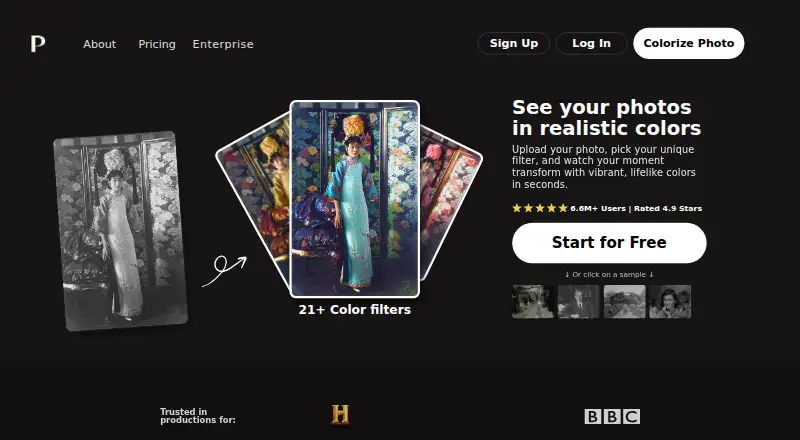
Palette is a photo colorization service that turns uploaded images into color versions after a user selects a filter.
What Palette is
Palette is a photo colorization service that turns uploaded images into color versions after a user selects a filter. Its web app offers more than 21 filters, and users can refine colors with descriptions and keywords. It supports batch processing, and Palette says a simple script can colorize over 1 million images per day. Its API supports automated and custom prompts, reference images, and up to 120 prompts for one image. The documented image limit is 4K resolution and 10MB per file. A beta Video API supports colorizing video frames in SD, Full-HD, and 4K. Palette documents connections with iPhone photos, Google Drive, Dropbox, and other photo apps, as well as a Windows desktop application from Covenant that uses its colorization engine. Its API platform has changed to RapidAPI. Uploaded files are securely processed and deleted shortly after results are provided. The terms say users retain ownership of their creations and may use them commercially without restrictions. Plans include a free trial, a one-time option for $49, and an annual subscription for $72 per year.
Good
- Offers over 21 web-app color filters
- Supports batch processing and API access
- API accepts reference images and custom prompts
- Uploaded files are deleted shortly after results
Watch out
- Image uploads are limited to 10MB each
- Video-frame colorization is labeled beta
- Free trial previews are resized and watermarked
Who it suits
Palette suits people who want to colorize photos through a web app, API, or documented integrations. Its batch and video options may also suit users processing larger image sets or video frames.
Verdict
Palette offers several ways to colorize images, from web filters to API workflows, with video-frame processing marked beta. Check the image limits and trial watermark before choosing an option.
Plans and prices
From Palette's own pricing page, checked 21 Oct 2026.
| Plan | Price | What it gives you |
|---|---|---|
| Try it for free | Free | 1 free full-resolution credit · unlimited previews · 500x500 preview maximum · watermark · 21+ filters |
| Pay once | $49, paid once | 75 credits · up to 5000x5000 pixels · credits valid 2 years · limited ads |
| Subscribe | $72 a year | 480 credits/year · up to 5000x5000 pixels · watermark-free · no ads · up to 10x faster · rollover up to five monthly amounts · annual |
The facts
Each one read from Palette's own pages, with the date it was checked.
Where it runs
- API platform
- Palette says its photo and video APIs have moved to RapidAPI.checked 21 Oct 2026
What it does
- Basic workflow
- Users upload photos, choose a filter, then download or edit the colorized result with keywords.checked 21 Oct 2026
- Batch uploads
- The product supports dragging in multiple photos and processing photo collections together.checked 21 Oct 2026
- Bulk processing
- Palette says a simple script can colorize over 1 million images per day.checked 2 Oct 2026
- Bulk scale
- Palette claims a simple script can process more than one million images per day.checked 21 Oct 2026
- Color customization
- Users can guide colorization with descriptions, keywords, automated prompts, custom prompts, or reference images.checked 21 Oct 2026
- Color filters
- The web app offers more than 21 color filters.checked 21 Oct 2026
- Content rights
- Terms state that users retain ownership of images and videos created with the service and may use them commercially without restrictions.checked 2 Oct 2026
- Credit model
- One consumer credit produces one logo-free high-resolution photo colorization.checked 21 Oct 2026
- Customization
- Users can fine-tune colors with descriptions and keywords after selecting a filter.checked 2 Oct 2026
- Data deletion
- Uploaded files are securely processed and deleted shortly after results are provided.checked 2 Oct 2026
- Developer examples
- The documentation includes Python requests examples for automatic prompts, base64 responses, reference images, and batch processing.checked 21 Oct 2026
- Enterprise API
- The enterprise offering provides one endpoint or a customer-run container for photo platforms, archives, and productions.checked 21 Oct 2026
- Enterprise licensing
- Enterprise licensing is offered as fixed project pricing, annual pricing with metered usage, or an unlimited-volume platform license.checked 21 Oct 2026
- Enterprise resale restriction
- Licenses cover a customer's own products but do not permit reselling Palette colorization as a standalone service.checked 21 Oct 2026
- Founder
- Emil Wallner identifies himself on GitHub as Palette's founder and describes himself as a former Google Arts & Culture resident.checked 21 Oct 2026
- Homepage rating claim
- Palette's homepage claims a 4.9-star rating alongside more than 6.6 million users.checked 21 Oct 2026
- Image API
- The image API exposes endpoints for automatic-prompt colorization, base64 output, reference-image colorization, and prompt generation.checked 21 Oct 2026
- Image limits
- The documented image limit is 4K resolution and 10MB maximum file size per image.checked 2 Oct 2026
- Image size limit
- The developer documentation sets a maximum image file size of 10 MB.checked 21 Oct 2026
- Independent praise: accessibility
- Tools for Humans says casual users value the browser workflow, no-install setup, and free or affordable entry point.checked 21 Oct 2026
The company
- Company usage claim
- The enterprise page says Palette has colorized 54 million photographs and served 6.6 million families.checked 21 Oct 2026
- Headquarters
- The official footer gives the address Rua do Almada 514, Porto, Portugal.checked 21 Oct 2026
Money
- Free-tier restriction
- Free previews are unlimited but larger images are resized to 500x500 pixels and carry a Palette watermark.checked 21 Oct 2026
The full review of Palette
Palette is a photo-colorization service for people who want some control over how an image is colored. It suits both occasional users and developers, with a web editor, API access and a Windows application built on its colorization engine.
Overview
Upload a photo, choose from more than 21 web filters, then refine the colors with descriptions or keywords. That extra direction is useful when an automatic result needs adjustment, though Palette’s free preview is watermarked and resized to 500×500 pixels. It is a way to assess the output, not a finished image.
Key features
- Color controls: Filter selection and text-based fine-tuning give users options beyond a single automatic pass. API users can also automate prompts, supply custom prompts or reference images, and generate up to 120 prompts for one image. That makes Palette more suitable for workflows that need variations or programmatic direction than for people seeking a one-click result.
- Batch and API processing: Batch processing is supported, and Palette says a simple script can colorize over 1 million images per day. For high-volume work, API access is more relevant than handling images individually in the web editor. The API platform has moved to RapidAPI, and the documented image limit is 4K resolution and 10MB per image.
- Video API: The beta service supports colorizing video frames in SD, Full-HD and 4K. Its beta status makes it a less settled choice than the photo workflow.
- Integrations and privacy: Palette documents connections with iPhone photos, Google Drive, Dropbox and other photo apps, plus a Windows desktop application from Covenant that uses its colorization engine. Uploaded files are securely processed and deleted shortly after results are provided. Users retain ownership of images and videos created with the service and may use them commercially without restrictions.
Pricing
The free Try it for free plan costs nothing and includes one trial credit and unlimited color previews. Those previews are limited to 500×500 pixels and carry a watermark, so the free tier is best for exploring filters rather than producing clean, full-size results.
Pay once costs $49, paid once, billed as a one-time payment. It provides 75 credits, supports images up to 5000×5000 pixels, is available for two years and includes limited ads. This suits occasional users who want a defined credit pack without an annual renewal; the two-year availability means it is not an indefinite balance.
Subscribe costs $72 a year, billed at $6/month = $72 year. It includes 480 credits per year, supports images up to 5000×5000 pixels, and refreshes credits monthly or yearly, with rollover up to five times the monthly plan amount. It is the stronger fit for regular use, though unused credits remain subject to that rollover cap.
Platforms
Palette is available on web, Windows and through an API. The service also documents integrations with iPhone photos, Google Drive, Dropbox and other photo apps. Its 10MB maximum upload size and 4K documented image limit matter for users working with large source files.
Who it's for
Palette is a good fit for people who want to steer photo colors with filters and text, and for developers who need batch processing or API-based prompt workflows. It is less compelling for users who need unrestricted free exports, or for those whose images exceed the upload limit. The video API may interest teams exploring frame colorization, but it is marked beta.
Pros and cons
- Pro: More than 21 web filters plus description and keyword controls give users ways to adjust color choices.
- Pro: API prompt automation, reference images and batch processing support programmatic and higher-volume use.
- Pro: Users retain ownership of created images and videos and may use them commercially without restrictions.
- Con: Free previews are watermarked and limited to 500×500 pixels, restricting their usefulness as finished outputs.
- Con: The image upload cap is 10MB, which can rule out larger source files.
- Con: The video workflow is beta, while paid image plans rely on credits and the one-time pack is available for only two years.
Alternatives
Consider PicWish Photo Colorizer if broader device coverage or free bulk editing matters: it supports Android, iOS, macOS, web, Windows and API, and its online plan offers free colorizing and downloads plus bulk edits of up to 30 images. Choose ImageColorizer if you want a free tier with 50 monthly credits and single processing, or a $6.90 a month Starter plan with 500 credits.
VanceAI Photo Colorizer may suit users looking for a 10-credit free tryout or a plan with 260 credits per month; its free online uploads support JPG and PNG up to 5MB. For a web option with no signup, watermark or photo-count limit, consider Colorize Photo, which is free.
Hotpot AI Photo Colorizer is another web alternative. SnapOtter is a free option for web, Linux and macOS. If you prefer paid desktop software with a lifetime license, AKVIS Coloriage AI offers Home Plugin and Home Standalone plans at $75, paid once for two computers, and Home Deluxe at $90, paid once.
HitPaw AI Image Colorizer is a paid alternative with a free trial and plans that automatically renew but can be canceled at any time.
Browse AI Image Colorizers, AI Photo Colorization Software or AI Image Enhancers to compare more options.
Verdict
Choose Palette if you want adjustable photo colorization with API and batch options, or a credit-based paid plan for recurring work. Its strongest advantage is the range from web filters to prompt-driven workflows; look elsewhere if you need unrestricted free exports, larger-than-10MB uploads or a mature video-colorization tool.
Alternatives to Palette
- 1

ImageColorizer
Free planAndroidiOSWebmacOS8.2From $19.99 a year - 2
PicWish Photo Colorizer
Free planAndroidiOSWebAPI8.1From $41.99 a year - 3
Colorize by Photomyne
Free planAndroidiOSWeb8.0From $59.99 a year - 4
snapnedit AI Photo Colorizer
Free planAndroidiOSWebAPI7.9Free plan - 5

Colorize Images
AndroidiOSWebmacOS7.4From $10 a year - 6

Hotpot AI Photo Colorizer
Free planWebAPISelf-hosted7.4Free plan