HitPaw AI Image Colorizer
HitPaw AI Image Colorizer is a photo tool that analyzes black-and-white images and automatically adds color.
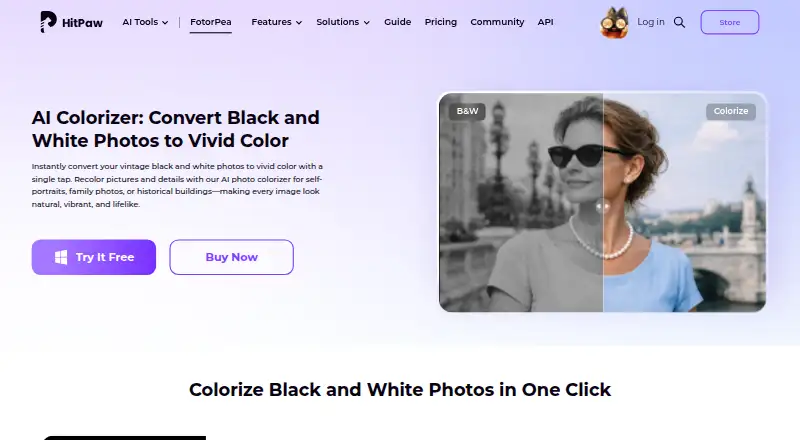
What HitPaw AI Image Colorizer is
HitPaw AI Image Colorizer is a photo tool that analyzes black-and-white images and automatically adds color. It can also remove scratches, restore faded details, sharpen photos, and process batches. Users can preview a colorized result and continue editing to adjust details; HitPaw says exports can reach 4K or higher resolution. The online tool accepts browser uploads and works without installation. Listed platforms include Windows, Mac, iPhone/iPad, Android, and a Photoshop plugin. The plugin offers 2x/4x upscaling, portrait sharpening, and old-photo repair, but has subscriptions and credits separate from FotorPea. Listed input formats include PNG, JPG, JPEG, WEBP, TIF, TGA, BMP, JFIF, NEF, and RAW; output formats include PNG, JPG, JPEG, WEBP, TIF, TGA, BMP, and JFIF. The pricing note lists service from $22.39/mo and a 3-day trial. Plan details describe monthly, yearly, perpetual, and annual business options, but do not list their individual prices.
Good
- Automatically adds color to black-and-white photos.
- Can repair scratches and faded details.
- Supports batch processing and continued editing.
- Browser tool works without installation.
- Lists RAW and common image formats.
Watch out
- Pricing note lists $22.39/mo.
- Trial lasts 3 days.
- Photoshop plugin subscriptions and credits are separate from FotorPea.
- Individual plan prices are not listed.
Who it suits
The colorizer may suit families, historians, photographers, educators, and creative users working with black-and-white photos. Browser use is an option for people who do not want to install the online tool.
Verdict
HitPaw AI Image Colorizer pairs automatic colorization with restoration, batch processing, and post-preview editing. Its listed trial, starting price, and separate plugin billing are relevant when weighing the available options.
Plans and prices
From HitPaw AI Image Colorizer's own pricing page, checked 30 Sep 2026.
| Plan | Price | What it gives you |
|---|---|---|
| 1 Month | — | 100 credits · 9 AI image enhancement models · all features · Automatically renew, cancel any time |
| 1 Year | — | 500 credits · 9 AI image enhancement models · 1-year free updates · all features · Automatically renew, cancel any time |
| Annual Business Plan | — | 5/10/100 PCs · 4,000/10,000/25,000 credits · multi-user control · company use · free tech support · Billed annually; auto-renewal, cancel at any time |
| Perpetual | — | 800 credits · 9 AI image enhancement models · one-time purchase · all features · One-Time price |
The facts
Each one read from HitPaw AI Image Colorizer's own pages, with the date it was checked.
What it does
- Batch processing
- The colorizer can remove scratches, restore faded details, sharpen images, and process images in batches.checked 30 Sep 2026
- Core function
- The AI colorizer analyzes black-and-white photos and automatically adds natural, realistic colors.checked 30 Sep 2026
- File formats
- Listed input formats include PNG, JPG, JPEG, WEBP, TIF, TGA, BMP, JFIF, NEF, and RAW; listed outputs include PNG, JPG, JPEG, WEBP, TIF, TGA, BMP, and JFIF.checked 30 Sep 2026
- Intended users
- HitPaw lists families, historians, photographers, educators, and creative users as users who can colorize black-and-white photos.checked 30 Sep 2026
- Online use
- HitPaw says its online tool lets users upload photos in a browser and colorize black-and-white images without installation.checked 30 Sep 2026
- Output resolution
- HitPaw says its colorize photo app can export images in 4K or higher resolution.checked 30 Sep 2026
- Payment and analytics security
- HitPaw says Stripe processes payments, it does not store full credit-card numbers, and its analytics tools are privacy-oriented and anonymized.checked 30 Sep 2026
- Photoshop integration
- The Photoshop plugin supports 2x/4x upscaling, portrait sharpening, and old-photo repair, with separate subscriptions and credits from FotorPea.checked 30 Sep 2026
- Preview and editing
- Users can preview the colorized photo instantly and continue editing to fine-tune details.checked 30 Sep 2026
- Privacy compliance
- HitPaw identifies HitPaw CO., LIMITED as the data controller and says it has appointed an EU representative under the GDPR.checked 30 Sep 2026
- Support and guarantee
- The purchase page advertises 24/7 technical support and a 30-day money-back guarantee.checked 30 Sep 2026
Money
- Free trial
- HitPaw offers a 7-day free desktop trial activated through an email download link.checked 30 Sep 2026
Where it runs
- Supported platforms
- FotorPea is offered for Windows, Mac, online use, iPhone/iPad, Android, and as a Photoshop plugin.checked 30 Sep 2026
The full review of HitPaw AI Image Colorizer
Overview
HitPaw AI Image Colorizer uses AI to add color to black-and-white photographs, with restoration and batch tools for working on older images or collections. It is best suited to people who want colorization alongside touch-ups across desktop, mobile, and browser options. The main trade-off is that its paid plans use credits, while the Photoshop plugin has separate billing.
Key features
Automatic colorization is the central draw: the software analyzes a monochrome image and applies color without manual painting. That makes it a practical starting point for family archives, historical photos, or educational material, though users who want precise artistic control should weigh the need to fine-tune the result after generation.
Restoration tools address scratches, faded detail, and softness, and batch processing can reduce repetitive work across a collection. Users can preview results and continue editing details. HitPaw says exports can reach 4K or higher, which is useful when image resolution matters. Input formats include PNG, JPG, JPEG, WEBP, TIF, TGA, BMP, JFIF, NEF, and RAW; output formats include PNG, JPG, JPEG, WEBP, TIF, TGA, BMP, and JFIF.
The online tool works in a browser without installation. FotorPea is also offered for Windows, Mac, iPhone and iPad, Android, and as a Photoshop plugin. The plugin adds 2x and 4x upscaling, portrait sharpening, and old-photo repair, but requires subscriptions and credits separate from FotorPea. HitPaw names HitPaw CO., LIMITED as data controller and says it has appointed an EU GDPR representative; it also says Stripe handles payments, full card numbers are not stored, and analytics are anonymized. The purchase page advertises 24/7 technical support and a 30-day money-back guarantee.
Pricing
HitPaw describes its pricing as paid, with a 3-day trial and a starting price of $22.39/mo. The free plan may suit an initial look, but no free-plan quota is given. The purchase options use credits across nine AI image enhancement models, so the allowance matters as much as the billing term:
- 1 Month: custom pricing; automatic renewal, cancel any time; 100 credits and all features. This is the shorter commitment, but frequent use may make its smaller allowance restrictive.
- 1 Year: custom pricing; automatic renewal, cancel any time; 500 credits, all features, and one year of free updates. It offers more credits than the monthly plan but commits to annual billing.
- Perpetual: custom pricing; one-time purchase; 800 credits, all features. It avoids recurring billing, though the credit allowance remains finite.
- Annual Business Plan: custom pricing; billed annually with auto-renewal and cancellation at any time; options for 5, 10, or 100 PCs and 4,000, 10,000, or 25,000 credits. Multi-user control, company use, and free technical support make it the option for teams rather than personal use.
HitPaw marks commercial use as personal, so business buyers should not assume an individual plan covers commercial work. The separate plugin subscription and credit system also needs to be budgeted independently.
Platforms
HitPaw lists Android, iOS, macOS, Windows, web, and an extension among its platforms. FotorPea is described for Windows, Mac, online use, iPhone and iPad, Android, and Photoshop. Browser access is the clearest choice for avoiding installation; users choosing a desktop, mobile, or plugin version should account for its distinct plan details.
Who it's for
Families restoring personal photographs, historians handling archival images, photographers, educators, and creative users are the audiences HitPaw identifies. Batch processing and restoration make it more compelling for a set of aging images than for someone seeking only a one-off color effect. Its personal-use designation makes it a poor fit for buyers who need clearly stated commercial rights.
Pros and cons
- Pros: Combines colorization with scratch removal, faded-detail restoration, sharpening, batch processing, and post-preview editing, which can consolidate several steps in a photo-revival workflow.
- Pros: Broad format support, browser access, and stated 4K-or-higher export give users flexibility in input and output.
- Cons: The 3-day trial is brief, and plan prices beyond the starting rate are custom pricing, making it harder to compare total cost before choosing an allowance.
- Cons: Credit limits apply even to the one-time Perpetual plan, and the Photoshop plugin is billed separately.
- Cons: Commercial use is marked personal, which limits its fit for professional work sold to clients.
Alternatives
Browse AI Image Colorizers to compare the category. ImageColorizer is worth considering for a free plan with 50 credits per month and a Starter plan at $6.90 a month; its free tier is ad-supported and single-processing.
PicWish Photo Colorizer is an option if free browser colorization and bulk editing up to 30 images are the priority. VanceAI Photo Colorizer may suit users who want a stated free allowance of 10 credits or a Starter plan at $15 a month, billed $180 billed annually, with 260 credits per month.
Palette offers a free trial credit, unlimited color previews, and previews resized to 500x500px with a watermark, so it may suit users who want to inspect previews before paying. Colorize Photo is the alternative to consider for free web use with no signup, watermark, or photo-count limit.
AKVIS Enhancer is another option for users seeking a Windows, macOS, or Linux tool. Colorize Images offers a freemium option on web, iOS, and Android. SnapOtter is a free option for web, Linux, and macOS.
Verdict
Choose HitPaw AI Image Colorizer if you need more than monochrome colorization: restoration, batch work, high-resolution export, and editing after preview give it a useful range for personal photo collections and archival projects. Look elsewhere if you need predictable plan pricing, generous ongoing free use, or commercial rights; the short trial, credit-based allowances, separate plugin billing, and personal-use designation are significant limits.
Alternatives to HitPaw AI Image Colorizer
- 1

ImageColorizer
Free planAndroidiOSWebmacOS8.2From $19.99 a year - 2
PicWish Photo Colorizer
Free planAndroidiOSWebAPI8.1From $41.99 a year - 3
Colorize by Photomyne
Free planAndroidiOSWeb8.0From $59.99 a year - 4
snapnedit AI Photo Colorizer
Free planAndroidiOSWebAPI7.9Free plan - 5

Palette
Free planWebAPISelf-hostedWindows7.6From $72 a year - 6
Colorize Images
AndroidiOSWebmacOS7.4From $10 a year