snapnedit AI Photo Colorizer
snapnedit AI Photo Colorizer turns black-and-white and grayscale photos into color by estimating plausible tones for the scene.
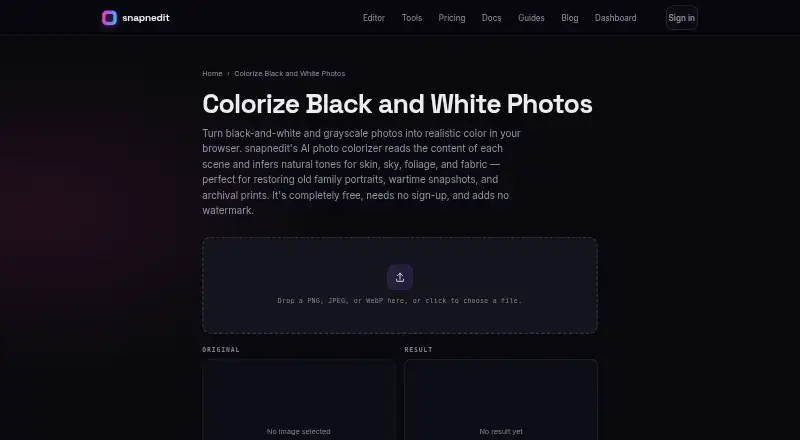
What snapnedit AI Photo Colorizer is
snapnedit AI Photo Colorizer turns black-and-white and grayscale photos into color by estimating plausible tones for the scene. It predicts a color value for each pixel while preserving the source image’s brightness and detail. The browser tool accepts PNG, JPEG, and WebP files up to 4096 pixels on the long edge, and downloads results as PNG. Browser colorization is free, needs no sign-up, has no daily cap, and adds no watermark. The tool is aimed in part at genealogy and heritage restoration, including family portraits, scanned prints, and archival photos. Its color estimates are interpretations, not reliable records of an object’s original appearance. After colorization, users can adjust white balance, warmth, and saturation or paint local corrections in the editor. It works in a browser on phones, tablets, and desktops without an app-store installation. The service is cloud-processed, and commercial use is allowed. API pricing lists one credit per metered colorization; identical cached reruns are free. One-time credit packs are 5.00 USD for 50 credits, 15.00 USD for 200 credits, and 35.00 USD for 600 credits; credits do not expire.
Good
- Free browser use requires no sign-up.
- No daily cap or watermark on browser downloads.
- Accepts PNG, JPEG, and WebP up to 4096 pixels.
- Editor supports tonal adjustments and local corrections.
- Works on phones, tablets, and desktops.
Watch out
- Original colors are inferred, not known.
- Colorized files export only as PNG.
- API colorization uses one credit per run.
Who it suits
It suits people restoring family or archival photographs who want a quick browser workflow and optional local color adjustments. Developers can also access the image operations through an API, SDK, or MCP server.
Verdict
snapnedit AI Photo Colorizer offers a free, accessible way to add plausible color to grayscale images, with tools for refining the result. Treat the output as an artistic restoration rather than proof of original colors.
Plans and prices
From snapnedit AI Photo Colorizer's own pricing page, checked 15 Oct 2026.
| Plan | Price | What it gives you |
|---|---|---|
| Free | Free | All 14 AI tools · full layered editor · PNG/JPG/WebP/AVIF export · no account · no watermark · Free forever |
| 50 credits | $5, paid once | 50 credits · 1 credit per colorization · credits do not expire · One-time purchase |
| 200 credits | $15, paid once | 200 credits · 1 credit per colorization · credits do not expire · One-time purchase |
| 600 credits | $35, paid once | 600 credits · 1 credit per colorization · credits do not expire · One-time purchase |
The facts
Each one read from snapnedit AI Photo Colorizer's own pages, with the date it was checked.
What it does
- Accuracy limit
- The maker says inferred colors are plausible artistic restoration rather than proof of an object's historically exact color.checked 15 Oct 2026
- AI training
- The colorization model is described as trained on millions of color photographs.checked 15 Oct 2026
- API
- A keyed developer HTTP API exposes the same image operations programmatically and meters usage with credits.checked 15 Oct 2026
- Color caveat
- The maker says the AI infers plausible colors but cannot know an object's true original color, so results are artistic restoration rather than a factual color record.checked 8 Oct 2026
- Color inference
- Its model predicts a color value for each pixel from grayscale content while preserving the source brightness and detail.checked 15 Oct 2026
- Color-photo limitation
- The colorizer is intended for black-and-white or grayscale images, while faded color photos should use editor color controls.checked 15 Oct 2026
- Damage limitation
- Creases, dust, tape and tears can receive odd tints because the model colorizes whatever texture it sees.checked 15 Oct 2026
- Documentation depth
- Documentation has getting-started guidance plus API authentication, operation reference, storage destinations, usage tracking, SDK, webhooks and editor embedding sections.checked 15 Oct 2026
- Editing after colorization
- Users can open results in the editor to adjust white balance, warmth, and saturation or paint local corrections.checked 8 Oct 2026
- File support
- The colorizer accepts PNG, JPEG, and WebP uploads up to 4096 pixels on the long edge and exports a PNG.checked 8 Oct 2026
- How it colors
- The page says the model predicts a color value for each pixel while keeping the original brightness and detail intact.checked 8 Oct 2026
- Import and export
- The editor imports JPEG, PNG, WebP and RAW files and exports JPEG, PNG, WebP or AVIF with selectable quality.checked 15 Oct 2026
- Independent listing identity
- G2's page is for a product named SnapEdit sold by Snapedi, so it does not establish a rating for snapnedit.com.checked 15 Oct 2026
- Input formats
- Colorize accepts PNG, JPEG and WebP uploads.checked 15 Oct 2026
- Integrations
- The site offers a developer API, a zero-dependency SDK, and an MCP server for running the same image operations programmatically.checked 8 Oct 2026
- Layered editor
- The browser editor includes raster layers, masks, selections, curves, levels, HSL, white balance, local adjustments, clone/heal, liquify, perspective and lens correction.checked 15 Oct 2026
- Licence
- No open-source licence is stated on the product, documentation, privacy or terms pages.checked 15 Oct 2026
- Limit: imperfect cleanup (similarly named G2 listing)
- The same G2 reviewer reported residual blur near detailed backgrounds or adjacent objects and said the free version felt limited for regular multi-image work.checked 15 Oct 2026
Where it runs
- App-store identity
- The Apple listing found is SnapEdit: Photo Editor AI at snapedit.app, not the snapnedit.com colorizer.checked 15 Oct 2026
- Browser access
- All in-browser tools are free, require no sign-up, have no stated daily cap and add no watermark.checked 15 Oct 2026
- Limit: pricing complaints (similarly named App Store listing)
- App Store reviewers of SnapEdit complained about premium costs and excessive advertising.checked 15 Oct 2026
Money
- Colorization price by API
- The pricing page lists Colorize Black and White Photos at 1 credit per metered run; identical cached reruns are free.checked 8 Oct 2026
- Free browser use
- The maker says browser colorization is free, requires no sign-up, has no daily cap, and downloads without a watermark.checked 8 Oct 2026
The company
- Company disclosure
- The snapnedit pages identify the product as snapnedit and provide no legal company name, headquarters, founding year, employee count or funding information.checked 15 Oct 2026
The full review of snapnedit AI Photo Colorizer
snapnedit AI Photo Colorizer is a browser tool for adding inferred color to grayscale photographs. It is a good fit for people bringing family portraits, scanned prints, or archival images to life without installing an app. Its greatest advantage is unrestricted free browser use; its central limitation is that plausible color is not historical evidence.
Overview
The colorizer predicts color values across an image while retaining its original brightness and detail. The result can make an old photograph more vivid, but the model cannot determine an object’s actual original color. Treat the image as an artistic restoration, especially when historical accuracy matters; the service does not guarantee the quality or accuracy of a particular result.
Users can refine the result in the editor by changing white balance, warmth, and saturation or painting local corrections. These controls offer useful ways to shape the look, but they cannot remove the uncertainty inherent in AI-inferred color.
Key features
- No-account browser access: Colorize for free without signing up, facing a daily cap, or receiving a watermarked download. That makes it particularly practical for occasional personal projects.
- Broad image input, PNG output: Upload PNG, JPEG, or WebP images up to 4096 pixels on the long edge. Results export as PNG, so users who need another output format will have to convert the file separately.
- Editor and local corrections: Adjust overall color balance or paint corrections in specific areas. This is useful when the first pass needs visual refinement, though it is not a substitute for evidence about original colors.
- Programmatic access: A developer API, zero-dependency SDK, and MCP server let developers run the same image operations programmatically. The API prices colorization at one credit per metered run, with identical cached reruns free.
- Cloud processing: The colorizer describes its AI as self-hosted, while its tools run on the maker’s servers. Users seeking processing entirely on their own device should look elsewhere.
- Usage rights: Users own generated results subject to rights in the uploaded photograph. Commercial use is supported, but the service makes no quality or accuracy guarantee.
Pricing
The browser colorizer is free, with no account requirement, watermark, or daily usage cap. That is the strongest choice for personal use and makes it easy to try multiple images without committing to a paid plan.
| Plan | Price | What it includes |
|---|---|---|
| Free | free, forever | All 14 AI tools in the browser, no account required, no watermark |
| 50 credits | 5.00 USD one-time | 50 credits; one credit per colorization; credits do not expire |
| 200 credits | 15.00 USD one-time | 200 credits; one credit per colorization; credits do not expire |
| 600 credits | 35.00 USD one-time | 600 credits; one credit per colorization; credits do not expire |
The paid credit packs are one-time purchases rather than subscriptions, and their credits do not expire. They suit users who want metered colorization or API use; the browser workflow remains the better fit for people who only need free colorization. There is no free trial.
Platforms
The colorizer runs in a browser on web, Android, and iOS devices, as well as desktop computers, with no app-store installation required. API access is also available for programmatic workflows. Image processing is cloud-based.
Who it's for
Choose snapnedit for family-history projects, heritage restoration, or archival images when you want a free, accessible color pass and the option to adjust it afterward. It is less suitable when the task demands proof of original colors, a non-PNG export, or processing that stays off the maker’s servers.
Pros and cons
- Pro: Free browser colorization has no sign-up, daily cap, or watermark, removing the usual friction for occasional use.
- Pro: White-balance, warmth, saturation, and local-paint controls let users refine the visual result rather than accept a single automatic pass.
- Pro: One-time credit packs do not expire, so paid use does not require an ongoing subscription.
- Con: Inferred colors cannot verify what objects originally looked like, limiting its value for evidence-based restoration.
- Con: Results export only as PNG, which may require an extra conversion step.
- Con: Processing runs in the cloud, not entirely on the user’s device.
Alternatives
For a wider directory of options, browse AI Image Colorizers.
- PicWish Photo Colorizer is worth considering if bulk editing matters: its free online colorizer supports bulk editing of up to 30 images.
- ImageColorizer offers a free tier with 50 credits per month and single processing, making it a better fit for someone who wants a monthly allowance rather than unlimited free browser colorization.
- VanceAI Photo Colorizer provides 10 free credits to try and supports JPG and PNG uploads up to 5MB online, useful if those upload constraints suit your workflow.
- Molyin Photo Colorizer is another web-based freemium option.
- RetroFix is an alternative for Android, iOS, and macOS.
- SnapOtter is a free, open-source option with unlimited usage across its tools and support for self-hosting, for users who prefer that model.
- Colorize by Photomyne suits mobile-only users who want Android or iOS access; its yearly membership costs $59.99 a year after a 3-day free trial.
- MyHeritage In Color offers up to 10 photos free with sign-up, so it may suit users comfortable creating an account for a limited initial set.
Verdict
Choose snapnedit AI Photo Colorizer if you want a no-sign-up, no-watermark browser tool for giving family or archival photographs a plausible color treatment, with controls for refining the result. Its free access and non-expiring paid credits make it flexible for both occasional and metered use. Look elsewhere if you need colors you can treat as historically factual, a non-PNG export, or local processing.
Getting started
- Open https://snapnedit.com/colorize in a browser
- Upload a PNG, JPEG, or WebP image up to 4096 pixels on the long edge
- Run the browser colorization without creating an account
- Download the PNG result without a watermark
- Open the result in the editor for tonal or local corrections
- Buy a one-time credit pack for metered API colorization
Limits worth knowing
The free browser plan is free, billed free forever, with all 14 AI tools, no account requirement, and no watermark. Paid colorization costs one credit per run; 50 credits cost $5, paid once, 200 cost $15, paid once, and 600 cost $35, paid once, with credits that do not expire.
Questions
Is snapnedit AI Photo Colorizer free?
Yes. Browser use is free, requires no sign-up, has no daily cap, and downloads without a watermark. The Free plan is free, billed free forever.
Which image formats and sizes are supported?
It accepts PNG, JPEG, and WebP uploads up to 4096 pixels on the long edge. Colorized results are exported as PNG files.
How are colors selected?
The model predicts a color value for each pixel while keeping the original brightness and detail. The maker says the colors are plausible inferences, not guaranteed records of true original colors.
Can I edit a colorized image?
Yes. Results can be opened in the editor to adjust white balance, warmth, and saturation, or to paint local corrections.
Does it work on mobile devices?
The browser editor works on phones and tablets as well as desktop computers, without app-store installation.
How does API pricing work?
The API pricing page lists one credit per metered black-and-white photo colorization.
Alternatives to snapnedit AI Photo Colorizer
- 1

ImageColorizer
Free planAndroidiOSWebmacOS8.2From $19.99 a year - 2
PicWish Photo Colorizer
Free planAndroidiOSWebAPI8.1From $41.99 a year - 3
Colorize by Photomyne
Free planAndroidiOSWeb8.0From $59.99 a year - 4

Palette
Free planWebAPISelf-hostedWindows7.6From $72 a year - 5

Colorize Images
AndroidiOSWebmacOS7.4From $10 a year - 6

Hotpot AI Photo Colorizer
Free planWebAPISelf-hosted7.4Free plan