Oxford Learner’s Bookshelf
Oxford Learner’s Bookshelf provides interactive Oxford e-books for teaching and learning English.
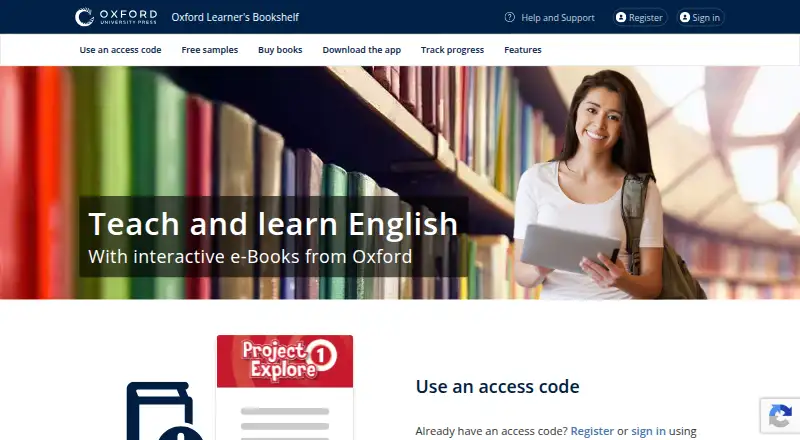
What Oxford Learner’s Bookshelf is
Oxford Learner’s Bookshelf provides interactive Oxford e-books for teaching and learning English. Its catalog includes Graded Readers, course student books and workbooks, grammar and reference books, and professional development for teachers. Some courses are offered as complete digital packs with e-books and Online Practice, and users can register for free samples. Depending on the title, books may include interactive activities, video, audio, answer checking, adjustable audio speed, and pronunciation recording and comparison. Readers can add sticky or voice notes, highlight or underline text, and annotate pages. Books downloaded in the apps work offline, while cloud sync can carry answers, notes, marks, bookmarks, and last-page position between devices. Teachers can assign e-books and Classroom Presentation Tools; some courses also let teachers track student progress and scores in a gradebook. Presentation Tools can play media, launch activities and games, show answers and scripts, and expand images. For Graded Readers, a reading diary tracks books and words read and can award a certificate; coursebooks are excluded. Books require an Oxford ID and a licence or access code. Prices vary by title, and some browser recording features require Chrome or Firefox rather than Edge or Safari.
Good
- Downloaded books are available offline in the apps.
- Notes, marks, bookmarks, and reading position can sync.
- Supports sticky notes, voice notes, highlighting, and annotations.
- Free sample e-books are available to try.
Watch out
- Books require an Oxford ID and a licence or access code.
- E-book and presentation-tool access cannot be shared.
- Audio notes and pronunciation practice recording do not work in Edge or Safari.
- Features vary by e-book.
Who it suits
It suits English learners who want digital Oxford books with offline reading and annotation, and teachers assigning books or presentation materials. The available activities and tools depend on the title and course.
Verdict
Oxford Learner’s Bookshelf combines English learning books with interactive and teacher-facing tools, though features vary by title. Check the specific book’s contents and access requirements before choosing it.
Plans and prices
From Oxford Learner’s Bookshelf's own pricing page, checked 7 Oct 2026.
| Plan | Price | What it gives you |
|---|---|---|
| Individual Oxford e-books and digital packs | — | Hundreds of titles · prices vary by title · some courses offered as digital packs with Online Practice |
The facts
Each one read from Oxford Learner’s Bookshelf's own pages, with the date it was checked.
What it does
- Account and access limits
- Books require an Oxford ID and a licence or access code, and students, teachers, and administrators cannot share an e-book or Classroom Presentation Tool.checked 7 Oct 2026
- Book selection
- The catalog includes Graded Readers, course student books and workbooks, grammar and reference books, and professional development for teachers.checked 7 Oct 2026
- Digital packs
- Some courses are available as complete digital packs that include e-books and Online Practice.checked 7 Oct 2026
- Interactive learning
- E-books can include interactive activities, video, audio, answer checking, adjustable audio speed, and pronunciation recording and comparison; features vary by e-book.checked 7 Oct 2026
- Notes and annotations
- The app supports sticky notes, voice notes, highlighting, underlining, and page annotations.checked 7 Oct 2026
- Offline access and sync
- Downloaded books can be used offline in the apps, while answers, notes, marks, bookmarks, and last-page position can sync between devices through the cloud.checked 7 Oct 2026
- Presentation tools
- Classroom Presentation Tools can play audio and video, launch activities and games, show answers, display scripts, and expand images.checked 7 Oct 2026
- Purpose
- Oxford Learner’s Bookshelf provides interactive Oxford e-books for teaching and learning English.checked 7 Oct 2026
- Reading records
- For Graded Readers, the reading diary tracks words and books read, and readers can earn a certificate; coursebooks are excluded from the reading diary.checked 7 Oct 2026
- Security and privacy
- Google Play’s developer-provided disclosure says data is encrypted in transit and users can request deletion; it also says personal information may be collected and some data types may be shared with third parties.checked 7 Oct 2026
- Support
- The maker’s offline-help page directs users needing further assistance to Customer Support at [email protected].checked 7 Oct 2026
- Teacher tools
- Teachers can assign e-books and Classroom Presentation Tools and, for some courses, track students’ progress and scores in a class gradebook.checked 7 Oct 2026
Where it runs
- Browser limitation
- Audio notes and pronunciation practice cannot be recorded in Edge or Safari; the help page directs users to Chrome or Firefox for recording.checked 7 Oct 2026
- Platforms
- The maker documents browser access and apps for Windows, Mac, Linux, iPad, and Android.checked 7 Oct 2026
Money
- Free samples
- Users can register to try sample Oxford University Press e-books for free.checked 7 Oct 2026
The company
- Headquarters
- Oxford, United Kingdomchecked 28 Sep 2026
Alternatives to Oxford Learner’s Bookshelf
- 1

OpenStax
Free planAndroidiOSWebAPI7.9Free plan - 2

DIKSHA
Free planOpen sourceAndroidiOSWebAPI7.8Free plan - 3
CK-12 FlexBook 2.0
Free planAndroidiOSWebExtension7.6Free plan - 4
LibreTexts
Free planAndroidiOSWeb7.4From $1,250 a year - 5
VitalSource Bookshelf
Free planAndroidiOSWebmacOS7.4Free plan - 6
ePathshala
Free planAndroidiOSWebWindows7.3Free plan