OpenLock
OpenLock is a free, open-source exam lockdown browser built natively for Linux.
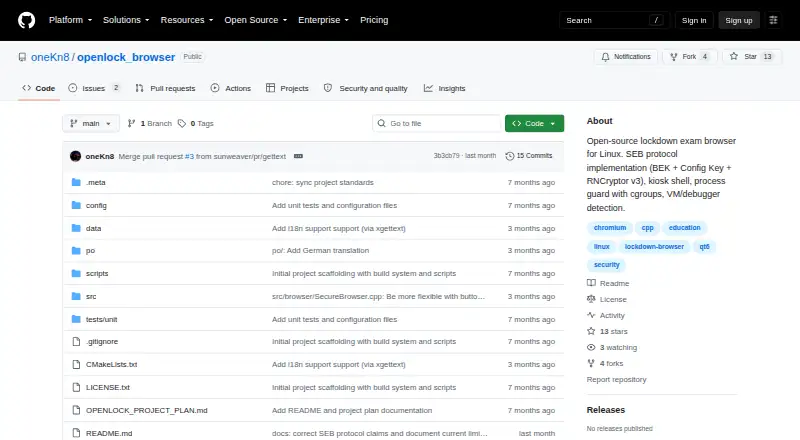
What OpenLock is
OpenLock is a free, open-source exam lockdown browser built natively for Linux. It is intended to bring Safe Exam Browser-style restrictions to Linux, but the project says it is not ready for exams: its SEB key derivation is not byte-exact, so its LMS handshake will fail. It can parse .seb configuration files and attach Browser Exam Key and Config Key headers, although those keys will not match the handshake. Its restrictions include fullscreen kiosk mode, monitoring and stopping prohibited processes, blocking shortcuts and clipboard use, and disabling browser tools and actions such as downloads and right-click. It also lists VM, debugger, and hypervisor detection, optional self-hash verification, URL filtering, cgroups v2 process isolation, and an off-the-record profile with permissions denied by default. Moodle, Canvas, and Blackboard adapters are listed, but the project has not been validated against live instances. Documented prerequisites include Ubuntu 22.04 or later, Fedora 38 or later, or Arch Linux, plus Qt6 and QtWebEngine. AppImage, .deb, .rpm, and Flatpak packaging are planned, not available releases.
Good
- Built natively for Linux.
- Blocks shortcuts and clipboard use.
- Provides URL filtering and kiosk mode.
- Free and open source under MPL 2.0.
Watch out
- Project says it is not exam-ready.
- LMS handshake keys currently will not match.
- Live LMS instances have not been validated.
- Listed package formats are planned, not available.
Who it suits
OpenLock may interest Linux users exploring exam-lockdown software or contributing to the project. It is not suitable for administering exams in its current state, according to the project.
Verdict
OpenLock lists a broad set of lockdown controls for Linux, but its stated SEB key and handshake limitation makes it not exam-ready. Treat its Moodle, Canvas, and Blackboard adapters as unvalidated.
The facts
Each one read from OpenLock's own pages, with the date it was checked.
Where it runs
- Browser hardening
- It disables developer tools, view source, downloads, right-click, console access and drag-and-drop.checked 30 Sep 2026
- Browser restrictions
- Browser hardening disables DevTools, View Source, downloads, right-click, console and drag-and-drop.checked 30 Sep 2026
- Kiosk mode
- Its kiosk mode uses fullscreen takeover via X11 override-redirect or a Wayland/Cage compositor.checked 30 Sep 2026
- Linux requirements
- The stated prerequisites include Ubuntu 22.04 or later, Fedora 38 or later, or Arch Linux, along with Qt6 and QtWebEngine.checked 30 Sep 2026
- Native Linux app
- It is built natively for Linux rather than through a compatibility layer.checked 30 Sep 2026
What it does
- Contribution support
- The maker welcomes contributions and asks contributors to open an issue before making changes.checked 30 Sep 2026
- Current limitation
- The repository states that OpenLock is not exam-ready because its SEB key derivation is not yet byte-exact and the LMS handshake fails.checked 30 Sep 2026
- Data handling
- The security model specifies an off-the-record browser profile with no persistent storage and permissions denied by default.checked 30 Sep 2026
- Distribution packaging
- AppImage, .deb, .rpm and Flatpak packaging are listed as planned rather than available releases.checked 30 Sep 2026
- Exam status
- The project says it is not exam-ready because its SEB key derivation is not byte-exact and has not been validated against a live LMS.checked 30 Sep 2026
- Input lockdown
- It blocks escape shortcuts including Alt+Tab, Alt+F4, Ctrl+C and PrintScreen and restricts clipboard use.checked 30 Sep 2026
- Input restrictions
- Input lockdown blocks shortcuts including Alt+Tab, Alt+F4, Ctrl+C and PrintScreen, as well as clipboard use.checked 30 Sep 2026
- Integrity checks
- The project lists VM, debugger and hypervisor detection, plus optional self-hash verification, as security measures.checked 30 Sep 2026
- License
- The repository says the project follows the Mozilla Public License 2.0 and allows proprietary use if modifications to MPL-licensed files remain open.checked 30 Sep 2026
- LMS integrations
- The project lists adapters for Moodle, Canvas and Blackboard, but says it has not been tested against live instances of those LMS platforms.checked 30 Sep 2026
- Navigation controls
- OpenLock supports URL whitelist and blacklist filtering and navigation policy enforcement.checked 30 Sep 2026
- Process guard
- It monitors and kills prohibited processes such as screen recorders, virtual machines and remote-desktop tools.checked 30 Sep 2026
- Process protection
- A process guard monitors and kills prohibited processes such as screen recorders, virtual machines and remote desktop software.checked 30 Sep 2026
- Purpose
- OpenLock is an open-source lockdown exam browser for Linux intended to bring Safe Exam Browser style exam lockdown to Linux distributions.checked 30 Sep 2026
- SEB protocol
- It parses .seb configuration files and attaches Browser Exam Key and Config Key headers to requests, but the project says these keys currently will not match an LMS handshake.checked 30 Sep 2026
- Security model
- Its security model uses cgroups v2 process isolation, input capture, an off-the-record browser profile, denied permissions and URL filtering.checked 30 Sep 2026
- Supported distributions
- The documented prerequisites include Ubuntu 22.04 or newer, Fedora 38 or newer and Arch Linux.checked 30 Sep 2026
- Validation status
- The project has not been validated against a live Moodle, Canvas or Blackboard instance.checked 30 Sep 2026
Alternatives to OpenLock
- 1

TAO
Free planOpen sourceWebAPILinuxmacOS8.4From $149 a month - 2
Eklavvya
Free planAndroidiOSWebAPI8.2$600 usage-based - 3
ThinkExam
Free planAndroidiOSWeb7.5From $3,125 a month - 4

Questionmark
AndroidiOSWebAPI7.4$4,000 one-time - 5
Talview
AndroidiOSWebAPI7.2 - 6

Aiseptor Secure Browser
Free planWebAPImacOSWindows7.1Free plan