Open Doodler
Open Doodler is free, open-source Windows software for creating whiteboard and doodle animations.
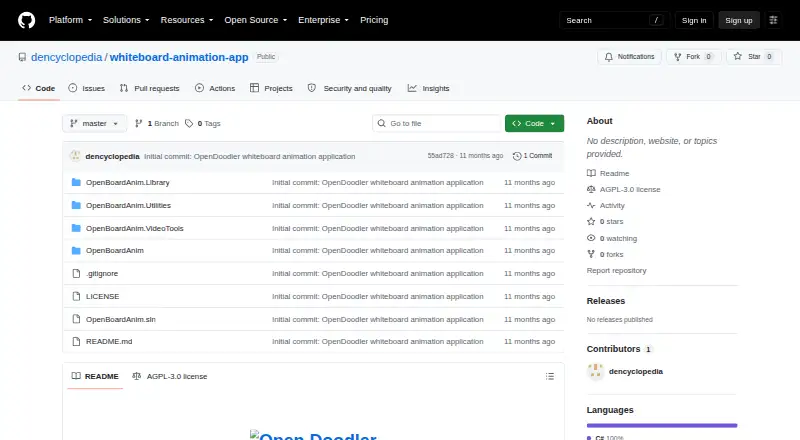
What Open Doodler is
Open Doodler is free, open-source Windows software for creating whiteboard and doodle animations. Its canvas combines SVG graphics and text, which can be animated stroke by stroke or introduced with Fade In and Pop In styles. Scenes support layered camera pan and zoom effects with Linear, Ease In, Ease Out, or Ease In-Out timing. The timeline allows voiceover for individual scenes and background music for the whole project. Projects can be previewed and exported as MP4 video with those audio tracks included. Export presets are described for YouTube, TikTok, and Instagram. The launch page lets you create a project or select an existing one, while a project window handles animation work. SVG files can be imported into the library. Windows installation uses OpenDoodlerSetup.msi from the Releases page; the project is also described as runnable from Visual Studio after cloning its repository. It uses the GNU Affero General Public License v3.0. SQLite stores project data locally, and uninstalling leaves the graphics library and saved projects. Animated GIF export and custom resolutions beyond built-in presets are wishlist items.
Good
- Free and open source
- Animates SVG and text graphics
- Includes camera pan and zoom timing
- Supports voiceover and background music
- Exports MP4 video
Watch out
- Windows only
- Animated GIF export is wishlist-only
- Custom export resolutions are wishlist-only
- Uses built-in aspect-ratio presets
Who it suits
Open Doodler is for Windows users creating whiteboard or doodle videos with SVG, text, camera effects, and audio. It also suits users seeking AGPL-licensed open-source software.
Verdict
Open Doodler offers a focused Windows workspace for whiteboard animation with SVG, text, camera movement, and audio. Its current export is MP4, while GIF and broader resolution options remain planned items.
The facts
Each one read from Open Doodler's own pages, with the date it was checked.
What it does
- Animation
- Graphics can be animated stroke by stroke, with Fade In and Pop In as alternate entrance styles.checked 9 Oct 2026
- Animation workspace
- A project window is used to work on an animation.checked 10 Oct 2026
- Audio
- The project timeline supports per-scene voiceover and project-wide background music.checked 9 Oct 2026
- Camera effects
- Scenes support layered camera pan and zoom effects with Linear, Ease In, Ease Out, or Ease In-Out timing.checked 9 Oct 2026
- Canvas
- The editor can compose SVG and text graphics on a canvas.checked 9 Oct 2026
- Contact
- The README lists [email protected] as a contact address.checked 10 Oct 2026
- Dependency
- The README credits Handy Control as an open source package used by the software.checked 10 Oct 2026
- Download
- The installation guide directs users to download OpenDoodlerSetup.msi from the project’s Releases page.checked 9 Oct 2026
- Export
- The app previews projects and exports MP4 video, including background music and per-scene voiceovers.checked 9 Oct 2026
- Export limits
- Animated GIF export and custom export resolutions beyond the built-in aspect-ratio presets are listed on the wishlist.checked 9 Oct 2026
- Integrations
- The README lists bundled FFmpeg for MP4 video export and NAudio for audio playback and waveform display.checked 9 Oct 2026
- Intended use
- The project describes itself as software for whiteboard animation and supports exporting presets for platforms including YouTube, TikTok, and Instagram.checked 9 Oct 2026
- License
- The project is licensed under AGPL-3.0.checked 10 Oct 2026
- Local data
- The README identifies SQLite as the local project database, and the installation guide says uninstalling leaves the local graphics library and saved project files in place.checked 9 Oct 2026
- Preview
- The app includes animation preview.checked 10 Oct 2026
- Projects
- The app has a launch page for creating new projects or selecting existing projects.checked 10 Oct 2026
- Purpose
- Open Doodler is described as open source animation software for whiteboard animation.checked 10 Oct 2026
- Setup
- The README's run instructions say to clone the repository, open OpenBoardAnim.sln in Visual Studio, set OpenBoardAnim as the startup project, and launch it.checked 10 Oct 2026
- Support
- The README invites contributors to open issues for bugs or ideas or submit pull requests.checked 9 Oct 2026
- SVG import
- Users can import SVG images for animation.checked 10 Oct 2026
- SVG library
- The instructions say the Library contains SVG and text graphics and has an import button for SVG images.checked 10 Oct 2026
- Text graphics
- Users can add text graphics to an animation.checked 10 Oct 2026
Money
- Planned feature
- A project creation window with modification of common features is listed as an upcoming feature.checked 10 Oct 2026
Where it runs
- Platform
- The project README says Open Doodler is Windows only and built with WPF (.NET 10).checked 9 Oct 2026
Alternatives to Open Doodler
- 1

mySimpleshow
Free planAndroidiOSWebAPI8.1From $5.99 a month - 2
Animaker
Free planAndroidiOSWebAPI7.8From $15 a month - 3
Whiteboard Video Maker
Free planiOSWebmacOS7.8From $9.99 a month - 4
Explideo
Free planWebmacOSWindows7.7From $19 a month - 5

AutoScribble
Free planAndroidWeb7.6From $25 a month - 6
Golpo AI
Free planWebAPI7.4From $39.99 a month