
AutoScribble
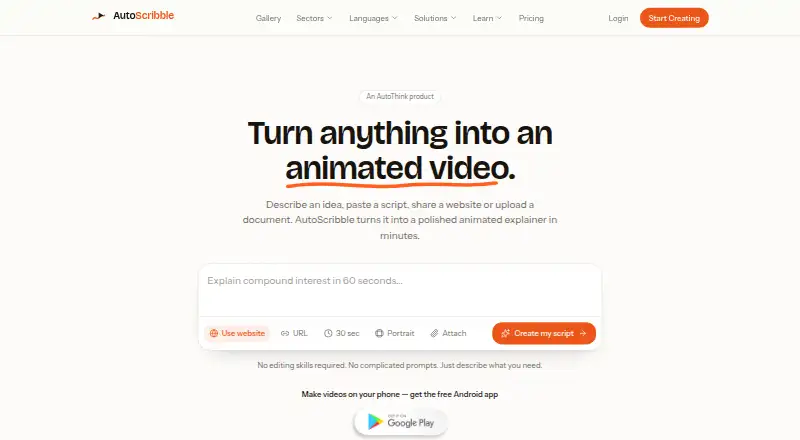
AutoScribble turns an idea, script, website, or document into a narrated animated whiteboard explainer video.
What AutoScribble is
AutoScribble turns an idea, script, website, or document into a narrated animated whiteboard explainer video. Before generation, it drafts a title, script, and visual style for approval; script writing and editing are free. Finished videos can be portrait, landscape, or square, with logo placement, MP4 downloads, and sharing through private links or email. Video generation uses credits: one finished minute costs 100 credits, and shorter-than-requested videos are charged for the seconds delivered. The free plan includes 100 welcome credits, script writing, downloads, and sharing; the listed allowance is one one-minute video or two 30-second videos. A one-time 100-credit pack costs $12, paid once. Monthly options include Starter at $25 a month for 300 credits and Pro at $65 a month for 1,000 credits. AutoScribble is available on the web and Android, where its maker says users can write, storyboard, brand, and share videos. Videos are private by default, and finished videos may be used commercially. The maker describes the service for teaching, training, and explaining, with examples in healthcare, education, workplace learning, and SaaS.
Good
- Script writing and editing are free before generation.
- Videos can be portrait, landscape, or square.
- Videos are private to the account by default.
- Finished videos may be used commercially.
Watch out
- One finished video minute costs 100 credits.
- No LMS, SCORM, or record-system integration.
- The free plan includes 100 welcome credits.
Who it suits
AutoScribble suits people creating narrated explainers for teaching, training, or communication. Its web and Android availability and private sharing options may suit users who want to write, brand, and distribute videos from a phone or browser.
Verdict
AutoScribble offers a clear script-first workflow and several ways to format and share finished explainers. Consider the per-minute credit cost and lack of direct learning-system integrations when planning production.
Plans and prices
From AutoScribble's own pricing page, checked 15 Oct 2026.
| Plan | Price | What it gives you |
|---|---|---|
| Free | Free | 100 welcome credits · one 1-minute video or two 30-second videos · full script writing · one finished video · download and share · £0 |
| 100-credit pack | $12, paid once | 100 credits · credits never expire · One-off |
| Starter | $25 a month | 300 credits per month · Monthly |
| Pro | $65 a month | 1,000 credits per month · Monthly |
| Business | $129 a month | 2,500 credits per month · 25 finished minutes · Monthly |
| Studio | $389 a month | 10,000 credits per month · 100 finished minutes · Monthly |
The facts
Each one read from AutoScribble's own pages, with the date it was checked.
Where it runs
- Android app features
- The Android app supports prompt or script input, scene planning, narration editing, orientation and logo selection, MP4 download and sharing.checked 15 Oct 2026
- Android data-safety declaration
- Google Play reports no data shared with third parties, no data collected and an option to request deletion.checked 15 Oct 2026
- Android security controls
- Google Play lists fingerprint, face or PIN app locking and encrypted data in transit.checked 15 Oct 2026
- Android update
- Google Play records the app as updated on October 3, 2026, adding biometric/PIN unlock, push notifications and fullscreen playback.checked 15 Oct 2026
- Mobile app
- AutoScribble has an Android app, and its maker says users can write, storyboard, brand and share videos from an Android phone.checked 4 Oct 2026
What it does
- API and SDK
- The reviewed product and documentation pages describe no public API or SDK.checked 15 Oct 2026
- Branding
- Users can add a logo and brand colours to the sketched video.checked 15 Oct 2026
- Commercial rights
- The terms state that created videos may be used commercially for advertising, sales, training and client work.checked 15 Oct 2026
- Credit expiry
- Purchased one-off credits do not expire, while monthly plan credits refresh each month.checked 15 Oct 2026
- Credit model
- The service charges 100 credits per finished minute, with 50 credits for 30 seconds and 200 for two minutes.checked 15 Oct 2026
- Credit usage
- One minute of finished video costs 100 credits, and shorter-than-requested videos are charged for the seconds delivered.checked 4 Oct 2026
- Data handling
- The maker says it does not sell personal information, card numbers do not reach its servers, and account data can be exported, corrected or deleted.checked 4 Oct 2026
- Developer identity
- Google Play identifies the developer as AUTOTHINK GROUP LTD at Moss Bridge House, Moss Bridge Road, Rochdale OL16 5EA, United Kingdom.checked 15 Oct 2026
- Editing limit
- The product has no timeline or drawing editor; users make choices for length, shape, voice and logo instead.checked 15 Oct 2026
- Export
- Finished videos can be downloaded as MP4 files.checked 15 Oct 2026
- Input methods
- Users can start from a sentence, their own script, a blog post, PDF, document or web page.checked 15 Oct 2026
- Integrations
- The maker says there is no LMS, SCORM or record-system integration; users download the video and upload it where needed.checked 4 Oct 2026
- LMS integration limit
- AutoScribble states that it has no LMS, SCORM or record-system integration; users download the video and upload it themselves.checked 15 Oct 2026
- Narration languages
- AutoScribble states that narration is available in 15 languages with a choice of voices.checked 15 Oct 2026
- Orientations
- Output can be landscape 16:9 or portrait 9:16, and the pricing page also lists square format.checked 15 Oct 2026
- Output
- The service offers portrait, landscape or square video, logo placement and one-click MP4 downloads.checked 4 Oct 2026
The company
- Company founded
- LinkedIn lists AutoThink Group as founded in 2022.checked 15 Oct 2026
- Company headquarters
- LinkedIn lists the headquarters in Rochdale, Lancashire, United Kingdom.checked 15 Oct 2026
- Company size
- LinkedIn lists AutoThink Group as having 2–10 employees.checked 15 Oct 2026
The full review of AutoScribble
Overview
AutoScribble turns ideas, scripts, websites and documents into narrated whiteboard videos, drafting a title, script and visual style for approval first. It is best suited to educators, trainers and businesses producing explainers. Free script editing and commercial-use rights are appealing, while per-minute credits and manual uploads matter for teams planning regular production.
Key features
The approval step is a useful guardrail: you can write and revise the script before spending credits on video generation. Drawing animation, scene templates and text-to-speech support the core explainer format. Portrait, landscape and square output, logo placement, and one-click MP4 downloads make it easier to adapt a finished video for different destinations.
Generation costs 100 credits per finished minute; if the result is shorter than requested, the charge is based on seconds delivered. This links cost to actual runtime, but makes estimating video length important when budgeting. Videos can be shared by private link or email, and remain private to the account unless the owner opts into the public gallery.
There is no LMS, SCORM or record-system integration, so publishing requires downloading the video and uploading it elsewhere. That is workable for occasional explainers, but less convenient for teams with established learning-system workflows. AutoScribble permits commercial use, including adverts, sales, training and client work.
The maker says it does not sell personal information and that card numbers do not reach its servers. Account data can be exported, corrected or deleted. Systems and suppliers are based in the UK, EEA and US, with standard contractual clauses or equivalent safeguards for transfers outside the UK or EEA. Privacy questions and data-rights requests go to [email protected]; the policy says requests will be answered within one month.
Pricing
The free plan costs nothing and includes 100 welcome credits, enough for one one-minute video or two 30-second videos, plus script writing, download and sharing. It is a practical way to assess the workflow, but the welcome balance is a limited starting allowance rather than a recurring monthly quota.
The 100-credit pack costs $12, paid once, billed One-off, and its credits never expire. It suits occasional projects where a monthly commitment is unnecessary. For recurring work, Starter costs $25 a month for 300 credits per month; Pro costs $65 a month for 1,000 credits per month. Business costs $129 a month and includes 2,500 credits per month and 25 finished minutes, while Studio costs $389 a month for 10,000 credits per month and 100 finished minutes. The larger monthly allowances suit higher-volume production; whichever plan you choose, the 100-credits-per-minute rate makes output length central to how much video the balance covers.
Platforms
AutoScribble is available on the web and Android. Its maker says the Android app supports writing, storyboarding, branding and sharing videos from a phone, which may suit creators who need a mobile workflow as well as browser access.
Who it's for
AutoScribble fits educators, healthcare and workplace trainers, and SaaS teams making narrated explainers. It is a stronger match when a draft script needs review and a downloadable video is an acceptable publishing format. Teams that require direct LMS, SCORM or record-system connections should look elsewhere.
Pros and cons
Pros
- Script approval before generation: writing and editing are free, so revisions do not consume video credits.
- Flexible finished outputs: three video orientations, logo placement and MP4 downloads support varied publishing needs.
- Commercial use is permitted: finished videos can be used for client work, training, sales and advertising.
- Private by default: videos enter the public gallery only when the owner opts in.
Cons
- Generation is metered: a one-minute video costs 100 credits, so longer explainers require more allowance.
- Publishing is manual: there are no LMS, SCORM or record-system integrations; users must download and upload videos.
- The free balance is finite: 100 welcome credits cover only one minute of video, or two 30-second videos.
Alternatives
Compare whiteboard animation software if you want to weigh AutoScribble against other tools in the category.
- Wink AI Whiteboard Video Generator is an alternative for users who want broad platform support, including iOS, macOS and Windows; its free plan uses limited AI generations and exports include a watermark.
- Animaker is another freemium option, with basic animation tools and limited premium assets on its free plan, but watermarked exports.
- Explideo may suit browser-based users who value unlimited browser exports; its free plan allows one server export per month with a watermark and caps videos at five minutes.
- Golpo AI offers a free one-video allowance for users who want to start with a single one-minute video.
- Renderforest Whiteboard Animation is an option for users who want Android, iOS and web access, though its free video exports carry a watermark.
- Mango Animate Whiteboard Animation Maker is a Windows-only alternative with a free plan that includes 576P video quality, 10+ dynamic characters and two backgrounds per project.
- mySimpleshow may fit users who can work within three free video renderings per month and want sharing by video link.
- Whiteboard Video Maker offers a free video of up to one minute, with a watermark-free preview and support for all input types.
Verdict
Choose AutoScribble if you want to turn source material into a reviewed, narrated whiteboard explainer and value commercial-use permission. Its free script workflow and flexible exports are the strongest reasons to choose it; credit-based generation and the need to upload videos manually are the clearest reasons to look elsewhere.
Alternatives to AutoScribble
- 1

mySimpleshow
Free planAndroidiOSWebAPI8.1From $5.99 a month - 2
Animaker
Free planAndroidiOSWebAPI7.8From $15 a month - 3
Whiteboard Video Maker
Free planiOSWebmacOS7.8From $9.99 a month - 4

Explideo
Free planWebmacOSWindows7.7From $19 a month - 5
Golpo AI
Free planWebAPI7.4From $39.99 a month - 6

Renderforest Whiteboard Animation
Free planAndroidiOSWeb7.3From $8 a month