
Onstipe
Onstipe collects and curates social posts into walls for websites and digital screens.
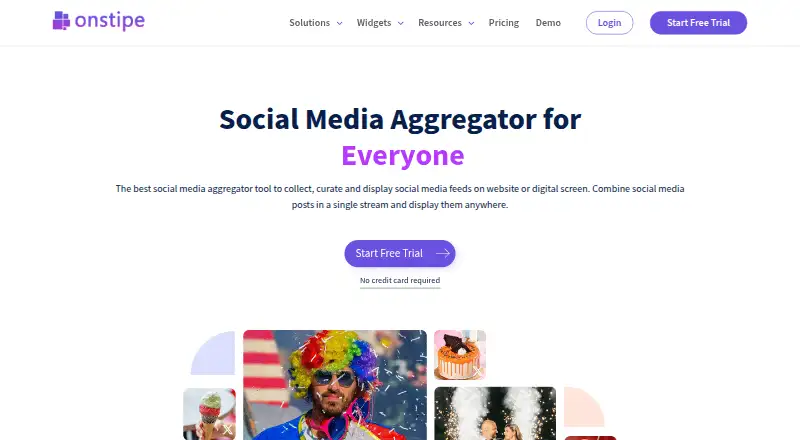
What Onstipe is
Onstipe collects and curates social posts into walls for websites and digital screens. Its listed sources include Facebook, Instagram, YouTube, Twitter, LinkedIn, Tumblr, Vimeo, Giphy, RSS, and Flickr. Teams can review posts manually or use rules and a profanity filter to screen unwanted content. Wall styling options include layouts, colors, fonts, banners, tickers, backgrounds, and custom CSS; posts can also carry call-to-action buttons or user-generated content made shoppable. Onstipe provides performance insights and reports, including information about active users or influencers. Walls can be embedded on websites or displayed on screens using a social-wall URL, and widgets are listed for platforms such as WordPress, Shopify, Drupal, Wix, Squarespace, and Blogger. API access covers posts in XML and JSON. Plan limits vary across walls, sources, updates, tweets, screens, page views, retained posts, and support.
Good
- Supports a broad list of social and feed sources.
- Offers manual and rule-based moderation.
- Walls support custom CSS and styling options.
- Can display walls on websites or screens.
- 14-day trial does not require a credit card.
Watch out
- Plans impose limits on walls, sources, and updates.
- Privacy policy cannot warrant complete information security.
- Free plan lists Facebook and Instagram, but no tweets.
Who it suits
Onstipe suits organizations that want to gather social posts into branded website or screen displays. Its moderation controls and reporting may help teams managing user content and social-feed activity.
Verdict
Onstipe combines social-wall display, moderation, customization, and reporting across web and screen uses. Compare plan limits for sources, update frequency, and display needs before choosing.
Plans and prices
From Onstipe's own pricing page, checked 30 Sep 2026.
| Plan | Price | What it gives you |
|---|---|---|
| Business | $1 a month | 8 stipes · 16 sources · 2,000 tweets/month · 15-minute updates · Billed (billing interval not specified in the opened page) |
| Economy | $1 a month | 5 stipes · 10 sources · 1,000 tweets/month · 30-minute updates · Billed (billing interval not specified in the opened page) |
| Nano | $1 a month | 2 stipes · 2 sources · no tweets · 4-hour updates · Billed (billing interval not specified in the opened page) |
| Plus | $1 a month | 3 stipes · 6 sources · 500 tweets/month · 1-hour updates · Billed (billing interval not specified in the opened page) |
| Starter | $1 a month | 2 stipes · 4 sources · no tweets · 1-hour updates · Billed (billing interval not specified in the opened page) |
| Micro Event | $29, paid once | 2 stipes · 2 sources · 500 tweets · 5-minute updates · One-Time Payment; /day |
| Gold | $99 a month | 2 stipes · 4 sources · 15-minute updates · Billed (billing interval not specified in the opened page) |
| Platinum | $149 a month | 4 stipes · 8 sources · 10-minute updates · Billed (billing interval not specified in the opened page) |
| Diamond | $249 a month | 10 stipes · 15 sources · 5-minute updates · Billed (billing interval not specified in the opened page) |
| Free Forever | — | 2 stipes · 2 sources · Facebook and Instagram · no tweets · 24-hour updates |
The facts
Each one read from Onstipe's own pages, with the date it was checked.
What it does
- Analytics
- Onstipe says it provides social-feed performance insights and reports, including information about active users or influencers.checked 30 Sep 2026
- API
- The pricing comparison describes API access to social posts in XML and JSON formats.checked 30 Sep 2026
- Calls to action
- Users can add call-to-action buttons to posts and make user-generated content shoppable.checked 30 Sep 2026
- Customization
- Social walls can use layouts, color and font customization, banners, tickers, backgrounds, and custom CSS.checked 30 Sep 2026
- Display
- Walls can be embedded on websites or displayed on screens through a social-wall URL.checked 30 Sep 2026
- GDPR
- Its privacy policy states that it supports GDPR, has appointed a Data Protection Officer, and allows users to request access, updates, or deletion of their information.checked 30 Sep 2026
- Moderation
- Users can moderate posts manually or filter unwanted content automatically with rules and a profanity filter.checked 30 Sep 2026
- Privacy and security
- Its privacy policy says it uses SSL to encrypt information in transit and notes that it cannot warrant complete security of transmitted or stored information.checked 30 Sep 2026
- Product
- Onstipe collects, curates, and displays social media posts together as social walls for websites and digital screens.checked 30 Sep 2026
- Sources
- It lists Facebook, Instagram, YouTube, Twitter, LinkedIn, Tumblr, Vimeo, Giphy, RSS, and Flickr among its supported social platforms.checked 30 Sep 2026
- Support
- Onstipe lists basic, standard, priority, and real-time support tiers across its plans and provides a support email address.checked 30 Sep 2026
- Website integrations
- Onstipe says its embed widgets work with platforms including WordPress, Shopify, Drupal, Wix, Squarespace, and Blogger.checked 30 Sep 2026
Money
- Plan limits
- The pricing page specifies per-plan limits for walls, sources, update intervals, tweets, screens, page views, retained posts, and support.checked 30 Sep 2026
- Trial
- The pricing page offers a 14-day free trial without requiring a credit card.checked 30 Sep 2026
The full review of Onstipe
Onstipe turns posts from social networks and other feeds into curated walls for websites and digital screens. It suits event organizers and site owners who want to bring several sources together and control how they appear. Its breadth of display and moderation tools is appealing, but plan quotas and unusually unclear billing terms make choosing a tier harder than the low entry price suggests.
Overview
Onstipe gathers posts from services including Facebook, Instagram, YouTube, Twitter, LinkedIn, Tumblr, Vimeo, Giphy, RSS, and Flickr. Users can review posts manually or apply rules and a profanity filter to screen unwanted content. That combination makes it more than a passive feed embed: it gives organizers a way to curate what visitors see, though moderation still needs attention when rules do not catch a post appropriately.
Walls can be embedded on a website or shown on a screen using a social-wall URL. Onstipe says its embed widgets work with WordPress, Shopify, Drupal, Wix, Squarespace, and Blogger. Calls to action and shoppable user-generated content can give a wall a commercial role, while reporting on feed performance and active users or influencers offers some insight into its reach.
Key features
Layouts, color and font controls, banners, tickers, backgrounds, and custom CSS offer useful range for matching a wall to a site or event screen. The trade-off is that custom CSS and multiple display options are most valuable to teams prepared to shape and maintain a presentation, rather than anyone seeking only a bare feed.
The pricing comparison describes API access to social posts in XML and JSON, which may suit teams that want to use post data beyond the supplied embeds. The privacy policy says information is encrypted in transit with SSL, while also cautioning that complete security of transmitted or stored information cannot be guaranteed. It states GDPR support, names a Data Protection Officer, and allows requests for access, updates, or deletion of personal information.
Pricing
Onstipe offers a Free Forever plan with 2 stipes, 2 sources, Facebook and Instagram, no tweets, and 24-hour updates. That is a constrained starting point for a small wall, not a good fit for broader source coverage or timely event display. A 14-day free trial requires no credit card, so readers can evaluate the product before committing.
Nano gives 2 stipes, 2 sources, no tweets, and 4-hour updates; it is a narrow option for infrequently refreshed walls. Starter also has 2 stipes and no tweets, but increases sources to 4 and refreshes hourly. Plus offers 3 stipes, 6 sources, 500 tweets per month, and hourly updates, a better fit for modest multi-source use. Economy expands that to 5 stipes, 10 sources, 1,000 tweets per month, and 30-minute updates; Business provides 8 stipes, 16 sources, 2,000 tweets per month, and 15-minute updates. Those higher quotas suit busier deployments, though their identical displayed price makes it especially important to confirm the actual billing terms before selecting a plan.
Micro Event costs $29, paid once, shown as a one-time payment, with 2 stipes, 2 sources, 500 tweets, and 5-minute updates. Its short, faster-refresh profile may suit a single event better than an ongoing subscription. Gold is $99 a month for 2 stipes, 4 sources, and 15-minute updates; Platinum is $149 a month for 4 stipes, 8 sources, and 10-minute updates; Diamond is $249 a month for 10 stipes, 15 sources, and 5-minute updates. These tiers trade substantially higher prices for more walls and faster updates, so they make sense only when that capacity matters.
Plan comparisons also set limits for screens, page views, retained posts, and support, with support tiers ranging from basic to real-time. Those constraints can affect a public installation or a busy event just as much as source counts; check the relevant plan caps before buying. Paid pricing starts at 1 /mo, but the listed plan terms leave renewal and billing interval unclear for several monthly options.
Platforms
Onstipe supports web use and an API. Website embeds cover several common publishing platforms, and the social-wall URL provides a separate route for screen display. API access to posts in XML and JSON may help teams building a more tailored integration.
Who it's for
Onstipe is a reasonable choice for event teams, businesses, and publishers that need a branded wall across a website or screen, especially when moderation, calls to action, or shoppable posts matter. It is less compelling for a simple, low-maintenance feed: the free plan refreshes only every 24 hours, and faster updates or larger deployments require careful plan selection. Buyers who need clear, comparable subscription terms should resolve the ambiguous billing details first.
Pros and cons
- Pros: Broad source coverage, including social networks, RSS, and Flickr, helps combine varied content in one wall.
- Pros: Manual moderation plus rules and a profanity filter gives organizers control over what appears publicly.
- Pros: Website embeds, screen URLs, styling options, and calls to action cover both presentation and engagement needs.
- Cons: Free Forever is limited to two sources, Facebook and Instagram, and 24-hour updates, restricting its usefulness for live events.
- Cons: Monthly prices and included quotas appear inconsistent across several low-cost plans, while billing intervals are unclear; buyers should verify the terms before subscribing.
- Cons: Higher-priced tiers still cap sources and stipes, so a large or especially varied deployment may outgrow even Diamond.
Alternatives
For a simpler single-feed widget, choose FeedWind: its free plan includes one widget and one feed. For a WordPress-centered setup or Shopify option, Flow-Flow Social Streams has a free WordPress version with four sources and a masonry layout, plus a Basic Shopify plan at $4.99 a month. Readers who prioritize a free feed allowance with a stated view cap can compare Tagembed, whose free plan includes one feed, 500 views per month, and refreshes every four days; that cadence is slower than Onstipe's free plan.
Wallrus is another social-wall alternative. Common Ninja Form Builder is a form builder rather than a direct social-wall substitute. For an embeddable social feed with a free plan of one source, 500 views per month, and 24-hour updates, consider EmbedSocial. Juicer offers a free plan with one source, one Juicer Page, and 300 feed views per month. SociableKIT Social Feed Widget is another option to compare.
Browse the Social Media Feed Software category for more options.
Verdict
Onstipe is best for teams that need a configurable, moderated social wall across web and screen displays, with room for calls to action and shoppable content. Its source breadth and presentation controls are the strongest reasons to choose it. Look elsewhere if a simple feed is all you need, or if you cannot confirm the billing terms and plan caps before purchase.
Getting started
- Open the Onstipe website.
- Start with the free plan or use the 14-day trial, which does not require a credit card.
- Choose social sources within the plan's source limits.
- Moderate posts manually or configure rules and a profanity filter.
- Customize the wall and embed it on a website or display it through a social-wall URL.
- Use the API to access posts in XML or JSON if needed.
Limits worth knowing
The Free Forever plan allows two walls and two sources, limited to Facebook and Instagram, with no tweets and 24-hour updates. Other plans set limits for walls, sources, update intervals, tweets, screens, page views, retained posts and support.
Questions
Is Onstipe free?
Yes. Its Free Forever plan includes two walls and two sources, limited to Facebook and Instagram, with no tweets and 24-hour updates.
Does Onstipe offer a trial?
Yes. The 14-day trial does not require a credit card.
Which platforms does Onstipe support?
The listed platforms are web and API. Walls can be embedded on websites or displayed on screens using a social-wall URL.
Which sources can Onstipe collect from?
Listed sources include Facebook, Instagram, YouTube, Twitter, LinkedIn, Tumblr, Vimeo, Giphy, RSS and Flickr. Source availability depends on plan limits.
Does Onstipe provide API access?
Yes. API access covers social posts in XML and JSON formats.
Alternatives to Onstipe
- 1
Flow-Flow Social Streams
Free planOpen sourceWebAPISelf-hosted7.7From $4.99 a month - 2

Taggbox
Free planWebAPIExtension7.6From $19 a month - 3

Curator.io
Free planWebAPIExtension7.5From $23 a month - 4
FeedPane
Free planWebAPI7.2From $15 a month - 5

EmbedSocial
Free planWebAPI6.9From €29 a month - 6
Social Wall
AndroidiOSWebExtension6.9From A$30 a month