Flow-Flow Social Streams
Flow-Flow Social Streams combines posts from multiple sources into social media walls for WordPress websites or blogs.
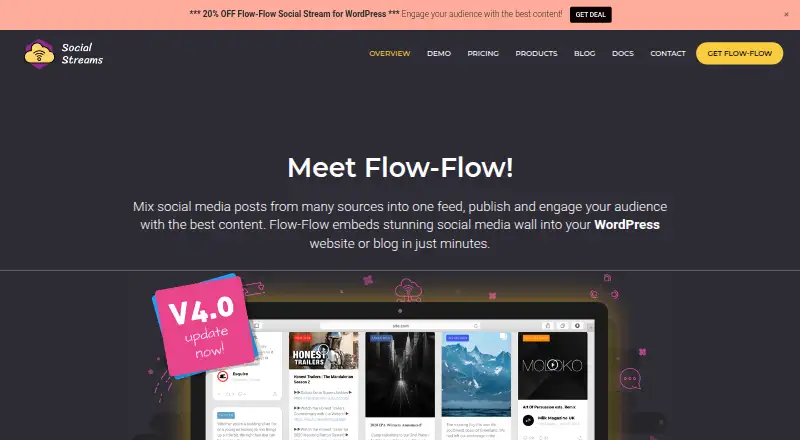
What Flow-Flow Social Streams is
Flow-Flow Social Streams combines posts from multiple sources into social media walls for WordPress websites or blogs. Its listed feeds cover Facebook, Twitter, Instagram, WordPress, Pinterest, SoundCloud, Tumblr, Foursquare, Dribbble, YouTube, Vimeo, Flickr, and RSS. Users can customize colors, card widths, margins, templates, and other design details. Feed visitors can share items, filter by network, search live, view posts in a lightbox, and load more items. The WordPress plugin supports responsive layouts and swipe motion for mobile sliding. Flow-Flow describes server caching for feed data and image caching that calculates image sizes on the server. Post exclusions can use words, usernames, or URLs; pre-moderation is listed as a Pro feature. The free WordPress version has four sources and a masonry layout, with unlimited streams subject to server capacity. The WordPress Pro version costs $49 once and includes 14 sources and several layouts. The plugin requires PHP 7.x or above and specified server components; some network APIs require server SSL.
Good
- Lists 14 feed sources, including social networks and RSS
- Offers customizable feed design elements
- Supports search, network filters, and lightbox viewing
- Can exclude posts by word, username, or URL
Watch out
- Stream capacity depends on server specifications
- Plugin requires PHP 7.x or above and server components
- Some network APIs require server SSL
- Pre-moderation is listed as a Pro feature
Who it suits
Flow-Flow suits WordPress site owners who want to display feeds from multiple social and content sources. It may also suit users who need feed styling, post filtering, and responsive layouts.
Verdict
Flow-Flow is a WordPress-focused way to combine feeds in customizable social walls, with several visitor interactions and moderation options. Review the hosting requirements and server-dependent stream capacity before choosing it.
Plans and prices
From Flow-Flow Social Streams's own pricing page, checked 2 Oct 2026.
| Plan | Price | What it gives you |
|---|---|---|
| Free Version (WordPress) | Free | 4 sources · Masonry layout · Unlimited streams (server dependent) |
| Basic (Shopify) | $4.99 a month | Up to 5 data feeds · Unlimited streams |
| Shopify Basic | $4.99 a month | Up to 5 data feeds · unlimited streams · no pre-moderation · no free trial · $4.99 / mo |
| Shopify Standard | $14.99 a month | Up to 20 data feeds · unlimited streams · pre-moderation · 7-day free trial · $14.99 / mo |
| Standard (Shopify) | $14.99 a month | Up to 20 data feeds · Unlimited streams · Pre-moderation · 7-day free trial |
| Flow-Flow standalone PHP | $29, paid once | Standalone PHP social wall · multiple layouts · RSS and social feeds · one-time purchase |
| Top (Shopify) | $34.99 a month | Up to 50 data feeds · Unlimited streams · Pre-moderation |
| Shopify Top | $34.99 a month | Up to 50 data feeds · unlimited streams · pre-moderation · no free trial · $34.99 / mo |
| PRO Version (WordPress) | $49, paid once | 14 sources including WordPress and RSS · Masonry, Slider, Wall, Justified layouts · Unlimited streams (server dependent) |
| Flow-Flow WordPress Pro | $59, paid once | 14+ social networks · priority support · additional layouts · lightbox · moderation · advanced filters · database snapshots · one-time CodeCanyon purchase |
The facts
Each one read from Flow-Flow Social Streams's own pages, with the date it was checked.
What it does
- AJAX and infinite scroll
- The plugin advertises AJAX loading and infinite scrolling optimized for page speed.checked 15 Oct 2026
- API data retention
- Facebook and Instagram post caches default to a 60-minute refresh and posts older than 30 days may be purged automatically.checked 15 Oct 2026
- Authentication
- One-click API authentication is provided for Instagram and Facebook, while other networks require their own credentials or keys.checked 15 Oct 2026
- Caching
- Background caching stores feed data so later visitors can receive cached content without waiting for live API calls.checked 15 Oct 2026
- Capacity limit
- The maker says stream capacity depends on server specifications and estimates an average server can handle ten streams with ten feeds each.checked 2 Oct 2026
- Customization
- Users can customize colors, card width, margins, templates and other feed design elements.checked 2 Oct 2026
- Developer API
- The PHP product documents an FFInjector class with methods to inject assets, the admin panel and a selected stream into custom pages.checked 15 Oct 2026
- Documentation depth
- The help center covers setup, authentication, installation, troubleshooting, moderation, feed updates, Shopify plans, PHP installation and injector-class programming.checked 15 Oct 2026
- Engagement counters
- Cards can show social engagement counts such as comments, likes and views.checked 15 Oct 2026
- Feeds
- The product lists feeds for Facebook, Twitter, Instagram, WordPress, Pinterest, SoundCloud, Tumblr, Foursquare, Dribbble, YouTube, Vimeo, Flickr and RSS.checked 2 Oct 2026
- Filtering
- Feeds support sorting, live search and post exclusion rules based on words, usernames or URLs.checked 15 Oct 2026
- Hosting requirements
- The WordPress plugin requires PHP 7.x or above, mysqli, cURL, GD, mbstring and allow_url_fopen; some network APIs require server SSL.checked 2 Oct 2026
- Installation
- WordPress installation supports dashboard upload or FTP placement in wp-content/plugins followed by activation.checked 15 Oct 2026
- Interaction
- Feeds support sharing, filtering by network, live search, lightbox viewing and loading more items.checked 2 Oct 2026
- Layouts
- Pro adds boxed and justified galleries, carousel or slider layouts and fixed-height grids.checked 15 Oct 2026
- Lightbox
- Pro includes an interactive lightbox with comments support for Facebook, Instagram and YouTube content.checked 15 Oct 2026
- Limit: authorization complexity
- WPMarmite found social-network authorization technically demanding for beginners.checked 15 Oct 2026
- Limit: breakage and support
- WordPress.org reviews include reports that the social wall stopped working, crashed Elementor and had nonexistent support.checked 15 Oct 2026
- Limit: LinkedIn availability
- WPMarmite commenters reported that LinkedIn support was removed or unavailable because of LinkedIn API changes.checked 15 Oct 2026
- Limit: load balancing
- A WPMarmite commenter reported incompatibility with HyperDB and direct database writes that can be problematic in read/write load-balanced WordPress deployments.checked 15 Oct 2026
- Limit: missing design preview
- WPMarmite criticized the lack of a complete design preview while configuring a wall.checked 15 Oct 2026
- Limit: uninstall failures
- Several WordPress.org reviewers reported that deactivation or uninstall became stuck on the survey screen.checked 15 Oct 2026
- LinkedIn product description
- LinkedIn describes Social Stream for WordPress by Looks Awesome as software that mixes posts from many sources into one feed for WordPress sites.checked 15 Oct 2026
The company
- Maker identity
- The product is developed and sold by Looks Awesome, also named as the developer in the WordPress listing and privacy policy.checked 15 Oct 2026
The full review of Flow-Flow Social Streams
Flow-Flow Social Streams brings posts from multiple sources into customizable social walls for WordPress sites and blogs. It suits site owners who want visitors to browse and interact with aggregated feeds in one embedded display. Its WordPress layouts and moderation tools are useful, but the server-dependent capacity and hosting requirements make it a poor fit for anyone seeking a managed, hosting-independent service.
Overview
Flow-Flow combines social posts into walls that can be embedded on a WordPress website or blog. The product spans both a WordPress plugin and Shopify plans, so the right option depends on where the wall will live and how many feeds it needs. WordPress capacity is tied to the hosting server rather than a fixed stream quota, an important trade-off for sites with limited or unpredictable server resources.
Key features
Feeds can draw from Facebook, Twitter, Instagram, WordPress, Pinterest, SoundCloud, Tumblr, Foursquare, Dribbble, YouTube, Vimeo, Flickr and RSS. Users can adjust colors, card widths, margins and templates, with masonry, slider, wall and justified layouts included in the WordPress Pro version. This range gives site owners room to shape a wall around a page, rather than settling for a single feed presentation.
Visitors can share posts, filter by network, search live, open items in a lightbox and load more entries. Responsive layouts and swipe motion support mobile browsing. These interaction options make a wall more useful than a static feed, though they also mean the display is a more prominent part of a page than a simple embed.
Moderation can exclude posts by word, username or URL; pre-moderation is included in the WordPress Pro comparison and in the Standard and Top Shopify plans. Server caching for feed data and image caching that calculates image sizes on the server are intended to manage feed and image handling. The maker estimates an average server can handle ten streams with ten feeds each, but actual capacity depends on server specifications.
Pricing
The free WordPress version costs nothing and includes four sources, a masonry layout and unlimited streams, subject to server capacity. It is a reasonable way to start with a basic wall, but it gives up the 14 sources and four layout choices in Pro. Pro costs $49, paid once and includes 14 sources, including WordPress and RSS, masonry, slider, wall and justified layouts, and unlimited streams subject to server capacity.
Shopify plans are priced monthly. Basic is $4.99 a month for up to five data feeds and unlimited streams. Standard is $14.99 a month for up to 20 feeds, unlimited streams, pre-moderation and a 7-day free trial. Top is $34.99 a month for up to 50 feeds, unlimited streams and pre-moderation. Basic fits a small feed collection; Standard adds moderation and room to grow, while Top raises the feed ceiling for larger collections. If a downgrade leaves more feeds active than the plan permits, excess recent feeds are deactivated and can be re-enabled after upgrading.
Platforms
Flow-Flow supports self-hosted WordPress and web-based Shopify use. The WordPress plugin requires PHP 7.x or above, mysqli, cURL, GD, mbstring and allow_url_fopen; some network APIs also require server SSL. These prerequisites and the server-dependent stream limit make it a better fit for owners comfortable managing their hosting than for users who want infrastructure handled for them. Support requests go through the Help Center; CodeCanyon purchases include six months of free support, and opened tickets usually receive a response within 1–2 business days (UTC+3).
Who it's for
Choose Flow-Flow if you run a WordPress site or Shopify storefront and want multiple social sources in a customizable, interactive wall. WordPress users with suitable hosting can start free and move to the one-time Pro purchase for more sources and layouts. Shopify users should match their feed count to the monthly plan and consider Standard or Top if pre-moderation matters. Look elsewhere if you need digital signage or a fixed, guaranteed stream capacity.
Pros and cons
- Pros: Fourteen sources, including WordPress and RSS, give Pro users a broad range of feed inputs.
- Pros: Multiple layouts, styling controls and visitor interactions allow walls to suit different page designs and browsing needs.
- Pros: Word and account-based exclusions, plus pre-moderation on qualifying plans, help control what appears.
- Cons: WordPress stream capacity depends on server specifications, so the unlimited-stream wording does not guarantee a particular workload.
- Cons: The plugin's PHP, extension and SSL requirements may rule it out for users whose hosting cannot meet them.
- Cons: The free WordPress version is limited to four sources and masonry layout; Shopify plans impose feed caps, with excess recent feeds deactivated after a downgrade.
Alternatives
Curator.io is another freemium option, with a free plan capped at three sources, 2,000 views per month and 1,000 posts; consider it if those explicit usage limits are a better fit than Flow-Flow's server-dependent WordPress capacity. Onstipe is a freemium alternative with a free trial; consider comparing its feed and plan requirements against Flow-Flow before choosing. FeedWind is another freemium, web-based alternative; consider it if you want to assess a web option alongside Flow-Flow's WordPress and Shopify support. Tagembed offers a free plan with one feed, 500 views per month and refreshes every four days; it may suit a small, low-volume feed more than Flow-Flow's multi-source wall. Wallrus is another freemium, web-based alternative. Common Ninja Form Builder is a freemium web form builder, rather than a direct social-feed alternative. ElectricBlaze offers a free plan with five widgets, 1,000 views per month and daily updates; consider it if those widget and view limits suit your needs. EmbedSocial offers a free plan with one source and 500 views per month; it may fit a smaller feed requirement. Compare more options in Social Media Feed Software.
Verdict
Flow-Flow is a strong fit for WordPress and Shopify owners who want a styled, interactive wall with feed controls and moderation options. The broad source range and flexible layouts are its main draw; the main reason to look elsewhere is the WordPress plugin's dependence on hosting requirements and server capacity. Choose it when your platform and server can support the wall you intend to run.
Getting started
- Open the Flow-Flow website
- Choose the free or Pro WordPress plan, or a Shopify plan
- Install the WordPress plugin or connect the Shopify service
- Confirm hosting requirements such as PHP, mysqli, cURL, GD, mbstring and allow_url_fopen
- Add feeds from the supported networks and sources
- Customize layout, colors, card sizing, margins and templates
- Configure filtering, sharing, search and post exclusions
Limits worth knowing
The free WordPress plan includes four sources and relies on server-dependent stream capacity. Shopify plans limit active data feeds to 5, 20 or 50; downgrading below the active count deactivates excess recent feeds until upgrading.
Questions
Is there a free plan?
Yes. The Free Version (WordPress) costs nothing and includes four sources, masonry layout and unlimited streams subject to server capacity.
What does WordPress Pro cost?
The PRO Version (WordPress) costs $49, paid once and includes 14 sources plus masonry, slider, wall and justified layouts.
Which platforms are supported?
Flow-Flow is available as self-hosted software and on the web, with WordPress and Shopify plans listed.
Which feeds can it display?
Listed feeds include Facebook, Twitter, Instagram, WordPress, Pinterest, SoundCloud, Tumblr, Foursquare, Dribbble, YouTube, Vimeo, Flickr and RSS.
Does it support moderation?
Posts can be excluded by word, username or URL. Pre-moderation is listed for selected paid plans.
What support is included?
Support requests go through the Help Center. CodeCanyon purchases include six months of free support, and opened tickets usually receive a response within 1–2 business days (UTC+3).
Alternatives to Flow-Flow Social Streams
- 1

Taggbox
Free planWebAPIExtension7.6From $19 a month - 2

Curator.io
Free planWebAPIExtension7.5From $23 a month - 3
FeedPane
Free planWebAPI7.2From $15 a month - 4

EmbedSocial
Free planWebAPI6.9From €29 a month - 5
Social Wall
AndroidiOSWebExtension6.9From A$30 a month - 6

Tagembed
Free planWebAPI6.8From $19 a month