
Onplana
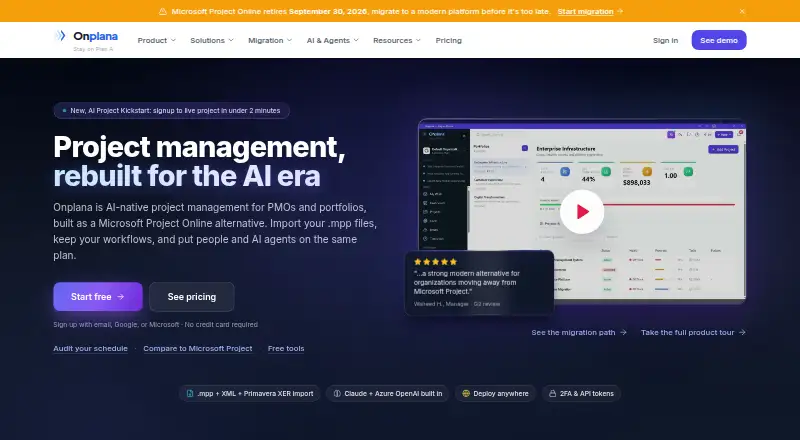
Onplana is an AI-oriented project and portfolio management platform from Devsoft Solutions, built as a replacement for Microsoft Project Online.
What Onplana is
Onplana is an AI-oriented project and portfolio management platform from Devsoft Solutions, built as a replacement for Microsoft Project Online. Its scheduling tools include a Gantt view with critical path, baselines, float and four task dependency types. Other team features include Kanban, calendars, sprints, comments, shared whiteboards and wikis, plus browser-based co-editing for Word, Excel and PowerPoint files. AI functions can generate project plans, answer questions using project context, summarize status, create reports, detect risks and surface portfolio insights. The listed connections include Microsoft Teams, Microsoft 365 Copilot, Outlook, Power BI, Excel and MCP connections for Claude, Cursor and ChatGPT. Imports cover Microsoft Project files, Primavera XER, Excel, CSV and Project Online OData. Onplana supports Android, iOS, web, desktop and self-hosted environments. The free plan allows five members and two projects; Starter costs $7 per user per month. The free tier has a 25-build-per-day cap, and its 100K AI token allowance per seat is a one-time bonus.
Good
- Gantt scheduling includes four dependency types
- Imports Microsoft Project and Primavera files
- AI tools cover plans, reports, and risk detection
- Supports waterfall, agile, and hybrid methods
Watch out
- Free plan limited to five members and two projects
- Free tier capped at 25 builds per day
- Free AI token bonus does not renew
Who it suits
Onplana may suit teams ranging from small startups to large PMOs that manage projects using waterfall, agile or hybrid methods. Its migration support is specifically listed for Enterprise plans.
Verdict
Onplana combines project scheduling, collaboration, import options and AI-assisted planning in one platform. Review the free plan's project, member, build and token limits before choosing it.
Plans and prices
From Onplana's own pricing page, checked 14 Oct 2026.
| Plan | Price | What it gives you |
|---|---|---|
| Free | Free | 5 members · 2 projects · 300 MB storage · 100K one-time AI tokens · 1 published app · Free forever |
| Starter | $7 a month | 25 members · 25 projects · 5 GB storage · 500K AI tokens per seat, one-time · 2 free guest seats |
| Professional | $12 a month | 100 members · 200 projects · 50 GB storage · 1M AI tokens/seat/month · 2 guest seats · $12/seat/month; annual billing discounted |
| Business | $20 a month | 1,000 members · unlimited projects · 500 GB storage · 1.5M AI tokens/seat/month · 5 guest seats · $20/seat/month; annual billing discounted |
| Enterprise | $29 a month | Unlimited members and projects · 1 TB storage · 2.5M AI tokens/seat/month · 10 guest seats · $29/seat/month; annual billing discounted |
| Enterprise+ | Priced on request | Dedicated deployment in your Azure subscription · unlimited storage and AI · customer-managed encryption keys · Contact sales |
The facts
Each one read from Onplana's own pages, with the date it was checked.
Money
- Agile planning
- Professional and higher tiers add sprints, epics, backlogs, burndown charts and Kanban boards.checked 14 Oct 2026
- Limit: free tier
- Independent directory descriptions identify the permanent free tier’s main constraints as two projects and 300 MB of storage.checked 14 Oct 2026
What it does
- AI capabilities
- AI functions include project-plan generation, natural-language task parsing, status summaries, risk detection, schedule suggestions and portfolio insights.checked 14 Oct 2026
- AI data handling
- The company says customer data is never used to train AI models.checked 29 Sep 2026
- AI features
- AI features include project plan generation, chat using project context, status summaries, reports, risk detection, and portfolio insights.checked 29 Sep 2026
- AI providers
- Onplana states that its AI layer uses both Claude and Azure OpenAI with automatic failover.checked 14 Oct 2026
- Collaboration
- Features include Kanban, calendars, sprints, comments, shared whiteboards and wikis, and browser-based co-editing of Word, Excel, and PowerPoint files.checked 29 Sep 2026
- Documentation
- The documentation site covers getting started, project views, agile, governance, resources, automation, security, agents and Maker.checked 14 Oct 2026
- Enterprise identity
- Enterprise supports SAML/OIDC SSO, SCIM provisioning, IP allowlisting and audit logs.checked 14 Oct 2026
- Enterprise security
- Enterprise security features include SSO, SCIM, IP allowlisting, audit-log export, and data residency controls; customer-managed keys are listed for Enterprise+.checked 29 Sep 2026
- File imports
- Supported imports include Microsoft Project MPP, Project XML, MPX, Primavera XER, Excel and CSV, with a 50 MB upload cap.checked 14 Oct 2026
- Google Play listing
- Google Play lists Onplana Tasks with 1+ downloads and no displayed star-rating summary.checked 14 Oct 2026
- Governance
- Enterprise adds a 12-stage proposal pipeline, weighted gate reviews, change-control boards and scenario planning.checked 14 Oct 2026
- Import
- The product supports importing Microsoft Project .mpp and XML files, Primavera XER, Excel, CSV, and Project Online OData.checked 29 Sep 2026
- Integrations
- The site lists Microsoft Teams, Microsoft 365 Copilot, Outlook, Power BI, Excel, and MCP connections for Claude, Cursor, and ChatGPT.checked 29 Sep 2026
- Intended users
- The company describes Onplana as serving teams from small startups to large PMOs and supporting waterfall, agile, and hybrid methods.checked 29 Sep 2026
- Limit: review evidence
- Capterra, GetApp and Software Advice pages currently show no user reviews, so independent customer feedback is sparse.checked 14 Oct 2026
- Limits
- The Free plan has a 25-build-per-day cap, and its 100K AI token bonus is one-time and does not renew.checked 29 Sep 2026
Where it runs
- Companion apps
- Free companion apps are offered as a browser extension, Windows tray app, Mac menu-bar app, iPhone app and Android app.checked 14 Oct 2026
The company
- Company founding
- Devsoft Solutions was founded in 2013; Onplana launched as a product in 2024.checked 14 Oct 2026
- Company ownership
- Onplana is operated by privately held Devsoft Solutions, LLC.checked 14 Oct 2026
- Company size
- LinkedIn lists DevSoft Solutions as a privately held IT-services company with one employee and Greenville headquarters.checked 14 Oct 2026
- Founded
- 2024checked 28 Sep 2026
- Headquarters
- Devsoft Solutions lists 141 Traction St, Greenville, South Carolina 29611, United States as its address.checked 14 Oct 2026
The full review of Onplana
Onplana is project and portfolio management software for teams that need formal schedule controls alongside day-to-day collaboration. It is a strong fit for PMOs and teams migrating from Microsoft Project Online; smaller teams should weigh its project caps and one-time AI allowances before committing.
Overview
Built by Devsoft Solutions as an alternative to Microsoft Project Online, Onplana combines detailed planning with support for waterfall, agile, and hybrid work. Its Gantt view covers critical paths, baselines, float, and all four dependency types. That makes it more compelling for interconnected schedules and resource planning than for teams that only need a simple task board.
Import support spans Microsoft Project MPP and XML, Primavera XER, Excel, CSV, and Project Online OData. These routes should help teams bring existing plans into the platform, and Enterprise plans include migration support from a dedicated specialist.
Key features
Planning and collaboration
Resource management and time tracking sit alongside Gantt scheduling, while Kanban boards, calendars, and sprints accommodate different working styles. Comments, shared whiteboards and wikis, and browser-based co-editing of Word, Excel, and PowerPoint files make it possible to coordinate plans and related work in one place. Teams that already rely on separate collaboration tools may find some of this breadth redundant.
AI and integrations
AI can generate project plans, break down tasks, recommend priorities, chat with project context, create status summaries and reports, detect risks, and provide portfolio insights. Connections include Microsoft Teams, Microsoft 365 Copilot, Outlook, Power BI, Excel, and MCP connections for Claude, Cursor, and ChatGPT. The AI tools are broad, but their token budgets are one-time per seat rather than recurring; the Free plan also has a 25-build-per-day cap. The company says customer data is not used to train AI models.
Security
Onplana specifies TLS 1.2+ for data in transit, AES-256 at rest, two-factor authentication, and tenant data isolation. SSO, SCIM, IP allowlisting, audit-log export, and data residency controls are enterprise features; customer-managed keys are reserved for Enterprise+. This makes the higher tiers more relevant to organizations with stricter identity and governance requirements.
Pricing
Onplana is freemium, with a 14-day trial and paid plans starting at $7 a month. The stated plan prices are per month, while the paid-from rate is per user per month.
| Plan | Price | Limits and allowance | Best fit |
|---|---|---|---|
| Free | free | 5 members, 2 projects, 300 MB storage, 100K AI tokens per seat once | Individuals or small teams evaluating the core workflow |
| Starter | $7 a month | 25 members, 25 projects, 5 GB storage, 500K one-time AI tokens per seat, 2 free guest seats | Small teams that have outgrown the Free project cap |
| Professional | $12 a month | 100 members, 200 projects, 50 GB storage, 1M one-time AI tokens per seat, 2 free guest seats | Growing teams managing a larger project portfolio |
| Business | $20 a month | 1,000 members, unlimited projects, 500 GB storage, 1.5M one-time AI tokens per seat, 5 free guest seats | Large teams needing substantially higher project and member limits |
| Enterprise | $29 a month | Unlimited members and projects, 1 TB storage, 2.5M one-time AI tokens per seat, 10 free guest seats | Organizations needing enterprise controls and migration support |
| Enterprise+ | Custom pricing | Unlimited members, projects, storage, and AI tokens; self-hosted deployment | Organizations requiring self-hosting and unrestricted allowances |
The Free tier is tightly capped at two projects, and its 100K-token bonus does not renew. Paid tiers raise project, storage, and token ceilings, but their per-seat AI grants are also one-time. Teams expecting regular AI usage should account for that distinction rather than treating the token totals as monthly budgets.
Platforms
Onplana supports Android, iOS, macOS, Windows, and web, as well as an API, browser extension, and self-hosted deployment option. The range suits teams working across desktop and mobile, while self-hosting is specifically available with Enterprise+.
Who it's for
Onplana is best suited to project teams and PMOs that need structured scheduling, portfolio visibility, and multiple ways to collaborate. Its import coverage makes it a natural candidate for teams moving from Microsoft Project or consolidating plans from spreadsheets and Primavera. Teams with modest needs may find the Free plan's two-project limit restrictive, while teams looking for lightweight issue tracking alone may not benefit from the broader controls.
Pros and cons
- Detailed schedule controls: Critical paths, baselines, float, and all four dependency types support complex project plans.
- Broad import coverage: MPP, XML, XER, Excel, CSV, and Project Online OData offer several paths for moving existing work.
- Collaboration beyond task boards: Shared workspaces and office-file co-editing can keep planning and team coordination together.
- Strict Free limits: Five members and two projects make the no-cost tier suitable for evaluation or very small workloads, not broad adoption.
- Nonrenewing AI tokens: Even paid-plan per-seat allowances are one-time, which limits their usefulness as a predictable ongoing budget.
- Security features are tiered: SSO, SCIM, and related enterprise controls are not included across every plan, and customer-managed keys require Enterprise+.
Alternatives
Compare AI project management software if you want to weigh Onplana against a wider category of tools.
- Taskade AI Agents is another freemium option, with a Free plan for 2 users, 6,000 one-time credits, up to 3 apps, and 1 AI agent.
- Asana is worth considering if its Personal plan for one or two people managing personal projects better matches your needs.
- ClickUp may suit teams that value unlimited tasks and unlimited free-plan members on its Free Forever plan.
- Linear is an alternative for teams that can work within its Free plan's 2 teams and 250 issues, with unlimited members.
- Wrike offers a Free plan with unlimited users, 2 GB of storage per account, and 200 active tasks.
- Teamwork.com has a Free plan for 5 projects and 5 users, and may suit teams comparing a smaller project allowance.
- ProjectLibre offers Microsoft Project import and Gantt and WBS features on its ProjectLibre Core plan at $9.99 a month billed annually.
- monday.com is another freemium option, with a Free plan capped at 2 seats, 3 boards, 200 items, and 500 MB of storage.
Verdict
Choose Onplana if your team needs substantial scheduling controls, broad migration paths, and collaboration tools in one project platform. Its strongest case is for PMOs and teams replacing Microsoft Project Online; look elsewhere if you need a generous free project cap or recurring AI allowances, since the free tier is limited and token grants do not renew.
Alternatives to Onplana
- 1

Jira
Free planAndroidiOSWebAPI8.4Free plan - 2

Linear
Free planAndroidiOSWebAPI8.4From $10 a month - 3

Teamwork.com
Free planAndroidiOSWebAPI8.4From $9.99 a month - 4

Wrike
Free planAndroidiOSWebAPI8.4From $10 a month - 5

Taskade AI Agents
Free planAndroidiOSWebAPI8.3From $10 a month - 6

Asana
Free planAndroidiOSmacOSWindows8.1From $10.99 a month