Ocenaudio
Ocenaudio is a free audio editor for editing and analyzing audio files on Windows, macOS, and Linux.
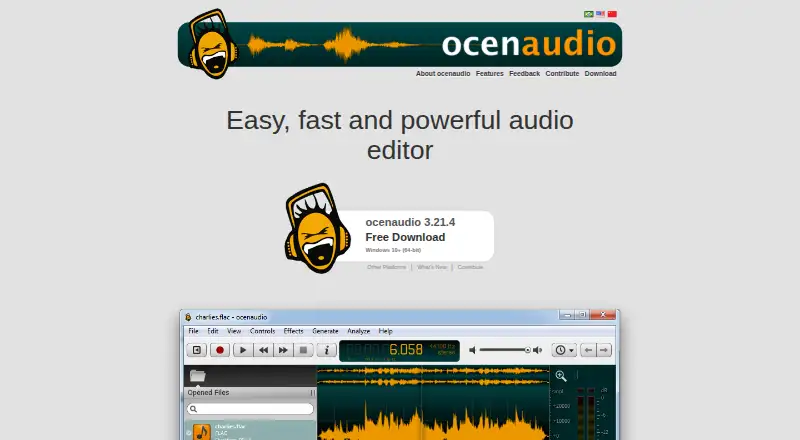
What Ocenaudio is
Ocenaudio is a free audio editor for editing and analyzing audio files on Windows, macOS, and Linux. Effects can be previewed while their controls are adjusted, including effects from VST plugins. Users can select separate sections of a file and edit or process them together. A spectrogram view provides settings that update in real time, and the editor also offers spectral analysis and audio signal generation. Opening, saving, and applying effects run in the background, so users can work with other files during those operations. The maker says there is no limit to audio-file length or quantity and describes memory management for large files. Windows downloads require Windows 10 or later, 64-bit, and are offered as an installer or portable ZIP. The current macOS download supports 14.4 or later on Intel and ARM 64-bit, with a legacy build for 10.14 or later. Linux downloads include AppImage and packages for several distributions.
Good
- Free desktop audio editor.
- Real-time preview for effects and VST plugins.
- Edits separate selected portions together.
- Background operations allow work on other files.
- Spectrogram settings update in real time.
Watch out
- Current Windows download requires 64-bit Windows 10 or later.
- Current macOS download requires version 14.4 or later.
- No security certifications or compliance standards are stated.
Who it suits
Ocenaudio suits people who need a free desktop editor for audio editing and analysis across Windows, macOS, or Linux. Its multi-selection, spectrogram, and VST support may fit users who want to work with effects and inspect audio.
Verdict
Ocenaudio combines editing, analysis, and real-time effect preview in a free cross-platform desktop app. Check the listed operating system requirements, especially if using an older Mac.
Plans and prices
From Ocenaudio's own pricing page, checked 3 Oct 2026.
| Plan | Price | What it gives you |
|---|---|---|
| Free | Free | Downloadable desktop audio editor |
The facts
Each one read from Ocenaudio's own pages, with the date it was checked.
What it does
- Audio effects
- Its effects include real-time preview while adjusting controls.checked 3 Oct 2026
- Contributions
- The maker accepts voluntary contributions through PayPal, Wise bank transfer, and cryptocurrency donations.checked 3 Oct 2026
- Formats and analysis
- The maker says the editor supports multiple file formats, spectral analysis, and audio signal generation.checked 3 Oct 2026
- Large files
- The maker says there is no limit to the length or quantity of audio files and describes an advanced memory management system for editing large files.checked 3 Oct 2026
- Multi-selection
- Users can select separate portions of an audio file and edit or apply effects to them together.checked 3 Oct 2026
- Multitrack editing
- Yeschecked 21 Sep 2026
- Noise reduction
- Yeschecked 21 Sep 2026
- Plugins
- Ocenaudio supports VST plugins, whose effects can use real-time preview.checked 3 Oct 2026
- Purpose
- Ocenaudio is an easy-to-use, cross-platform audio editor for editing and analyzing audio files.checked 3 Oct 2026
- Responsiveness
- Opening, saving, and applying effects run in the background so users can work on other files.checked 3 Oct 2026
- Security and compliance
- The opened maker pages do not state security certifications or compliance standards.checked 3 Oct 2026
- Spectrogram
- The software includes a spectrogram view with settings that update in real time.checked 3 Oct 2026
- Support contact
- Users can contact the development team through a feedback form to share experience, suggest features, or report bugs; an email is required only to receive a response.checked 3 Oct 2026
- Third-party plugins
- Yeschecked 21 Sep 2026
- Video synchronization
- Yeschecked 21 Sep 2026
Money
- Free plan
- Yeschecked 21 Sep 2026
Where it runs
- Linux support
- The download page offers Linux AppImage and packages for Debian, Ubuntu, Fedora, Rocky Linux, openSUSE, and Arch Linux.checked 3 Oct 2026
- macOS support
- The current download page lists macOS 14.4 or later for Intel and ARM 64-bit, plus a legacy build for macOS 10.14 or later.checked 3 Oct 2026
- Supported platforms
- Windows, macOS, Linuxchecked 21 Sep 2026
- Windows support
- The current download page lists Windows 10 or later, 64-bit, and offers an installer and a portable ZIP.checked 3 Oct 2026
The full review of Ocenaudio
Ocenaudio is a free desktop audio editor for editing and analyzing sound files. It is best suited to creators, editors, and analysts who want focused work on Windows, macOS, or Linux rather than a subscription-based production suite. Its strongest case is efficient file editing with immediate effect feedback; platform requirements deserve attention before installing on an older machine.
Overview
Ocenaudio brings editing, analysis, and effects into a cross-platform desktop application. Multitrack editing and video synchronization make it more capable than a simple clip trimmer, while its purpose remains clearly centered on working with audio files. That focus is a benefit for users who want a direct editing tool, but it is not evidence of a complete studio-production environment.
The software is free to download and use. The maker also accepts voluntary contributions through PayPal, Wise bank transfer, and cryptocurrency, so donations are optional rather than a condition of access.
Key features
Effects provide real-time previews while controls are adjusted. In practice, you can hear the likely result before committing to a change, which makes iterative tonal or corrective work less wasteful. Ocenaudio extends that behavior to VST plugins, allowing plugin effects to be previewed in real time as well. This is a meaningful advantage for users who already rely on VST processing.
Multi-selection lets you select separate portions of a single file and edit or apply effects to all of them together. Repeated corrections therefore need not be performed region by region. Noise reduction is included, giving cleanup work a dedicated tool rather than requiring an external application.
A spectrogram view provides visual inspection of frequency content, with settings that update in real time. Spectral analysis and audio signal generation add measurement and test-oriented uses alongside ordinary editing. Multiple file formats are supported, although the supported format list is not enumerated.
The maker says there is no limit on the length or quantity of audio files and describes an advanced memory-management system for large-file editing. Opening, saving, and applying effects run in the background, so work on other files can continue while those operations finish. Those claims make Ocenaudio particularly appealing for sizeable file collections and long recordings, while actual performance will still depend on the computer and files involved.
Pricing
| Plan | Price | Includes |
|---|---|---|
| Free | free | Downloadable desktop audio editor |
There are no paid tiers, subscription renewals, seat charges, quotas, or trial deadlines attached to the Free plan. It fits anyone who needs the full downloadable editor without allocating a software budget. Because there is no lower-cost paid tier, buyers do not trade away features for a cheaper plan; the decision is simply whether Ocenaudio’s workflow and platform support meet the requirement.
Platforms
Ocenaudio supports Windows, macOS, and Linux. Windows downloads require Windows 10 or later on 64-bit systems, with both an installer and a portable ZIP. macOS downloads support Intel and ARM 64-bit systems from macOS 14.4 onward, and a legacy build is offered for macOS 10.14 or later. Linux users can choose an AppImage or packages for Debian, Ubuntu, Fedora, Rocky Linux, openSUSE, and Arch Linux.
Users can contact the development team through a feedback form to report bugs, suggest features, or share their experience. An email address is needed only when a reply is requested. No security certifications or compliance standards are stated.
Who it's for
Choose Ocenaudio if you edit and analyze files on a desktop, need multitrack or video-synchronized work, or value hearing effects while tuning them. VST users and people making repeated corrections across separated regions benefit especially from real-time previews and multi-selection. Large-file claims and background processing also suit workflows involving long recordings or several files.
Look elsewhere if you need a mobile app, a documented security-compliance program, or a broader production environment than focused file editing provides. Mac users on older releases should verify compatibility before relying on the current build.
Pros and cons
Pros
- Real-time effect previews: Hear adjustments before applying them, including VST plugin effects.
- Efficient repeated edits: Multi-selection applies one operation to separated regions together.
- Strong analysis tools: Spectrogram controls, spectral analysis, and signal generation support inspection as well as editing.
- Broad desktop coverage: Windows, macOS, and Linux builds include distribution-specific Linux options.
- No usage ceiling stated: The maker describes no limit on file length or quantity and background processing for continued work.
Cons
- Strict current Mac baseline: The main macOS download requires 14.4 or later, so some older Macs must use the legacy build or another editor.
- Desktop-only positioning: The supported platforms are desktop operating systems, not mobile devices.
- Limited workflow scope: Its stated purpose is file editing and analysis, so it may not replace a full production suite.
- Unstated compliance posture: No security certifications or compliance standards are provided for regulated environments.
Alternatives
Audacity is the closest free alternative for users who want an open-source desktop editor, no subscription, and additional Android and iOS availability.
Pro Tools is the better direction for casual creators who want a free-forever Intro offering with up to eight audio, instrument, and MIDI tracks, or a larger paid workflow.
PhotoDirector is a general freemium alternative with a limited free plan rather than a dedicated audio-editor focus.
WavePad suits users seeking mobile support or a paid Master's Edition with a sound-effects library and full VST support.
WaveLab is an alternative for users considering paid Elements or Pro versions, with a free LE copy also offered.
AudioMass is a free, open-source web editor for people who prefer browser-based or self-hosted work.
GoldWave is a paid option with a one-year license priced at $19 a year.
Qtractor is a Linux-only, GPL version 2-or-later alternative.
For broader category browsing, see Audio Editing Software and Game Audio Editors.
Verdict
Ocenaudio is a strong recommendation for anyone who wants a free, cross-platform desktop editor with real-time effect previews, VST support, multi-selection, and useful visual analysis. Its focused file-based workflow and generous large-file claims are the main reasons to choose it. Look elsewhere for mobile editing, formal compliance requirements, or a more expansive production environment, and check the operating-system requirements before installing on older hardware.