
NoteGen
NoteGen is a free note-making workspace that gathers text, audio, screenshots, images, links, files, and tasks in one stream, then uses AI to organize materi…
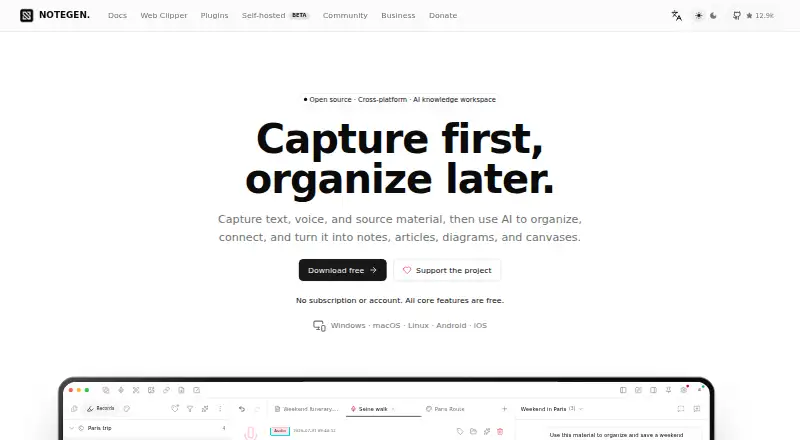
What NoteGen is
NoteGen is a free note-making workspace that gathers text, audio, screenshots, images, links, files, and tasks in one stream, then uses AI to organize material into notes, articles, diagrams, and canvases. Its editor works with standard Markdown files and supports tables, math, diagrams, and Mermaid. AI chat can answer questions or generate content; its Agent can handle multi-step tasks with required approval. Canvas connects notes, records, images, links, shapes, and charts as nodes, and can produce diagrams with AI. You can configure OpenAI-compatible providers such as ChatGPT, Gemini, Ollama, LM Studio, or a custom platform. Local storage is the default for notes and related data, while enabled online functions may send relevant data to configured services. Sync options include GitHub, Gitee, GitLab, Gitea, S3, WebDAV, OneDrive, and iCloud Drive. Core features require no subscription or account. Installers are listed for Windows, macOS, Linux, Android, and iOS; the mobile versions are marked beta. It is also listed as a browser extension for Chrome, Edge, and Firefox. NoteGen is not yet signed for macOS, and the download page provides steps to bypass its quarantine warning.
Good
- Collects text, audio, images, links, files, and tasks.
- Markdown editor supports tables, math, and Mermaid.
- Core features are free without a subscription or account.
- Local storage is the default for notes and related data.
- Available for desktop, mobile, and browser extensions.
Watch out
- Android and iOS installers are identified as beta.
- macOS version is not yet signed.
- Enabled online features may send relevant data to configured services.
Who it suits
NoteGen suits people who want to collect varied source material, organize it with AI, and keep notes in Markdown. It may also suit users seeking local-first storage and configurable sync or AI providers.
Verdict
NoteGen combines capture, Markdown editing, AI workflows, and configurable sync in a free workspace. Consider the mobile beta status and macOS signing limitation when choosing where to use it.
Plans and prices
From NoteGen's own pricing page, checked 2 Oct 2026.
| Plan | Price | What it gives you |
|---|---|---|
| Free | Free | No subscription or account · all core features are free |
The facts
Each one read from NoteGen's own pages, with the date it was checked.
What it does
- AI providers
- Users can configure OpenAI-compatible providers, including ChatGPT, Gemini, Ollama, LM Studio, or a custom platform.checked 2 Oct 2026
- AI workflows
- Chat answers questions and generates content, while Agent can perform multi-step tasks using tools after required approval.checked 2 Oct 2026
- Analytics
- Anonymous startup analytics sends an ephemeral session ID, operating system, locale, and app version, but not note content, file names, paths, AI chats, or a hardware machine ID.checked 2 Oct 2026
- Canvas
- Canvas supports notes, records, images, links, shapes, and charts as connected nodes, with AI-generated diagrams and Mermaid.checked 2 Oct 2026
- Capture
- It collects text, audio, screenshots, images, links, files, and tasks in one stream.checked 2 Oct 2026
- Local storage and privacy
- Notes, records, chats, memories, vector indexes, and settings are stored locally by default; enabled online features may send relevant data to configured services.checked 2 Oct 2026
- Markdown
- The editor uses standard Markdown files and supports tables, math, diagrams, and Mermaid.checked 2 Oct 2026
- Purpose
- NoteGen captures text, voice, and source material, then uses AI to organize it into notes, articles, diagrams, and canvases.checked 2 Oct 2026
- Security limit
- The download page says NoteGen is not yet signed for macOS and provides instructions for bypassing the quarantine warning.checked 2 Oct 2026
- Self-hosting
- NoteGen Server offers accounts, device pairing, real-time sync, team collaboration, and account administration, and is described as experimental.checked 2 Oct 2026
- Support
- The maker directs users to QQ and WeChat community groups for feedback and usage discussions and recommends GitHub Issues for reproducible bugs or feature requests.checked 2 Oct 2026
- Sync integrations
- Sync options include GitHub, Gitee, GitLab, Gitea, S3, WebDAV, OneDrive, iCloud Drive, and experimental NoteGen self-hosting.checked 2 Oct 2026
- Web clipper
- The Web Clipper saves user-selected page content locally, with later processing depending on model, image-hosting, and sync settings.checked 2 Oct 2026
Where it runs
- Platform availability
- The download page lists Windows, macOS, Linux, Android, and iOS installers, with Android and iOS identified as beta.checked 2 Oct 2026
Alternatives to NoteGen
- 1
Notion
Free planAndroidiOSWebmacOS8.3From $10 a month - 2
Goodnotes
Free planAndroidiOSWebmacOS8.2From $11.99 a year - 3

HyNote
Free planAndroidiOSWebExtension8.2From $6.66 a month - 4

Mem Agent
Free planiOSWebAPIExtension8.2From $9 a month - 5

Supernotes
Free planAndroidiOSWebAPI8.2From £6 a month - 6

Voicenotes
Free planAndroidiOSWebAPI8.1From $9 a month