
NormalMap AI
NormalMap AI is a browser-based tool suite for making PBR textures from images or text descriptions.
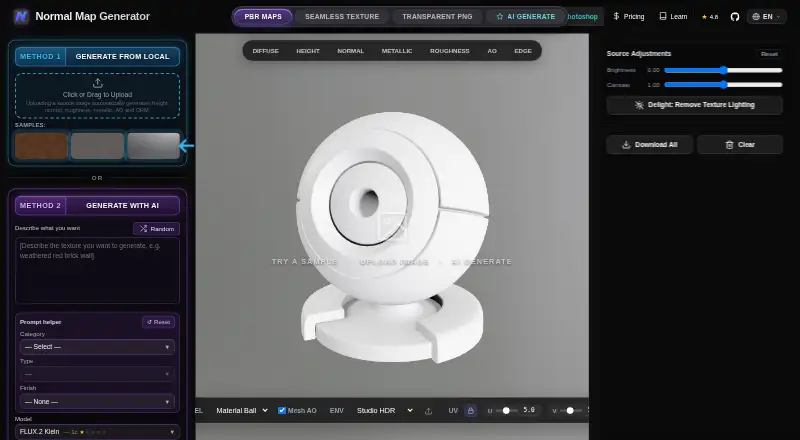
What NormalMap AI is
NormalMap AI is a browser-based tool suite for making PBR textures from images or text descriptions. Uploading an image produces height, normal, roughness, metallic, ambient occlusion, and ORM maps. You can adjust normal strength, blur, displacement depth, and roughness, then preview the material in 3D. A separate generator creates textures from prompts, with daily free AI credits. Its seamless tool blends image edges to help textures tile, and generated maps can be prepared for Unity, Unreal Engine, or Blender, with a green-channel option for DirectX or OpenGL. The local PBR tools process images on-device; AI generation stores textures, prompts, and usage metadata. The service says it uses encryption and account-scoped storage, and offers controls to access, correct, or delete personal data. It runs in browsers on Android, iOS, and the web, including capable mobile devices, though it is optimized for desktop. The free plan includes local tools and daily credits; Lite costs $8.90 a month. One-time credit top-ups cost 9.90 USD and do not expire.
Good
- Creates six map types from an uploaded image.
- Includes 3D preview and texture adjustments.
- Seamless tool helps textures tile.
- Supports Unity, Unreal Engine, and Blender workflows.
- Daily free AI credits are available.
Watch out
- Desktop use is the optimization priority.
- Subscriber credits do not roll over.
- AI generation stores prompts and usage metadata.
Who it suits
It suits texture artists and 3D creators who want to generate or adjust PBR maps from images or prompts. Mobile access is available, but the service is optimized for desktop use.
Verdict
NormalMap AI brings image-based map creation, prompt-based generation, and material preview into a browser tool suite. Its free plan covers local tools and daily AI credits, while paid options add monthly credits and capabilities.
Plans and prices
From NormalMap AI's own pricing page, checked 30 Sep 2026.
| Plan | Price | What it gives you |
|---|---|---|
| Free | Free | Core local tools · daily free AI credits |
| Lite | $8.90 a month | 2,000 credits/month · up to 2,000 generations at 1024×1024 · all AI models · standard queue · $8.90 /mo |
| Credit top-up | $9.90, paid once | 1,000 credits · never expires · does not auto-renew · 1000 credits for $9.90 |
| Pro | $19.90 a month | 5,000 credits/month · up to 5,000 generations at 1024×1024 · all AI models · priority queue · $19.90 /mo |
| Premium | $34.90 a month | 10,000 credits/month · up to 10,000 generations at 1024×1024 · all AI models · priority queue · higher resolution support · $34.90 /mo |
| Annual | $249.90 a year | 11,000 credits/month · up to 11,000 generations/mo at 1024×1024 · all AI models · priority queue · $249.90 /yr |
The facts
Each one read from NormalMap AI's own pages, with the date it was checked.
What it does
- AI generation
- The site offers AI texture generation from a text description and says free AI image credits are available every day.checked 30 Sep 2026
- Content limits
- NSFW, sexually explicit, and adult content generation is prohibited, and prompts are automatically screened before reaching an AI model.checked 30 Sep 2026
- Credits and expiration
- Free users receive daily credits, subscriber credits do not roll over between billing periods, and one-time top-up credits do not expire.checked 30 Sep 2026
- Data security
- The privacy policy says user data is protected with industry-standard encryption and access controls, and generated textures are stored in Cloudflare R2 with access scoped to the account.checked 30 Sep 2026
- Editing and preview
- Users can adjust normal strength, blur, displacement depth, and roughness, then preview the result in 3D.checked 30 Sep 2026
- Local tools
- Uploading a source image automatically generates height, normal, roughness, metallic, AO, and ORM maps.checked 30 Sep 2026
- Mobile access
- NormalMap AI is described as a progressive web app that runs in a browser and can be accessed on capable mobile devices without an app store download; it is optimized for desktop use.checked 30 Sep 2026
- Privacy controls
- The site says users can access, correct, or delete personal data, including deleting their account and associated data from the dashboard or by contacting support.checked 30 Sep 2026
- Privacy distinction
- The free in-browser PBR utility tools process images client-side, while AI generation stores generated textures, prompts, and usage metadata.checked 30 Sep 2026
- Seamless textures
- The site offers a seamless texture tool that blends image edges to make textures tileable.checked 30 Sep 2026
- Support
- The site lists [email protected] for support and privacy inquiries.checked 30 Sep 2026
- Supported workflows
- The site says generated maps are ready for Unity, Unreal Engine, or Blender, and allows flipping the green channel for DirectX or OpenGL standards.checked 30 Sep 2026
- Third-party services
- The privacy policy names Supabase, Creem, Runware, Kie.ai, Cloudflare R2, Cloudflare, and Google Analytics as third-party services used to operate the service.checked 30 Sep 2026
- What it does
- NormalMap AI is a browser-based tool suite that generates PBR textures, including normal, roughness, and displacement maps, from standard images.checked 30 Sep 2026
The full review of NormalMap AI
Overview
NormalMap AI is a browser-based PBR texture tool for turning images and text prompts into material maps. It is best suited to artists and 3D creators who want map generation, adjustment, and 3D preview together. Its strongest case is a free local workflow with optional AI generation; the main trade-off is that paid generation is credit-based and most plans cap output at 1024×1024.
Key features
Upload an image and the local tools automatically create height, normal, roughness, metallic, ambient occlusion, and ORM maps. Because this processing happens in the browser, it is a practical choice when you want a PBR map set from an existing image without sending that image through AI generation. The distinction matters: AI generation stores generated textures, prompts, and usage metadata.
Text prompts can generate new textures, with free daily AI credits for occasional use. Adjustments for normal strength, blur, displacement depth, and roughness, alongside a 3D material preview, help refine results before export. The seamless tool blends image edges to make textures tileable. Generated maps are aimed at Unity, Unreal Engine, and Blender workflows, with a green-channel flip for DirectX or OpenGL conventions.
PNG is the stated export format, and the standard maximum resolution is 1024 px. Premium adds higher-resolution support, making it the more relevant tier for users whose assets need more detail. NSFW, sexually explicit, and adult content generation is prohibited; prompts are screened before they reach an AI model.
NormalMap AI says it protects user data with encryption and access controls, and stores generated textures in Cloudflare R2 with access scoped to the account. It uses third-party services including Supabase, Creem, Runware, Kie.ai, Cloudflare R2, Cloudflare, and Google Analytics. Users can access, correct, or delete personal data, including by deleting the account through the dashboard or contacting support.
Pricing
The Free plan costs nothing and includes core local tools and daily free AI credits. It is the sensible starting point for image-based map work and light prompt experimentation, but daily credits make it a limited option for regular AI production.
Lite costs $8.90 a month, billed $8.90 /mo, for 2,000 credits/month and up to 2,000 generations at 1024×1024, all AI models, and a standard queue. It suits steady but moderate generation; it gives up the priority queue and higher-resolution support of the upper tiers.
Pro costs $19.90 a month, billed $19.90 /mo, and raises the allowance to 5,000 credits/month and up to 5,000 generations at 1024×1024, with all models and a priority queue. Premium costs $34.90 a month, billed $34.90 /mo, for 10,000 credits/month, up to 10,000 generations at 1024×1024, all models, priority queue, and higher-resolution support. Pro is the middle ground for heavier use; Premium is the clearest fit when both volume and resolution matter.
The Annual plan costs $249.90 a year, billed $249.90 /yr, and includes 11,000 credits/month, up to 11,000 monthly generations at 1024×1024, all models, and a priority queue. Its monthly credit allowance is higher than Pro's, but it does not mention Premium's higher-resolution support. Subscriber credits do not roll over between billing periods, so unused monthly allowance is lost.
A Credit top-up costs $9.90, paid once, billed 1000 credits for $9.90. Those credits never expire and do not auto-renew, making the top-up a better fit than a subscription for occasional bursts of AI use. Free daily credits and paid monthly credits serve different rhythms: the former suit sporadic experiments, while subscriptions provide a larger recurring allowance.
Platforms
NormalMap AI runs in a browser on web, Android, and iOS. Its progressive web app can be accessed on capable mobile devices without an app-store download, but it is optimized for desktop use. It is therefore a better fit for a desktop material workflow than for users expecting a mobile-first experience.
Who it's for
Choose NormalMap AI if you need image-to-PBR maps, prompt-based texture generation, or quick material previews in one browser suite, especially if free local processing covers much of your work. It is less compelling for people who need consistently high-resolution exports on a low-cost tier, or who want AI texture generation without credit limits.
Pros and cons
- Pros: Free local tools generate six map types from an image, so the core image-to-map workflow does not depend on AI credits.
- Pros: Editing controls, 3D preview, seamless tiling, and green-channel flipping support refinement and common engine workflows in one place.
- Pros: One-time top-up credits do not expire or auto-renew, which suits intermittent generation better than a monthly allowance.
- Cons: Standard output is capped at 1024 px, and higher-resolution support appears only with Premium.
- Cons: Subscriber credits expire at the end of each billing period, so uneven usage can leave paid allowance unused.
- Cons: AI generation stores prompts, generated textures, and usage metadata, unlike the client-side local utility tools.
- Cons: The service is optimized for desktop, despite browser access on capable mobile devices.
Alternatives
AI Texture Generators is the category list to consult if you want to compare options beyond this tool.
Consider Mixos Text to Texture if its support for iOS, macOS, Windows, and web better matches your devices. AnnoMotion is another freemium alternative, with web, Windows, and API access. AI Texture Studio offers a web-based free tier with 10 starter credits and public assets in a personal workspace. PLAYTEX AI has web and API access, with a free tier whose outputs are public and do not include a commercial-use license. Boracity AI Texture Generator offers a free web tier with generation up to 2K, while its Pro plan costs $10.99 a month. CraftPBR offers a free web plan with 10 credits per month and a full PBR map set. PBRize is a web alternative with 12 monthly usage units and a 1K maximum resolution on its free tier. Material Forge is another web option with a free tier of 100 monthly credits and one concurrent generation.
Verdict
NormalMap AI is a strong fit for creators who want free, client-side image-to-map tools alongside optional prompt generation and preview. Its combination of map controls and engine-oriented options is the reason to choose it; look elsewhere if you need higher resolution without the Premium tier or predictable carryover of unused subscription credits.
Getting started
- Open https://normalmap.ai/ in a browser.
- Use the free local tools to upload a source image and generate maps.
- Adjust map settings and preview the material in 3D.
- For AI texture generation, use daily free credits or choose a paid plan or credit top-up.
Limits worth knowing
The Free plan includes core local tools and daily AI credits. Lite costs $8.90 a month and includes 2,000 monthly credits, with up to 2,000 generations at 1024×1024; subscriber credits do not roll over between billing periods.
Questions
Is NormalMap AI free?
Yes. Its Free plan costs nothing and includes core local tools and daily AI credits.
What do paid plans cost?
Lite is $8.90 a month. One-time credit top-ups cost 9.90 USD for 1,000 credits, which do not expire.
Which platforms does it support?
It runs in browsers on Android, iOS, and the web. It is optimized for desktop use.
What happens to images I use?
The free in-browser PBR utilities process images client-side. AI generation stores generated textures, prompts, and usage metadata.
Which workflows and export formats are supported?
Generated maps are ready for Unity, Unreal Engine, or Blender, with a green-channel option for DirectX or OpenGL. Exports are PNG, and maximum texture resolution is 1024 px.
Alternatives to NormalMap AI
- 1

AnnoMotion
Free planWebAPIWindows7.6From £4.50 a month - 2

Mixos Text to Texture
Free planiOSWebmacOSWindows7.2From $8.99 a month - 3

CADX AI Texture Generator
Free planWeb6.7From $20 a month - 4
PBRize
Free planWeb6.7From $10 a month - 5
PLAYTEX AI
Free planWebAPI6.7From $3 a month - 6
Texturly
Free planWeb6.7From $9 a month