
Mixos Text to Texture
Mixos Text to Texture turns a written prompt into an editable PBR material with base color, normal, roughness, metallic and height channels.
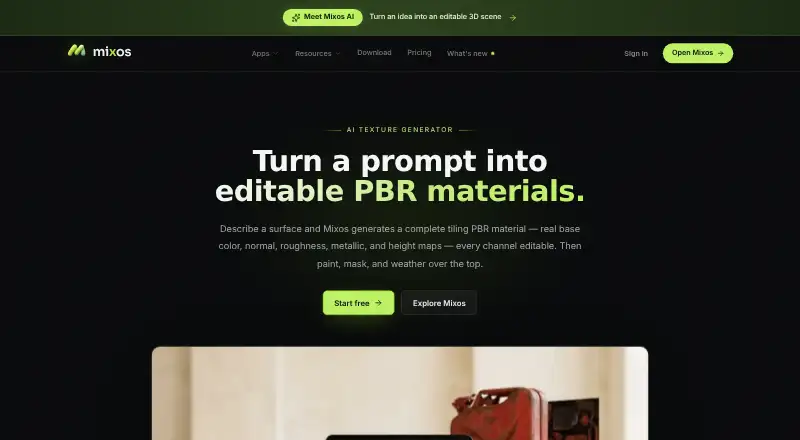
What Mixos Text to Texture is
Mixos Text to Texture turns a written prompt into an editable PBR material with base color, normal, roughness, metallic and height channels. Its Auto-Texture feature applies a prompt over an entire mesh in one action and returns editable layers. Generated materials tile seamlessly, which supports use across large surfaces. Modeling, sculpting, painting and viewport rendering run locally in a browser using WebGPU, with WebGL 2 as a fallback. Mixos says projects, models, textures, brushes and prompts are not used to train AI models. The desktop app offers Live Link updates to Blender, Cinema 4D and Unreal. File workflows include standard PBR maps and GLB, glTF, USDZ, FBX, OBJ and STL. The Free plan includes 10 trial AI credits, 100 MB cloud storage and public Community generations, but no production export. Pro is $8.99/mo, Max is $17.99/mo and a perpetual license is $99 once. The iPhone and iPad app includes Studio, Paint and Mold and requires iOS 26 or later. Mixos says it has no equivalent security audit, uptime guarantee or service-level agreement.
Good
- Creates editable materials with five PBR channels.
- Applies prompts across an entire mesh.
- Generated materials tile seamlessly.
- Browser processing uses WebGPU with WebGL 2 fallback.
- Desktop Live Link updates materials in listed 3D tools.
Watch out
- Free plan has no production export.
- Free plan includes only 10 trial AI credits.
- Free cloud storage is 100 MB.
- No equivalent security audit or uptime guarantee.
Who it suits
It suits game artists, motion designers, 3D hobbyists, students and studios who want to generate and edit PBR materials from text prompts. The listed mobile app is for iPhone and iPad devices running iOS 26 or later.
Verdict
Text to Texture combines prompt-based material generation with editable layers and whole-mesh texturing. The Free plan is limited to trial credits and does not allow production export, so paid access or a license is needed for that use.
Plans and prices
From Mixos Text to Texture's own pricing page, checked 1 Oct 2026.
| Plan | Price | What it gives you |
|---|---|---|
| Free | Free | 10 trial AI credits · 100 MB cloud storage · public Community generations · no production export |
| Pro | $8.99 a month | 50 AI credits/month · 4K watermark-free export · 25 GB cloud storage · email support · billed monthly |
| Max | $17.99 a month | 150 AI credits/month · 4K watermark-free export · 50 GB cloud storage · priority support · billed monthly |
| Perpetual license | $99, paid once | 4K watermark-free export forever · 20 GB cloud storage · AI credits sold separately |
The facts
Each one read from Mixos Text to Texture's own pages, with the date it was checked.
What it does
- AI privacy
- Mixos states that projects, models, textures, brushes and prompts are not used to train AI models.checked 1 Oct 2026
- Audience
- Mixos says it is built for game artists, motion designers, 3D hobbyists, students and studios.checked 1 Oct 2026
- Data storage
- Account records use Supabase Postgres, larger files use Cloudflare R2, and the application is hosted on Vercel with database row-level security.checked 1 Oct 2026
- File interoperability
- Mixos exports standard PBR maps and supports GLB, glTF, USDZ, FBX, OBJ and STL workflows.checked 1 Oct 2026
- Integrations
- The desktop app provides Live Link streaming to Blender, Cinema 4D and Unreal, including automatic material updates.checked 1 Oct 2026
- Mobile support
- The iPhone and iPad app includes Studio, Paint and Mold and requires iOS 26 or later.checked 1 Oct 2026
- Seamless materials
- Generated materials tile seamlessly for covering large surfaces.checked 1 Oct 2026
- Security posture
- Mixos states that it has no SOC 2, ISO 27001 or equivalent audit, no uptime guarantee and no service-level agreement.checked 1 Oct 2026
- Support
- Pro includes email support, Max includes priority support, and vulnerability reports go to [email protected].checked 1 Oct 2026
- Text-to-texture
- Mixos turns a text description into an editable PBR material with base color, normal, roughness, metallic and height channels.checked 1 Oct 2026
- Whole-model texturing
- Auto-Texture applies a prompt across an entire mesh in one click and returns editable layers.checked 1 Oct 2026
Where it runs
- Browser execution
- Modeling, sculpting, painting and viewport rendering run locally in the browser on WebGPU, with WebGL 2 fallback.checked 1 Oct 2026
The company
- Maker
- Matthew Guild says he is the founder and sole builder of Mixos, an art director specializing in 3D graphics at CBS News.checked 1 Oct 2026
The full review of Mixos Text to Texture
Mixos Text to Texture makes prompt-driven materials and whole-mesh texturing for people working with 3D assets, from hobbyists and students to game artists and studios. Its editable layers, broad file workflows and desktop Live Link integrations make it more than a texture generator, but the free tier is best treated as a trial rather than a production option.
Overview
A text description produces an editable PBR material with base color, normal, roughness, metallic and height channels. Materials tile seamlessly, a practical advantage when covering large surfaces without obvious breaks. Auto-Texture extends the prompt workflow to an entire mesh in one click and returns editable layers, so artists can refine the result instead of accepting a flattened output.
The browser app runs modeling, sculpting, painting and viewport rendering locally using WebGPU, with WebGL 2 fallback. Desktop Live Link streams to Blender, Cinema 4D and Unreal, including automatic material updates. That combination suits artists who want to move between material generation and a broader 3D workflow; it is less compelling for someone seeking only a simple one-off image generator.
Key features
Editable, seamless PBR materials
Separate PBR channels and seamless tiling give the output useful flexibility for asset and surface work. A 3D material preview helps assess the result before export. Standard PBR maps and GLB, glTF, USDZ, FBX, OBJ and STL workflows support handoff to other tools.
Whole-mesh texturing
Auto-Texture applies one prompt across a complete mesh and preserves editable layers. That can shorten the initial texturing pass, while keeping room for artist-directed changes.
Local browser work and privacy
Mixos says browser modeling, sculpting, painting and viewport rendering run on the user's device. It also says projects, models, textures, brushes and prompts are not used to train AI models. That is a meaningful privacy commitment, though it does not amount to an audited security posture: Mixos has no SOC 2, ISO 27001 or equivalent audit, uptime guarantee or service-level agreement. Account records use Supabase Postgres, larger files Cloudflare R2, and the app is hosted on Vercel with database row-level security.
Pricing
The free plan costs nothing and includes 10 trial AI credits and 100 MB of cloud storage. Community generations are public and production export is unavailable, so it is suitable for evaluating the workflow, not delivering production assets.
Pro costs $8.99 a month, billed monthly. It includes 50 AI credits per month, 4K watermark-free export, 25 GB of storage and email support. This is the practical entry point for regular individual use, though the monthly credit allowance puts a ceiling on prompt-heavy work.
Max costs $17.99 a month, billed monthly, and raises the allowance to 150 AI credits per month and storage to 50 GB, with priority support. It fits users who generate more often or value faster support; the export resolution remains 4K.
The Perpetual license costs $99, paid once and provides 4K watermark-free export forever with 20 GB of cloud storage. AI credits are sold separately, so the upfront payment does not cover ongoing generation. It suits users prioritizing lasting export access over a monthly subscription.
Platforms
Mixos is available on iOS, macOS, web and Windows. The iPhone and iPad app includes Studio, Paint and Mold and requires iOS 26 or later. The desktop app adds Live Link to Blender, Cinema 4D and Unreal.
Who it's for
Mixos is aimed at game artists, motion designers, 3D hobbyists, students and studios. Its strongest fit is a 3D creator who wants prompt-assisted material creation, editable layers and a route into an existing asset workflow. The trial cap and public-only community outputs make it a poor fit for production users unwilling to pay, while the absence of audited security and service guarantees may matter to organizations with formal procurement requirements.
Pros and cons
Pros
- Materials remain editable: five PBR channels and layer-based whole-mesh output leave room for refinement.
- Useful workflow reach: seamless materials, common 3D file workflows and automatic Live Link updates connect generation to asset work.
- Clear privacy position: Mixos says user projects and prompts are not used to train AI models.
Cons
- Free access is limited: 10 trial credits, 100 MB storage, public Community generations and no production export prevent a sustained production workflow.
- Credits remain a constraint: paid plans have monthly quotas, while the perpetual license sells AI credits separately.
- No formal service assurances: there is no named security audit, uptime guarantee or service-level agreement.
Alternatives
For a broader comparison, browse AI Texture Generators. NormalMap AI is an alternative with Android support and daily free AI credits; choose it if those are more useful than Mixos's whole-mesh workflow and desktop Live Link. AnnoMotion is another freemium option, available through web, Windows and API. AI Texture Studio offers a web-only free tier with starter credits and a personal workspace; consider it if browser access and a one-time starter pack suit your needs. PLAYTEX AI has a free tier with five one-time credits, monthly generation or export caps, up-to-1K output and no commercial-use license, so it is a different fit for limited experimentation. Boracity AI Texture Generator offers free generation up to 2K and a Pro plan with 150 AI credits per month; pick it if that generation allowance is preferable to Mixos's editing and integration workflow. CraftPBR provides 10 monthly free credits and a full PBR map set, with materials published to a community library. PBRize has a free monthly allowance, 1K maximum resolution and 1 GB storage, making it a lower-resolution web option. Material Forge is another freemium web alternative.
Verdict
Choose Mixos if prompt-based material creation needs to feed into editable 3D assets, especially when seamless tiling, whole-mesh texturing or Live Link can save workflow steps. The free tier is too restricted for production, and paid users must weigh monthly credit limits against the convenience of the integrated workflow. Look elsewhere if you need a formal service guarantee, audited security posture or production export without paid access.
Getting started
- Open https://www.mixos.io/text-to-texture in a browser or use a listed platform.
- Create an account to use account storage and plan features.
- Enter a text description to generate an editable material, or apply Auto-Texture to a mesh.
- Use the Free plan's trial AI credits, or choose Pro, Max or a perpetual license for paid features.
- For iPhone or iPad, use the app on a device running iOS 26 or later.
Limits worth knowing
Free includes 10 trial AI credits and 100 MB cloud storage, and its Community generations are public. Production export requires a paid plan or license; Pro and Max include 4K watermark-free export, while the perpetual license provides that export indefinitely.
Questions
Is Mixos Text to Texture free?
Yes. The Free plan includes 10 trial AI credits and 100 MB cloud storage, but it does not include production export.
What do the paid options cost?
Pro costs $8.99/mo and Max costs $17.99/mo, both billed monthly. The perpetual license costs $99 once.
Which platforms are supported?
The listed platforms are iOS, macOS, web and Windows. The iPhone and iPad app requires iOS 26 or later.
What file workflows does it support?
It supports standard PBR map export and GLB, glTF, USDZ, FBX, OBJ and STL workflows.
Does it integrate with 3D desktop apps?
The desktop app provides Live Link streaming to Blender, Cinema 4D and Unreal, including automatic material updates.
Who made Mixos?
Matthew Guild says he is Mixos's founder and sole builder, and an art director specializing in 3D graphics at CBS News.
Alternatives to Mixos Text to Texture
- 1

AnnoMotion
Free planWebAPIWindows7.6From £4.50 a month - 2

NormalMap AI
Free planAndroidiOSWeb7.3From $8.90 a month - 3

CADX AI Texture Generator
Free planWeb6.7From $20 a month - 4

PBRize
Free planWeb6.7From $10 a month - 5

PLAYTEX AI
Free planWebAPI6.7From $3 a month - 6

Texturly
Free planWeb6.7From $9 a month