
AI Texture Studio
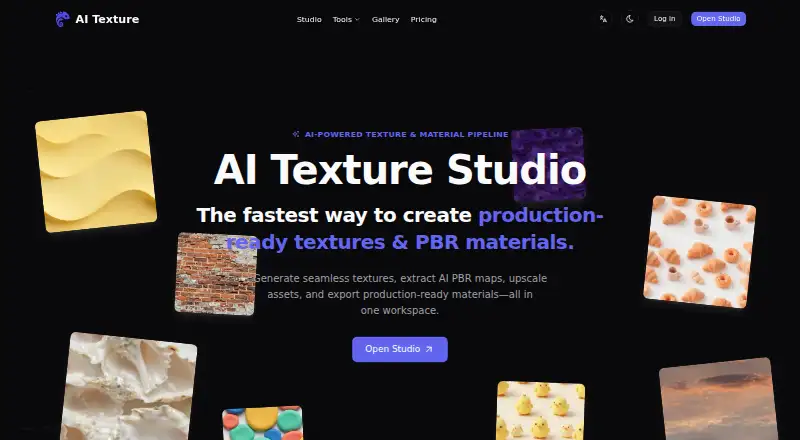
AI Texture Studio is a web tool that turns prompts or image references into seamless textures, PBR maps, and export-ready materials.
What AI Texture Studio is
AI Texture Studio is a web tool that turns prompts or image references into seamless textures, PBR maps, and export-ready materials. Its texture workflow creates tiles designed to repeat along both X and Y axes. The material workflow produces Base Color, Normal, Roughness, Metalness, and Height maps as a set, while the Image to PBR workflow starts from a photo or other image. Optional 2× or 4× upscaling is offered to 8K. Export workflows are shown for Unreal Engine, Unity, Blender, and Godot, including ORM and Mask Map packing. The product is aimed at 3D artists, game developers, indie teams, and technical artists. New accounts receive 10 starter credits, and the site says no credit card is needed to try it. Generation credit costs vary by workflow, output size, map count, and upscale setting, with the exact cost shown before generation. Free accounts have public assets and no private assets. The Plus plan is listed at $14.00 per month, billed annually at $168; paid-tier textures and materials are intended for commercial use without royalties.
Good
- Generates textures designed to tile on both axes.
- Creates five coordinated PBR map types.
- Accepts image references for material maps.
- Offers optional upscaling to 8K.
- Shows workflows for four named engines and tools.
Watch out
- Free assets are public, with no private assets.
- Generation credit costs vary by workflow and settings.
- Starter credits are limited to 10.
Who it suits
It suits 3D artists, game developers, indie teams, and technical artists who need tileable textures or coordinated material maps. Users who need private assets or engine exports should review the paid plan details.
Verdict
AI Texture Studio covers prompt- and image-based material workflows, with map generation, upscaling, and engine export workflows. Check credit costs before generation and note that private assets are not included in the Free plan.
Plans and prices
From AI Texture Studio's own pricing page, checked 2 Oct 2026.
| Plan | Price | What it gives you |
|---|---|---|
| Free | Free | 10 starter credits · Basic generation · Public assets · Personal workspace · No private assets |
| Starter Pack | $9.99, paid once | 200 credits · Valid for 90 days · One-time purchase |
| Plus | $14 a month | 9,600 credits / year · Private by default · Full PBR workflow · Engine exports · $19.99$14/month; billed annually at $168 |
| Creator Pack | $19.99, paid once | 500 credits · Valid for 180 days · One-time purchase |
| Pro | $38 a month | 30,000 credits / year · Private by default · Priority queue · Priority support · $49.99$38/month; billed annually at $456 |
| Studio Pack | $59.99, paid once | 2,000 credits · Valid for 365 days · One-time purchase |
The facts
Each one read from AI Texture Studio's own pages, with the date it was checked.
What it does
- Audience
- The maker describes the product for 3D artists, game developers, indie teams, and technical artists.checked 2 Oct 2026
- Commercial use
- The maker says paid-tier generated textures and materials are intended for commercial games, films, ArchViz renderings, and merchandise without royalties.checked 2 Oct 2026
- Image input
- The Image to PBR workflow accepts a photo or image reference and prepares tileable material maps.checked 2 Oct 2026
- Integrations
- Engine export workflows are shown for Unreal Engine, Unity, Blender, and Godot, including ORM and Mask Map packing.checked 2 Oct 2026
- PBR maps
- The material workflow generates Base Color, Normal, Roughness, Metalness, and Height maps as a coordinated set.checked 2 Oct 2026
- Privacy
- The privacy policy page describes its scope as collecting, using, sharing, and protecting account, generation, billing, and usage data.checked 2 Oct 2026
- Product
- AI Texture Studio turns prompts or source images into seamless texture assets, PBR maps, and export-ready materials.checked 2 Oct 2026
- Seamless generation
- The texture workflow generates tiles designed to repeat seamlessly on both the X and Y axes.checked 2 Oct 2026
- Support
- The contact page lists [email protected] for product support, billing questions, partnerships, or account help.checked 2 Oct 2026
- Upscaling
- The workflow offers optional 2× or 4× upscaling to 8K.checked 2 Oct 2026
Money
- Credit cost
- Generation credit cost varies by workflow, output size, map count, and upscale setting, with the exact cost shown before generation.checked 2 Oct 2026
- Free use
- New accounts receive 10 starter credits, and the site says users can try the product without a credit card.checked 2 Oct 2026
The full review of AI Texture Studio
Overview
AI Texture Studio is a web-based tool for creating textures and materials from prompts or image references. It is best suited to 3D artists and game developers who need tileable surfaces and engine-ready maps; its main trade-off is that private assets and the full PBR workflow sit behind paid plans.
Key features
Textures are designed to repeat on both the X and Y axes, making the generator a practical fit for surfaces that need broad coverage without visible joins. The Image to PBR workflow turns a photo or reference image into tileable material maps, while the material workflow produces Base Color, Normal, Roughness, Metalness, and Height maps together. That coordinated set is more useful for a complete material setup than a color texture alone.
Optional 2× or 4× upscaling reaches 8K, and 3D material preview supports checking the result before it enters a wider workflow. Export workflows cover Unreal Engine, Unity, Blender, and Godot, including ORM and Mask Map packing; outputs are available as WEBP or ZIP. These options make the tool more relevant to artists already working in those engines than to someone seeking only a standalone image generator.
Generation costs vary with workflow, output size, map count, and upscaling. Because the credit cost is shown before generation, users can weigh quality and map requirements against their balance before committing. Paid-tier textures and materials are intended for commercial games, films, ArchViz renderings, and merchandise without royalties. Free assets are public, so the free tier is a poor fit for confidential or unreleased work.
Pricing
The Free plan costs nothing and includes 10 starter credits, basic generation, a personal workspace, and public assets. New accounts can try the product without a credit card, but there are no private assets on this tier. It is suitable for a limited introduction, not private production work.
One-time credit packs offer a way to buy credits without a monthly commitment: Starter Pack is $9.99, paid once for 200 credits valid for 90 days; Creator Pack is $19.99, paid once for 500 credits valid for 180 days; and Studio Pack is $59.99, paid once for 2,000 credits valid for 365 days. Their validity windows matter: infrequent users should consider whether they can spend the credits before expiry.
Plus costs $14 a month, billed annually at 168 USD, and includes 9,600 credits per year, private-by-default assets, the full PBR workflow, and engine exports. It is the more fitting subscription for regular individual use that needs privacy and complete maps. Pro costs $38 a month, billed annually at 456 USD, and includes 30,000 credits per year, private-by-default assets, a priority queue, and priority support. Its larger annual allowance and queue priority are aimed at heavier use; the listed plan terms do not specify a seat count. Credit use still depends on the generation settings, so the annual balance is not a fixed number of outputs.
Platforms
AI Texture Studio runs on the web. That suits browser-based access, while the engine export workflows provide a route into Unreal Engine, Unity, Blender, and Godot projects.
Who it's for
3D artists, game developers, indie teams, and technical artists are the clearest audience, particularly those who want to move from a prompt or image reference to tileable PBR maps and engine-oriented exports. It is less suitable for users who require private assets without a subscription or need a predictable output count per credit balance.
Pros and cons
- Pros: Tileable generation on both axes and coordinated five-map PBR output address common material needs in one workflow.
- Pros: Engine workflows for four named tools, with ORM and Mask Map packing, reduce the gap between generation and project use.
- Pros: Credit costs appear before generation, helping users judge a request before spending.
- Cons: Free assets are public and the free tier lacks private assets, limiting its use for confidential work.
- Cons: Credit costs vary by workflow and settings, so the same balance does not imply a consistent number of outputs.
- Cons: Monthly subscriptions are billed annually, while one-time packs expire after 90, 180, or 365 days depending on the pack.
Alternatives
AI Texture Generators is the broader category to browse when comparing texture tools.
Choose Mixos Text to Texture instead if its support across iOS, macOS, web, and Windows better matches your devices. NormalMap AI is an alternative with Android and iOS apps as well as web access. AnnoMotion offers API, web, and Windows platforms. PLAYTEX AI is another option with API and web access. Boracity AI Texture Generator, CADX AI Texture Generator, CraftPBR, and PBRize are also alternatives to compare.
Verdict
AI Texture Studio is a strong choice for 3D artists and game developers who want prompt- or image-driven tileable materials, coordinated PBR maps, and exports for common engines. Its clearest reason to choose it is the combination of those workflows with a visible per-generation credit cost; look elsewhere if private assets are essential but a subscription is not, or if variable credit consumption makes budgeting difficult.
Getting started
- Open https://aitexture.ai/
- Create a new account and use the 10 starter credits
- Try a prompt or upload an image reference
- Choose texture, material, or Image to PBR generation
- Review the displayed credit cost before generating
- Export materials as WEBP or ZIP, or use an engine workflow
Limits worth knowing
The Free plan provides 10 starter credits, basic generation, a personal workspace, public assets, and no private assets. One-time credit packs expire after 90, 180, or 365 days depending on the pack; subscription plans provide annual credit allocations.
Questions
Is AI Texture Studio free?
It has a Free plan with 10 starter credits, and new users can try it without a credit card. Paid options start with one-time packs and subscriptions.
What is the Plus plan price?
Plus is listed at $14.00 per month, billed annually at $168, with 9,600 credits per year.
What does the Free plan include?
It includes basic generation, 10 starter credits, a personal workspace, public assets, and no private assets.
Which engines can receive exports?
Export workflows are shown for Unreal Engine, Unity, Blender, and Godot, including ORM and Mask Map packing.
Can paid creations be used commercially?
The maker says paid-tier generated textures and materials are intended for commercial games, films, ArchViz renderings, and merchandise without royalties.
Alternatives to AI Texture Studio
- 1

AnnoMotion
Free planWebAPIWindows7.6From £4.50 a month - 2
NormalMap AI
Free planAndroidiOSWeb7.3From $8.90 a month - 3

Mixos Text to Texture
Free planiOSWebmacOSWindows7.2From $8.99 a month - 4

CADX AI Texture Generator
Free planWeb6.7From $20 a month - 5

PBRize
Free planWeb6.7From $10 a month - 6

PLAYTEX AI
Free planWebAPI6.7From $3 a month