myMDM
myMDM is an open-core unified endpoint management platform for managing device fleets from one console.
What myMDM is
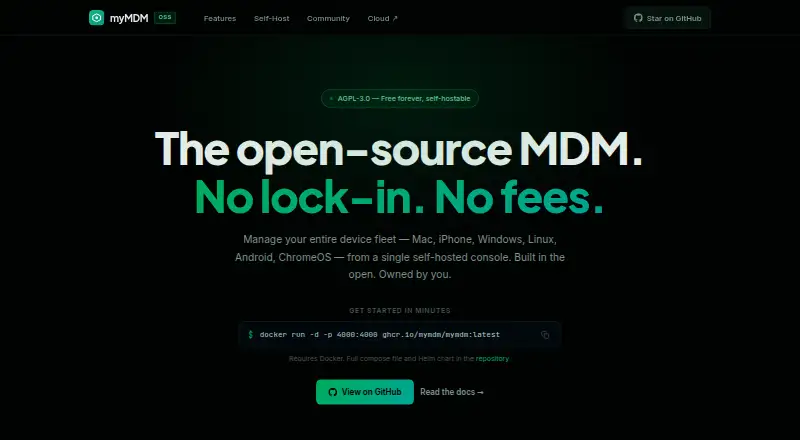
myMDM is an open-core unified endpoint management platform for managing device fleets from one console. Its device coverage includes Macs, iPhones, Windows and Linux devices, Android devices, ChromeOS devices and cloud VMs. Listed management methods include Apple Declarative Device Management and classic MDM, Android Management API, Windows OMA-DM, a Linux agent and ChromeOS enrollment. The policy engine handles passcodes, Wi-Fi, VPN, restrictions, OS updates, compliance rules, mobile threat defense integration, geofencing and workflow automation. App tools cover managed apps, an enterprise catalog and automated third-party patching for 100+ titles. Identity capabilities include directory sync, SAML 2.0, OIDC, SCIM provisioning and role-based access control. The self-hosted core is available under AGPL-3.0 and includes the policy engine, platform agents, enrollment, app management, identity federation and web console. Self-hosting supports Docker, Docker Compose and Helm. The managed product is marked Coming Soon and offers a waitlist for early access. The Free plan costs nothing and covers up to 25 devices; Pro costs $4 a month and includes unlimited devices. The platform is available through the web and has a free plan.
Good
- Covers Apple, Android, Windows, Linux and ChromeOS management.
- The self-hosted core is released under AGPL-3.0.
- Free supports up to 25 devices across all six platforms.
- Pro includes unlimited devices and third-party patching.
- Self-hosting supports Docker, Docker Compose and Helm.
Watch out
- The managed product is marked Coming Soon.
- Free is limited to 25 devices.
- Self-hosting requires Docker 24+ or Kubernetes 1.28+, PostgreSQL 15+ and public HTTPS.
Who it suits
The Free plan is described for individuals and small teams, while Pro targets IT teams. Enterprise is aimed at MSPs and large organizations; teams considering the managed service should note that it is marked Coming Soon.
Verdict
Consider myMDM if you need centralized management across multiple device platforms and are comfortable evaluating either a self-hosted core or a managed service still marked Coming Soon. The Free plan supports up to 25 devices; larger fleets can consider Pro at $4 a month or review Enterprise for its MSP and large-organization features.
Plans and prices
From myMDM's own pricing page, checked 15 Oct 2026.
| Plan | Price | What it gives you |
|---|---|---|
| Free | Free | up to 25 devices · all 6 platforms · core MDM policies · basic app management · community support · $0/mo |
| Pro | $4 a month | unlimited devices · AI fleet automation · DEX analytics · third-party patching · MTD integration · SAML/OIDC identity federation · TeamViewer/Splashtop remote support · priority support · $4/device/mo |
| Enterprise | Priced on request | everything in Pro · MSP organization hierarchy · white-label and custom domain · ZTNA posture API · per-app VPN · SLA and dedicated support · on-premises deployment · Custom |
The facts
Each one read from myMDM's own pages, with the date it was checked.
What it does
- AI automation
- The planned cloud tier describes natural-language fleet queries, anomaly detection, predictive compliance and plain-English policy generation.checked 15 Oct 2026
- API and extensibility
- The project advertises an Open API, webhooks and a gRPC plugin SDK with a Go SDK for custom integrations, policy enforcers and data connectors.checked 15 Oct 2026
- Availability
- The managed product is marked “Coming Soon” and invites visitors to join a waitlist for early access.checked 9 Oct 2026
- Capacity guidance
- The site recommends 2 vCPU and 4 GB RAM for deployments of up to 500 devices.checked 9 Oct 2026
- Cloud availability
- The managed cloud site labels the service as coming soon and invites visitors to join an early-access waitlist.checked 15 Oct 2026
- Documentation depth
- The project links self-hosting, API-reference and contributing documentation through its GitHub project and provides Docker, Compose and Helm examples.checked 15 Oct 2026
- Identity
- Identity features include LDAP/AD sync, SAML 2.0, OIDC, SCIM 2.0 provisioning, just-in-time provisioning, and role-based access control with IdP role mapping.checked 9 Oct 2026
- Identity federation
- Identity features include LDAP/AD synchronization, SAML 2.0, OIDC, SCIM 2.0, just-in-time provisioning and IdP-to-RBAC role mapping.checked 15 Oct 2026
- Independent listing deployment
- That GoodFirms entry describes its listed myMDM as cloud-hosted and web-based, with iPhone/iPad, Android, Windows and Mac support.checked 15 Oct 2026
- Independent listing features
- GoodFirms lists application management, asset management, deployment management, device enrollment, location tracking, remote maintenance, rewards and gamification, and security management for its entry.checked 15 Oct 2026
- Independent listing identity
- GoodFirms lists a myMDM product whose website is datacapturesolutions.co.uk, indicating that its directory entry may refer to a different or older product than mymdm.org.checked 15 Oct 2026
- Independent listing pricing
- GoodFirms marks the listed product's pricing as contact-vendor and quote-based, with no free version.checked 15 Oct 2026
- Independent listing support
- GoodFirms says its listed product offers phone support and knowledge resources including help guides, video guides and blogs.checked 15 Oct 2026
- Independent review volume
- GoodFirms reports that no reviews had been submitted for its myMDM listing.checked 15 Oct 2026
- Integrations
- The managed product lists Entra ID, Okta Device Trust, Cloudflare Access, Zscaler, TeamViewer, and Splashtop integrations.checked 9 Oct 2026
- Intended users
- The site describes the Free plan for individuals and small teams, Pro for IT teams, and Enterprise for MSPs and large organizations.checked 9 Oct 2026
- Licence
- The self-hosted core is released under the GNU Affero General Public License version 3.0.checked 15 Oct 2026
Where it runs
- Android management
- Android devices are managed through the Android Management API and Android Zero-Touch enrollment.checked 15 Oct 2026
- Apple management
- Apple support combines Declarative Device Management with classic MDM and includes SCEP, APNs lifecycle handling and ABM/ASM zero-touch enrollment.checked 15 Oct 2026
- Application management
- App controls include Apple VPP/ABM apps, Google Play managed configurations, an enterprise catalog, AppConfig.org and automated patching for more than 100 titles.checked 15 Oct 2026
- App management
- App features include Apple VPP/ABM managed apps, Google Play managed configurations, an enterprise app catalog, AppConfig.org, and automated third-party patching for 100+ titles.checked 9 Oct 2026
- Device management
- Listed capabilities include Apple Declarative Device Management and classic MDM, Android Management API, Windows OMA-DM, Linux agent, and ChromeOS enrollment.checked 9 Oct 2026
The company
- Independent company association
- The G2 seller page associates its myMDM listing with Quadient, whose profile states a 1924 founding year and headquarters in Bagneux, France.checked 15 Oct 2026
- Independent company size
- The G2 category page reports 3,976 LinkedIn employees for Quadient in the myMDM listing metadata.checked 15 Oct 2026
The full review of myMDM
Overview
myMDM is an open-core unified endpoint management platform that brings device fleets into one console. It suits teams managing a mix of operating systems that can run a self-hosted service or are willing to wait for the managed offering. The breadth of its device, policy, app and identity controls is compelling, but the hosted product is still marked “Coming Soon.”
Key features
myMDM covers Apple Declarative Device Management and classic MDM, Android Management API, Windows OMA-DM, a Linux agent and ChromeOS enrollment. Its supported endpoint types also include cloud VMs. That range makes it relevant to organizations with mixed fleets rather than teams managing only one device family.
The policy engine handles passcodes, Wi-Fi, VPN, restrictions, OS updates and compliance rules, with additional support for geofencing, mobile threat defense integration and workflow automation. These controls let IT teams address routine configuration and compliance within the same platform. Mobile threat defense integration is a Pro feature, so Free users should not expect the full policy and security offering.
App management includes Apple VPP and ABM managed apps, Google Play managed configurations, an enterprise app catalog, AppConfig.org and automated third-party patching for more than 100 titles. The combination is useful for teams standardizing app deployment across platforms, while automated third-party patching is reserved for Pro.
Identity capabilities include LDAP and Active Directory sync, SAML 2.0, OIDC, SCIM 2.0 provisioning, just-in-time provisioning and role-based access control with identity-provider role mapping. The managed product also lists integrations with Entra ID, Okta Device Trust, Cloudflare Access and Zscaler, plus remote-support connections to TeamViewer and Splashtop. These options give larger IT teams a way to connect device management with identity and access workflows; some are tied to paid plans.
The self-hosted core is licensed under AGPL-3.0 and includes the policy engine, platform agents, enrollment, app management, identity federation and web console. Docker, Docker Compose and Helm are supported. Running it requires Docker 24+ or Kubernetes 1.28+, PostgreSQL 15+ and a public HTTPS endpoint for Apple APNs and Android AMAPI callbacks. The recommended 2 vCPU and 4 GB RAM for up to 500 devices is a modest stated starting point, but the infrastructure and endpoint requirements make self-hosting a real operational commitment.
The web console provides SIEM-compatible audit logs, and remote-support sessions are recorded and audited. That is useful for organizations that need an audit trail around administration and support activity.
Pricing
myMDM uses a freemium model, with a Free tier and two paid tiers aimed at larger or more demanding deployments.
- Free — free: Up to 25 devices, all six platforms, core MDM policies, basic app management and community support. It is a sensible starting point for individuals and small teams, but the device cap and basic app offering leave little room for a growing fleet or advanced operational needs.
- Pro — $4 a month: Unlimited devices, AI fleet automation, DEX analytics, third-party patching, mobile threat defense integration, SAML/OIDC identity federation, TeamViewer/Splashtop remote support and priority support. This is the practical fit for IT teams that need to manage beyond 25 devices or want the added automation, analytics and integrations.
- Enterprise — custom pricing: Everything in Pro, plus MSP organization hierarchy, white-labeling and a custom domain, ZTNA posture API, per-app VPN, SLA and dedicated support, and on-premises deployment. These features target MSPs and large organizations; custom pricing means buyers will need to assess the cost against their deployment needs.
The managed service is marked “Coming Soon” and invites visitors to join a waitlist. Teams ready to deploy now should evaluate the self-hosted core rather than assume a managed subscription is currently available.
Platforms
myMDM supports macOS, iOS, Windows, Linux, Android and ChromeOS, with web and API access also represented in its platform coverage. Its endpoint scope includes Mac computers, iPhone, Windows and Linux devices, Android devices, ChromeOS devices and cloud VMs. This makes it a strong candidate for mixed-platform fleets, not just conventional mobile-device management.
Who it's for
Individuals and small teams can use Free to manage up to 25 devices, provided core policies and basic app management are enough. IT teams with larger fleets are better served by Pro’s unlimited device count and added automation, patching and identity features. Enterprise is aimed at MSPs and large organizations that need multi-organization management, custom branding, on-premises deployment or dedicated service commitments.
myMDM is less suitable for teams that require an immediately available managed service or cannot take on the requirements of self-hosting. Its open-core model offers flexibility, but the self-hosted route still calls for container or Kubernetes operations, a PostgreSQL database and publicly reachable HTTPS callbacks.
Pros and cons
- Pro: Broad coverage across six operating systems, including ChromeOS and Linux, makes it useful for varied device estates.
- Pro: Policy, app and identity controls span more than enrollment, with identity federation and automated third-party patching available in Pro.
- Pro: The AGPL-3.0 self-hosted core includes the web console and major management components, giving technically equipped teams a deployable option while the managed service is pending.
- Con: Free is limited to 25 devices and community support, so it is primarily a small-team entry point.
- Con: The managed product is still marked “Coming Soon,” leaving self-hosting as the immediate path for teams that need to proceed.
- Con: Self-hosting requires container or Kubernetes infrastructure, PostgreSQL and a public HTTPS endpoint, which adds operational work for teams seeking a turnkey service.
Alternatives
For other options in this category, see Unified Endpoint Management Software.
- FileWave is worth comparing if its Community Edition’s free allowance of up to 15 computers, 15 tablets and 15 Chrome devices suits your fleet.
- Relution offers a free plan for up to five devices, with Shared Cloud or On Premises deployment and no time limit; it may suit a very small deployment.
- Miradore offers a free plan for up to 50 devices after a 14-day trial, making it a comparison point for teams prioritizing a higher stated free-device allowance.
- OpenUEM is a free, open-source alternative for teams focused on Linux, macOS and Windows.
- SureAsset is a free option for hardware and software license tracking, asset lifecycle management, API access and automation.
- Ivanti Neurons for Zero Trust Access is another option to consider for zero-trust access.
- ManageEngine Endpoint Central has a Free Edition for 25 endpoints; it may be a fit for teams comparing free endpoint-management plans.
- UNO UEM offers per-managed-device pricing scaled to fleet size and needs, with full platform access and six-platform support.
Verdict
myMDM is a strong choice for technically capable teams that want broad cross-platform management, centralized policies and app controls, and the option to run an open-core system themselves. Free is enough for a small fleet, while Pro removes the device cap and adds tools for active IT operations. The main reason to look elsewhere is straightforward: if you need a managed service now and do not want to operate the infrastructure, myMDM’s current path may not fit.
Getting started
- Visit https://mymdm.org/ and choose the web console or self-hosted route.
- For the managed product, join the early-access waitlist.
- For self-hosting, use Docker, Docker Compose or Helm.
- Meet the stated requirements: Docker 24+ or Kubernetes 1.28+, PostgreSQL 15+ and a public HTTPS endpoint.
- Start with Free for up to 25 devices, or choose Pro for unlimited devices.
Limits worth knowing
The Free plan is limited to 25 devices and community support. Self-hosting requires Docker 24+ or Kubernetes 1.28+, PostgreSQL 15+ and a public HTTPS endpoint for Apple APNs and Android AMAPI callbacks.
Questions
Is myMDM open source?
Its self-hosted core is released under AGPL-3.0. It includes the policy engine, platform agents, enrollment, app management, identity federation and web console.
Is the managed product available?
It is marked Coming Soon, and visitors can join a waitlist for early access.
What does the Free plan include?
It costs nothing and covers up to 25 devices, all six platforms, core MDM policies, basic app management and community support.
How much is Pro?
Pro costs $4 a month and includes unlimited devices, AI fleet automation, DEX analytics, third-party patching, MTD integration, identity federation, remote support and priority support.
Which devices and operating systems does it support?
Listed endpoint types include Mac computers, iPhone, Windows, Linux, Android, ChromeOS devices and cloud VMs. Supported operating systems are macOS, iOS, Windows, Linux, Android and ChromeOS.
What self-hosting requirements are stated?
The stated requirements include Docker 24+ or Kubernetes 1.28+, PostgreSQL 15+ and a public HTTPS endpoint for Apple APNs and Android AMAPI callbacks.
Alternatives to myMDM
- 1
FileWave
Free planAndroidiOSWebAPI8.3Free plan - 2

Codeproof Cyber Device Manager
AndroidiOSWebAPI7.7From $24 a year - 3

Relution
Free planAndroidiOSWebAPI7.7Free plan - 4

Miradore
Free planAndroidiOSWebAPI7.6From $2.75 a month - 5
Microsoft Defender for Business
AndroidiOSAPImacOS7.5 - 6
Hexnode UEM
AndroidiOSWebLinux7.3From $2.20 a month