MuJava
MuJava is a free, open-source tool for mutation testing Java programs.
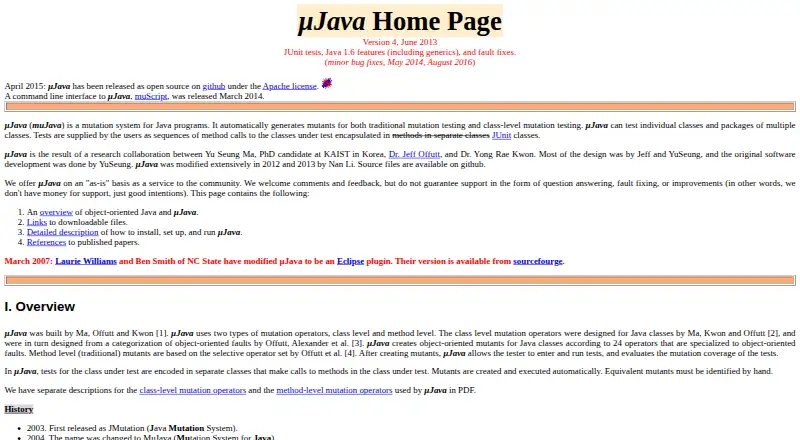
What MuJava is
MuJava is a free, open-source tool for mutation testing Java programs. It generates method-level and class-level mutants, then runs JUnit tests against them to evaluate mutation coverage. Its object-oriented support includes 24 class-level operators. The test input is JUnit test cases containing calls to the class under test; JUnit test suites are not supported. Equivalent mutants need manual identification, and the documentation says they typically make up 5% to 20% of generated mutants. Version 4 supports Java 1.6 language features such as generics, annotations, enumerations, varargs, enhanced for-each loops, and static imports. The documented installation uses two JAR files and a configuration file, with Java CLASSPATH and PATH setup. Its workflow uses Java GUI applications, while the muScript command-line interface was released in March 2014. The project also had an Eclipse plugin created in 2007. MuJava is available for Linux, macOS, and Windows, and is provided as-is without a guarantee of answers, fixes, or improvements.
Good
- Generates method-level and class-level mutants.
- Evaluates mutation coverage using JUnit tests.
- Supports Java 1.6 language features.
- Open source under the Apache license.
- Supports Linux, macOS, and Windows.
Watch out
- JUnit test suites are not supported.
- Equivalent mutants require manual identification.
- Setup requires CLASSPATH and PATH configuration.
- Maintainers provide it as-is without improvement guarantees.
Who it suits
MuJava suits students and researchers working on Java class or package testing with JUnit. It may also fit users comfortable with manual setup and reviewing equivalent mutants.
Verdict
MuJava provides Java mutation generation and JUnit-based coverage evaluation at no cost. Its test-suite limitation, manual equivalent-mutant review, and documented setup are important considerations before adopting it.
Plans and prices
From MuJava's own pricing page, checked 8 Oct 2026.
| Plan | Price | What it gives you |
|---|---|---|
| µJava | Free | Open source under Apache license · provided as-is |
The facts
Each one read from MuJava's own pages, with the date it was checked.
What it does
- CLI
- A command-line interface called muScript was released in March 2014.checked 8 Oct 2026
- Command line
- A command line interface called muScript was released in March 2014.checked 8 Oct 2026
- Coverage
- After generating mutants, µJava runs tests and evaluates their mutation coverage.checked 8 Oct 2026
- Eclipse
- The maker page says an Eclipse plugin version was created by Laurie Williams and Ben Smith of NC State in 2007.checked 8 Oct 2026
- Equivalent mutants
- Equivalent mutants must be identified by hand, and the documentation says 5% to 20% of mutants are typically equivalent.checked 8 Oct 2026
- Installation
- The documented setup uses two JAR files and a configuration file, and requires configuring Java CLASSPATH and PATH.checked 8 Oct 2026
- Intended users
- The maker describes MuJava as a service to the community and says it has been used by students and researchers.checked 8 Oct 2026
- Interface
- The documented workflow uses Java GUI applications to generate and run mutants.checked 8 Oct 2026
- Java compatibility
- Version 4 supports JUnit tests and Java 1.6 language features, including generics, annotations, enumerations, varargs, enhanced for-each loops, and static imports.checked 8 Oct 2026
- Language support
- Version 4 supports Java 1.6 language features including generics, annotations, enumerations, varargs, enhanced for-each loops, and static imports.checked 8 Oct 2026
- License
- The project was released as open source under the Apache license in April 2015.checked 8 Oct 2026
- Mutation operators
- It creates object-oriented mutants using 24 class-level operators and also supports method-level operators.checked 8 Oct 2026
- Purpose
- MuJava automatically generates mutants for Java programs for traditional method-level and class-level mutation testing.checked 8 Oct 2026
- Support
- The maintainers offer MuJava as-is and do not guarantee question answering, fault fixing, or improvements.checked 8 Oct 2026
- Test evaluation
- MuJava runs tests against generated mutants and evaluates mutation coverage.checked 8 Oct 2026
- Test framework
- Tests are provided as JUnit test classes containing methods that call the class under test; JUnit test suites are not supported.checked 8 Oct 2026
- Test integration
- Tests are written as JUnit test cases containing sequences of method calls to the classes under test.checked 8 Oct 2026
- Test limitation
- JUnit test suites are not supported; test sets must be JUnit test cases with public test classes and methods.checked 8 Oct 2026
- Test scope
- It can test individual Java classes and packages containing multiple classes.checked 8 Oct 2026
The company
- Founded
- 2003checked 28 Sep 2026
Where it runs
- Platforms
- The download instructions say MuJava can run on Unix, Linux, and Windows, and provide Mac setup instructions.checked 8 Oct 2026
The full review of MuJava
MuJava is a free Java mutation-testing tool for people assessing the strength of JUnit tests, particularly students and researchers.
Overview
MuJava generates method-level and class-level mutants for Java programs, then runs tests against them to evaluate mutation coverage. It can target an individual class or a package with multiple classes, helping developers see whether their tests catch altered behavior rather than merely pass against the original code.
Its object-oriented emphasis is a notable strength: 24 class-level operators sit alongside method-level operators. The trade-off is a constrained test workflow. Test inputs must be public JUnit test classes and methods, and JUnit test suites are unsupported.
Key features
Mutation generation and coverage
MuJava runs tests against generated mutants and evaluates mutation coverage. This gives Java developers a way to assess test effectiveness through behavioral changes. Equivalent mutants still need to be identified manually; documentation says they typically account for 5% to 20% of mutants, so interpreting results can require meaningful human review.
JUnit and Java compatibility
Tests are JUnit test cases containing sequences of method calls to the classes under test. Version 4 supports Java 1.6 language features, including generics, annotations, enumerations, varargs, enhanced for-each loops and static imports. That compatibility is useful for code using those features, but the unsupported suite format can require adapting an existing test setup.
Setup and workflow
The documented installation uses two JAR files and a configuration file, with Java CLASSPATH and PATH configuration. The workflow uses Java GUI applications to generate and run mutants; muScript, a command-line interface, was released in March 2014. This is workable for users comfortable with Java configuration, but less attractive for teams expecting a streamlined or actively supported integration.
An Eclipse plugin was created in 2007 by Laurie Williams and Ben Smith of NC State. MuJava was released as open source under the Apache license in April 2015. The maintainers provide it as-is and do not guarantee answers to questions, fixes or improvements, a material drawback when relying on it for ongoing team workflows.
Pricing
µJava: free. The free plan is open source under the Apache license. There is no free trial because the software is free; there are no paid tiers or seat-based charges in the stated plan. Its cost advantage does not offset the manual equivalent-mutant review, setup requirements or as-is support for users who need ongoing assistance.
Platforms
MuJava supports Linux, macOS and Windows. Its supported language is Java, and its test framework is JUnit.
Who it's for
MuJava is best suited to students and researchers evaluating Java tests, and to developers who want class-level mutation operators without a software fee. It is also a reasonable option for users who can configure Java paths and work within JUnit test cases.
Look elsewhere if your project depends on JUnit suites, you need help with maintenance or troubleshooting, or you want equivalent mutants handled without manual review. The documented support commitment is explicitly limited, so it is not a strong choice for teams that need dependable vendor assistance.
Pros and cons
- Pros: Free and open source under Apache; offers 24 class-level operators alongside method-level mutation; evaluates coverage by running tests against mutants; works across Linux, macOS and Windows.
- Cons: Does not support JUnit test suites; requires manual identification of equivalent mutants, typically 5% to 20% of the set; setup requires JARs, configuration and Java path changes; maintainers offer no guarantee of answers, fixes or improvements.
Alternatives
Mutation Testing Tools is the broader category to explore when comparing options.
- ArcMutate is freemium, with a free license for open-source projects and an $8 a month Base plan; consider it if those terms and its Linux, macOS, Windows or self-hosted platforms better suit your project.
- Mutant offers a free full-featured plan for public repositories and a $30 a month commercial plan billed per developer; consider it if you need its Linux or macOS platform options.
- Mutatest is a free, MIT-licensed option for Linux, macOS and Windows; consider it if that alternative better fits your needs.
- pymute is a free, open-source Linux option installed with Rust and Cargo; consider it if that setup and platform fit your project.
- go-mutesting is a free, MIT-licensed Go mutation-testing framework for Linux and self-hosted use; consider it for Go projects.
- LittleDarwin is a free Java mutation analysis framework for Linux, supported through donations; consider it if that option fits your platform needs.
- MutPy is a free Linux and self-hosted option with no paid plans or usage limits stated; consider it for those environments.
- pytest-gremlins is a free, MIT-licensed Linux package requiring Python 3.11 or later; consider it for Python projects meeting that requirement.
Verdict
Choose MuJava if you need free Java mutation testing with class-level operators and can work within its JUnit case format, configure the Java environment and review equivalent mutants yourself. Its central reason to choose is the combination of mutation coverage evaluation and 24 class-level operators at no cost; its central reason to look elsewhere is the manual effort and limited support surrounding the workflow.
Getting started
- Visit the MuJava project website.
- Install the documented two JAR files and configuration file.
- Configure Java CLASSPATH and PATH.
- Use the Java GUI applications to generate mutants and run tests.
- Write public JUnit test classes and methods for the classes under test.
Limits worth knowing
MuJava is free. JUnit suites are unsupported, equivalent mutants require manual identification, and the project is provided as-is without guaranteed answers, fixes, or improvements.
Questions
How much does MuJava cost?
MuJava is free; its listed plan is free.
Which language and test framework does it support?
MuJava supports Java and uses JUnit test cases. JUnit test suites are not supported.
What platforms are supported?
The listed platforms are Linux, macOS, and Windows.
Is MuJava open source?
Yes. The project was released under the Apache license.
How are mutants and tests evaluated?
MuJava generates class-level and method-level mutants, runs JUnit tests against them, and evaluates mutation coverage. Equivalent mutants need to be identified manually.
What setup and support should users expect?
The documented setup uses two JAR files and a configuration file, and requires Java CLASSPATH and PATH configuration. MuJava is provided as-is, without guaranteed answers, fixes, or improvements.
Alternatives to MuJava
- 1
Mutatest
Free planOpen sourceAPILinuxmacOSSelf-hosted7.2Free plan - 2

ArcMutate
Free planLinuxmacOSSelf-hostedWindows6.7From $8 a month - 3
Mutant
Free planLinuxmacOS6.7From $250 a year - 4
pymute
Free planLinux6.3Free plan - 5
go-mutesting
Free planLinuxSelf-hosted6.2Free plan - 6
LittleDarwin
Free planLinux6.2Free plan