MoodHaven Journal
MoodHaven Journal is a free journaling app with guided prompts and end-to-end encryption.
What MoodHaven Journal is
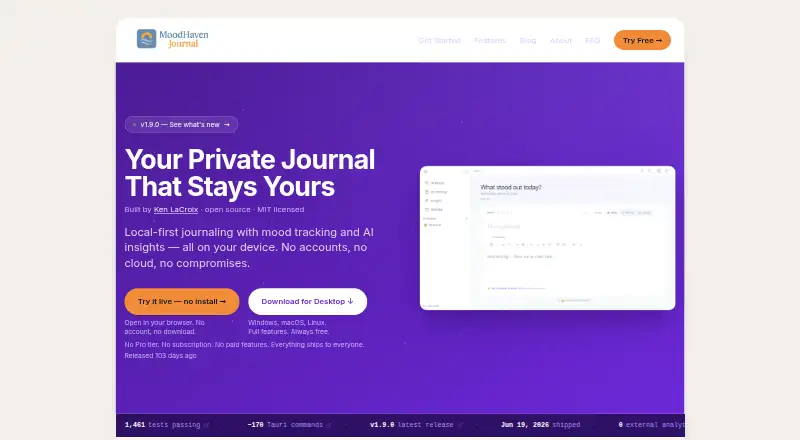
MoodHaven Journal is a free journaling app with guided prompts and end-to-end encryption. It runs on Android, iOS, Windows, macOS, Linux, and the web, with a browser PWA available without installation or an account. No account or email is required to use it. Journal entries are encrypted with AES-256-GCM and PBKDF2-HMAC-SHA256; keys are derived in memory and cleared when the app is locked, and passwords are not stored or transmitted. Devices can sync over a local network using encrypted transport, without a cloud relay. Data is not uploaded or shared unless you choose to export it. Entries can be exported either as an encrypted .moodhaven backup or as plaintext. Wear OS supports voice capture and memos, transcribed locally with Whisper.cpp. AI features analyze metadata such as mood scores and patterns, while journal text remains on the device. The app includes 15 predefined activities and supports up to 50 custom activities. It is open source under the MIT license, and all features are included free.
Good
- No account or email is required.
- Entries use end-to-end encryption.
- Local-network sync needs no cloud relay.
- Wear OS memos are transcribed locally.
- Exports include encrypted and plaintext options.
Watch out
- No team workspace or administrator features are stated.
- No trial or refund policy is stated.
Who it suits
It suits people who want private journaling across desktop, mobile, and web, including users who prefer not to create an account. Wear OS voice capture and local transcription may also suit people who want to record entries from their wrist.
Verdict
MoodHaven Journal offers guided journaling across six platform types with encryption, local-network sync, and no account requirement. The listing says all features are free, with no paid tier.
Plans and prices
From MoodHaven Journal's own pricing page, checked 28 Sep 2026.
| Plan | Price | What it gives you |
|---|---|---|
| Free | Free | No account, subscription, Pro tier, or paid features required. · Open-source MIT license · No subscription · No paid features · All features included |
The facts
Each one read from MoodHaven Journal's own pages, with the date it was checked.
What it does
- Account requirement
- No account or email is required to use the app.checked 28 Sep 2026
- Activity limits
- There are 15 predefined activities and up to 50 custom activities.checked 28 Sep 2026
- AI privacy
- AI analyzes metadata such as mood scores and patterns; journal text never leaves the device.checked 28 Sep 2026
- Data export
- Entries can be exported as an encrypted .moodhaven backup or as a plaintext file.checked 28 Sep 2026
- Encryption method
- Entries use AES-256-GCM encryption with PBKDF2-HMAC-SHA256 and 600,000 iterations.checked 28 Sep 2026
- End-to-end encryption
- Yeschecked 20 Sep 2026
- Export formats
- .moodhaven encrypted backup,plaintextchecked 20 Sep 2026
- Key storage
- Keys are derived in memory and cleared on lock; passwords are never stored or transmitted.checked 28 Sep 2026
- Peer sync
- Devices can sync over a local network using Ed25519 identity and encrypted transport, without cloud relay.checked 28 Sep 2026
- Pricing model
- The app is completely free with no Pro tier, subscription, or paid features.checked 28 Sep 2026
- Prompt features
- guidedchecked 20 Sep 2026
- Search scope
- entrychecked 20 Sep 2026
- Sharing model
- Data is not uploaded or shared unless the user chooses to export it.checked 28 Sep 2026
Where it runs
- Available platforms
- web,windows,macos,linux,ios,androidchecked 20 Sep 2026
- Browser app
- A browser PWA is available at journal.moodhaven.app without installation or an account.checked 28 Sep 2026
- Desktop platforms
- Native desktop apps are available for Windows, macOS, and Linux.checked 28 Sep 2026
- Wear OS support
- Wear OS supports voice captures and voice memos from the wrist.checked 28 Sep 2026
The company
- Company builder
- MoodHaven Journal was built by Ken LaCroix and is open source under the MIT license.checked 28 Sep 2026
- Founded
- 2025checked 28 Sep 2026
- Teams and admin
- No team workspace or administrator features are stated in the supplied page text.checked 28 Sep 2026
Money
- Free plan
- Yeschecked 20 Sep 2026
- Free tier limits
- Everything ships to everyone; the page does not state feature limits for the free plan.checked 28 Sep 2026
- Trial and refund
- No trial or refund policy is stated in the supplied page text.checked 28 Sep 2026
The full review of MoodHaven Journal
Overview
MoodHaven Journal is a guided journal for people who want to keep personal entries private and use the app across desktop, mobile and web. It suits writers who prefer local control over cloud accounts, but its no-cost, no-paid-features approach leaves no upgrade path for anyone seeking a different tier.
Its strongest case is the combination of end-to-end encryption, local-network device sync and a browser app that needs no account. The trade-off is that syncing is peer-to-peer rather than cloud-relayed, and there are no stated team or administrator tools.
Key features
Guided prompts give users a starting point when an open-ended blank page is a barrier. Entry-level search helps locate past writing, while 15 built-in activities and room for up to 50 custom activities add structure without making the journal only about freeform text.
Entries are encrypted with AES-256-GCM, with keys derived using PBKDF2-HMAC-SHA256 at 600,000 iterations. Keys remain in memory and are cleared when the app locks; passwords are neither stored nor transmitted. That is a meaningful privacy design for people wary of putting intimate writing in a conventional cloud service. Data is not uploaded or shared unless the user chooses to export it.
Devices can sync over a local network using Ed25519 identity and encrypted transport, without a cloud relay. This keeps the sync model aligned with local control, but it depends on devices being able to reach one another on that network. Export offers an encrypted .moodhaven backup or a plaintext file; the latter is more portable but no longer protected by the journal's encryption.
AI analyzes metadata such as mood scores and patterns, while journal text stays on the device. Wear OS adds voice capture and voice memos; those recordings are transcribed locally with Whisper.cpp. This is a focused mix for people who want reflection prompts and wrist-based capture without sending entry text away for analysis.
Pricing
Free — free. The single plan includes every feature, carries no subscription, and requires no account. The software is open source under the MIT license. There is no paid tier to unlock more, so the plan fits anyone comfortable with the product's feature set as-is; it is not a stepping stone to paid extras.
No feature cap is stated for the free plan. No trial or refund policy is stated, and there is no separate paid plan or custom pricing to compare.
Platforms
MoodHaven runs on Android, iOS, Windows, macOS, Linux and the web. Native desktop apps cover all three desktop systems, while the browser PWA at journal.moodhaven.app works without installation or an account. Wear OS support is specifically for voice captures and memos, not a full journal interface.
Who it's for
This is a strong fit for individual journalers who value privacy, want guided prompts, or need a journal across phone, desktop and browser without creating an account. It also suits users who want local voice transcription and are comfortable managing sync over their own network.
Look elsewhere if you need a team workspace, administrator controls, or cloud-relay synchronization. The local-network model favors privacy over effortless syncing when devices are apart.
Pros and cons
- Pros: End-to-end encryption, in-memory key handling and no required account put privacy at the center of the product.
- Pros: Local-network sync avoids a cloud relay, and six platform types make it practical to use across desktop, mobile and browser.
- Pros: Every feature is included in the free plan, with guided prompts, local voice transcription and encrypted or plaintext export.
- Cons: Peer sync requires devices to connect over a local network, so it is not a substitute for cloud sync across distant devices.
- Cons: No team or administrator features are stated, making it a personal journal rather than a shared workspace.
- Cons: Plaintext export gives up encryption, so users need to protect the exported file themselves.
Alternatives
Journaling Software is the broader category to browse if MoodHaven's local-first design is not the right fit.
- Journey is worth considering if its annual membership's 10GB cloud storage and allowance of 5,000 entries are more useful than MoodHaven's local-network sync.
- Rosebud is an option for readers who want a freemium journal with a free trial and support for Android, iOS, macOS, web and Windows.
- Day One suits someone who wants a one-month in-app free trial, subject to App Store eligibility, and support for browser extensions alongside its listed platforms.
- Mindsera is an alternative for users who want a web journal on Android and iOS, with its Curious plan including a habit tracker, passcode and smart highlights.
- Stoic is another freemium journaling option, with Android, iOS, macOS and web support.
- Diarium is a fit for users whose priority is Windows, macOS, Android and iOS coverage and a free basic journaling plan.
- Penzu is an alternative for people who want web and mobile journaling with reminders and journal covers and fonts in its Basic plan.
- StoryPad may suit readers seeking an open-source journal under the GNU GPL v3.0 license, with core features and no ads in its free plan.
Verdict
Choose MoodHaven Journal if you want guided personal journaling with strong local privacy, broad device coverage and no subscription or account requirement. Its main appeal is that encryption and every feature come without a paid tier; its main limitation is that sync depends on a shared local network rather than a cloud relay. If you need team controls or syncing between devices that cannot meet on a network, choose another journal.
Getting started
- Open the browser PWA at journal.moodhaven.app, or visit https://www.moodhaven.app/.
- Choose a platform: Android, iOS, Windows, macOS, Linux, or web.
- Use the browser PWA without installation or an account, or install a native app for your platform.
- Start journaling with guided prompts and export entries as an encrypted backup or plaintext file if needed.
Questions
How much does MoodHaven Journal cost?
It is free, with all features included and no paid features.
Do I need an account?
No account or email is required.
Which platforms are supported?
MoodHaven is available on Android, iOS, Windows, macOS, Linux, and the web. A browser PWA is available, and Wear OS supports voice captures and memos.
Is MoodHaven open source?
Yes. It was built by Ken LaCroix and is licensed under MIT.
How are journal entries protected?
Entries use AES-256-GCM with PBKDF2-HMAC-SHA256 and 600,000 iterations. Keys are derived in memory and cleared on lock; passwords are not stored or transmitted.
Can I export entries?
Yes. Entries can be exported as an encrypted .moodhaven backup or as a plaintext file.
Alternatives to MoodHaven Journal
- 1

Stoic
Free planAndroidiOSWebmacOS8.9From $39.99 a year - 2

Journey
Free planAndroidiOSWebLinux8.6From $50.04 a year - 3
Day One
Free planAndroidiOSExtensionmacOS8.4From $49.99 a year - 4

Mindsera
Free planAndroidiOSWeb8.4From $129 a year - 5

Daybook
Free planAndroidiOSWeb8.1From $39.99 a year - 6
Skrive
Free planAndroidiOSmacOS8.1Free plan