Molecular Workbench
Molecular Workbench is a free tool for designing and conducting computational experiments across science.
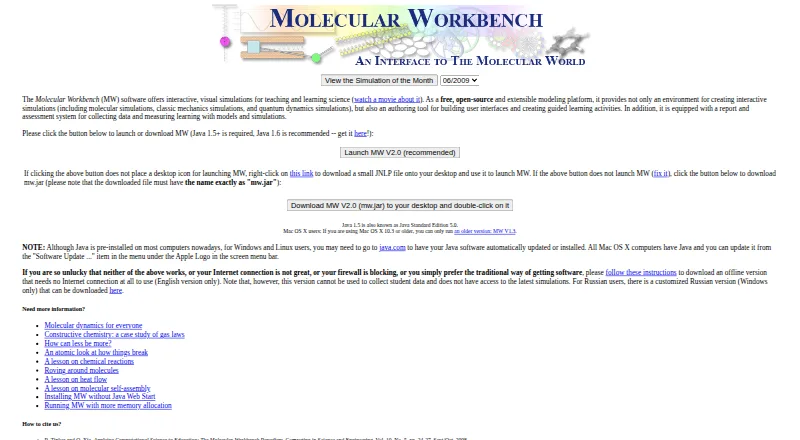
What Molecular Workbench is
Molecular Workbench is a free tool for designing and conducting computational experiments across science. Its interactive learning environment supports science inquiry, and users can customize simulations or create new ones. An authoring system lets instructional designers build and publish curriculum materials based on models and simulations. Topics include gas laws, fluid mechanics, states of matter, chemical reactions, genetics, protein synthesis, and quantum phenomena. Activities can include embedded assessments, student-data collection, learning monitoring, and teacher feedback. Simulations can run inside blogs, wikis, or web pages. The next-generation browser edition uses HTML5, while an offline version is also available. Offline use cannot access the latest simulations or collect student data. The download page lists Windows, Mac OS X, and Linux support and requires Java Runtime Environment 1.5 or later. The maker notes that the software needs considerable computing power and may take time to launch while the Java virtual machine starts. Molecular Workbench is developed and maintained by the Concord Consortium; its headquarters are in Concord, Massachusetts, USA.
Good
- Free and open-source
- Users can customize or create simulations
- Activities can include assessments and teacher feedback
- Simulations can be embedded in web pages
Watch out
- Offline version cannot access latest simulations
- Offline version cannot collect student data
- Download requires Java Runtime Environment 1.5 or later
- May launch slowly and needs considerable computing power
Who it suits
Molecular Workbench suits educators and instructional designers creating simulation-based science activities. It may also suit learners using interactive experiments across its listed science topics.
Verdict
Molecular Workbench brings simulation authoring and interactive science activities together, with assessment and student-data options. Choose between browser and offline use with the offline data and content limits in mind.
Plans and prices
From Molecular Workbench's own pricing page, checked 29 Sep 2026.
| Plan | Price | What it gives you |
|---|---|---|
| Molecular Workbench | Free | Free and open-source |
| Molecular Workbench Free | Free | Core software and learning materials · Java desktop and browser editions · Free |
The facts
Each one read from Molecular Workbench's own pages, with the date it was checked.
What it does
- Analysis tools
- Built-in analysis includes speed and velocity distributions, graphing, snapshots and report export.checked 15 Oct 2026
- Assessment
- Activities can contain embedded assessments, collect student work and provide teacher feedback.checked 15 Oct 2026
- Assessments and student data
- Activities can include embedded assessments, monitor student learning, collect student data, and provide teacher feedback.checked 29 Sep 2026
- Authoring
- Teachers and instructional designers can create models, user interfaces, guided activities and curriculum modules.checked 15 Oct 2026
- Content licence
- Concord-hosted materials use Creative Commons Attribution-NonCommercial 3.0, requiring attribution and permission for commercial use.checked 15 Oct 2026
- Content licensing
- The FAQ says Concord.org materials may be reused with attribution for noncommercial purposes, while commercial use requires permission from the Concord Consortium.checked 29 Sep 2026
- Customization
- Users can customize or create simulations and curricula.checked 29 Sep 2026
- Developer source
- The classic Java source is available through Concord Consortium SVN and can be browsed online.checked 15 Oct 2026
- Documentation
- An online user manual is available from the application and is intended to teach simulation and activity creation.checked 15 Oct 2026
- Embedding
- Simulations can run as applets embedded in blogs, wikis, or web pages.checked 29 Sep 2026
- Extensibility
- The Lab framework defines shareable, embeddable and authorable interactives in JSON and can connect models with probes and sensors.checked 15 Oct 2026
- Installation limitation
- The project documents Java Web Start failures caused by Java bugs, network settings and Apple updates, and offers mw.jar as a workaround.checked 15 Oct 2026
- Integrations
- Next-generation interactives can be shared or embedded in course sites, blogs, emails and learning-management systems.checked 15 Oct 2026
- Interactive widgets
- Authors can add sliders, buttons, graphs, text fields, multiple-choice items and script-driven controls.checked 15 Oct 2026
- Learning
- It provides an interactive learning environment that supports science inquiry.checked 29 Sep 2026
- Limit: internet dependence
- An Italian teacher resource explains that Java Web Start launches download data from the server and requires an internet connection for the online application.checked 15 Oct 2026
- Limit: learning level
- RSC Education noted that one protein-folding activity is two-dimensional and aimed at school-aged learners, while more advanced users may need to design their own simulations.checked 15 Oct 2026
- Limit: legacy technology
- The maker’s development blog says the classic edition runs in desktop Java and therefore does not run on iPads.checked 15 Oct 2026
Where it runs
- Browser edition
- The next-generation edition uses HTML5 and JavaScript to make interactives available in modern browsers and on multiple device types.checked 15 Oct 2026
- Browser version
- The Next-Generation Molecular Workbench brings interactive computational experiments to web browsers using HTML5.checked 29 Sep 2026
The company
- Founded
- 1994checked 23 Sep 2026
- Headquarters
- Concord, Massachusetts, USAchecked 23 Sep 2026
- Maker
- Molecular Workbench is developed and maintained by the Concord Consortium.checked 29 Sep 2026
- Maker facts
- LinkedIn lists The Concord Consortium as a nonprofit education research organization founded in 1994, headquartered in Concord, Massachusetts, with 11–50 employees.checked 15 Oct 2026
The full review of Molecular Workbench
Molecular Workbench is a science modeling and curriculum-authoring tool for learners and educators. It suits teachers and instructional designers who want to build simulation-based inquiry activities, especially across more than one science subject. Its strongest case is the combination of customizable experiments and assessment tools in a free package.
Overview
Developed and maintained by the Concord Consortium, Molecular Workbench spans topics from gas laws and fluid mechanics to genetics, protein synthesis, and quantum phenomena. That range makes it more useful for cross-subject science teaching than a resource confined to chemistry. Learners can explore interactive computational experiments, while educators can adapt simulations or create curricula around them.
The HTML5 browser version brings experiments to the web, and simulations can be embedded in blogs, wikis, or web pages. An offline version is also available, but it misses the latest simulations and cannot collect student data. The maker warns that the software needs considerable computing power and may start slowly while Java launches, which makes it a less appealing choice for older or constrained computers.
Key features
Author experiments and curriculum
Users can customize existing simulations or create their own, and instructional designers can publish model- and simulation-based learning materials. This flexibility is valuable for educators who want activities tailored to a lesson rather than a fixed set of demonstrations. Embedding simulations in web pages also gives teachers a way to place experiments alongside existing class materials.
Assess learning
Activities can include embedded assessments, track student learning, collect student data, and provide teacher feedback. Those capabilities make Molecular Workbench a stronger fit for guided classroom inquiry than a simulation collection without assessment support. The offline edition gives up student-data collection, so educators who need that workflow should use the browser version.
Pricing
Molecular Workbench is free and open-source: its listed plan costs nothing. There is no free trial because the product itself is free. That makes it a low-cost option for teachers and learners, with no paid tier or seat count to weigh; the tradeoff is that offline use lacks current simulations and student-data collection.
Concord.org materials may be reused with attribution for noncommercial purposes. Commercial use requires permission from the Concord Consortium, a meaningful constraint for organizations planning to reuse or distribute materials commercially.
Platforms
Molecular Workbench is available for web, Windows, macOS, and Linux. The downloadable edition requires Java Runtime Environment 1.5 or later; the browser-based Next-Generation Molecular Workbench uses HTML5. The Java requirement and potentially slow startup make the browser version the more practical route for many users, while offline use may suit settings with limited connectivity if its content and data limits are acceptable.
Who it's for
Teachers and instructional designers who want to author science activities, assess student learning, or work across several science subjects will get the most from Molecular Workbench. It is less suitable when a class depends on current simulations and student-data collection but must work offline, or when devices struggle with demanding software.
Pros and cons
Pros
- Broad science coverage: Topics include physical science, chemistry, biology, and quantum phenomena, supporting use across subjects.
- Authoring and customization: Educators can adapt or create simulations and publish curriculum materials rather than relying only on prebuilt activities.
- Assessment and feedback: Embedded assessments and student-data tools support monitoring learning and responding to it.
- Free and open-source: The plan costs nothing, making the software accessible without a subscription price.
Cons
- Offline limitations: The offline edition cannot access the latest simulations or collect student data.
- Computing demands: The maker warns that the software can require considerable computing power and may start slowly as Java initializes.
- Java requirement for downloads: The desktop version needs Java Runtime Environment 1.5 or later, which adds a dependency absent from the HTML5 browser option.
- Commercial reuse restrictions: Concord.org materials require permission for commercial use, despite being reusable with attribution for noncommercial purposes.
Alternatives
For a free web-based virtual lab with access under the Nodal Centre Program and no registration fee for that program, consider Amrita Virtual Lab. Beyond Labz is worth considering when you want an instructor option for teaching, previews, and assignment building, alongside a one-time Chemistry plan at 31.95 USD for 20 weeks of access.
LabXchange is another free option for learners and educators, with its platform supported by grant funding. Schools or districts seeking tiered pricing based on student numbers, with district-wide and multi-year options, can consider Inq-ITS. PraxiLabs offers a free plan with one month of access to three simulations, basic real-time guidance, and English and Arabic interfaces.
VRLab Academy may suit readers looking for a library of more than 240 experiments, instructor access, learner management, and LMS integration. For a free virtual lab that educators and students can install, use, and distribute, consider ChemCollective Virtual Lab. WebLab-Deusto is an alternative for readers who prioritize open-source software under the BSD 2-Clause license.
For broader comparisons, see Virtual Lab Software and Chemistry Simulation Software.
Verdict
Molecular Workbench is a strong fit for educators who want free, customizable science simulations with curriculum authoring and built-in assessment options. Its broad subject range and student-learning tools are compelling reasons to choose it; look elsewhere if offline access must include current activities and data collection, or if Java and computing demands are a poor match for your devices.
Getting started
- Open https://mw.concord.org/modeler/home.html
- Use the HTML5 browser edition or download the Windows, Mac OS X, or Linux version
- Install Java Runtime Environment 1.5 or later for the downloadable application
- Create or customize simulations and curriculum activities
- Embed simulations in blogs, wikis, or web pages when needed
Limits worth knowing
The offline version cannot access the latest simulations or collect student data. The downloadable application requires Java Runtime Environment 1.5 or later and may start slowly on systems with limited computing power.
Questions
Is Molecular Workbench free?
Yes. The Molecular Workbench plan costs nothing and is free and open-source.
Which platforms are supported?
The browser version uses HTML5, and downloads support Windows, Mac OS X, and Linux.
Who develops Molecular Workbench?
It is developed and maintained by the Concord Consortium.
Does it include assessment and teacher tools?
Yes. It supports embedded assessments, student-data collection, teacher feedback, teacher dashboards, and learning-management-system integration.
Can simulations be embedded elsewhere?
Yes. Simulations can run as applets embedded in blogs, wikis, or web pages.
Alternatives to Molecular Workbench
- 1

Beyond Labz
Free planAndroidiOSWebmacOS8.2$31.95 one-time - 2
PraxiLabs
Free planAndroidiOSWeb8.1From $29.99 a year - 3
ChemCollective Virtual Lab
Free planAndroidiOSWebmacOS7.5Free plan - 4
Avidemux
Free planOpen sourceWebLinuxmacOSWindows7.3Free plan - 5
MolView
Free planWebAPISelf-hosted7.3From $9 a year - 6

Collisions Higher Education
Free planAndroidiOSWebmacOS7.2From $15 a year