
Amrita Virtual Lab
Amrita Virtual Lab provides browser-accessible laboratories and learning materials for distance education and experimentation.
What Amrita Virtual Lab is
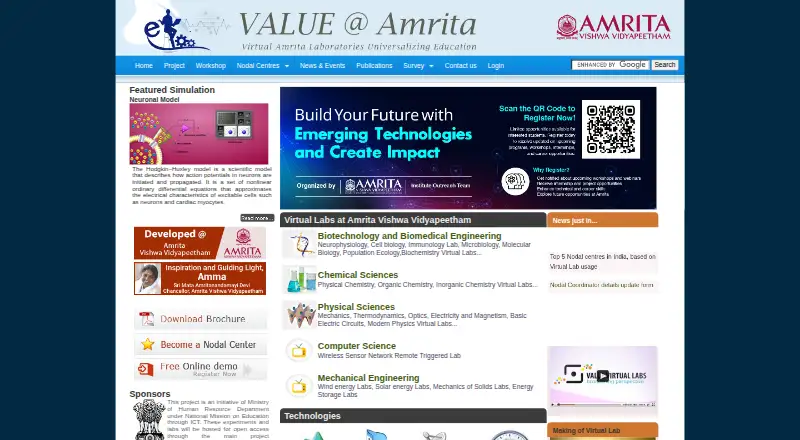
Amrita Virtual Lab provides browser-accessible laboratories and learning materials for distance education and experimentation. On an internet-connected computer, learners can use simulations, interactive animations, and remotely triggered experiments alongside web resources, video lectures, procedures, lab manuals, quizzes, and other materials. The project says it has built 1,500 experiments and supports on-the-spot assessment. Subject areas include computer science, engineering, biotechnology and biomedical engineering, and physical and chemical sciences. Examples include neurophysiology simulations, physics tools such as DC circuits and virtual optics, and a wireless sensor network lab. Teachers can monitor student progress and change instructional materials. Labs are hosted for open access through the project websites, and the team offers free online and offline classes for students and faculty at nodal centres. The free access plan is listed as free under the Nodal Centre Program, with no registration fee for that program. Institutions participating as nodal centres must choose at least three experiments and have at least 300 students using the labs. Some access is conditional: the Chemical Sciences questionnaire requires a user ID provided by VALUE.
Good
- Browser access to simulations and interactive experiments
- Covers science and engineering subject areas
- Includes procedures, lab manuals, and quizzes
- Teachers can monitor progress and modify materials
- Free online and offline classes through nodal centres
Watch out
- Nodal centres must choose at least three experiments
- Nodal-centre participation requires at least 300 student users
- Chemical Sciences questionnaire access requires a VALUE-provided user ID
Who it suits
Amrita Virtual Lab suits students, research scholars, faculty, and high-school learners seeking online science and engineering experiments. Teachers and institutions may also value its student-progress tools and nodal-centre training, subject to the stated participation requirements.
Verdict
Amrita Virtual Lab brings a broad collection of experiments and learning materials to browser-based study, with assessment and teacher tools. Institutions considering nodal-centre participation should account for its minimum experiment and student requirements.
Plans and prices
From Amrita Virtual Lab's own pricing page, checked 30 Sep 2026.
| Plan | Price | What it gives you |
|---|---|---|
| Free access | Free | free of cost under Nodal Centre Program · no registration fee for this program |
The facts
Each one read from Amrita Virtual Lab's own pages, with the date it was checked.
What it does
- Access model
- The virtual labs are hosted for open access through the project website.checked 30 Sep 2026
- Access requirement
- The Chemical Sciences page says users need to log in with a user ID provided by VALUE to access its online questionnaire.checked 30 Sep 2026
- Assessment
- The platform allows on-the-spot assessment of student knowledge.checked 30 Sep 2026
- Curriculum integration
- Nodal-centre support includes assistance integrating virtual-lab scores into the regular curriculum.checked 30 Sep 2026
- Disciplines
- The initiative covers computer science, electronics, electrical engineering, mechanical engineering, civil engineering, chemical engineering, biotechnology and biomedical engineering, physical sciences, and chemical sciences.checked 30 Sep 2026
- Example physics tools
- The project page lists DC circuit, torsion pendulum, Faraday’s law, Barkhausen effect and virtual optics simulators.checked 30 Sep 2026
- Example simulations
- The project page describes neurophysiology simulations for brain slicing, patch clamping, neuronal action potentials, and voltage and current clamp protocols.checked 30 Sep 2026
- Experiment materials
- Experiments include procedures, lab manuals, pre- and post-experiment quizzes, and additional lab resources.checked 30 Sep 2026
- Experiment types
- The project has built 1,500 experiments comprising simulations, interactive animations, and remotely triggered experiments.checked 30 Sep 2026
- Institutional use
- The site says registering an institution as a nodal centre provides services and resources and is intended to promote virtual labs in higher education.checked 30 Sep 2026
- Interactive learning
- The site describes virtual labs as an immersive e-learning tool with a media-rich, interactive interface that teachers can use to supplement their curriculum.checked 30 Sep 2026
- Lab subjects
- The site lists virtual labs in biotechnology and biomedical engineering, chemical and physical sciences, computer science, and mechanical engineering.checked 30 Sep 2026
- Learning format
- Labs are browser-accessible on an internet-connected computer and use animation, simulation or remotely triggered hardware.checked 30 Sep 2026
- Learning system
- The platform includes web resources, video lectures, animated demonstrations, and self-evaluation.checked 30 Sep 2026
- Nodal-centre limits
- Participating institutes must choose at least three experiments and have at least 300 students using the virtual labs.checked 30 Sep 2026
- Open access
- The project page says experiments and labs are hosted for open access through the project website and the main Virtual Labs website.checked 30 Sep 2026
- Project sponsor
- The site identifies the project as an initiative of the Ministry of Human Resource Development under the National Mission on Education through ICT.checked 30 Sep 2026
- Purpose
- Amrita Virtual Labs provides remote access to science and engineering laboratories through web-enabled experiments.checked 30 Sep 2026
- Remote lab example
- The Computer Science section describes a partly indoor and partly outdoor wireless sensor network lab for practical experience designing, deploying and implementing sensor networks.checked 30 Sep 2026
- Repeatability
- The demo page describes online labs as providing anytime, anywhere access and repeatability for students and research scholars.checked 30 Sep 2026
- Scheduling
- The platform reserves time slots for experiments that require scheduling.checked 30 Sep 2026
- Security and scale
- The collaborative platform provides server-side architecture intended to run virtual labs securely and serve thousands of students simultaneously.checked 30 Sep 2026
- Target users
- The project serves undergraduate students, postgraduate students, research scholars, science and engineering faculty, and high-school students.checked 30 Sep 2026
- Teacher tools
- Teachers can monitor student progress and change instructional material.checked 30 Sep 2026
The full review of Amrita Virtual Lab
Amrita Virtual Lab is a browser-based collection of virtual science and engineering experiments, course materials and assessment tools. It is best suited to students and educators supplementing formal study across multiple disciplines. Its breadth and free access are compelling; institutions seeking nodal-centre support must meet participation thresholds.
Overview
The project brings together 1,500 simulations, interactive animations and remotely triggered experiments with video lectures, animated demonstrations and web resources. Experiments include procedures, lab manuals, quizzes before and after the activity, and additional materials, while on-the-spot assessment can help learners check their understanding. That structure makes the collection useful for guided coursework as well as independent review.
Labs run in a browser on an internet-connected computer. Depending on the activity, students work with animation, simulation or remote hardware. The project describes experiments as repeatable and accessible at any time, giving learners a way to revisit material outside class; it does not remove the need for a computer and internet connection.
Key features
- Coverage across disciplines: Subjects include computer science, electronics, electrical, mechanical and civil engineering, chemical engineering, biotechnology and biomedical engineering, and physical and chemical sciences. This range is useful to institutions supplementing several courses with one resource, though users looking for a single specialized lab may prefer a narrower tool.
- Varied experiment formats: Examples range from neurophysiology activities on brain slicing, patch clamping and neuronal action potentials to physics tools for circuits, torsion pendulums and optics. A wireless sensor network lab combines indoor and outdoor elements, offering practical design and deployment experience beyond a purely visual simulation.
- Assessment and teaching tools: Quizzes and on-the-spot assessment support learning checks, while teachers can monitor progress and adjust instructional material. Experiment authoring, assessment tools, a teacher dashboard and LMS integration make the platform more relevant to organized teaching than to casual exploration alone.
- Scheduled activities: Experiments that require scheduling can reserve time slots. This supports access to shared resources, but means those activities are not necessarily as immediate as self-paced simulations.
Pricing
Free access — free. Access is free of cost under the Nodal Centre Program, with no registration fee for the program. The open-access project also hosts labs through its project and main Virtual Labs websites, making it an appealing option for students and educators who want to supplement study without a software subscription.
Institutions seeking nodal-centre services and resources must choose at least three experiments and have at least 300 students using the labs. The team offers free online and offline classes for students and faculty at nodal centres, with introductory sessions potentially delivered through Google Meet, Zoom or Microsoft Teams subject to expert availability. Support also includes help integrating virtual-lab scores into the regular curriculum. These thresholds make the program a better fit for institutions with an established student cohort than for a small class seeking formal centre participation.
Platforms
Amrita Virtual Lab is web-based. Students use an internet-connected computer, so it fits browser-based study but is not a native mobile app.
Who it's for
The project serves high-school and undergraduate students, postgraduate students, research scholars, and science and engineering faculty. It is particularly well suited to educators who want experiments, learning materials and assessment in one broad resource, and to learners who benefit from repeating activities at their own pace. Institutions can consider nodal-centre participation for training and curriculum-integration support, provided they meet the experiment and student minimums.
The project is identified as an initiative of India's Ministry of Human Resource Development under the National Mission on Education through ICT. Its collaborative server-side architecture is intended to run labs securely and serve thousands of students simultaneously.
Pros and cons
- Pro: A substantial collection spans simulations, interactive animations and remotely triggered experiments, giving courses access to more than one kind of virtual lab activity.
- Pro: Procedures, manuals, quizzes and assessment tools add structure that can support teaching and self-evaluation.
- Pro: Free access and repeatable browser-based activities lower barriers to revisiting experiments beyond class time.
- Con: Browser access requires an internet-connected computer, limiting learners who need an offline or native mobile experience.
- Con: Nodal-centre participation requires at least three experiments and 300 student users, a substantial commitment for smaller institutions.
- Con: Access to the Chemical Sciences online questionnaire requires a user ID provided by VALUE, so open access does not mean every related activity is immediately available without credentials.
Alternatives
Virtual Lab Software is the broader category directory for comparing options.
- Molecular Workbench is another free option, with Linux, macOS, web and Windows support; choose it if desktop-platform coverage matters alongside browser access.
- Beyond Labz has a free instructor-access plan for teaching, previewing and building assignments, plus a one-time Chemistry plan at 31.95 USD. Choose it when that chemistry-focused paid option suits your needs better than Amrita's broad free collection.
- LabXchange offers a free platform for educational resources, supported by grant funding. Consider it for a free learning-resource platform across macOS, web and Windows.
- Inq-ITS offers tiered school and district plans with pricing based on student count and district-wide and multi-year options. It may suit schools seeking those purchasing arrangements.
- PraxiLabs offers a free plan with one month of access to three simulations, basic real-time guidance and English and Arabic interfaces, plus a 6.99 USD monthly plan. Choose it if that defined trial is a better way to start than Amrita's broader free-access model.
- VRLab Academy offers subscription options with more than 240 experiments, instructor access, learner management and LMS integration. Consider it if those subscription features match your teaching needs.
- ChemCollective Virtual Lab is free to install, use and distribute for educators and students, and supports Android, iOS, macOS, web and Windows. It may fit readers who prioritize that platform range.
- WebLab-Deusto is an open-source option under the BSD 2-Clause license, with web, self-hosted, API and desktop-platform availability.
Verdict
Amrita Virtual Lab is a strong choice for students and educators who want broad, free virtual experiments with structured learning materials and teaching tools. Its range and repeatability are the main reasons to choose it; look elsewhere if you need offline or native mobile access, or if your institution cannot meet the nodal-centre participation minimums.
Alternatives to Amrita Virtual Lab
- 1

Beyond Labz
Free planAndroidiOSWebmacOS8.2$31.95 one-time - 2
PraxiLabs
Free planAndroidiOSWeb8.1From $29.99 a year - 3
Molecular Workbench
Free planOpen sourceWebLinuxmacOSWindows7.6Free plan - 4
ChemCollective Virtual Lab
Free planAndroidiOSWebmacOS7.5Free plan - 5

Labster
AndroidiOSWebmacOS7.0From $5,000 a year - 6
Pivot Interactives
iOSWebmacOSWindows7.0From $6.10 a year