Microsoft Dev Box
Microsoft Dev Box gives developers self-service access to cloud workstations configured for coding.
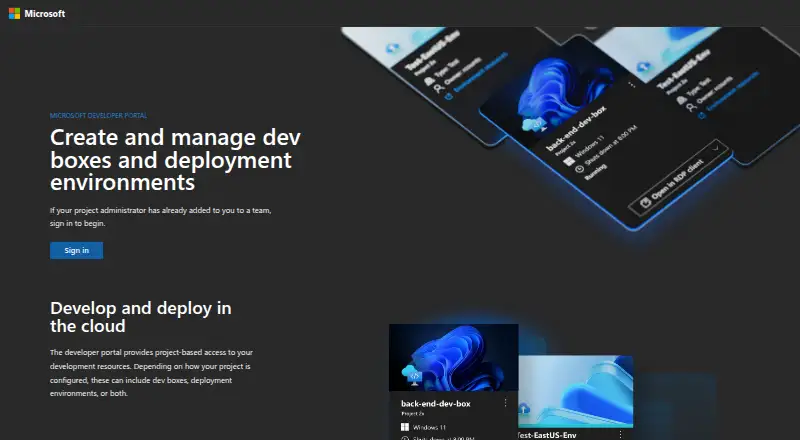
What Microsoft Dev Box is
Microsoft Dev Box gives developers self-service access to cloud workstations configured for coding. Organizations can define environments with YAML image definitions, custom Azure Compute Gallery images, or Azure Marketplace images. Developers can create and manage multiple dev boxes for separate projects or tasks through a self-service portal. Platform engineers and project administrators can use autostop schedules and hibernation to manage costs. Provisioned boxes automatically enroll in Microsoft Intune, while identity uses Microsoft Entra ID, with optional on-premises Active Directory Domain Services support. Disks are encrypted by default with a platform-managed key, and organizations can use Microsoft-hosted or customer-managed Azure network connections. Dev Box supports Windows Subsystem for Linux for Linux development scenarios. It is in maintenance mode, with no additional features planned, and Microsoft recommends Windows 365 for virtualized developer environments. The service fully retires at 17:00 UTC on September 18, 2028; its closing-down period begins at 16:00 UTC on September 14, 2026. It requires work or school accounts and specified Windows Enterprise, Intune, and Entra ID P1 licenses.
Good
- Developers can manage multiple project workstations.
- Supports custom images and YAML image definitions.
- Autostop schedules and hibernation help control costs.
- Disks are encrypted by default.
- Supports Windows Subsystem for Linux.
Watch out
- No additional features are planned.
- Fully retires September 18, 2028.
- Personal accounts and guest access are unsupported.
- Each user needs specified licenses.
Who it suits
Dev Box is aimed at organizations and developers who need configurable cloud workstations for separate projects or workloads. It is a poor fit for personal-account users, and its maintenance and retirement schedule should factor into adoption decisions.
Verdict
Dev Box offers configurable, managed cloud workstations, but it is in maintenance mode and has a scheduled retirement. Its account and licensing requirements also make it an organization-oriented choice.
Plans and prices
From Microsoft Dev Box's own pricing page, checked 1 Oct 2026.
| Plan | Price | What it gives you |
|---|---|---|
| Microsoft Dev Box instance (SKU-dependent) | — | 8–32 vCPU · 32–128 GB RAM · 256 GB–2,048 GB storage · Monthly or hourly pricing options per Dev Box instance |
The facts
Each one read from Microsoft Dev Box's own pages, with the date it was checked.
What it does
- Account limitation
- Microsoft Dev Box supports work and school accounts but does not support personal accounts or guest access through Microsoft Entra B2B collaboration.checked 1 Oct 2026
- Connectivity
- Users can connect through Windows App on Windows, macOS, iOS/iPadOS, Android/Chrome OS preview, or through a web browser.checked 1 Oct 2026
- Developer workflow
- Developers can create and manage multiple dev boxes through the self-service developer portal for separate projects, workloads, or tasks.checked 1 Oct 2026
- Environment configuration
- Organizations can configure dev boxes with YAML image definitions, Azure Compute Gallery custom images, or Azure Marketplace images.checked 1 Oct 2026
- Identity and access
- Dev Box uses Microsoft Entra ID and can optionally use on-premises Active Directory Domain Services for identity, domain join, and RDP authentication.checked 1 Oct 2026
- Intune integration
- Every provisioned dev box automatically enrolls in Microsoft Intune for device configuration, app deployment, updates, and management.checked 1 Oct 2026
- Licensing requirement
- Each user needs Windows 10 or Windows 11 Enterprise, Microsoft Intune, and Microsoft Entra ID P1 licenses, which can be included in specified Microsoft 365 subscriptions.checked 1 Oct 2026
- Maintenance status
- Microsoft Dev Box is in maintenance mode with no additional features planned, and Microsoft recommends Windows 365 for virtualized developer environments.checked 1 Oct 2026
- Network integration
- Dev Box supports Microsoft-hosted network connections and customer-managed Azure network connections with Azure virtual network security and routing features.checked 1 Oct 2026
- Purpose
- Microsoft Dev Box provides developers self-service access to ready-to-code cloud workstations.checked 1 Oct 2026
- Retirement
- Microsoft Dev Box fully retires at 17:00 UTC on September 18, 2028, with its closing-down period beginning at 16:00 UTC on September 14, 2026.checked 1 Oct 2026
- Security
- Dev Box disks are encrypted by default with a platform-managed key.checked 1 Oct 2026
Money
- Cost controls
- Platform engineers and project administrators can use autostop schedules and hibernation to control costs.checked 1 Oct 2026
The company
- Founded
- 1975checked 28 Sep 2026
- Headquarters
- Redmond, Washington, USAchecked 28 Sep 2026
Where it runs
- Linux support
- Microsoft Dev Box supports Windows Subsystem for Linux for Linux development scenarios.checked 1 Oct 2026
Alternatives to Microsoft Dev Box
- 1

Replit
Free planAndroidiOSWebLinux8.4From $18 a month - 2

StackBlitz
Free planAndroidiOSWebAPI8.2Free plan - 3

Kloudlite
Free planOpen sourceWebAPIExtensionLinux8.1From $29 a month - 4

DevZero
Free planAndroidiOSWebAPI8.0From $5 a month - 5

Daytona
Free planWebAPILinuxmacOS7.9Free plan - 6
GitHub Codespaces
Free planAndroidiOSWebAPI7.9Free plan