Micronaut Launch
Micronaut Launch is a free web application for creating Micronaut projects without using the console CLI.
What Micronaut Launch is
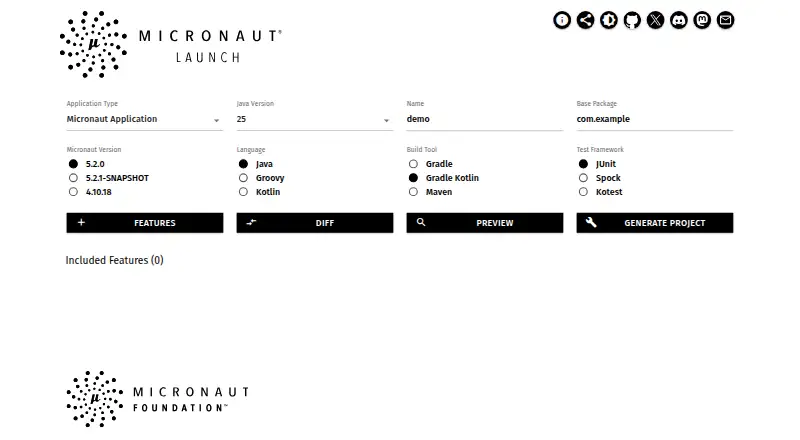
Micronaut Launch is a free web application for creating Micronaut projects without using the console CLI. Users can choose an application type, project name, language, build tool, Java version, test framework, and project features. Available languages are Java, Groovy, and Kotlin; build options include Gradle, Gradle Kotlin, and Maven, while test choices include JUnit, Spock, and Kotest. The interface previews the project, can show changes for a selected feature, and downloads the generated project as a ZIP. Configurations or previews can also be shared through links. The Launch API lets users create applications through the web using curl, without installing the CLI. Project types include applications, functions, CLI applications, and gRPC applications. Selectable features include OpenAPI tools, retries, and serialization options. The companion Micronaut CLI has native Linux, macOS, and Windows distributions and can create applications offline or with limited connectivity.
Good
- Free project generation through a web interface
- Supports Java, Groovy, and Kotlin
- Previews projects and downloads them as ZIP files
- Configured projects and previews can be shared by link
Watch out
- Unsupported Micronaut versions switch to the most recent release
- The interface generates a project ZIP rather than describing direct deployment
Who it suits
Micronaut Launch suits developers starting a Micronaut project who want to configure and preview it through a web interface. Its API also suits users who want to create applications with curl rather than install the CLI.
Verdict
Micronaut Launch brings project configuration, preview, and ZIP generation together in a browser, with an API option for curl. Check version availability if you need a version that is no longer supported.
The facts
Each one read from Micronaut Launch's own pages, with the date it was checked.
What it does
- API
- The Launch API is accessible through cURL at launch.micronaut.io.checked 4 Oct 2026
- API access
- Micronaut says its Launch API can be used to create applications via the web without installing the CLI and is accessible with curl at launch.micronaut.io.checked 3 Oct 2026
- Build and test options
- Launch offers Gradle, Gradle Kotlin, and Maven builds, plus JUnit, Spock, and Kotest test frameworks.checked 3 Oct 2026
- Build tools
- The Launch page lists Maven and Gradle as build tool options.checked 4 Oct 2026
- Configuration
- The Launch page lets users select application type, project name, language, build tool, Java version, test framework, and features.checked 3 Oct 2026
- Feature selection
- Users can add project features, including data-jpa, flyway, jdbc-hikari, and mysql in the displayed example.checked 4 Oct 2026
- Generated project types
- Micronaut Launch supports generating applications, functions, CLI applications, and gRPC applications.checked 3 Oct 2026
- Integrations
- The Launch page lists selectable features including OpenAPI tools, retries, serialization options, AWS CodeBuild workflow CI, and an Azure Container Instance GitHub workflow.checked 3 Oct 2026
- Intended users
- Micronaut Launch is presented as a way to create a new project with the latest version of the Micronaut framework.checked 4 Oct 2026
- Languages
- The Launch page lists Java, Kotlin, and Groovy as available languages.checked 4 Oct 2026
- Preview and download
- The interface offers project preview and downloads the generated project as a ZIP file.checked 3 Oct 2026
- Project generation
- The interface can generate a project ZIP, and the Launch API can be used with cURL.checked 4 Oct 2026
- Project generator
- Micronaut Launch is a web application for creating Micronaut projects through an interface instead of the console CLI.checked 3 Oct 2026
- Project licensing
- The Micronaut FAQ states that the framework and code and documentation in its public repositories are licensed under Apache License v2.checked 3 Oct 2026
- Project options
- Users can select the application type, project name, language, build tool, Java version, and project features.checked 4 Oct 2026
- Project preview
- The Launch interface can preview a project and show a diff of changes for a feature.checked 4 Oct 2026
- Purpose
- Micronaut Launch lets users create Micronaut projects through a web interface instead of the console CLI.checked 4 Oct 2026
- Security feature
- Micronaut Security is an optional application dependency; its documentation says routes must be explicitly allowed through the provided mechanisms.checked 4 Oct 2026
- Shareable configurations
- The Launch page provides links for sharing a configured project or its preview.checked 3 Oct 2026
- Support
- Micronaut community support directs users to Stack Overflow for specific programming questions and Discord for broader discussion.checked 4 Oct 2026
- Supported languages
- Launch offers Java, Groovy, and Kotlin.checked 3 Oct 2026
- Version availability
- The Launch page states that unsupported Micronaut versions are switched to the most recent release version.checked 3 Oct 2026
Where it runs
- CLI platforms
- The Micronaut CLI distributions target Linux, macOS, and Windows.checked 4 Oct 2026
The company
- Maker organization
- The Micronaut Foundation describes itself as a not-for-profit organization that supports and promotes the Micronaut framework.checked 4 Oct 2026
Alternatives to Micronaut Launch
- 1
Play Framework
Free planOpen sourceWebAPILinuxmacOS7.5Free plan - 2

Gatsby
Free planWebAPISelf-hosted7.4From $9 a month - 3
Symfony MakerBundle
Free planOpen sourceAPILinuxmacOSSelf-hosted7.4Free plan - 4

Ionic Framework
Free planAndroidiOSWeb6.8Free plan - 5

Laravel Vapor
Free planWebAPI6.6From $399 a year - 6
NestJS CLI
Free plan6.4Free plan