MES AI
MES AI is on-premise software for managing manufacturing execution tasks.
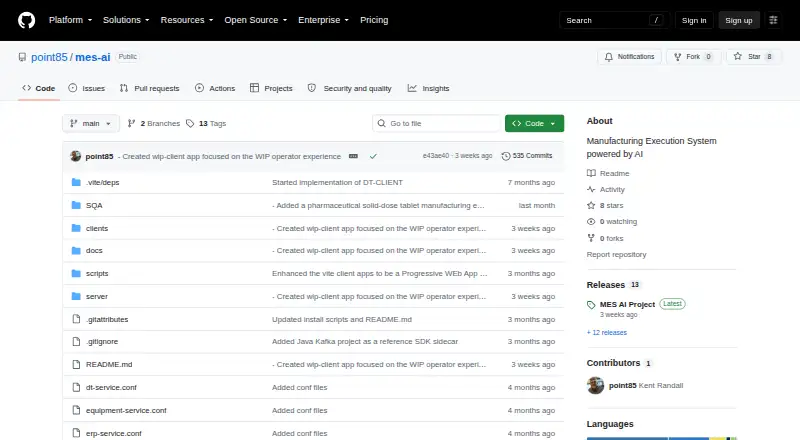
What MES AI is
MES AI is on-premise software for managing manufacturing execution tasks. It includes work order management and quality management, along with lot and serial traceability for tracking production items. Shop-floor data capture supports collecting information from manufacturing operations, and real-time dashboards present operational information. ERP integration connects the system with enterprise resource planning software. MES AI is available for web, Windows, macOS, and Linux. The listed pricing model is free, with a free plan. These capabilities make it relevant to manufacturers seeking software for coordinating work orders, quality processes, traceability, and shop-floor information in an on-premise deployment. The available facts describe its manufacturing functions and deployment model, but do not specify user limits or additional plan tiers.
Good
- Free plan is listed.
- Manages work orders and quality processes.
- Tracks lots and serials.
- Provides shop-floor capture and real-time dashboards.
- Supports ERP integration and on-premise deployment.
Watch out
- Deployment is on-premise.
- No other deployment option is listed.
Who it suits
MES AI suits manufacturers that need work order and quality management, traceability, and shop-floor data capture. It is relevant to teams looking for on-premise software with ERP integration.
Verdict
MES AI brings several manufacturing management functions together, including traceability and real-time dashboards. Its free plan and on-premise deployment are central considerations for prospective users.
Plans and prices
From MES AI's own pricing page, checked 5 Oct 2026.
| Plan | Price | What it gives you |
|---|---|---|
| MES AI | Free | Free and open-source MES framework |
The facts
Each one read from MES AI's own pages, with the date it was checked.
What it does
- API and events
- The server exposes a versioned REST API and WebSocket event stream for near-real-time updates.checked 5 Oct 2026
- Capabilities
- The runtime supports WIP processing, dispatching, inventory activity, shop-floor execution, and hold or disposition handling.checked 5 Oct 2026
- Core workflows
- Its design-time client configures products, routes, dispositions, equipment, plugins, and master data, while the runtime client processes WIP and shop-floor execution.checked 5 Oct 2026
- Customization
- Built-in and user-defined plugins can add REST endpoints, event handlers, equipment behavior, dispatch strategies, and integration logic.checked 5 Oct 2026
- Databases
- PostgreSQL is the default database, and SQL Server and Oracle are also supported.checked 5 Oct 2026
- Deployment
- MES AI can run on Linux, macOS, or Windows, with a FastAPI server and separate Vite client applications.checked 5 Oct 2026
- ERP flows
- An ERP simulator exercises inbound planning, order release, and outbound reporting flows without a real ERP connection.checked 5 Oct 2026
- Extensibility
- Plugins can add REST endpoints, event handlers, equipment behavior, dispatch strategies, and integration logic.checked 5 Oct 2026
- Integrations
- Optional integration dependencies include OPC UA, MQTT, SAP, SQL Server, Oracle, Modbus, Redis, STOMP, and AVEVA historian integration work.checked 5 Oct 2026
- Intended users
- The framework is intended for teams that want to adapt MES workflows and integrations to their own manufacturing operations.checked 5 Oct 2026
- Product
- MES AI is an open-source Manufacturing Execution System framework for tailoring manufacturing workflows, integrations, and user experiences.checked 5 Oct 2026
- Purpose
- MES AI is an open-source Manufacturing Execution System framework for teams tailoring MES workflows, integrations, and user experiences to their operations.checked 5 Oct 2026
- Security
- The server enforces authentication and role-based access control across API and UI-backed workflows.checked 5 Oct 2026
- Support
- The project asks users to email comments or issues to [email protected].checked 5 Oct 2026
- Testing
- The project describes server-side unit tests and end-to-end SQA coverage for key design-time and runtime workflows.checked 5 Oct 2026
- Tryout
- The repository links to test drives of its MES applications that require no authentication.checked 5 Oct 2026
Where it runs
- Applications
- It includes design-time, runtime, ERP simulator, equipment simulator, and WIP client browser applications.checked 5 Oct 2026
- Web applications
- The project includes browser-based design-time, runtime, ERP simulator, equipment simulator, and WIP client applications.checked 5 Oct 2026
The full review of MES AI
MES AI is an open-source manufacturing execution system framework for teams that need to shape shop-floor workflows and integrations around their own operations. It suits manufacturers with the technical capacity to configure and extend a self-hosted system. Its free plan and broad customization make it worth considering; the trade-off is taking responsibility for adapting and deploying the framework.
Overview
MES AI separates configuration from execution: a design-time client sets up products, routes, equipment, dispositions, plugins, and master data, while a runtime client handles work in process (WIP) and shop-floor activity. Browser applications also cover ERP simulation, equipment simulation, and WIP access. Together, these components offer a framework for building manufacturing workflows rather than a fixed, one-size-fits-all package.
The runtime supports dispatching, inventory activity, shop-floor execution, and hold or disposition handling. Work order management, quality management, lot and serial traceability, shop-floor data capture, real-time dashboards, and ERP integration are among its capabilities. The ERP simulator can exercise inbound planning, order release, and outbound reporting without connecting to a real ERP system.
Key features
Plugins let teams add REST endpoints, event handlers, equipment behavior, dispatch strategies, and integration logic. That range is useful when standard workflows do not match a plant’s processes, but it also makes MES AI a better fit for teams prepared to develop and maintain their own extensions.
A versioned REST API and WebSocket event stream support integrations and near-real-time updates. PostgreSQL is the default database, with SQL Server and Oracle also supported. Optional integration dependencies cover OPC UA, MQTT, SAP, SQL Server, Oracle, Modbus, Redis, STOMP, and AVEVA historian integration work; these options broaden its potential fit, but add integration choices to configure.
The server enforces authentication and role-based access control across API and UI-backed workflows. The project describes server-side unit tests and end-to-end SQA coverage for key design-time and runtime workflows. Test drives of the MES applications are available without authentication, giving prospective users a way to explore the applications before deploying them.
Pricing
MES AI — free. The free, open-source framework is the only plan described. There is no paid tier or seat, usage, or trial limit to weigh against it in the plan terms. The cost advantage comes with a practical caveat: teams need to adapt the framework to their workflows and integrations themselves.
Platforms
MES AI supports Linux, macOS, and Windows, as well as web and self-hosted deployment. Its server uses FastAPI, with separate Vite client applications. The project also identifies an API platform. This range gives teams deployment flexibility, while self-hosting makes infrastructure and deployment part of the implementation decision.
Who it's for
MES AI is best suited to manufacturing teams that want to tailor execution workflows, integrations, and user experiences, and have the technical capacity to do that work. Its configuration clients, plugins, API, and simulator applications are useful building blocks for that goal. Organizations seeking a ready-made system with little need for configuration or extension should look elsewhere.
Pros and cons
- Pros: Free and open source, with no paid plan required to use the framework.
- Pros: Plugins can extend endpoints, events, equipment behavior, dispatching, and integration logic, giving technical teams several ways to adapt workflows.
- Pros: The ERP simulator exercises planning, order-release, and reporting flows without a live ERP connection.
- Cons: Its extensibility means teams must take on the work of tailoring workflows and integrations to their operations.
- Cons: Self-hosted deployment and multiple supported databases offer flexibility but require teams to make and manage infrastructure choices.
Alternatives
Manufacturing Execution Systems is the broader category to explore when comparing MES options.
- OpenMES is another free, self-hosted MES option, with Android, iOS, API, and web platforms. Its Community plan is designed for single-site operations; choose it when that stated scope better matches your needs.
- Leading2Lean Smart Manufacturing Platform is a paid option with Android, iOS, macOS, web, and Windows platforms; choose it if you want to consider a paid platform instead.
- NETVIBES is a paid option with a free plan and free trial, and supports Android, iOS, self-hosted, and web platforms; consider it if those access and evaluation options are a better fit.
- ABB Manufacturing Execution System is a paid MES with Android, API, iOS, web, and Windows platforms; consider it as a commercial alternative.
- Aptean Industrial Manufacturing ERP Traverse Edition is a paid option with a free trial and Android, iOS, web, and Windows platforms; consider it if a trial is important to your evaluation.
- GE Vernova Proficy Plant Applications offers hosted or on-premises deployment mixes for process, discrete, and mixed manufacturing; consider it if those deployment options and manufacturing types fit your operation.
- FactoryLogix is a paid option with API, self-hosted, web, and Windows platforms; consider it as another commercial MES.
- Plex MES offers a low annual subscription fee, unlimited users and machines, no overage charges, and no data-transfer limit; consider it if predictable subscription terms and those allowances matter most.
Verdict
Choose MES AI if your manufacturing team wants a free, open-source foundation it can adapt, and values configurable workflows, integration hooks, and self-hosted deployment. Look elsewhere if you need a ready-to-run system without taking on customization and deployment work.
Getting started
- Visit the MES AI GitHub project.
- Choose Linux, macOS, or Windows for the server deployment.
- Select PostgreSQL, SQL Server, or Oracle as the database.
- Use the design-time client to configure products, routes, equipment, plugins, or master data.
- Open a project test drive to explore the MES applications without authentication.
Questions
Is MES AI free?
Yes. The listed MES AI plan is free, and the framework is open source.
What operating systems does it run on?
It can run on Linux, macOS, or Windows. Its client applications are browser-based.
Which databases does MES AI support?
PostgreSQL is the default database. SQL Server and Oracle are also supported.
What manufacturing workflows does it cover?
Listed capabilities include work order and quality management, lot and serial traceability, shop-floor data capture, real-time dashboards, WIP processing, dispatching, inventory activity, and hold or disposition handling.
Can it connect to ERP and equipment systems?
ERP integration is listed, and an ERP simulator exercises planning, order release, and outbound reporting flows without a real ERP connection. Optional integration dependencies include OPC UA, MQTT, SAP, Modbus, and others.
How can I try the applications?
The project links to MES application test drives that require no authentication.
Alternatives to MES AI
- 1
OpenMES
Free planOpen sourceAndroidiOSWebAPI8.5From €5,000 a year - 2

GE Vernova Proficy Plant Applications
AndroidiOSWebAPI7.7From $5,800 a month - 3
qcadoo MES
AndroidWebSelf-hosted7.0From €195 a month - 4

Siemens Opcenter
WebAPISelf-hostedWindows7.0 - 5

MIE Trak Pro
AndroidiOSWebAPI6.9 - 6
Statii
AndroidiOSWeb6.9From £8.50 a month