Memento AI
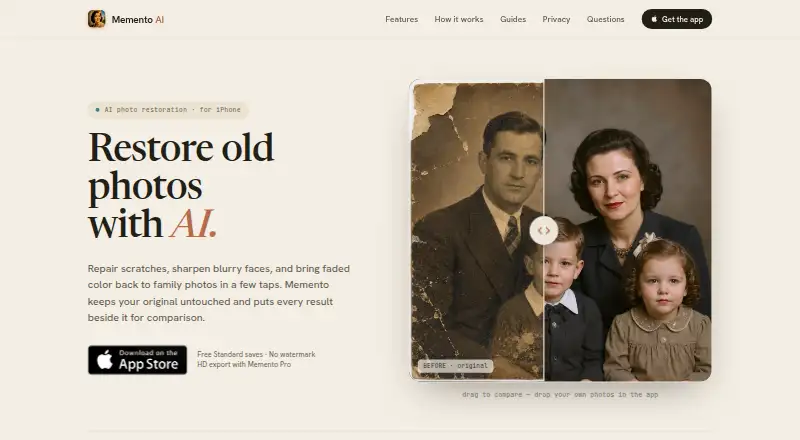
Memento AI restores old photographs by repairing scratches, sharpening blurry faces, and refreshing faded color.
What Memento AI is
Memento AI restores old photographs by repairing scratches, sharpening blurry faces, and refreshing faded color. It can also create a color version of a black-and-white image. A restoration is saved separately, so the original remains unchanged, and users can compare the two before saving. The app uses the selected photo from the system photo picker or camera and sends that image to an AI restoration service; it says unrelated library photos are not uploaded. The free Standard plan saves restorations without a watermark. Memento Pro Annual costs $36.99 a year, billed through Apple, and adds HD export and private on-device History. Pro History stays in the app’s private local container rather than syncing to an account or cloud history service. AI estimates details and color from the available image, so it cannot verify information missing from the original. Memento is available on iOS and macOS. The App Store listing requires iOS 18.0 or later, or iPadOS 18.0 or later for iPad. On Mac it requires macOS 15.0 or later and an Apple M1 chip or later; the listing says it is not verified for macOS.
Good
- Free Standard saves without a watermark.
- Repairs scratches and sharpens blurry faces.
- Can colorize black-and-white photos.
- Restoration leaves the original unchanged.
- Pro History stays in a private local container.
Watch out
- Batch processing is not available.
- AI cannot verify details missing from the original.
- Mac listing says the app is not verified for macOS.
- Mac requires macOS 15.0 and an Apple M1 chip or later.
Who it suits
Memento AI suits people looking to restore, preserve, gift, or share family photographs. It is also relevant to users who want to compare a restoration with the unchanged original before saving.
Verdict
Memento AI offers basic photo restoration free, with paid HD export and private on-device History. Check device requirements first, especially for Mac, and keep in mind that AI cannot recover verified details absent from a photo.
Plans and prices
From Memento AI's own pricing page, checked 21 Oct 2026.
| Plan | Price | What it gives you |
|---|---|---|
| Standard | Free | Standard restoration saves · no watermark |
| Memento Pro Annual | $36.99 a year | HD export · private on-device History · Billed through Apple |
The facts
Each one read from Memento AI's own pages, with the date it was checked.
What it does
- Accuracy limit
- AI estimates details and color from available image information and cannot verify details missing from the original.checked 5 Oct 2026
- AI processing provider
- The privacy policy identifies Fal.ai's image restoration model as the current provider for processing selected photos.checked 21 Oct 2026
- Colorization
- It can create a natural-looking color version of a black-and-white photo.checked 5 Oct 2026
- Comparison
- Users can compare a restored image with its original before saving.checked 5 Oct 2026
- History storage
- Restoration History is stored in the app's private local container and is not synced to an account or cloud history service.checked 21 Oct 2026
- Intended users
- The maker presents Memento for preserving, gifting, and sharing family photographs.checked 5 Oct 2026
- Key feature: before-and-after comparison
- Users can inspect the restored image against the unchanged original before saving.checked 21 Oct 2026
- Key feature: color restoration
- It refreshes faded color images and can create a color version of a black-and-white photograph.checked 21 Oct 2026
- Key feature: Pro export and History
- Pro adds HD exports and a private restoration History stored on the device.checked 21 Oct 2026
- Key feature: scratch and damage repair
- The app reduces visible scratches, dirt, and age marks in photographs.checked 21 Oct 2026
- Key feature: unblur and enhance
- The app is designed to improve soft portraits and make facial details clearer.checked 21 Oct 2026
- Limit: no cloud History
- The maker says restoration History is not currently synced to an account or cloud service.checked 21 Oct 2026
- Limit: restoration accuracy
- The maker says AI estimates details and color from the source image and cannot verify information missing from the original.checked 21 Oct 2026
- Originals
- Restoration creates a separate result and leaves the original photo unchanged.checked 5 Oct 2026
- Photo access
- The privacy policy says the app processes only the photo selected through the system picker or camera and does not upload the rest of the photo library.checked 21 Oct 2026
- Privacy and data sharing
- The policy says the app does not sell personal information and may share processing with Apple, RevenueCat, Fal.ai, and support providers.checked 21 Oct 2026
- Processing
- The selected image is sent to an AI restoration service to generate the result.checked 5 Oct 2026
- Product
- Memento AI is an iPhone photo restoration app for damaged, faded, blurry, and black-and-white photographs.checked 21 Oct 2026
- Purpose
- Memento AI restores old photos by repairing scratches, sharpening blurry faces, and refreshing faded color.checked 5 Oct 2026
Where it runs
- Apple compatibility
- The App Store listing requires iOS 18.0 or later and lists iPadOS 18.0 or later for iPad.checked 5 Oct 2026
- App Store developer
- The Apple listing names Gokhan Namal as the developer and © 2026 Fync Apps as the copyright holder.checked 21 Oct 2026
- Mac availability
- The App Store listing says Mac requires macOS 15.0 or later and an Apple M1 chip or later, and notes the app is not verified for macOS.checked 5 Oct 2026
The company
- Company
- Fync Apps describes itself as an independent iOS product studio.checked 21 Oct 2026
Money
- Key feature: free Standard save
- Standard restorations can be saved for free without a watermark.checked 21 Oct 2026
The full review of Memento AI
Overview
Memento AI is an iOS and Mac app for restoring old photographs, best suited to people working on individual family pictures. Its free plan saves standard restorations without a watermark; HD export and private on-device History require Pro.
It covers common repairs and colorization, while leaving the original untouched for comparison. The trade-off is a narrow, one-photo-at-a-time workflow and cloud-based AI processing; its generated details should not be treated as verified history.
Key features
Repair and colorize
The app repairs scratches, sharpens blurry faces, refreshes faded color, and can create a natural-looking color version of a black-and-white photo. That is a useful set of tools for preserving or sharing family photographs, but the lack of batch processing makes it a poor fit for restoring a large archive efficiently.
Compare without changing the original
Each restoration is saved as a separate result, and you can compare it with the source before saving. That gives you a chance to reject an interpretation that changes the photograph too much. Still, AI estimates details and color from what remains; it cannot confirm details missing from the original.
Photo access and History
Memento AI accesses the image selected through the system photo picker or camera, and says unrelated library photos are not uploaded. The selected image is sent to an AI restoration service, so processing is not entirely on-device. Pro History is stored in the app’s private local container and is not synced to an account or cloud history service. That keeps History local, but does not change where restoration processing happens.
Pricing
Standard: free. It saves standard restorations without a watermark, making it the sensible starting point for occasional use. It does not include the stated Pro benefits of HD export and private on-device History.
Memento Pro Annual: $36.99 a year, billed annually through Apple. It adds HD export and private on-device History, a better fit for people who want higher-resolution saved results or local access to past Pro restorations. The annual charge is a commitment rather than a monthly option.
Platforms
Memento AI is available for iOS and macOS. The App Store requires iOS 18.0 or later, and iPadOS 18.0 or later for iPad. On Mac, it requires macOS 15.0 or later and an Apple M1 chip or later; the app is not verified for macOS, so Mac users should check compatibility before relying on it. Support questions and product feedback go to [email protected].
Who it's for
Choose Memento AI for a small number of family photos when you value free, watermark-free standard saves and want to review the restored version beside the untouched original. It is less suitable for bulk restoration, and anyone needing verified historical detail should not rely on AI reconstruction as evidence.
Pros and cons
- Pro: Standard restorations save without a watermark at no cost, so occasional users can keep results without paying for Pro.
- Pro: Comparison happens before saving and the original remains unchanged, making it easier to keep only results you accept.
- Pro: Pro History stays in the app’s private local container rather than syncing to a cloud history service.
- Con: No batch processing means a large collection must be handled image by image.
- Con: Restoration sends the selected image to an AI service, which may not suit people who require fully on-device processing.
- Con: Mac compatibility is limited to macOS 15.0 or later and Apple M1 or later, and the app is not verified for macOS.
- Con: AI cannot verify details absent from the original, so restored faces and colors may be estimates rather than faithful recovery.
Alternatives
For wider device coverage, ImageColorizer runs on Android, iOS, macOS, web, and Windows; its free plan provides 50 credits per month with single processing, all AI features, and ads. That is a better fit if you want cross-platform access and can work within a monthly credit allowance.
AIPhotor is another freemium option for Android, iOS, and web, with a free account that includes 5 credits and a free trial. Consider it if those platforms or a trial are more important than Memento’s Apple-device focus.
Reviva is also available on iOS and macOS. Its free plan includes 3 restorations, full-resolution downloads, and no watermarks; consider it if you want those stated free-plan allowances.
HitPaw FotorPea is an alternative.
RenewShot is an iOS alternative.
Restore.Photo is a web and API alternative.
VanceAI Photo Restorer is a web and desktop alternative.
DaVinci AI Photo Restoration is an alternative.
Browse Photo Restoration Software or AI Image Restoration Software for more options.
Verdict
Memento AI is a solid starting point for Apple users restoring a few family photos: the free plan saves without a watermark, and comparison protects the untouched original. Choose another tool if you need batch work, fully on-device restoration, or verified recovery of missing details; check Mac requirements carefully before paying.
Alternatives to Memento AI
- 1

ImageColorizer
Free planAndroidiOSWebmacOS8.2From $19.99 a year - 2

AIPhotor
Free planAndroidiOSWebAPI8.0From $29.99 a year - 3

DaVinci AI Photo Restoration
AndroidiOSWeb7.7From $39.99 a month - 4
Hotpot AI Photo Restorer
Free planWebAPISelf-hosted7.6$12 one-time - 5

VanceAI Photo Restorer
WebAPILinuxmacOS7.5From $99.90 a year - 6

HitPaw FotorPea
AndroidiOSWebExtension7.4From $90.39 a year