
mcskincraft
MCSkinCraft is a free web community for creating, browsing, sharing, and equipping Minecraft skins.
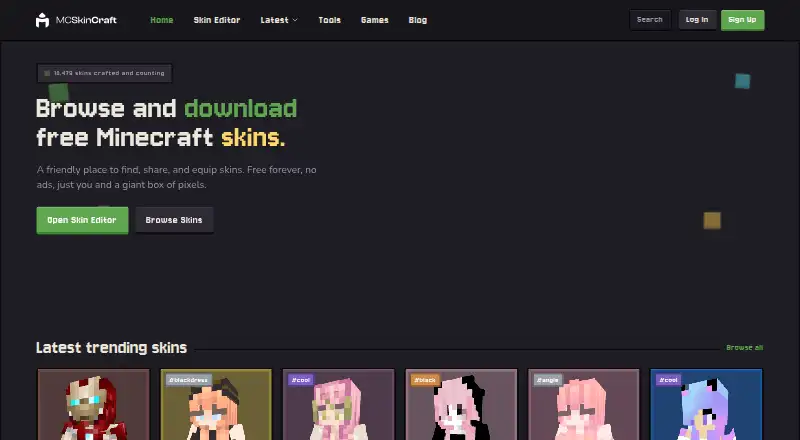
What mcskincraft is
MCSkinCraft is a free web community for creating, browsing, sharing, and equipping Minecraft skins. Its browser editor includes drawing, filling, erasing, color picking, real-time 3D previews, and PNG export or publishing. It handles classic 64×64 and HD 128×128 skins, including Steve wide and Alex slim models. The image-to-skin tool maps PNG, JPG, or GIF images onto a character; a separate flipper swaps front and back and mirrors arms and legs. Other tools make posed renders of up to eight 3D characters, 1280×720 thumbnails, and chibi-style pixel characters. Pose and thumbnail exports can be made without an account or watermark. Published skins have individual download and share pages, and users can save skins to an account. Downloads do not require an account. The free plan has no payment, subscription, or trial limit; signing in removes editor ads. MCSkinCraft says it is not an official Minecraft product and is not affiliated with Mojang.
Good
- Browser editor offers real-time 3D previews and PNG export.
- Supports classic and HD skin formats and both models.
- Image-to-skin accepts PNG, JPG, and GIF.
- Downloads do not require an account.
- Pose maker exports transparent renders up to 4K.
Watch out
- Web platform only.
- Signing in is needed to save skins to an account.
- Terms require parental or guardian involvement for users under 13.
Who it suits
It suits Minecraft players who want to make or adapt skins in a browser, including users working with classic, slim, or HD models. Its pose, thumbnail, and chibi tools also suit people making profile art or shareable skin content.
Verdict
MCSkinCraft brings skin editing, image conversion, sharing, and related character-art tools together in a free browser service. Check its content restrictions and account terms before publishing or saving work.
Plans and prices
From mcskincraft's own pricing page, checked 30 Sep 2026.
| Plan | Price | What it gives you |
|---|---|---|
| Free | Free | Free browser editor; signing in removes editor ads · Free forever; no payment, subscription, or trial limit |
The facts
Each one read from mcskincraft's own pages, with the date it was checked.
The company
- Chibi maker
- The chibi tool turns a Minecraft skin into a big-headed pixel character for avatars, forum icons, stickers, and profile art.checked 30 Sep 2026
- Pose maker
- The pose maker lets users pose up to eight 3D characters and download a transparent PNG render at up to 4K, without an account or watermark.checked 30 Sep 2026
- Thumbnail maker
- The thumbnail maker exports banner-ready 1280×720 PNGs and offers layouts, backdrops, borders, headlines, and canvas resizing, without an account or watermark.checked 30 Sep 2026
What it does
- Community sharing
- Published skins have their own page with a download button and share link, and users can save skins to an account.checked 30 Sep 2026
- Content restrictions
- The terms prohibit uploads showing identifiable real people or sensitive personal information, among other prohibited content.checked 30 Sep 2026
- Flip tool
- The free browser flipper swaps a skin’s front and back and mirrors its arms and legs, supporting classic and slim models in 64×64 and 128×128 PNG formats.checked 30 Sep 2026
- Image conversion
- The image-to-skin tool maps a PNG, JPG, or GIF onto a Minecraft character and supports classic and slim arm models, including 128×128 HD skins.checked 30 Sep 2026
- Intended users
- The site describes itself as a place for block-builders of all ages, while its terms require users under 13 to have parental or guardian involvement.checked 30 Sep 2026
- Minecraft affiliation
- MCSkinCraft states that it is not an official Minecraft product and is not affiliated with Mojang.checked 30 Sep 2026
- Privacy and security
- The privacy policy says the service uses essential cookies for sessions, authentication, and security, may use non-identifying analytics cookies, and cannot guarantee absolute data security.checked 30 Sep 2026
- Sign-in options
- The FAQ says users who registered with Google or Discord can sign in again using the matching button.checked 30 Sep 2026
- Skin editor
- The browser editor supports drawing, filling, erasing, color picking, real-time 3D previews, and PNG export or publishing.checked 30 Sep 2026
- Skin formats
- The editor supports classic 64×64 and HD 128×128 skins, as well as Steve wide and Alex slim models.checked 30 Sep 2026
- Support
- Users can contact support through the contact page, and the FAQ says the team aims to reply within two working days.checked 30 Sep 2026
- What it does
- MCSkinCraft is an online community where people can create, share, browse, and equip Minecraft skins.checked 30 Sep 2026
The full review of mcskincraft
MCSkinCraft is a browser-based Minecraft skin workshop and community, built for players who want to make or adapt skins as well as browse and share them. Its strongest case is the range of free character-art tools; look elsewhere if you need a native mobile app.
Overview
The service brings skin creation, image conversion, small editing utilities, and character-art exports into one web destination. The combination suits creators who move from a skin to a pose or thumbnail, while its community pages also let players share skins and download them without an account.
MCSkinCraft says it is not an official Minecraft product and is not affiliated with Mojang. Its terms bar uploads depicting identifiable real people or sensitive personal information, among other prohibited content. The site welcomes block-builders of all ages, but users under 13 need parental or guardian involvement.
Key features
Skin creation and conversion
The editor provides drawing, fill, erase, color picking, and a real-time 3D preview, then lets users export a PNG or publish the skin. Support for classic 64×64 and HD 128×128 formats, plus Steve wide and Alex slim models, makes it useful across more than one common skin shape. The image-to-skin tool maps a PNG, JPG, or GIF onto a character and supports classic and slim arms, including HD skins; that is a practical shortcut when starting from existing artwork, though it is a conversion tool rather than a substitute for editing.
Utilities and exports
The flipper swaps front and back and mirrors arms and legs, with classic and slim models in 64×64 and 128×128 PNG formats. For creators making content around a skin, the pose maker supports up to eight 3D characters and transparent PNG renders up to 4K. The thumbnail maker exports 1280×720 PNGs with layouts, backdrops, borders, headlines, and canvas resizing. Both export tools work without an account or watermark, keeping quick promotional graphics accessible without a signup step.
A chibi maker turns a skin into a big-headed pixel character for avatars, forum icons, stickers, and profile art. Published skins receive an individual page with a download button and share link; users can also save skins to an account. Downloads do not require an account, and the service supports Bedrock skins, both skin models, advanced search filters, uploads, and favorites or collections.
Pricing
MCSkinCraft is free: its Free plan costs nothing, is billed free forever, and has no payment, subscription, or trial limit. It includes the browser editor; signing in removes editor ads. There is no paid tier or trial to weigh against the free option. The trade-off is that the stated benefit of signing in is ad removal, while downloads themselves do not require an account.
Platforms
MCSkinCraft runs on the web. That makes its tools available through a browser, but readers specifically seeking an Android or iOS app should consider a mobile alternative.
Who it's for
This is a good fit for Minecraft players who want to create, convert, flip, or present skins without paying, and for creators who value the additional pose and thumbnail exports. It is less suitable for people who want a dedicated phone app or need to upload content involving identifiable real people or sensitive personal information.
Pros and cons
- Pro: A broad free toolset spans skin editing, image conversion, flipping, posing, thumbnails, and chibi art, so creators can handle several related tasks in one browser service.
- Pro: HD 128×128 support and classic and slim model options cover a useful range of skin formats.
- Pro: Pose and thumbnail exports need no account and carry no watermark; skin downloads are also account-free.
- Con: It is web-only, so it does not serve readers who want a native mobile app.
- Con: Upload rules exclude identifiable real people and sensitive personal information, limiting some uses of the conversion and sharing tools.
- Con: The privacy policy says absolute data security cannot be guaranteed, a consideration for anyone saving work to an account.
Alternatives
For a broader directory of options, browse Minecraft Skin Libraries. Choose SkinsCollection if Android access matters: it offers community skins, a built-in 3D editor, and PNG downloads on Android and web. MC-Skins.net is another free web library, with no account, login, or paywall.
Pick World of Skins if you want Android or iOS access as well as web; downloads are free, though a short ad may be required to open a skin. The Skindex is a free option on Android, iOS, and web. Minecraft Plot has Android, iOS, and web versions and a free basic-tools tier, with premium membership also offered. Planet Minecraft is a free web alternative. MC Toolbox Skin Library offers a free web library with 55 skins, 3D viewing, PNG downloads, and a skin editor. MinecraftSkins.app is another free web option.
Verdict
MCSkinCraft is the stronger choice for a creator who wants a free, browser-based toolkit that goes beyond editing into skin conversion and polished character-art exports. Its breadth and account-free downloads are compelling; choose a different service if native mobile access is essential, and review its upload rules before sharing work.
Alternatives to mcskincraft
- 1

NeedCoolerShoes
Free planOpen sourceAndroidiOSWeb7.9Free plan - 2

Minecraft Plot
Free planAndroidiOSWeb7.3$4.99 one-time - 3

MinecraftSkins.app
Free planAndroidiOSWeb7.3Free plan - 4
Blessing Skin
Free planOpen sourceWebAPISelf-hosted7.1Free plan - 5
World of Skins
Free planAndroidiOSWeb7.1Free plan - 6

MC-Skins.net
Free planWeb6.4Free plan