
MinecraftSkins.app
MinecraftSkins.app is a free browser-based library and editor for Minecraft skins.
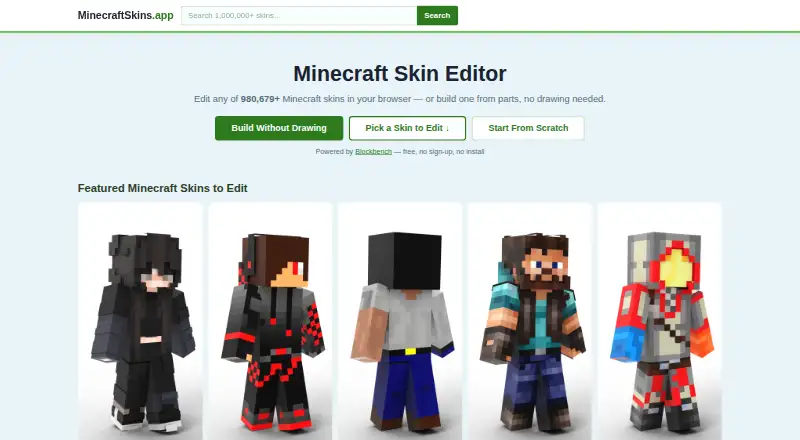
What MinecraftSkins.app is
MinecraftSkins.app is a free browser-based library and editor for Minecraft skins. Its library offers over 980,679 ready-made skins to browse, and its tools support both Java Edition and Bedrock Edition. In the editor, users can paint pixels, inspect a skin on a posed 3D model, then export a PNG. A separate combiner builds a look from a body tone, hair, and clothing parts; users can recolor pieces, shuffle the result, and export a 64×64 PNG. The site says its tools run locally in the browser, with no sign-up or installation required. Saved skins in My Skins stay in the current browser, so clearing browser data removes them. For importing, its instructions direct Java users to Profile → Skins and Bedrock users to Dressing Room → Classic Skin. Skins and exports are described as compatible with MCPE/Pocket Edition on iOS and Android. The editor uses Blockbench, and the homepage links to Craftkit for 3D previews and in-game installation. MinecraftSkins.app says it is not an official Minecraft product and is not associated with Mojang or Microsoft.
Good
- Free browser tools require no sign-up or install.
- Browse over 980,679 ready-made skins.
- Paint pixels and preview skins on a 3D model.
- Combiner exports 64×64 PNGs.
- Tools run locally in the browser.
Watch out
- My Skins are removed when browser data is cleared.
- Not an official Minecraft product or Mojang/Microsoft affiliate.
Who it suits
It suits Minecraft players who want to browse, edit, or combine skins in a browser for Java or Bedrock Edition. It also fits users on iOS or Android looking for MCPE/Pocket Edition-compatible skins.
Verdict
MinecraftSkins.app brings a large skin library, pixel editor, and combiner together in a free browser-based package. Check its import instructions for your edition, and remember that saved My Skins are stored only in the current browser.
Plans and prices
From MinecraftSkins.app's own pricing page, checked 15 Oct 2026.
| Plan | Price | What it gives you |
|---|---|---|
| Free | Free | browser skin library, editor and combiner · 64×64 PNG export · no sign-up or install |
| MinecraftSkins.app | Free | Free browser-based skin library, editor and combiner · no sign-up or install stated · 64×64 PNG export |
The facts
Each one read from MinecraftSkins.app's own pages, with the date it was checked.
What it does
- 3D preview
- The editor provides a rotatable and zoomable 3D model preview alongside the skin canvas.checked 15 Oct 2026
- Affiliation
- The site states that it is not an official Minecraft product and is not approved by or associated with Mojang or Microsoft.checked 8 Oct 2026
- Affiliation disclaimer
- The site says it is not an official Minecraft product and is not approved by or associated with Mojang or Microsoft.checked 15 Oct 2026
- Blockbench integration
- The site says its editor is powered by Blockbench.checked 15 Oct 2026
- Compatibility
- The site says its 64×64 skin exports can be used with Java Edition and Bedrock Edition.checked 8 Oct 2026
- Craftkit developer
- Apple identifies the Craftkit developer as 晓龙 张.checked 15 Oct 2026
- Craftkit paid options
- Craftkit lists weekly access at $9.99, annual access at $44.99 and lifetime access at $99.99.checked 15 Oct 2026
- Craftkit privacy disclosure
- Apple's disclosure says search history, identifiers, usage data and diagnostics may be used for tracking, advertising or analytics.checked 15 Oct 2026
- Domain history
- DomainBeat listed minecraftskins.app among newly registered or activated .app domains on February 22, 2025.checked 15 Oct 2026
- Editor
- The browser editor lets users paint pixels, preview skins on a posed 3D model, and export a PNG.checked 8 Oct 2026
- Editor access
- The browser tools are presented as free and require neither an account nor installation.checked 15 Oct 2026
- Import into Minecraft
- The editor page instructs Java users to upload through Profile → Skins and Bedrock users through Dressing Room → Classic Skin.checked 8 Oct 2026
- Independent description
- Eaglercraft Studio characterizes MinecraftSkins.app as a large community gallery with categories, search and downloadable PNGs.checked 15 Oct 2026
- Layer visibility
- A skin-layer control can temporarily hide hats, jackets, sleeves and pants overlays while editing.checked 15 Oct 2026
- Library size
- The homepage advertises more than 980,679 ready-made skins.checked 15 Oct 2026
- Limit: import failures
- A reviewer said some downloads sometimes fail to transfer into Minecraft and that item names can be unclear.checked 15 Oct 2026
- Limit: performance
- App Store reviews mention lag and being returned to the home screen during use.checked 15 Oct 2026
- Limit: unavailable content
- Reviewers reported that some Craftkit mods do not work and suggested stronger screening before release.checked 15 Oct 2026
- Local processing
- The homepage states that every tool runs locally in the browser.checked 15 Oct 2026
- Minecraft import paths
- Instructions direct Java users to Profile → Skins and Bedrock users to Dressing Room → Classic Skin.checked 15 Oct 2026
- Mobile compatibility
- The homepage says skins and exports work with MCPE or Pocket Edition on iOS and Android.checked 15 Oct 2026
Where it runs
- Craftkit app scope
- The linked Craftkit listing advertises more than one million skins, maps and add-ons, smart search, YouTuber collections, daily featured rotation and 3D previews.checked 15 Oct 2026
- Craftkit platform
- The App Store listing is free with in-app purchases for iPhone and iPad, is not verified for macOS and lists a 132 MB size.checked 15 Oct 2026
- Mobile app
- The homepage links to the Craftkit app for previewing skins in 3D and installing them into the game.checked 8 Oct 2026
The full review of MinecraftSkins.app
Overview
MinecraftSkins.app is a free browser-based library and creation toolkit for Minecraft skins, built for Java and Bedrock players who want to find or make a skin without installing an editor. Its best case is quick skin discovery and editing in one place; browser-only saves make it less suitable as a long-term collection.
Key features
The library contains more than 980,679 ready-made skins. That gives players a broad starting point, though basic search filters can make a precise design harder to find.
The pixel editor supports painting, previewing a skin on a posed 3D model and exporting a PNG. Powered by Blockbench, it offers a visual way to create or adjust a skin in the browser. The site says the tools run locally, and downloading does not require an account.
The combiner is aimed at players who prefer assembling a look to painting every detail. Choose a body tone, add hair and clothing pieces, recolor them or shuffle the result, then export a 64×64 PNG. That is a practical shortcut for a coordinated skin, while the pixel editor gives more direct control.
The site provides import directions for both editions: Java players upload through Profile → Skins, and Bedrock players use Dressing Room → Classic Skin. It also says skins and exports work with MCPE/Pocket Edition on iOS and Android. My Skins saves remain in the current browser, so clearing browser data removes them; keep separate copies of exports you want to retain.
The homepage links to the Craftkit app for 3D skin previews and installation into the game. MinecraftSkins.app is not an official Minecraft product and is not approved by or associated with Mojang or Microsoft.
Pricing
The browser library, editor and combiner are free: the plan is free, with 64×64 PNG export and no sign-up or install required. There is no paid tier to add ongoing costs or unlock more tools, so it suits players who want occasional skin work without a subscription.
Platforms
The service is available on web, Android and iOS. The browser tools cover skin creation and export, and the site says its skins work with Pocket Edition on mobile. Java and Bedrock are both supported. The linked Craftkit app offers 3D preview and in-game installation.
Who it's for
Choose MinecraftSkins.app if you want a large free skin library alongside both pixel editing and a component-based combiner, especially if you play Java or Bedrock across desktop or mobile. It is less compelling if you need detailed search controls or a saved collection that survives clearing or changing browsers.
Pros and cons
- Pros: A library of more than 980,679 skins gives players a wide selection to browse.
- Pros: Free browser access, PNG export and no account requirement reduce friction from finding a skin to importing it.
- Cons: Basic search filters offer limited help when narrowing a large library to a specific look.
- Cons: My Skins data is tied to the current browser and is lost when browser data is cleared.
Alternatives
For more options in this category, browse Minecraft Skin Libraries.
World of Skins is another free option on Android, iOS and web; opening a skin may require a short ad. Choose it if that download flow suits you.
Minecraft Plot has a free tier with basic tools and standard support, while its free plan excludes exclusive member tools and priority feature requests. Choose it if those tools are enough, or consider it when you want its paid membership options.
MC-Skins.net is a free web library with no account, login or paywall. It is a straightforward alternative if you want a library without paying.
NeedCoolerShoes is a free option across Android, iOS and web, with no paid plans stated. Consider it if you want another cross-platform choice.
SkinsCollection offers community skins, a built-in 3D editor and PNG downloads on Android and web. Choose it if those are the features you need.
Minecraft Skin World is a free web option with skins and an editor.
Blessing Skin is free forever, with no ads or subscription fees, and supports web and self-hosting. Consider it if those terms and deployment options fit your needs.
MC Toolbox Skin Library offers 55 skins, 3D viewing, PNG downloads and a skin editor on web. It may suit you if a smaller library with those tools is enough.
Verdict
MinecraftSkins.app is a strong fit for players who want a free, no-account route to browse, build and export Java or Bedrock skins from a browser. Its combination of a very large library and two distinct creation tools is the reason to choose it; basic filters and browser-bound saves are the reasons to look elsewhere if you need precise discovery or a durable collection.
Getting started
- Open https://minecraftskins.app/ in a browser
- Browse the ready-made skin library or open the editor
- Paint pixels or combine body, hair, and clothing parts
- Export the design as a PNG or 64×64 PNG
- Import Java skins through Profile → Skins
- Import Bedrock skins through Dressing Room → Classic Skin
Limits worth knowing
My Skins saves are tied to the current browser, so clearing browser data removes them. Search filters are basic.
Questions
Is MinecraftSkins.app free?
Yes. It offers a free browser-based library, editor, and combiner, with a listed price of no cost.
Do I need an account or installation?
No. The browser tools are described as requiring no sign-up or install, and downloading does not require an account.
Which Minecraft editions are supported?
The service supports Java Edition and Bedrock Edition, with 64×64 exports usable in both.
Can I use skins on mobile?
The site says skins and exports are compatible with MCPE/Pocket Edition on iOS and Android.
What happens to saved skins?
Skins in My Skins remain in the current browser and are removed when that browser's data is cleared.
Is it an official Minecraft service?
No. The site says it is not official and is not approved by or associated with Mojang or Microsoft.
Alternatives to MinecraftSkins.app
- 1

NeedCoolerShoes
Free planOpen sourceAndroidiOSWeb7.9Free plan - 2

Minecraft Plot
Free planAndroidiOSWeb7.3$4.99 one-time - 3
Blessing Skin
Free planOpen sourceWebAPISelf-hosted7.1Free plan - 4
World of Skins
Free planAndroidiOSWeb7.1Free plan - 5

MC-Skins.net
Free planWeb6.4Free plan - 6

The Skindex
AndroidiOSWeb6.4