
Mcgic Banner Maker
Mcgic Banner Maker is a free browser-based tool for designing Minecraft banners and generating Java Edition commands.
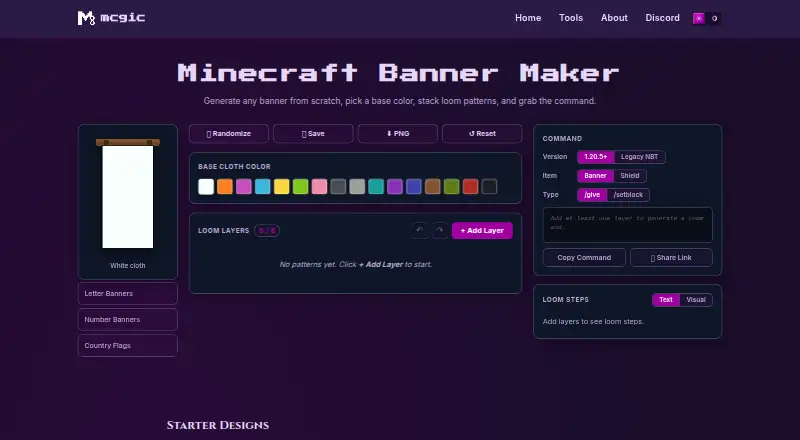
What Mcgic Banner Maker is
Mcgic Banner Maker is a free browser-based tool for designing Minecraft banners and generating Java Edition commands. Users choose a base cloth color and add loom pattern layers from a library of more than 40 options, including stripes, shapes, borders, gradients, and special patterns. Each banner can have up to six layers, and the Loom Steps panel lists the dye and pattern item needed for each one. The preview uses Minecraft banner geometry on a 20×40 grid and the 16 dye colors; it is flat vector art rather than an in-game cloth rendering. The tool creates commands for banners or shields using /give or /setblock, in modern Java 1.20.5+ and legacy 1.13–1.20.4 formats. Users can reorder, duplicate, remove, undo, or redo layers, randomize a design, save it in the current browser, download a PNG, or share a link. It warns when a command exceeds Minecraft chat's 256-character limit. Commands are for Java Edition; Bedrock players can follow the loom instructions instead.
Good
- More than 40 patterns and up to six layers
- Lists dye and pattern items for each layer
- Exports designs as PNG or shareable links
- Free to use without an account
Watch out
- Generated commands are for Java Edition only
- Preview lacks in-game cloth texture and lighting
- Saved designs stay in the current browser
Who it suits
Mcgic Banner Maker suits Minecraft builders, server owners, map makers, and players who want to plan banner patterns or produce Java commands.
Verdict
Mcgic Banner Maker provides a focused way to plan layered banners and generate Java Edition commands. Bedrock players can use its loom steps, but not the generated commands.
Plans and prices
From Mcgic Banner Maker's own pricing page, checked 30 Sep 2026.
| Plan | Price | What it gives you |
|---|---|---|
| Free | Free | Completely free · no account required |
The facts
Each one read from Mcgic Banner Maker's own pages, with the date it was checked.
What it does
- Affiliation
- Mcgic says it is not affiliated with Mojang or Microsoft.checked 30 Sep 2026
- Audience
- Mcgic describes its platform as built for creators, builders, server owners, map makers, and technical Minecraft players.checked 29 Sep 2026
- Command formats
- The tool supports modern Java Edition commands for version 1.20.5 and later and legacy NBT for versions 1.13–1.20.4.checked 30 Sep 2026
- Command length limit
- The tool warns when a command exceeds Minecraft chat’s 256 character limit and suggests using a command block.checked 29 Sep 2026
- Commands
- It generates Java Edition commands in modern 1.20.5+ and legacy 1.13–1.20.4 formats, with options for banners or shields and /give or /setblock.checked 29 Sep 2026
- Compatibility
- The page says generated commands are for Minecraft Java Edition and advises Bedrock players to use the loom steps because Bedrock uses a different command system.checked 30 Sep 2026
- Compatibility limit
- Generated commands are for Java Edition; the page says Bedrock uses a different command system and recommends following the loom steps there.checked 29 Sep 2026
- Crafting guidance
- The Loom Steps panel lists the dye and pattern item needed for each layer, and the maker says every starter design is craftable on a vanilla loom.checked 30 Sep 2026
- Design tools
- Users can randomize, save, reset, undo, redo, reorder, duplicate, and delete layers, and download a PNG or share a design link.checked 29 Sep 2026
- Layer limit
- A banner can have up to 6 loom pattern layers.checked 30 Sep 2026
- Loom instructions
- The Loom Steps panel lists the dye and pattern item needed for each layer.checked 29 Sep 2026
- Outputs
- Users can generate commands for banners or shields using /give or /setblock, copy the command, share a link, or download a PNG.checked 30 Sep 2026
- Pattern library
- The banner maker supports more than 40 loom patterns, including stripes, quarters, shapes, borders, gradients, and special charges.checked 30 Sep 2026
- Preview
- The SVG preview uses Minecraft banner geometry on a 20×40 unit grid and Minecraft's 16 dye colors, but does not reproduce cloth texture or lighting.checked 30 Sep 2026
- Privacy
- Mcgic says tool functionality runs in the browser, creations remain on the device, and no personal data is collected; it may use minimal anonymous analytics and third-party integrations to track or collect activity data.checked 30 Sep 2026
- Purpose
- The Minecraft Banner Maker lets users build banners from a base color and layered loom patterns, then get a command for the design.checked 30 Sep 2026
- Saved designs
- Saved designs are kept in the user's browser and can be loaded back into the editor.checked 30 Sep 2026
- Support
- Mcgic offers a contact form for help, feedback, or collaboration, and says submitted messages are used only to respond to the inquiry.checked 30 Sep 2026
- Who it serves
- Mcgic describes its tools platform as built for creators, builders, server owners, map makers, and technical Minecraft players.checked 30 Sep 2026
Where it runs
- Platforms
- Mcgic says its tools are browser-based, require no downloads or setup, and are designed for desktop and mobile.checked 30 Sep 2026
The full review of Mcgic Banner Maker
Overview
Mcgic Banner Maker is a browser-based Minecraft banner editor for players who want to plan a design before crafting it or turn it into a Java Edition command. Its strongest fit is builders and map makers who value both loom guidance and command output; Bedrock players can follow the crafting steps, but cannot use its generated commands.
The editor combines a broad pattern catalog with a six-layer ceiling. That is enough room for many layered designs, while players seeking more elaborate builds will need another approach. Its live preview uses Minecraft’s banner shape, a 20×40 grid, and the 16 dye colors, but remains flat vector art rather than reproducing cloth texture or in-game lighting.
Key features
- Layered pattern editor: Choose a base cloth color and build with up to six layers from more than 40 loom patterns, including stripes, shapes, borders, gradients, and special patterns. Reordering, duplicating, and deleting layers make revisions practical without rebuilding a design.
- Loom guidance: The Loom Steps panel identifies the dye and pattern item for each layer. This makes the tool useful even when the goal is to craft by hand rather than use a command; Mcgic says every starter design is craftable on a vanilla loom.
- Java command output: Generate commands for banners or shields using /give or /setblock. The editor supports modern Java Edition commands for 1.20.5 and later and legacy NBT for 1.13–1.20.4. It warns when a command exceeds Minecraft chat’s 256-character limit and suggests a command block, a helpful distinction for complex designs.
- Design handling: Randomize, save, reset, undo, redo, copy a command, share a design link, or download a PNG. Saved banners stay in the current browser, so this is local continuity rather than a cross-device design library.
Pricing
Mcgic Banner Maker is free: the Free plan costs nothing, is completely free, and requires no account. It includes command output, a live banner preview, Java edition support, up to six pattern layers, image export, and the banner pattern catalog. There is no free-trial period to manage; the trade-off is a fixed six-layer limit and Java-only command generation rather than a paid tier to expand those capabilities.
Mcgic says its tools run in the browser and that designs, commands, and exports remain on the device. It may also use minimal anonymous analytics and third-party integrations to collect activity data, so local design handling does not mean the service makes no activity-data collection.
Platforms
The tool is listed for Android, iOS, and web, with a browser-based workflow. Its generated commands target Minecraft Java Edition. Bedrock players can use the loom steps, but Bedrock's different command system makes the generated commands unsuitable for that edition.
Who it's for
This is a sensible choice for creators, builders, server owners, map makers, and technical Minecraft players who want to move from a visual plan to a craftable loom recipe or Java command. It is less suited to Bedrock players looking for direct command output, or designers who need more than six layers or an in-game-textured preview.
Pros and cons
- Pro: More than 40 patterns and six layers offer meaningful design range, while the per-layer loom recipe keeps designs usable in survival crafting.
- Pro: Modern and legacy Java formats, banner and shield targets, and both /give and /setblock outputs serve different Java workflows.
- Pro: Free use without an account, plus PNG export and shareable links, keeps the path from design to sharing straightforward.
- Con: Commands are Java-only, so Bedrock users must rely on crafting instructions instead.
- Con: Six layers cap complexity, and the flat preview cannot show cloth texture or lighting.
- Con: Saved designs remain in the current browser, which limits portability compared with a persistent cross-device library.
Alternatives
Browse Minecraft Banner Generators to compare banner tools by category. Consider these alternatives when their particular limits or scope better match your needs:
- BlockForge Minecraft Banner Designer is another free web tool; its maker identifies himself as a one-person maintainer, which may appeal to readers who prefer a solo-built project.
- DoneInBrowser Minecraft Banner Designer offers up to six layers in Survival mode or 16 in Creative / Commands mode, plus 35 geometric patterns; choose it if the higher Creative / Commands layer ceiling matters more than Mcgic's larger pattern count.
- MineBuildr Banner Generator has a free tier and a Premium plan at $9 a month, billed $9/ month, with 10 members-; choose it if a freemium directory of tools better fits your needs.
- siutil Minecraft Banner Maker is a free web tool with 16 dye colors, up to six layers, a Java /give command, PNG export, and no account or install; pick it for that focused combination of outputs.
- Astroworld Banner Designer is a free web tool; its Free Minecraft Tools plan has no sign-up and no ads.
- FadeHost Banner Maker offers up to six pattern layers and loom-craftable patterns on its free plan, a direct fit for readers focused on craftable designs.
- MineSchematic is a free web tool from an independent developer and Minecraft enthusiast based in the United Kingdom.
- MineSpecs is a free browser-based tool directory with no account or sign-in, no ads, and browser tools and downloads.
Verdict
Choose Mcgic Banner Maker if you want a free, no-account route from a layered banner concept to either vanilla loom instructions or Java Edition commands. Its pattern breadth, version-specific output, and practical crafting guidance make it a strong fit for Java builders and map makers. Look elsewhere if you need Bedrock commands, more than six layers, or a preview with in-game cloth texture and lighting.
Getting started
- Open the banner maker in a browser.
- Choose a base cloth color and add loom pattern layers.
- Use the Loom Steps panel to see the dye and pattern item for each layer.
- Generate and copy a Java Edition command, or download a PNG or share a design link.
Limits worth knowing
The free tool supports up to six pattern layers per banner. Generated commands are for Java Edition, and commands over Minecraft chat’s 256-character limit may need a command block.
Questions
How much does Mcgic Banner Maker cost?
The Free plan is free, and no account is required.
Which Minecraft edition does it support?
Generated commands are for Java Edition, with modern formats for 1.20.5 and later and legacy formats for 1.13–1.20.4. For Bedrock, Mcgic recommends following the loom steps because Bedrock uses a different command system.
How many patterns and layers can I use?
The tool has more than 40 loom patterns and allows up to six pattern layers per banner.
Can I export or share a design?
You can download a PNG or share a design link. Saved banners remain in the current browser.
Does it show how to craft a banner?
The Loom Steps panel lists the dye and pattern item needed for each layer. Mcgic says every starter design is craftable on a vanilla loom.
Where are designs and commands handled?
Mcgic says its tools run in the browser and that designs, commands, and exports remain locally on the device. It may use minimal anonymous analytics and third-party integrations to collect activity data.
Alternatives to Mcgic Banner Maker
- 1

NeedCoolerShoes
Free planOpen sourceAndroidiOSWeb7.9Free plan - 2
MineBuildr Banner Generator
Free planWeb7.2From $9 a month - 3

Astroworld Banner Designer
Free planWeb6.6Free plan - 4

BeeForge Minecraft Banner Generator
Free planWeb6.6Free plan - 5
MCPlayerTools Banner Maker
Free planWeb6.6Free plan - 6

BlockForge Minecraft Banner Designer
Free planWeb6.4Free plan