
BlockForge Minecraft Banner Designer
BlockForge Minecraft Banner Designer is a free browser tool for creating Minecraft banner designs and generating a `/give` command.
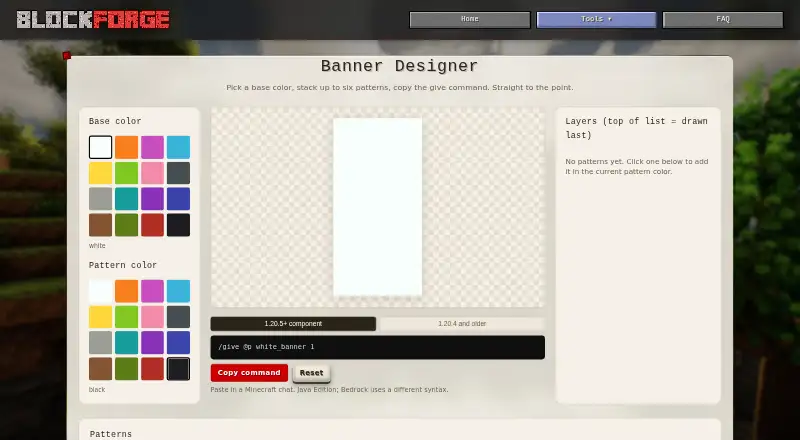
What BlockForge Minecraft Banner Designer is
BlockForge Minecraft Banner Designer is a free browser tool for creating Minecraft banner designs and generating a `/give` command. A design starts with a base color and can have up to six pattern overlays, with later layers drawn over earlier ones. Users can choose pattern colors and see a live banner preview alongside a catalog of patterns. The generated command targets `@p` and uses modern Java Edition component syntax for Minecraft 1.20.5 and later, or legacy syntax for 1.20.4 and older. Its output can bypass the special matching-item requirement for Creeper, Skull, Flower, and Mojang banner charges. The maker says the tool runs in the browser and does not upload inputs; the tool itself is not described as tracking activity beyond site-wide analytics, which may collect page, device, browser, and approximate location data when consent allows. No signup is stated as required. The command is for Java Edition; Bedrock uses different syntax. The maker describes the service as free and best-effort, provided as-is without warranty, and accepts feedback through a contact form.
Good
- Free browser tool with no signup stated.
- Supports a base color and up to six overlays.
- Includes a live preview and pattern catalog.
- Generates syntax for modern and older Java versions.
Watch out
- Bedrock uses different command syntax.
- The service is provided without warranty.
- Site-wide analytics may collect data when consent allows.
Who it suits
It suits Minecraft Java Edition players who want to design a banner and generate a command for it. Players using Bedrock should account for its different command syntax.
Verdict
BlockForge combines banner design and command generation, with syntax options for two Java version ranges. Its browser-based processing keeps inputs from being uploaded, while the service terms and analytics scope are worth noting.
Plans and prices
From BlockForge Minecraft Banner Designer's own pricing page, checked 3 Oct 2026.
| Plan | Price | What it gives you |
|---|---|---|
| Free | Free | Free browser tool · no signup stated |
The facts
Each one read from BlockForge Minecraft Banner Designer's own pages, with the date it was checked.
What it does
- Analytics
- The banner page says activity is tracked only through site-wide analytics subject to the cookie popup; the privacy policy says Google Analytics can collect page, device, and approximate location data when consent allows it.checked 2 Oct 2026
- Audience
- BlockForge describes its tools as free browser tools for Minecraft builders.checked 3 Oct 2026
- Color controls
- The tool lets users choose a base color and a pattern color before adding patterns.checked 3 Oct 2026
- Command output
- The generated command targets `@p` and outputs a `banner_patterns` component for modern versions or `BlockEntityTag` for older versions.checked 2 Oct 2026
- Integrations
- The banner command is intended to be pasted into Minecraft chat; the page specifies Java Edition and says Bedrock uses different syntax.checked 3 Oct 2026
- Layer limit
- A banner has a base color and supports up to six pattern overlays, with later layers drawn on top.checked 2 Oct 2026
- No account
- The banner tool requires no signup.checked 2 Oct 2026
- Pattern layers
- A banner can have up to six pattern overlays, and later layers are drawn over earlier ones.checked 3 Oct 2026
- Privacy policy
- The maker's privacy policy says tool inputs stay in the browser, while site analytics may collect page views, browser and device type, and approximate location subject to consent settings.checked 3 Oct 2026
- Purpose
- The Banner Designer creates Minecraft banner designs and copies a ready-to-paste /give command.checked 3 Oct 2026
- Service terms
- The maker's terms describe the service as free, best-effort, and provided as-is without warranty.checked 3 Oct 2026
- Special charges
- Its command output can include Creeper, Skull, Flower, and Mojang charges without the special crafting item normally required at a loom.checked 3 Oct 2026
- Support
- The maker invites bug reports and feedback through its contact page and says replies may take a while.checked 3 Oct 2026
- Tracking
- The banner page says the tool itself tracks nothing beyond the site-wide analytics governed by the cookie consent choice.checked 3 Oct 2026
- Version support
- It supports component syntax for Minecraft Java 1.20.5+ and legacy NBT syntax for 1.20.4 and older.checked 3 Oct 2026
Where it runs
- Browser processing
- The maker says the tool runs in the browser and does not upload user designs or make a server round-trip.checked 3 Oct 2026
The company
- Maker
- The site identifies its maker as Kody, known online as Saturnity, a self-taught developer and amateur photographer.checked 3 Oct 2026
Money
- Price
- BlockForge describes its tools as free browser tools for Minecraft builders.checked 2 Oct 2026
The full review of BlockForge Minecraft Banner Designer
Overview
BlockForge Minecraft Banner Designer is a web tool for composing Minecraft banners and producing an in-game /give command. It suits Java Edition players who want a visual design workflow without creating an account. Its narrow focus is a strength for banner-making, but Bedrock players will need another option.
Key features
Choose a base color, then add colored patterns from the catalog, up to six overlays. Each new layer sits above the previous ones, making order an important part of shaping the final design. A live preview helps you judge the result as you work, though the six-layer ceiling limits more elaborate compositions.
The generated command targets @p and uses the banner_patterns component for Java Edition 1.20.5 and later, or BlockEntityTag for 1.20.4 and older. That makes the tool useful across two Java syntax eras; users still need to choose the format that matches their game version. Commands can include Creeper, Skull, Flower, and Mojang banner charges without the special matching items normally required for those patterns. The output is meant to be pasted into Minecraft chat, and the page specifies Java Edition; Bedrock uses different syntax.
The maker says banner inputs remain in the browser and are not uploaded. That is a meaningful privacy advantage for the design itself, but it does not mean the site collects no data: site-wide analytics may record page views, browser and device type, and approximate location when cookie consent allows it. The maker is a one-person operation, accepts feedback and bug reports through a contact form, and cautions that replies may take a while. Its terms describe a free, best-effort service provided as-is without warranty.
Pricing
BlockForge is free, with a Free plan at free. The browser tool requires no signup, and there is no free trial to consider. There are no paid tiers or quotas to weigh; the practical limits are its Java-only scope and six pattern overlays.
Platforms
BlockForge runs on the web. It generates a command rather than integrating with Minecraft directly, so players copy it into chat. The tool specifies Java Edition, not Bedrock.
Who it's for
Choose BlockForge if you play Java Edition, want to preview a banner before using it, and need command syntax for either modern or older Java versions without signing up. Look elsewhere if you need Bedrock syntax or want to build designs with more than six overlays.
Pros and cons
- Pros: Modern and legacy Java command formats cover two version ranges, reducing syntax guesswork when moving between them.
- Pros: In-browser processing keeps banner inputs off the maker's servers, and no account is required.
- Pros: The command can include four special banner charges without requiring their matching items.
- Cons: Six overlays cap the design's complexity.
- Cons: Java-only command output rules out Bedrock players.
- Cons: Site analytics may collect usage and device information when consent permits, and support comes from a solo maker who says replies can take time.
Alternatives
Compare Minecraft Banner Generators if you want to survey more options before settling on a tool.
- Mcgic Banner Maker is a free, no-account option that also runs on Android and iOS, making it a better fit if you want mobile access alongside the web.
- DoneInBrowser Minecraft Banner Designer is another free web option, with up to 16 layers in Creative / Commands mode as well as six in Survival mode.
- Gamer Geeks Minecraft Tools may suit readers who want a wider Minecraft tools offering; its free account has lower save storage than subscribers.
- MineBuildr Banner Generator offers a free web tier with copy, download, and sharing across its tool directory, plus a Premium plan at $9 a month.
- Minecraft Banner Maker is a free web alternative with up to six layers for Survival designs and 16 for Command designs.
- siutil Minecraft Banner Maker is a free web option that includes PNG export as well as a Java command.
- Astroworld Banner Designer is a free, no-sign-up web alternative.
- FadeHost Banner Maker is a free web option with up to six pattern layers and loom-craftable patterns.
Verdict
BlockForge is a sound pick for Java builders who want a preview-led banner maker and a ready-to-paste command across modern and older Java syntax. Its no-signup browser workflow and special-charge support are useful; choose another tool if you need Bedrock support, deeper layering, or a different platform.
Getting started
- Open the banner designer website.
- Choose a base color for the banner.
- Select a pattern color and add up to six overlays, using the preview to check the design.
- Generate the command and paste it into Minecraft chat.
Limits worth knowing
The free plan is a browser tool with no signup stated. Designs support a base color and up to six pattern overlays; the generated command is for Java Edition, not Bedrock.
Questions
How much does BlockForge Minecraft Banner Designer cost?
It is free, with a listed plan price of no cost.
Do I need an account?
No signup is required.
Which platforms and Minecraft edition does it support?
The tool runs on the web and provides Java Edition commands. Bedrock uses different syntax.
Which Java command formats does it generate?
It outputs modern component syntax for Minecraft 1.20.5 and later, and legacy `BlockEntityTag` syntax for 1.20.4 and older.
How many patterns can a banner have?
A banner can have a base color and up to six pattern overlays. Later overlays are drawn over earlier ones.
Does it upload banner inputs?
The maker says inputs stay in the browser and are not uploaded. Site-wide analytics may collect page, browser, device, and approximate location data when consent permits.
Alternatives to BlockForge Minecraft Banner Designer
- 1

NeedCoolerShoes
Free planOpen sourceAndroidiOSWeb7.9Free plan - 2
MineBuildr Banner Generator
Free planWeb7.2From $9 a month - 3

Mcgic Banner Maker
Free planAndroidiOSWeb7.1Free plan - 4

Astroworld Banner Designer
Free planWeb6.6Free plan - 5

BeeForge Minecraft Banner Generator
Free planWeb6.6Free plan - 6
MCPlayerTools Banner Maker
Free planWeb6.6Free plan