
DoneInBrowser Minecraft Banner Designer
DoneInBrowser Minecraft Banner Designer is a free web tool for making banners for Minecraft.
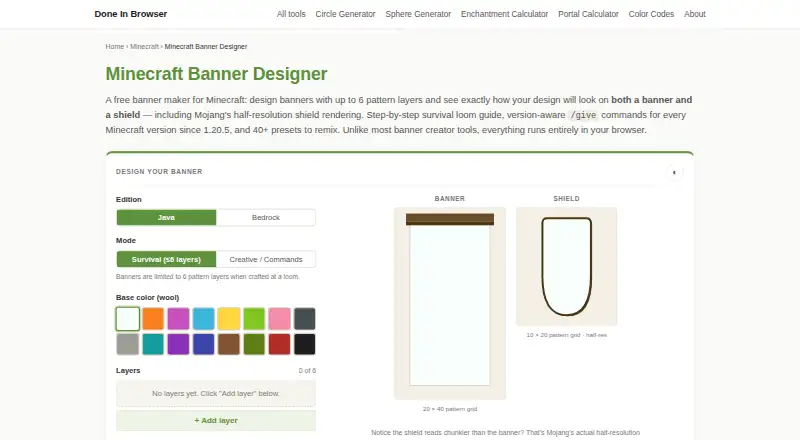
What DoneInBrowser Minecraft Banner Designer is
DoneInBrowser Minecraft Banner Designer is a free web tool for making banners for Minecraft. It provides live banner and shield previews, including a shield view that reflects its half-resolution rendering. You can start from more than 40 presets, such as flags, mob faces and kingdom crests, or build a design from 35 geometric patterns. The tool creates `/give` commands for Java and Bedrock editions, with syntax options for older and newer Java versions. A crafting panel lists the materials for a survival design and can be printed or saved as a PDF. Designs can be saved and shared through a URL without creating an account; the design is encoded in the URL hash. Design work runs in the browser, and the maker says design data is not sent to its server. Survival mode follows the loom's six-layer limit, while Creative / Commands mode allows up to 16 layers. Eight detailed charge patterns are not included and must be added in-game at a loom.
Good
- Free browser-based banner design.
- Live banner and shield previews.
- Generates commands for Java and Bedrock.
- Crafting list can be printed or saved as PDF.
- Design sharing does not require an account.
Watch out
- Survival designs are capped at six layers.
- Eight detailed charge patterns are omitted.
- Requires a browser; no other platform is listed.
Who it suits
This tool suits Minecraft players who want to plan banner designs, check shield previews or generate edition-specific commands. Its crafting list is useful for players planning a survival-mode design.
Verdict
DoneInBrowser is a focused choice for previewing and sharing Minecraft banner designs, with useful command and crafting outputs. Keep its pattern and survival-layer limits in mind when planning a design.
Plans and prices
From DoneInBrowser Minecraft Banner Designer's own pricing page, checked 3 Oct 2026.
| Plan | Price | What it gives you |
|---|---|---|
| Free | Free | Up to 6 layers in Survival mode · 16 layers in Creative / Commands mode · 35 geometric patterns · Free |
The facts
Each one read from DoneInBrowser Minecraft Banner Designer's own pages, with the date it was checked.
What it does
- Commands
- It generates version-aware `/give` commands for Java and Bedrock, with options for legacy and newer Java syntax.checked 3 Oct 2026
- Crafting guide
- A survival crafting panel lists the items needed for the design and can be printed or saved as a PDF.checked 3 Oct 2026
- Data handling
- Banner design work runs in the browser, and the maker says design data is not sent to its server; sharing encodes the design in the URL hash.checked 3 Oct 2026
- Design sharing
- Designs can be saved and shared through a URL that encodes the design, without an account.checked 3 Oct 2026
- Hosting
- The privacy policy says the site is hosted on Cloudflare Pages, which logs standard server data such as IP address, browser type and requested URL.checked 3 Oct 2026
- Integrations
- The tool can be embedded on other sites for free, with a credit link retained.checked 3 Oct 2026
- Layer limit
- Survival mode reflects the loom’s six-layer cap; Creative / Commands mode raises the tool’s cap to 16.checked 3 Oct 2026
- Pattern limit
- The tool supports 35 geometric patterns and omits eight detailed charge patterns that can instead be added in-game at a loom.checked 3 Oct 2026
- Presets
- The page offers 40+ hand-designed presets to remix, including country flags, mob faces and kingdom crests.checked 3 Oct 2026
- Previews
- It shows live banner and shield previews, including the shield’s half-resolution rendering.checked 3 Oct 2026
- Privacy and analytics
- The privacy policy says Google advertising and analytics scripts load only after cookie consent, and do not receive tool inputs.checked 3 Oct 2026
- Purpose
- A free in-browser tool for designing Minecraft banners.checked 3 Oct 2026
The company
- Maker and support
- Done In Browser describes itself as an independent, one-person project and directs visitors to its contact page for feedback and questions.checked 3 Oct 2026
The full review of DoneInBrowser Minecraft Banner Designer
DoneInBrowser Minecraft Banner Designer is a free browser tool for composing Minecraft banners, checking them on banners and shields, and producing commands and crafting instructions. It is a strong fit for players who want a shareable survival plan without an account, or builders who need a quick Creative-mode mock-up. Its focused pattern set and different survival and Creative limits are the main considerations before committing to a design.
Overview
The workspace keeps banner planning in one web page. You can begin from a blank design or remix more than 40 hand-made presets covering country flags, mob faces and kingdom crests. Live previews show both the full banner and the shield version, with the shield rendered at half resolution. That lower-resolution view is particularly useful when a design will be used in combat, where fine layers may disappear.
Saving and collaboration require no account: a URL encodes the design in its hash, allowing another player to reopen the same work. The creator also allows free embedding on other websites when the embed keeps a credit link. Design work runs in the browser and is not sent to the maker's server. Google advertising and analytics scripts load only after cookie consent and do not receive tool inputs, while Cloudflare Pages records routine request information such as IP address, browser type and requested URL.
Key features
Design, presets and pattern coverage
More than 40 presets provide practical starting points instead of forcing every project to begin from a blank canvas. The catalog contains 35 geometric patterns, enough for extensive flag, stripe and emblem work, but it excludes eight detailed charge patterns. Those charges must be added later at an in-game loom, so this is not a complete substitute for Minecraft's native pattern selection when your concept depends on ornate charges.
Survival mode follows the loom's six-layer ceiling. Creative / Commands mode raises the designer's cap to 16 layers, making it the better choice for elaborate command-built banners but not a faithful survival recipe. The distinction is clearly consequential: a 10-layer concept cannot be crafted as shown in Survival mode.
Previews and outputs
Live banner and shield previews expose how layer order and reduced shield resolution affect legibility before you spend materials. The tool generates version-aware /give commands for both Java and Bedrock, with legacy and newer Java syntax options. That makes it useful across editions and versions, although players who intend to craft rather than paste commands should use the survival view as the authority.
A survival crafting panel lists the required items and can be printed or saved as a PDF. This turns a visual idea into a shopping and crafting reference, while command output serves Creative players and server administrators who want a ready-to-use result. Designs can also be shared by URL, and the browser-only workflow avoids an account requirement.
Pricing
DoneInBrowser is free, with a Free plan listed as free and no trial or paid tier. It includes up to six layers in Survival mode, 16 layers in Creative / Commands mode and all 35 geometric patterns. There are no seats, renewal charges or quotas beyond those design limits. The trade-off is capability rather than price: eight charge patterns remain an in-game loom task, and survival designs cannot exceed six layers.
Platforms
The designer runs on the web, so it suits desktop or mobile browsers without an installation. Java and Bedrock command generation is included, covering both major editions, while the crafting guide is aimed at survival play.
Who it's for
Choose it if you want to sketch a banner, verify its shield appearance, share the design by link and obtain a usable Java or Bedrock command without registering. Survival players benefit from the six-layer recipe view and printable materials list; Creative players gain the broader 16-layer canvas. It is less suitable for designs built around the eight omitted charge patterns or for anyone seeking a full replacement for every loom option.
Pros and cons
- Pros: Live banner and half-resolution shield previews catch readability problems early.
- Pros: Version-aware Java and Bedrock /give commands reduce manual command construction.
- Pros: More than 40 remixable presets speed up work on flags, faces and crests.
- Pros: URL sharing, PDF crafting output and no-account access make designs easy to pass between players.
- Pros: Browser-side design handling keeps tool inputs out of the maker's server.
- Cons: Eight detailed charge patterns are unavailable in the editor and require a loom.
- Cons: Survival mode stops at six layers, so complex concepts must be simplified or moved to Creative / Commands mode.
- Cons: Cloudflare hosting still logs standard request data, including IP address and requested URL.
Alternatives
For a broader directory of comparable tools, see Minecraft Banner Generators.
- Mcgic Banner Maker is a free Android, iOS and web option with no account requirement, useful when you want an installed mobile choice as well as browser access.
- NeedCoolerShoes is free on Android, iOS and the web, with no paid plans stated, so it fits users wanting cross-platform access.
- BlockForge Minecraft Banner Designer is another free web tool maintained by one person.
- BeeForge Minecraft Banner Generator is a free web tool with no registration required.
- Gamer Geeks Minecraft Tools offers a free account with lower save storage than subscribers, plus a yearly supporter subscription whose pledge amount is set by the supporter.
- MineBuildr Banner Generator has a free tier and a $9.00-per-month Premium plan with 10 members.
- Minecraft Banner Maker is a free browser tool with six-layer Survival designs and 16-layer command designs, matching the same basic layer split.
- siutil Minecraft Banner Maker is a free web tool offering 16 dye colors, six layers, Java commands and PNG export without an account or installation.
Verdict
DoneInBrowser Minecraft Banner Designer is the right pick for players who want visual planning, shield checking, crafting guidance and Java/Bedrock commands in a free, account-free browser workflow. Choose it for shareable survival-ready designs and fast Creative composition; look elsewhere when your banner depends on the eight omitted charge patterns or needs a richer native pattern catalog.
Alternatives to DoneInBrowser Minecraft Banner Designer
- 1

NeedCoolerShoes
Free planOpen sourceAndroidiOSWeb7.9Free plan - 2
MineBuildr Banner Generator
Free planWeb7.2From $9 a month - 3

Mcgic Banner Maker
Free planAndroidiOSWeb7.1Free plan - 4

Astroworld Banner Designer
Free planWeb6.6Free plan - 5

BeeForge Minecraft Banner Generator
Free planWeb6.6Free plan - 6
MCPlayerTools Banner Maker
Free planWeb6.6Free plan