MasteringBOX
MasteringBOX is an online audio mastering application that uses AI to analyze a track’s dynamic and spectral characteristics and make adjustments.
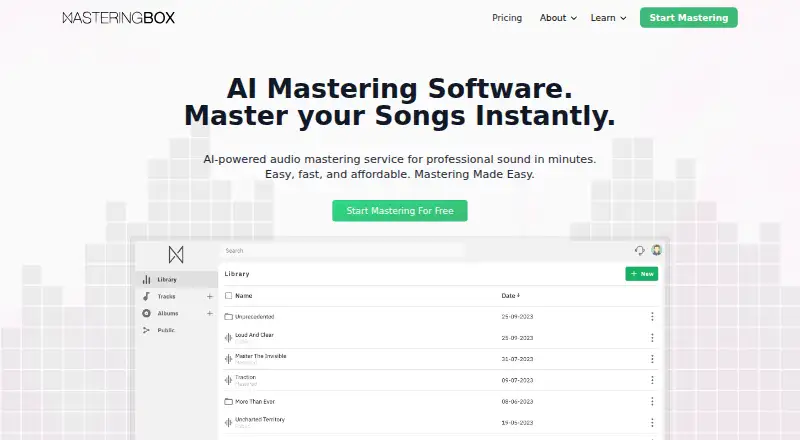
What MasteringBOX is
MasteringBOX is an online audio mastering application that uses AI to analyze a track’s dynamic and spectral characteristics and make adjustments. Upload a track to process it, then preview the master, change loudness or its three-band dynamic EQ, and compare the result with the original. You can remaster a track without extra cost. Masters are available as M4A, MP3, WAV, or HD WAV; M4A and MP3 files can include cover art and track information. Projects can be arranged in folders and albums. Album tracks can be downloaded as a ZIP, and DDP 2.0 export is available in beta. Sharing tools let you publish tracks and albums with a player for comments, likes, and sharing, and create artist profiles. The free account permits one MP3 or M4A master every 24 hours, with 200 MB storage and masters retained for up to 90 days depending on settings. MasteringBOX is available on Android, iOS, and the web.
Good
- Preview and compare masters with originals
- Control loudness and three-band dynamic EQ
- Download WAV and HD WAV masters
- Publish albums with comments and sharing
- Available on Android, iOS, and web
Watch out
- Free account allows one master per 24 hours
- Free storage is limited to 200 MB
- Free masters are kept for up to 90 days
- DDP 2.0 album export is beta
Who it suits
It suits musicians who want to master and compare tracks, organize releases into albums, or share music through artist profiles. The free account’s daily mastering and storage limits are worth considering.
Verdict
MasteringBOX combines track mastering controls with album organization and sharing. Check the free account’s mastering and storage limits against your workflow before choosing a plan.
Plans and prices
From MasteringBOX's own pricing page, checked 11 Oct 2026.
| Plan | Price | What it gives you |
|---|---|---|
| Free | Free | 1 master per day · 90 day storage · Loudness Control · Create Albums |
| Basic | $7.99 a month | Unlimited mastering in MP3/M4a · 180 day storage · Loudness and EQ Control · Cover Art and ID3 Tags · Basic Support |
| Pro | $12.99 a month | 3 WAV/HD Masters per month · 360 day storage · Loudness and EQ Control · Advanced Mastering Settings · Premium Support |
| Unlimited | $24.99 a month | Unlimited mastering in all formats · Unlimited storage · Advanced Mastering Settings · Premium Support |
The facts
Each one read from MasteringBOX's own pages, with the date it was checked.
What it does
- Account use
- Free, Basic, Pro, and Unlimited accounts are for personal use and the subscriber’s own tracks; the terms say Studio subscribers may master client tracks.checked 11 Oct 2026
- Albums
- Users can organize projects into folders, export albums as DDP 2.0 master files (beta), or download album tracks as a ZIP file.checked 11 Oct 2026
- Data controls
- The data policy says users can access, rectify, export, or delete data through account settings, and can delete their account at any time.checked 11 Oct 2026
- EQ and preview
- Users can control loudness, adjust a 3-band dynamic EQ, compare mastered and original versions, and remaster a track without extra cost.checked 11 Oct 2026
- Output formats
- Masters can be downloaded as M4A, MP3, WAV, or HD WAV; cover art and track information can be embedded in M4A and MP3 files.checked 11 Oct 2026
- Privacy and storage
- The data policy says uploaded tracks are stored for download or sharing, and data is stored on servers in Canada, Germany, and/or Spain.checked 11 Oct 2026
- Product
- MasteringBOX is an online, AI-powered audio mastering application that analyzes a track’s dynamic and spectral characteristics and applies adjustments.checked 11 Oct 2026
- Refunds
- The maker states a 14-day satisfaction refund policy for premium accounts if fewer than three tracks have been mastered, plus a 14-day grace period for an unused renewed plan.checked 11 Oct 2026
- Sharing
- Users can publish tracks and albums with a player that supports comments, likes, and sharing, and create artist profiles with bios, pictures, tracks, and albums.checked 11 Oct 2026
- Support
- The pricing page lists Basic Support for Basic and Premium Support for Unlimited and Pro plans.checked 11 Oct 2026
- Workflow
- The service analyzes and processes uploaded tracks, then lets users preview and adjust loudness and EQ before saving the master.checked 11 Oct 2026
Money
- Free limits
- The free account allows one MP3 or M4A master every 24 hours, has a 200 MB storage limit, and keeps masters for up to 90 days depending on user settings.checked 11 Oct 2026
The full review of MasteringBOX
MasteringBOX is an online AI mastering service with controls for loudness and dynamic EQ, plus tools for organizing and sharing album projects. It suits independent artists preparing their own releases and collecting feedback in one place. Its strongest case is a controllable, multi-format workflow; studios handling client work and users expecting unrestricted free mastering should look elsewhere.
Overview
MasteringBOX analyzes an uploaded track’s dynamic and spectral characteristics, applies adjustments, and presents a preview before the master is saved. You can compare the processed version with the original, alter loudness, and remaster without an extra charge. That makes the result more adjustable than a fixed one-click service, while the three-band dynamic EQ remains a focused mastering control rather than a complete mixing environment.
Album tools broaden the service beyond single files. Projects can be arranged in folders, albums can be downloaded as ZIP archives, or exported as DDP 2.0 master files in beta. The beta label makes DDP less suitable as the only release-delivery route. Published tracks and albums have a player supporting comments, likes, and sharing, and artist profiles can present bios, pictures, tracks, and albums.
Key features
Mastering and output
Loudness control, loudness targets, and a 3-band dynamic EQ let users make practical finishing adjustments after analysis. Masters download as M4A, MP3, WAV, or HD WAV. Cover art and track information can be embedded in M4A and MP3 files, useful when distributing tagged listening copies. WAV and HD WAV are available for higher-quality delivery, although their plan availability matters: Pro includes three WAV/HD masters per month, while Unlimited removes that format quota.
Albums and sharing
Folders and album downloads help artists keep a release together rather than managing every track separately. Sharing tools are suited to review rounds or public presentation because listeners can comment, like, and share. Artist profiles add a simple identity layer for showcasing a catalog. DDP 2.0 export is promising for release preparation, but its beta status argues for retaining another dependable archive or delivery method.
Storage, privacy, and account controls
Uploaded tracks are stored for download or sharing, with data held on servers in Canada, Germany, and/or Spain. Account settings allow users to access, rectify, export, or delete data, and an account can be deleted at any time. Free, Basic, Pro, and Unlimited accounts are for personal use and the subscriber’s own tracks; the terms make Studio the appropriate account for mastering client material.
Pricing
| Plan | Price | What it includes |
|---|---|---|
| Free | free | One master per day, 90-day storage, loudness control, and album creation |
| Basic | $7.99 a month | Unlimited MP3/M4A mastering, 180-day storage, loudness and EQ control, cover art and ID3 tags, Basic Support |
| Pro | $12.99 a month | Three WAV/HD masters per month, 360-day storage, loudness and EQ control, Advanced Mastering Settings, Premium Support |
| Unlimited | $24.99 a month | Unlimited mastering in all formats, unlimited storage, Advanced Mastering Settings, Premium Support |
The free account is suitable for occasional sketches or low-volume personal work, but one MP3 or M4A master every 24 hours and a 200 MB storage limit make regular release schedules difficult. Masters remain for up to 90 days depending on user settings. Basic is the economical choice for MP3/M4A catalogs and adds longer retention, but it excludes WAV and HD WAV. Pro fits artists who need occasional high-resolution exports and advanced settings; three such masters per month is a real ceiling. Unlimited is the clearest choice for frequent mastering or mixed-format delivery, provided personal-use terms fit the account.
The pricing note states paid access from €6/mo (annual), while the listed plan prices above are monthly USD amounts. Premium accounts have a 14-day satisfaction refund policy when fewer than three tracks have been mastered, plus a 14-day grace period for an unused renewed plan.
Platforms
MasteringBOX runs on Android, iOS, and the web, giving artists browser access alongside mobile use.
Who it's for
Choose it for independent musicians who want adjustable AI mastering, loudness targets, album organization, tagged exports, and built-in feedback sharing. Basic suits MP3/M4A-focused workflows; Pro suits occasional WAV delivery; Unlimited suits heavier personal catalogs. It is not the right account for routine client mastering unless the Studio terms apply, and the free tier is too constrained for high-volume experimentation.
Pros and cons
Pros
- Adjustable loudness and 3-band dynamic EQ provide control after automated processing.
- M4A, MP3, WAV, and HD WAV exports cover listening and higher-resolution delivery needs.
- Folders, ZIP album downloads, profiles, and comment-enabled sharing connect mastering with release organization.
- Remastering does not add a per-track charge.
Cons
- The free plan allows only one MP3 or M4A master per 24 hours and limits storage to 200 MB.
- Basic has no WAV or HD WAV output, while Pro limits those masters to three per month.
- DDP 2.0 album export is beta, so it should not be treated as the sole delivery path.
- Personal-use restrictions exclude ordinary client work from the Free, Basic, Pro, and Unlimited accounts.
Alternatives
Browse AI Music Mastering Software for a broader category comparison. Pick AI Mastering instead if unlimited mastering on a free plan and wider platform coverage, including API and self-hosted options, matter most. RoEx Mastering is better when you prefer a free preview and pay-per-download credits. Choose Matchering for GPLv3 open-source software with no published paid plans. TrackGleam suits users seeking unlimited free WAV and MP3 mastering without sign-up. Sauce Mastering AI offers a free preview on every track and a free first master. SongUp AI is another freemium web option. SoundBoost.ai is an alternative with Android, iOS, and web access. Auralith Forge is worth considering for one-time masters rather than a subscription.
Verdict
MasteringBOX is a strong fit for independent artists who want AI assistance without giving up loudness and EQ control, and who value album management and sharing alongside exports. Choose Basic for tagged MP3/M4A work, Pro for limited WAV needs, or Unlimited for sustained multi-format output. Look elsewhere if you need unrestricted free mastering, dependable non-beta DDP delivery, or routine client projects under a personal-use account.
Alternatives to MasteringBOX
- 1

Loudly
Free planAndroidiOSWebAPI8.3From $96 a year - 2
TrackGleam
Free planAndroidiOSWebLinux8.0Free plan - 3

AI Mastering
Free planOpen sourceAndroidiOSWebAPI7.8Free plan - 4
Matchering
Free planOpen sourceWebAPILinuxmacOS7.5Free plan - 5
SongUp AI
Free planWeb7.5From $9.99 a month - 6
Free Music Creator AI Mastering
Free planWeb7.3From $10.49 a month