Free Music Creator AI Mastering
Free Music Creator AI Mastering is a web tool that shapes a finished stereo mix toward a reference track.
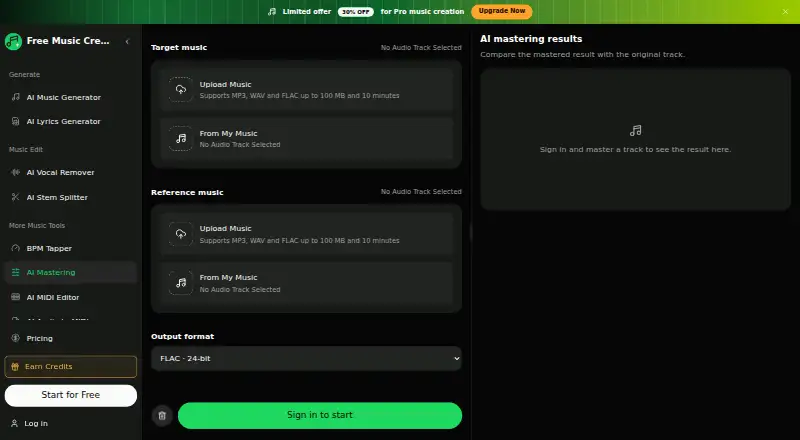
What Free Music Creator AI Mastering is
Free Music Creator AI Mastering is a web tool that shapes a finished stereo mix toward a reference track. It analyzes the target and reference, then adjusts overall loudness, frequency balance, peak amplitude, and stereo width in the reference's direction. The maker says it works best when the target is already a balanced stereo mix and the reference has the tone and presentation the user wants. It accepts MP3, WAV, and FLAC files, with each target or reference limited to 100 MB and 10 minutes. Output options are 320 kbps MP3, 16-bit WAV, or 24-bit FLAC. Each submitted task uses 2 FreeMusic credits, refunded if the task fails under the stated failure conditions. Completed results include a switch between the original and mastered versions that keeps playback at approximately the same position. Once accepted, processing continues on the server if the page is closed. It handles the complete stereo file and cannot isolate or repair individual tracks, severely clipped recordings, or mix problems such as buried vocals.
Good
- Adjusts loudness, frequency balance, peaks, and stereo width.
- Accepts MP3, WAV, and FLAC input.
- Offers 320 kbps MP3, 16-bit WAV, or 24-bit FLAC output.
- Accepted tasks continue processing after the page closes.
Watch out
- Each mastering task costs 2 FreeMusic credits.
- Files are limited to 100 MB and 10 minutes each.
- Cannot isolate or repair individual tracks.
Who it suits
It suits people with a finished, balanced stereo mix and a reference track that represents the tone they want. It is not suited to repairing individual tracks, severe clipping, or buried vocals.
Verdict
This tool aims to move a complete stereo mix toward a chosen reference, rather than repair separate tracks or mix defects. It is most relevant when the mix is already balanced and both files fit the size and duration limits.
Plans and prices
From Free Music Creator AI Mastering's own pricing page, checked 21 Oct 2026.
| Plan | Price | What it gives you |
|---|---|---|
| Free | Free | 2 songs/month · 1 music generation/month · 1 concurrent task · personal use only · email support · $0 |
| Starter Pack | $7.99, paid once | 20 generations · 40 songs · credits never expire · one-time payment |
| Starter | $10.49 a month | 200 songs/month · 100 music generations/month · 2 concurrent tasks · commercial license · up to 1000 downloads · email support · $125.92 billed yearly; cancel anytime |
| Pro Pack | $19.99, paid once | 60 generations · 120 songs · credits never expire · one-time payment |
| Pro | $20.99 a month | 500 songs/month · 250 music generations/month · 5 concurrent tasks · commercial license · unlimited downloads · priority email support · $251.92 billed yearly; cancel anytime |
| Premium | $34.99 a month | 1200 songs/month · 600 music generations/month · 10 concurrent tasks · commercial license · unlimited downloads · priority email support · $419.92 billed yearly; cancel anytime |
| Premium Pack | $39.99, paid once | 125 generations · 250 songs · credits never expire · one-time payment |
| Ultra Pack | $69.99, paid once | 250 generations · 500 songs · credits never expire · one-time payment |
The facts
Each one read from Free Music Creator AI Mastering's own pages, with the date it was checked.
What it does
- API and SDKs
- The opened product and pricing pages describe a browser workflow and do not document a public API or SDK.checked 21 Oct 2026
- Audio formats
- It accepts MP3, WAV, and FLAC files and offers output as 320 kbps MP3, 16-bit WAV, or 24-bit FLAC.checked 7 Oct 2026
- Commercial licence terms
- The licence page says an active yearly subscription is the condition for its commercial licence, which grants non-exclusive, perpetual, worldwide usage rights for generated music.checked 21 Oct 2026
- Documentation and support
- The mastering page includes workflow steps and an FAQ; the pricing page lists email support on all subscription tiers.checked 21 Oct 2026
- Feature: A/B comparison
- Completed tasks provide a switch between the original and mastered audio at approximately the same playback position.checked 21 Oct 2026
- Feature: frequency balance
- The tool aims to move a mix's broad tonal balance toward the selected reference.checked 21 Oct 2026
- Feature: loudness matching
- Processing adjusts the target mix toward the reference track's overall level.checked 21 Oct 2026
- Feature: output formats
- Mastered output options are 320 kbps MP3, 16-bit WAV, and 24-bit FLAC.checked 21 Oct 2026
- Feature: peak level
- The mastering process considers peak amplitude, while the maker cautions that it cannot repair a severely clipped recording.checked 21 Oct 2026
- Feature: stereo width
- The reference can guide the overall stereo image wider or narrower, but cannot reposition instruments already combined in the stereo mix.checked 21 Oct 2026
- Feature: task history
- The page says processing continues on the server after submission and task history displays status or a completed download later.checked 21 Oct 2026
- Independent listing
- BetaList has a listing describing FreeMusicCreator.ai as a service for generating royalty-free songs from text prompts or lyrics.checked 21 Oct 2026
- Independent review coverage
- The opened independent sources did not provide verified user-review ratings specifically for the AI Mastering product.checked 21 Oct 2026
- Independent trust assessment
- ScamAdviser describes the domain's trust score as fair and notes that the domain owner's identity is hidden in WHOIS.checked 21 Oct 2026
- Input limits
- Target and reference files can be MP3, WAV, or FLAC, with a maximum of 100 MB and 10 minutes per file.checked 21 Oct 2026
- Integrations
- The opened mastering page describes file upload and selection from My Music but does not list third-party integrations.checked 21 Oct 2026
- Licence
- The product is presented as a hosted online service, and the pages opened do not state an open-source software licence.checked 21 Oct 2026
- Limitations
- The tool processes the complete stereo file and cannot isolate or repair individual tracks, severely clipped recordings, or mix problems such as buried vocals.checked 7 Oct 2026
- Limit: results vary
- The maker says results depend on the target mix and chosen reference and may not sound better to every listener.checked 21 Oct 2026
The company
- Company headquarters and founding
- The opened product and company pages do not state a headquarters or founding year.checked 21 Oct 2026
- Company identity
- The product pages identify the service as Free Music Creator and do not provide a legal company name in the opened content.checked 21 Oct 2026
- Limit: ownership transparency
- ScamAdviser reports hidden WHOIS ownership information and says the registrant and technical contact email addresses appeared invalid in its checks.checked 21 Oct 2026
Money
- Credit cost
- Each submitted mastering task costs 2 FreeMusic credits, which the service says it refunds if processing fails or the result cannot be transferred after configured retries.checked 21 Oct 2026
- Free-plan limit
- The free tier is limited to 2 songs and 1 music generation per month, one concurrent task, and personal use according to the pricing page.checked 21 Oct 2026
Alternatives to Free Music Creator AI Mastering
- 1

Loudly
Free planAndroidiOSWebAPI8.3From $96 a year - 2
TrackGleam
Free planAndroidiOSWebLinux8.0Free plan - 3

AI Mastering
Free planOpen sourceAndroidiOSWebAPI7.8Free plan - 4
Matchering
Free planOpen sourceWebAPILinuxmacOS7.5Free plan - 5
SongUp AI
Free planWeb7.5From $9.99 a month - 6

MasterForge
Free planWebAPISelf-hosted7.3From €4.99 a month