Manga Studio
Manga Studio is a local-first AI pipeline for turning a premise into manga pages with lettering.
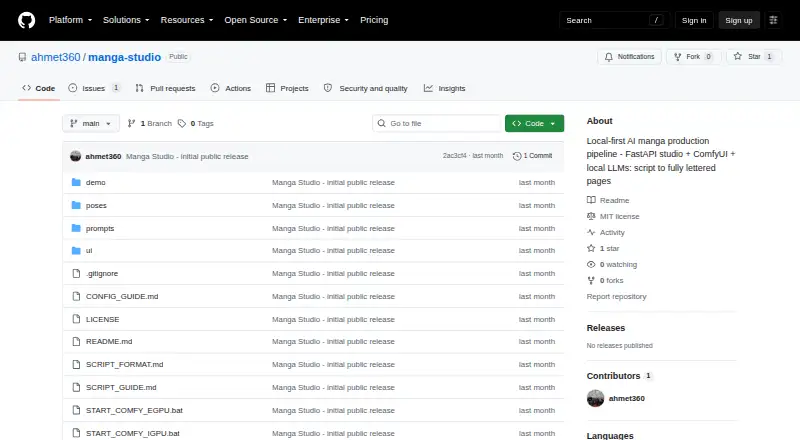
What Manga Studio is
Manga Studio is a local-first AI pipeline for turning a premise into manga pages with lettering. Its web studio includes script writing, a render queue, a page gallery, panel regeneration, crop-based inpainting, speech-bubble layout, and layer compositing. Multi-character panels can use a background plate and separate character cutouts, which can be exported or regenerated independently. Character consistency tools include identity and outfit tags, LoRA support, regional prompting, and reference images through IPAdapter. The workflow can run two ComfyUI backends with separate queues, while vision-model quality checks run alongside rendering. Other quality tools include take scoring, tag checks, high-resolution fixes, detailers, and upscaling. The documented setup needs Python 3.9 or newer and a running ComfyUI installation with an Illustrious-XL or NoobAI-XL family checkpoint; custom nodes are not required. It supports SDXL, Illustrious, and NoobAI-family checkpoints, but not Anima or video models such as LTX and WAN. The project is free, MIT-licensed, and exports PNG files.
Good
- Free and MIT-licensed.
- Includes script writing and page assembly tools.
- Character references and LoRA support are available.
- Saves workflow JSON for panels.
- Exports PNG files.
Watch out
- Requires Python 3.9 or newer and ComfyUI.
- Anima and specified video models are incompatible.
- SDXL may blend traits in multi-character panels.
Who it suits
It suits creators who want a local pipeline for scripting, generating, lettering, and assembling manga pages, and who can provide the documented Python and ComfyUI setup. Users working with incompatible Anima or video models will need another model workflow.
Verdict
Manga Studio brings writing, image generation, lettering, and page assembly into a local-first workflow. Its model compatibility and setup requirements are important constraints to check first.
The facts
Each one read from Manga Studio's own pages, with the date it was checked.
What it does
- Character consistency
- Character consistency features include identity and outfit tags, LoRA support, regional prompting, IPAdapter reference images, and generated drift-protection negatives.checked 30 Sep 2026
- Character tools
- Character consistency features include identity and outfit tags, LoRA support, regional prompting, IPAdapter reference images, and drift-protection negatives.checked 29 Sep 2026
- Demo limitation
- The README says its displayed pipeline page is from no-GPU dry-run mode, using placeholder art while demonstrating script parsing, lettering, and page assembly.checked 29 Sep 2026
- GPU orchestration
- The project supports two ComfyUI backends with independent queues and can run vision-model quality checks on one GPU while the other renders.checked 30 Sep 2026
- Integrations
- The documented generation setup uses ComfyUI and local language models through LM Studio, with optional cloud-GPU burst and model downloads from Hugging Face.checked 30 Sep 2026
- Known limitation
- The README notes that SDXL can blend character traits in multi-character panels and says character LoRAs can reduce, but not eliminate, this issue.checked 30 Sep 2026
- Layered panels
- Multi-character scenes can be rendered as a background plate plus character cutouts, with layers that can be exported, replaced, or regenerated independently.checked 30 Sep 2026
- License
- The repository includes an MIT license.checked 30 Sep 2026
- Local processing
- The README describes generation as running on local hardware, including AMD GPUs via ComfyUI and local LLMs via LM Studio, with optional cloud-GPU burst.checked 29 Sep 2026
- Local requirements
- The documented pipeline requires Python 3.9 or newer and a running ComfyUI installation with an Illustrious-XL or NoobAI-XL family checkpoint; the workflow uses core nodes and needs no custom nodes.checked 30 Sep 2026
- Model limit
- The workflow supports SDXL, Illustrious, and NoobAI-family checkpoints, while Anima checkpoints and video models such as LTX and WAN are incompatible.checked 29 Sep 2026
- Purpose
- Manga Studio is a local-first AI manga production pipeline that turns a premise or structured script into lettered manga pages.checked 30 Sep 2026
- Quality features
- Its quality workflow includes best-of-N takes with automatic scoring, WD14 tag checks, vision-model verdicts, high-resolution fixes, face and body detailers, and seam-fixed upscaling.checked 30 Sep 2026
- Reproducibility
- The project uses deterministic seeds by default and saves the exact workflow JSON sent for each panel for debugging or reuse.checked 30 Sep 2026
- Requirements
- The project requires Python 3.9 or later and a running ComfyUI installation with an Illustrious-XL or NoobAI-XL family checkpoint; it says no custom ComfyUI nodes are needed.checked 29 Sep 2026
- Supported models
- The pipeline supports SDXL, Illustrious, and NoobAI-family checkpoints; the README says Anima checkpoints and video models such as LTX and WAN use incompatible architectures.checked 30 Sep 2026
- Web studio
- Its FastAPI and vanilla JavaScript web studio offers AI script generation, a render queue, a page gallery, per-panel regeneration, crop-based inpainting, speech-bubble layout, and layer compositing.checked 30 Sep 2026
- Writing tools
- Writer tools include master-prompt templates, compact delta-panel edits, page-filtered editing, and chat-based script edits with history.checked 30 Sep 2026
The full review of Manga Studio
Overview
Manga Studio is a free, local-first pipeline for turning a premise into lettered manga pages. It suits creators who want to manage scripts, image generation, and page assembly in one workflow and are comfortable setting up ComfyUI and compatible models. Its breadth is appealing, but model support and local hardware requirements make it a poor fit for anyone seeking a ready-to-use, hosted generator.
Key features
From premise to assembled page
The web studio brings together AI script writing, a render queue, page gallery, speech-bubble layout, and layer compositing. Prompt templates, delta-panel syntax, page-filtered editing, and chat-based script edits with history support targeted revisions. That makes the project more than a prompt box for isolated images, though it also means users must configure its generation stack themselves.
Panel and character control
Creators can regenerate panels or use crop-based inpainting to revise a selected region. For multi-character scenes, the pipeline can separate a background plate from character cutouts so those pieces can be replaced or regenerated independently. Identity and outfit tags, LoRA support, regional prompting, IPAdapter reference images, and drift-protection negatives give creators several ways to pursue consistency. They do not eliminate a stated weakness: SDXL may blend traits in multi-character panels, and the README says character LoRAs can reduce the issue.
Quality and workflow controls
Best-of-N selection with automatic scoring, WD14 tag checks, vision-model verdicts, high-resolution fixes, detailers, and seam-fixed upscaling provide multiple steps for refining output. Deterministic seeds and saved workflow JSON for each panel make a result easier to reproduce or debug. The project can orchestrate two ComfyUI backends with separate queues, assigning vision-model checks to one GPU while the other renders; that is useful for a multi-GPU setup, but not a substitute for having compatible hardware and models.
Local generation, with boundaries
The documented pipeline uses ComfyUI for images and local language models through LM Studio, with optional cloud-GPU burst. It supports SDXL, Illustrious, and NoobAI-family checkpoints, but not Anima checkpoints or video models such as LTX and WAN. PNG export and the MIT license are practical advantages for creators who want a permissive project and a common image format. The displayed pipeline page is a no-GPU dry run with placeholder art, so it demonstrates script parsing, lettering, and assembly rather than generated artwork.
Pricing
Manga Studio is free, with no free trial. There are no paid tiers or seat and usage quotas to weigh; the cost is the setup and hardware burden. It requires Python 3.9 or newer and a running ComfyUI installation with an Illustrious-XL or NoobAI-XL family checkpoint. The workflow uses core nodes and needs no custom ComfyUI nodes.
Platforms
Manga Studio is available as a web studio and supports Linux, Windows, and self-hosted use. Its local-first approach also supports AMD GPUs through ComfyUI and local language models through LM Studio, with optional cloud-GPU burst.
Who it's for
Choose Manga Studio if you want control over a manga workflow from script edits through layered, lettered PNG pages, and already have—or are willing to configure—its local generation stack. Its panel-level editing and reproducibility controls are especially relevant to creators iterating on scenes. Look elsewhere if you need broad model compatibility, a turnkey hosted service, or dependable separation of character traits in every multi-character panel.
Pros and cons
Pros
- One pipeline for writing and page assembly: scripts, render queues, lettering, compositing, and a page gallery sit in the same studio.
- Granular revision tools: panel regeneration, crop-based inpainting, and independently replaceable character cutouts let creators target changes.
- Reproducible local workflow: deterministic seeds and saved per-panel workflow JSON help with reuse and debugging.
- Free and MIT-licensed: there is no subscription charge, and the repository includes an MIT license.
Cons
- Setup is a prerequisite: users need Python 3.9 or newer, ComfyUI, and a compatible checkpoint before the documented pipeline can run.
- Model range is bounded: Anima and video models including LTX and WAN are incompatible.
- Character separation can falter: SDXL may blend character traits in multi-character panels, even though LoRAs can mitigate the problem.
- The demo art is not generated output: the showcased pipeline page uses placeholder art in no-GPU dry-run mode.
Alternatives
Browse AI Comic Generators for a wider category comparison. Consider ComicInk instead if you want an iOS or web service with a paid monthly option that includes 1,500 credits, 150 Sidekick messages, and about 30 comic pages per month. GenToon is another choice for Android, iOS, or web, with a free tier of 150 monthly credits and 20 characters, or a Lite plan at $10 a month with 800 credits and 20 characters.
Anifusion is a web-based alternative with a 2,000-credit pack at $15, paid once-time purchase. AI Manga Studio may suit readers seeking an extension or web option with a free trial that includes seven AI image generations, 30 chat exchanges, and one automatic story generation. ComicsAI offers a web free tier with one credit for new users, basic art styles, and standard-resolution output, subject to first-1,000-users-each-day availability.
YumeComic is worth considering for a web plan with stated monthly generation and page limits: Pro Yearly costs $29.99 a year and includes 2,000 generations each month, comics up to 12 pages, up to eight panels per page, and up to four consistent characters. ComicStory AI offers a web free tier with 50 one-time sign-up credits and a Creator plan priced at $9.99 a month. Dashtoon Studio is another web-based freemium option.
Verdict
Manga Studio is best for technically comfortable creators who want a free, local-first route from script to assembled manga page, with fine-grained editing and reproducible panel workflows. Its strongest reason to choose it is that breadth of control without a subscription. Its clearest reason to look elsewhere is the need to configure a narrow, compatible ComfyUI model stack—and to accept that multi-character consistency can still be imperfect.
Alternatives to Manga Studio
- 1
LlamaGen.ai
Free planAndroidiOSWebAPI8.2From $13.99 a month - 2

ComicsAI
Free planAndroidiOSWebExtension8.0From $15.90 a month - 3

GenToon
Free planAndroidiOSWeb7.5From $10 a month - 4

Anifusion
Free planWebAPI7.4From $9 a month - 5
SparkStation
Free planWebAPIExtension7.1Free plan - 6

ComicAI
Free planAndroidWeb6.9Free plan