
MailDrop
MailDrop provides temporary disposable email addresses for sign-ups, verification messages, downloads, trials and forms.
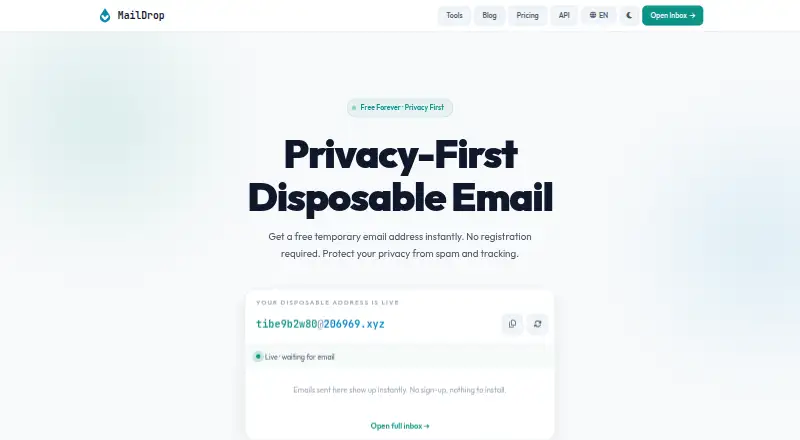
What MailDrop is
MailDrop provides temporary disposable email addresses for sign-ups, verification messages, downloads, trials and forms. Users can open an inbox without an account, phone number or personal information, set a custom prefix and choose from several domains. Inboxes refresh every 30 seconds and can receive HTML emails, verification codes and attachments for browser preview or download. Messages are kept temporarily and deleted automatically, so the service advises against relying on temporary inboxes for long-term accounts such as banking. MailDrop also offers a REST API to create temporary mailboxes and read incoming messages. API keys authenticate requests, claimed mailboxes are readable only by the key that created them, and exhausted quotas return HTTP 429 with quota state in response headers. The free API plan is described as a permanent trial and requires no credit card. The Free plan costs nothing and includes 300 requests per day and one mailbox per 24 hours. Starter costs $5 a month and includes 30,000 requests per month and 10 mailboxes per 24 hours. Access is listed for web and API.
Good
- No account, phone number or personal information required
- Inbox refreshes every 30 seconds
- Can receive and download attachments
- REST API creates mailboxes and reads email
Watch out
- Messages are deleted automatically
- Custom domains are not available
- Free plan allows one mailbox per 24 hours
Who it suits
MailDrop suits people who want a temporary inbox for sign-ups or verification, as well as developers using its mailbox API. It is not intended for long-term accounts such as banking.
Verdict
MailDrop provides browser-based temporary inboxes and a REST API, with a free API tier and paid plans starting at $5 a month. Because messages are temporary, it should not be used for accounts that need lasting email access.
Plans and prices
From MailDrop's own pricing page, checked 14 Oct 2026.
| Plan | Price | What it gives you |
|---|---|---|
| Free | Free | 1 mailbox per 24h · all public domains · community support · 300 requests / day |
| Pay as you go | $1, paid once | No subscription · balance never expires · monthly spending cap · $1 / 1,000 requests; top up from $5 |
| Starter | $5 a month | 30,000 requests / month · 10 mailboxes per 24h · all public domains · email support · $5/month |
| Pro | $15 a month | 200,000 requests / month · 50 mailboxes per 24h · webhook notifications · priority support · $15/month |
| Business | $49 a month | 1,000,000 requests / month · 200 mailboxes per 24h · webhook notifications · priority support & SLA · $49/month |
The facts
Each one read from MailDrop's own pages, with the date it was checked.
What it does
- Account requirements
- The website says no account, phone number, or personal information is required to open an inbox.checked 3 Oct 2026
- Address options
- Users can set a custom email prefix and choose from several domains.checked 3 Oct 2026
- API
- The REST API can create temporary mailboxes and read incoming email.checked 3 Oct 2026
- API access
- API keys are sent as Bearer tokens in the Authorization header or in the X-API-Key header.checked 3 Oct 2026
- API authentication
- API keys are accepted as Bearer tokens or through the X-API-Key header.checked 14 Oct 2026
- API endpoints
- Documentation covers mailbox creation, message listing, individual-message retrieval, and account-usage inspection.checked 14 Oct 2026
- API errors
- The API documents JSON error codes for authentication, quota, mailbox, subscription, and spending-cap failures.checked 14 Oct 2026
- API mailbox controls
- API mailbox creation accepts optional prefix and public-domain suffix values, and claimed mailboxes are readable only by the creating key.checked 14 Oct 2026
- API mailbox privacy
- The API documentation says claimed mailboxes are readable only by the key that created them.checked 3 Oct 2026
- API quota behavior
- When a quota is exhausted, the API responds with HTTP 429 and exposes quota state in response headers.checked 3 Oct 2026
- Attachment handling
- Received attachments can be previewed or downloaded in the browser.checked 14 Oct 2026
- Automatic deletion
- Messages are retained temporarily and then deleted automatically.checked 14 Oct 2026
- Automatic refresh
- The browser inbox refreshes itself every 30 seconds.checked 14 Oct 2026
- Custom prefixes
- Users can choose a custom email prefix and select from several public domains.checked 14 Oct 2026
- Developer tools
- The site lists free utilities including password, UUID, URL, WHOIS, header, identity, diff, breach-check, encoding, JSON, hash, timestamp, and QR tools.checked 14 Oct 2026
- External classification
- UserCheck identifies maildrop.cx as a disposable or temporary email domain and recommends blocking such domains for signup-quality control.checked 14 Oct 2026
- External domain fact
- UserCheck lists CentralNic Ltd as the registrar for maildrop.cx and records a March 28, 2026 flag date.checked 14 Oct 2026
- GitHub popularity
- That archived repository shows 724 stars and 73 forks.checked 14 Oct 2026
- GitHub project status
- A GitHub repository named m242/maildrop describes an open-source Mailinator alternative but has been archived since April 27, 2019.checked 14 Oct 2026
- GitLab project date
- The linked GitLab project states that it was created on April 18, 2019.checked 14 Oct 2026
- Inbox refresh
- The inbox auto-refreshes every 30 seconds.checked 3 Oct 2026
- Instant access
- A temporary address becomes available immediately and can receive mail without installing software.checked 14 Oct 2026
Where it runs
- App data disclosure
- Google Play says the listed app may share location and personal data, collects personal information, encrypts data in transit, and does not allow data deletion.checked 14 Oct 2026
- Google Play app identity
- The Google Play listing attributes that MailDrop app to developer Amit Das/JewelCad Designs, with 10K+ downloads and ads.checked 14 Oct 2026
The full review of MailDrop
Overview
MailDrop gives people a disposable inbox in a browser and developers a REST API for creating temporary mailboxes and reading incoming messages. It suits short-lived sign-ups and verification flows where a lasting email address would be unnecessary.
Its appeal is no-registration access paired with a usable API free tier; automatic deletion is the decisive limitation. Choose it for temporary tasks, not accounts whose messages you may need later.
Key features
You can open an inbox without an account, phone number, or personal information, choose a domain, and set a custom prefix. That makes it practical to create an address for a particular sign-up, though you cannot use your own domain. The inbox refreshes every 30 seconds and supports HTML email, verification codes, and attachments that can be previewed or downloaded in a browser.
The REST API can create mailboxes and retrieve incoming mail. Keys are supplied as Bearer tokens in the Authorization header or in the X-API-Key header. A claimed mailbox is readable only by the key that created it, which gives API-based workflows a defined privacy boundary. When a quota runs out, the API returns HTTP 429 and exposes quota state in response headers, so an integration can detect and handle the limit.
Messages are deleted automatically after a temporary period. That is a sensible fit for one-off forms, downloads, trials, and verification, but a poor substitute for an inbox that must preserve account history. MailDrop specifically advises against using temporary addresses for long-term accounts such as banking.
The service is available in seven languages and describes its open-source security and developer utilities as aimed at developers and privacy-conscious users.
Pricing
The free API plan is a permanent trial with no credit card required. Free costs nothing and allows 300 requests per day, one mailbox per 24 hours, all public domains, and community support. This is a low-commitment way to try an integration, but the daily request and mailbox caps make it better for light use than sustained automation.
Starter costs $5 a month for 30,000 requests per month, 10 mailboxes per 24 hours, all public domains, and email support. It suits modest recurring workloads; the mailbox cap remains relevant even with a larger monthly request allowance. Pro is $15 a month and raises the limits to 200,000 requests per month and 50 mailboxes per 24 hours, adding webhook notifications and priority support. Those additions make more sense for workflows that need higher volume or prompt event notification.
Business costs $49 a month and includes 1,000,000 requests per month, 200 mailboxes per 24 hours, webhooks, priority support, and an SLA. It is the plan for larger workloads that need a service commitment, rather than occasional inboxes.
Pay as you go is priced at $11,000, paid once, with no subscription, top-ups from $5, a balance that never expires, and a rate of $1 per 1,000 requests. Its non-expiring balance can suit uneven usage, while the subscription plans provide defined monthly request and mailbox allowances.
Platforms
MailDrop is available on the web and through an API. The browser inbox serves direct, short-term email needs; the API is the option for developers automating mailbox creation and message retrieval.
Who it's for
MailDrop is best for privacy-conscious users who want a temporary address without sharing personal details, and developers who need disposable inboxes in sign-up or verification workflows. The free tier is appropriate for trying an API integration or handling light demand; paid tiers suit increasing request volumes and mailbox needs. Anyone who needs reliable access to old messages should use a lasting email service instead.
Pros and cons
- Pro: No account, phone number, or personal information is required to open a browser inbox, reducing friction for one-off use.
- Pro: Custom prefixes, multiple domains, attachment handling, and a 30-second refresh make the browser inbox more flexible than a bare verification-only address.
- Pro: The API offers a permanent, no-card free tier, key-scoped claimed mailboxes, and explicit quota responses for integrations.
- Con: Automatic deletion makes MailDrop unsuitable for lasting accounts or keeping a useful message archive.
- Con: Custom domains are not supported, and free API use is capped at 300 requests per day and one mailbox per 24 hours.
Alternatives
Disposable Email Services is a category directory for comparing services in this space.
Choose SecureTempMail if you want platform coverage that includes desktop operating systems and extensions, or need its stated premium features such as up to 30-day retention and inbox search; its Premium plan costs $39 a year.
EmailOnDeck is another freemium alternative with Android, iOS, extension, web, and API platforms.
Temp-Mail.org offers Android, iOS, extension, web, and API access; its free messages are stored for up to 1–2 hours and are receive-only, while its monthly premium plan costs $10 a month.
MailTub is a free alternative.
Mohmal is a web-only freemium alternative with a stated free plan that includes an own domain, three inbox records, and three saved messages; Standard costs $4.99 a month.
TempMailPortal is a free Android and web alternative whose messages expire within up to 24 hours.
Emailnator is a web and API freemium alternative; its free tier allows up to 100 addresses at once, with public inboxes and deletion after 24 hours.
Mailinator is a web and API freemium alternative with a free trial and a Verified Pro option that includes unlimited private inboxes and permanent storage.
Verdict
MailDrop is a strong fit for short-lived sign-ups and developer workflows that benefit from an API, especially when the free daily allowance is enough. Its no-registration inbox and clear paid quotas are compelling reasons to choose it; automatic deletion and the lack of custom-domain support are reasons to look elsewhere when continuity or a branded domain matters.
Alternatives to MailDrop
- 1

EmailOnDeck
Free planAndroidiOSWebAPI8.9Free plan - 2

Guerrilla Mail
Free planOpen sourceAndroidWebAPIExtension8.9From $9.99 a year - 3

1SecMail
Free planAndroidWebAPIExtension8.5From $35.99 a year - 4
Mail.cx
Free planWebAPI8.1From $9.90 a year - 5
TempMailo
Free planAndroidiOSWebExtension8.1Free plan - 6

10 Minute Mail
Free planAndroidiOSWebExtension8.0Free plan