Maestro Planner
Maestro Planner is a shared music practice tracker for teachers and students to coordinate work between lessons.
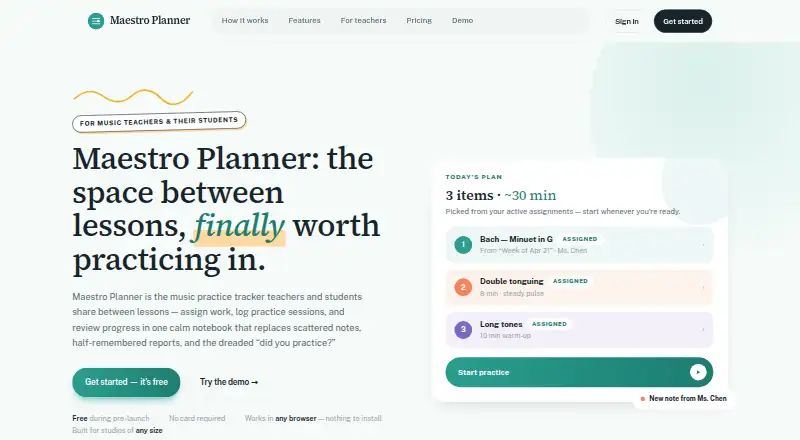
What Maestro Planner is
Maestro Planner is a shared music practice tracker for teachers and students to coordinate work between lessons. Teachers create weekly assignments linked to students' active practice items, and students can log session duration, tempo reached, improvements, weak spots, and notes. Teachers can review recent sessions, recurring weak spots, item notes, and assignment context together. The product tracks practice history, item trends, practice-day streaks, and assignment follow-through. It is designed for independent teachers, students, and larger multi-teacher organizations. It runs in a browser on a laptop, tablet, or phone without an app download or installation. Recording requires a supported browser and microphone permission. Google or Apple can be connected as sign-in methods when available. Users can request a JSON export and delete their account from settings. The Teacher Free plan is free, with up to 3 active students, 1 pending invite at a time, and 500 MB media storage. Teacher Pro is $10 a month, billed $10 /month or $100/year. Studio is $79 a month, billed $79 /month or $790/year.
Good
- Weekly assignments link to active practice items
- Session logs capture tempo, weak spots, and notes
- Tracks practice history and assignment follow-through
- Runs in a browser without installation
Watch out
- Free plan allows up to 3 active students
- Free plan allows 1 pending invite at a time
- Recording requires a supported browser and microphone permission
Who it suits
Maestro Planner suits music teachers and students who want to assign, log, and review practice between lessons. Its plans also include options for larger multi-teacher organizations.
Verdict
Maestro Planner brings assignments, practice logs, and teacher review into a shared workflow. The free plan has student and invite limits; larger rosters have paid plan options.
Plans and prices
From Maestro Planner's own pricing page, checked 8 Oct 2026.
| Plan | Price | What it gives you |
|---|---|---|
| Teacher Free | Free | Up to 3 active students · 1 pending invite at a time · 500 MB media storage |
| Teacher Pro | $10 a month | No student roster cap · 25 GB media storage · Includes all current teacher workflows · $10 /month or $100/year |
| Studio | $79 a month | Up to 500 students per organization · 100 GB media storage · Includes all Teacher Pro capabilities · $79 /month or $790/year |
The facts
Each one read from Maestro Planner's own pages, with the date it was checked.
What it does
- Assignment workflow
- Teachers create focused weekly assignments tied to students’ active practice items.checked 8 Oct 2026
- Children's data
- The privacy policy says the product does not currently describe a standalone age-verification or parental-consent workflow in the product itself.checked 8 Oct 2026
- Data controls
- Users can request a JSON export and self-service account deletion from account settings.checked 8 Oct 2026
- Hosting and transport
- The privacy policy says the app uses hosted infrastructure including Render and PostgreSQL-backed storage, and that data is intended to be transmitted over HTTPS.checked 8 Oct 2026
- Integrations
- The help page says users can connect Google or Apple as sign-in methods when available.checked 8 Oct 2026
- Intended users
- The product is designed for music teachers and their students, including independent teachers and larger multi-teacher organizations.checked 8 Oct 2026
- Practice history
- The product tracks session history, item trends, practice-day streaks, and assignment follow-through.checked 8 Oct 2026
- Purpose
- Maestro Planner is a shared music practice tracker for teachers and students to assign work, log practice sessions, and review progress between lessons.checked 8 Oct 2026
- Recording requirement
- Recording requires a supported browser and microphone permission.checked 8 Oct 2026
- Session logs
- Practice sessions can record duration, tempo reached, improvements, weak spots, and notes.checked 8 Oct 2026
- Support
- The help center directs users to email [email protected] for human support.checked 8 Oct 2026
- Teacher review
- Teachers can review recent sessions, repeated weak spots, item-level notes, and assignment context in one view.checked 8 Oct 2026
Where it runs
- Browser access
- Maestro Planner runs in a browser on a laptop, tablet, or phone and requires no app download or installation.checked 8 Oct 2026
The full review of Maestro Planner
Maestro Planner is a shared workspace for music teachers and students who need practice assignments and lesson follow-up in one place. It is best suited to teachers coordinating ongoing work across a roster, rather than players seeking only a private practice diary. Its paid tiers make the most sense once the three-student free cap becomes restrictive.
Overview
The service links weekly teacher assignments to students’ active practice items, then carries the resulting session records into teacher review. A student can document more than elapsed time: each practice entry may include duration, achieved tempo, improvements, weak spots, and notes. That gives the next lesson a clearer account of what happened between meetings.
Maestro Planner is designed for independent teachers as well as multi-teacher organizations. The shared workflow is its defining advantage, but it also assumes students will log consistently and that teachers want an organized review process rather than informal messaging.
Key features
Assignments and practice logs
Teachers create focused weekly assignments around current repertoire or other active practice items. Students then record sessions against that work, preserving context that a basic timer cannot provide. This is useful when tempo targets, recurring technical problems, or specific notes need to survive from one lesson to the next.
Teacher review and history
Recent sessions, repeated weak spots, item-level notes, and assignment context appear together for review. Practice history adds item trends, practice-day streaks, and assignment follow-through. Those views favor coaching and accountability across time; a solo musician who does not need teacher oversight may find the structure unnecessary.
Data controls and support
Account settings provide JSON data export and self-service deletion. Human help is available by email at [email protected]. The privacy policy describes hosted infrastructure using Render and PostgreSQL-backed storage, with data intended to travel over HTTPS. It does not describe a standalone age-verification or parental-consent workflow, a consideration for organizations working with children.
Pricing
The freemium model offers a genuinely usable starting point, but the free roster limit is low for a working studio.
| Plan | Price | What it includes |
|---|---|---|
| Teacher Free | free | Up to 3 active students, 1 pending invite at a time, and 500 MB media storage |
| Teacher Pro | $10 a month; billed $10 /month or $100/year | No student roster cap, 25 GB media storage, and all current teacher workflows |
| Studio | $79 a month; billed $79 /month or $790/year | Up to 500 students per organization, 100 GB media storage, and all Teacher Pro capabilities |
Teacher Free fits a teacher with no more than three active students and modest media needs. Teacher Pro is the practical choice for an independent teacher whose roster exceeds that cap; the annual billing option lowers the stated monthly equivalent compared with paying twelve monthly charges. Studio is aimed at larger organizations that need an organization-level limit of up to 500 students and substantially more storage. The free plan’s single pending invite and 500 MB allowance can become friction points even before a roster grows, while Studio is difficult to justify for a small practice.
Platforms
Maestro Planner runs on the web through a laptop, tablet, or phone browser, so there is no app installation to manage. Recording requires a supported browser and microphone permission. Google or Apple sign-in can be connected when available. It is listed for web access rather than separate native Android, iOS, or desktop applications.
Who it's for
Choose Maestro Planner if you teach music and want assignments, detailed practice evidence, and review history connected between lessons. It also fits multi-teacher organizations that can use the Studio roster and storage allowance. Students benefit when their teacher actively uses the assignment and review loop. It is less appropriate for an individual who only wants a lightweight diary, timer, or streak tracker, and the child-data workflow deserves scrutiny from youth-focused programs.
Pros and cons
Pros
- Teacher-centered continuity: Assignments, session details, weak spots, and follow-through stay connected for lesson planning.
- Useful practice evidence: Tempo, improvements, notes, and duration provide more actionable context than minutes practiced alone.
- Clear scaling path: Teacher Pro removes the student cap, while Studio supports up to 500 students and 100 GB of media.
- Browser access and data controls: No installation is required, and users can export JSON or delete an account themselves.
Cons
- Tight free limits: Three active students, one pending invite, and 500 MB of storage constrain even a small teaching roster.
- Teacher workflow dependency: The product’s value drops for students who do not maintain session logs or for solo users without a teacher.
- Recording requirements: Audio capture depends on browser support and microphone permission.
- Child-safety documentation gap: No standalone age-verification or parental-consent workflow is described.
Alternatives
For a wider comparison, see Music Practice Software.
Vivid Practice is a better fit when you want Android, iOS, and web access plus a free single-student tier and studio plans starting at $9.00 per month.
Pick Octero instead if ad-free access and group features matter more than Maestro Planner’s teacher-assignment workflow; its Premium plan is $5.99 per month.
Practis suits an individual who needs a free diary for up to five active pieces, goals, history, and streaks, with Pro from $4.99 monthly.
Choose ChoirMate for choir administration, including a free tier for up to 50 people.
Modacity is an alternative for structured individual practice on mobile and macOS.
Andante is another option for iOS and macOS practice.
Exerzisor fits users who prefer self-hosting or teacher and school cloud hosting.
Intrada is worth considering if a free iOS and web service during beta is sufficient.
Verdict
Maestro Planner is a strong choice for music teachers who want assignments, substantive practice logs, and review history in one shared workflow. Start with Teacher Free for a tiny roster, move to Teacher Pro as soon as the three-student ceiling interferes with teaching, and reserve Studio for larger organizations. Look elsewhere if you only need solo practice tracking, native mobile apps, or a more explicit child-consent process.
Alternatives to Maestro Planner
- 1

ChoirMate
Free planAndroidiOSWeb7.9From $4.99 a month - 2
Vivid Practice
Free planAndroidiOSWeb7.9From $90 a year - 3

MatchMySound
Free planAndroidWebAPIExtension7.6From $4.99 a month - 4
Instrumentive
AndroidiOSWebmacOS7.3From $17.49 a year - 5
Octero
Free planAndroidiOSWeb7.3From $5.99 a month - 6

Practis
Free planAndroidiOSWeb7.2From $39.99 a year