Madsonic
Madsonic is a web-based media library and streamer with jukebox functionality.
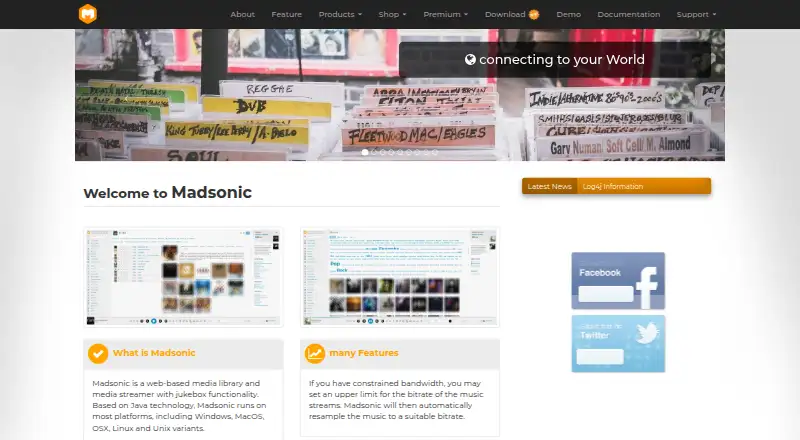
What Madsonic is
Madsonic is a web-based media library and streamer with jukebox functionality. It can stream music, movies, and photos, and supports audio and video formats including MP3, FLAC, OGG, and AAC. On-the-fly conversion and bitrate resampling help adapt playback to different formats and bandwidth needs. The maker says it can manage collections of 100,000 or more music files without limitations.
Users can play media through the built-in website or compatible Madsonic/Subsonic REST API clients; the free API supports XML, JSON, and JSONP. Playback options include Chromecast, Sonos, compatible DLNA/UPnP devices, and a local jukebox mode. Madsonic also lists integrations or support for Last.fm, Echonest, Musicbrainz, IMDb, and LDAP. Users can create playlists for others and share media with family and friends.
The free basic edition includes podcasts, artist and genre radio, AutoDJ, history, and advanced player controls. A 30-day trial provides access to premium features. Madsonic is open-source software under the GPL, and its listed platforms include web, Windows, macOS, Linux, iOS, and Android.
Good
- Streams music, movies, and photos.
- Supports MP3, FLAC, OGG, AAC, and other formats.
- Manages music collections of 100,000 or more files, according to the maker.
- Offers a free API with XML, JSON, and JSONP.
- Open-source software licensed under GPL.
- Includes playlists and media sharing.
Watch out
- Premium features are available for a 30-day trial before upgrading.
- Sonos, UPnP/DLNA, and Chromecast support are listed with Premium.
- Premium plan price is not provided in the listed plan details.
Who it suits
Madsonic suits people who want to organize and stream a personal media collection across web, desktop, and mobile platforms. It also fits users seeking jukebox playback, media sharing, or support for devices such as Sonos, Chromecast, and DLNA/UPnP players.
Verdict
Pick Madsonic if you want a self-managed media library with streaming, jukebox playback, sharing, and broad format support. Look elsewhere if you need the listed Premium device support or authentication features without moving beyond the free edition.
Plans and prices
From Madsonic's own pricing page, checked 22 Sep 2026.
| Plan | Price | What it gives you |
|---|---|---|
| Madsonic Free | Free | Artist-Hub Index · Folder-based security · Podcast feature · Artist Radio · AutoDJ · Genre and mood radio |
| Madsonic Premium | — | Personal madsonic.org server address · Sonos support · UPnP/DLNA support · Chromecast support · LDAP authentication · Advanced service integrations |
| FREE | Free | no extra feature · common free usage · single instance · no subscription |
| Professional | €195 a year | common extra feature · common private usage · multi instance · yearly subscription |
| Professional Go | €215 a month | common extra feature · common private usage · multi instance · monthly subscription |
| Enterprise | €295 a year | advanced API access · LDAP/Social access · server synchronisation · yearly subscription |
| Enterprise Go | €325 a month | common extra feature · common private usage · multi instance · monthly subscription |
| Lifetime | €14,800, paid once | all enterprise feature · advanced support · lifetime subscription |
| Commercial | Priced on request | advanced customizing support · advanced support · all enterprise feature · advanced business subscription |
The facts
Each one read from Madsonic's own pages, with the date it was checked.
What it does
- Clients and API
- Clients can use the built-in website or Madsonic/Subsonic REST API compatible clients; the free API supports XML, JSON, and JSONP.checked 11 Oct 2026
- Formats and transcoding
- It supports MP3, FLAC, OGG, AAC, and other audio or video formats, with on-the-fly conversion and bitrate resampling.checked 11 Oct 2026
- Integrations
- The maker lists Last.fm, Echonest, Musicbrainz, IMDb, Sonos, Chromecast, and LDAP integrations or support.checked 11 Oct 2026
- Library scale
- The maker says it can manage music collections of 100,000 or more files without limitations.checked 11 Oct 2026
- License
- Madsonic is open-source software licensed under GPL.checked 11 Oct 2026
- Media types
- The maker says Madsonic streams music, movies, and photos.checked 11 Oct 2026
- Product
- Madsonic is a web-based media library and media streamer with jukebox functionality.checked 11 Oct 2026
- Security
- The maker says users log in with username and password, receive different privileges, and that LDAP/Active Directory authentication and HTTPS/SSL are supported.checked 11 Oct 2026
- Sharing
- Users can create playlists to share with other users and share media with family and friends.checked 11 Oct 2026
- Support
- The maker lists a support forum and gives contact hours as Monday through Friday, 9:00 AM to 19:00 PM.checked 11 Oct 2026
Money
- Free edition
- The basic edition is free and includes features such as podcasts, artist and genre radio, AutoDJ, history, and advanced player controls.checked 11 Oct 2026
- Free plan
- Yeschecked 22 Sep 2026
- Trial
- The maker says premium features are available for 30 days to try before upgrading.checked 11 Oct 2026
The company
- Maker and location
- The site identifies Karel IT Service e.U. in Wieselburg, Austria, and names Karel Martin as company founder.checked 11 Oct 2026
Where it runs
- Playback devices
- Madsonic supports Chromecast, Sonos, and compatible DLNA/UPnP devices, and offers local jukebox mode.checked 11 Oct 2026
- Supported platforms
- web,Windows,macOS,Linux,iOS,Androidchecked 22 Sep 2026
The full review of Madsonic
Madsonic combines a web-based library for personal media with streaming and jukebox playback. It is best suited to people who want to manage and share their own collection, rather than browse a ready-made music catalog. Its free edition covers substantial library and playback needs, while several prominent device and authentication features require Premium.
Overview
Madsonic can organize and stream music, movies, and photos, with support for MP3, FLAC, OGG, AAC, and other audio and video formats. On-the-fly conversion and bitrate resampling help adapt media to different playback conditions. The maker says it can manage music collections of 100,000 or more files without limitations, making scale a particular strength for large personal libraries.
This is a self-managed media setup, so its appeal depends on wanting control of a collection and its playback. It is less suitable for someone whose priority is choosing from a ready-made streaming catalog.
Key features
Users can play media through the built-in website or compatible Madsonic/Subsonic REST API clients; the free API supports XML, JSON, and JSONP. That client flexibility, alongside local jukebox mode, makes Madsonic useful for both remote playback and playback where the library is managed. Playlists can be shared with other users, and media can be shared with family and friends.
The free edition includes podcasts, artist and genre radio, AutoDJ, listening history, and advanced player controls. The maker also names Last.fm, Echonest, Musicbrainz, and IMDb among its integrations or supported services. Chromecast, Sonos, and compatible DLNA/UPnP playback are supported, but those device connections are part of Premium, an important distinction for anyone building a setup around them.
Username-and-password login, user privileges, and HTTPS/SSL support provide basic access controls. LDAP and Active Directory authentication are also supported, but LDAP authentication is a Premium feature. Madsonic is open-source software under the GPL.
Pricing
Madsonic is freemium. Madsonic Free costs nothing and includes Artist-Hub Index, folder-based security, podcasts, Artist Radio, AutoDJ, and genre and mood radio. It is the sensible starting point for personal libraries that do not require Premium device support or authentication features.
Madsonic Premium has custom pricing. It adds a personal madsonic.org server address, Sonos, UPnP/DLNA and Chromecast support, LDAP authentication, and advanced service integrations. The maker offers a 30-day trial of Premium features before upgrading. Choose Premium if one of those additions is essential; otherwise, the free edition already covers a broad set of listening and library features.
The pricing information also presents separate plans: FREE at no cost, with no subscription, common free usage, and a single instance; Professional at €195 a year and Professional Go at €215 a month, both for private usage with multiple instances; and Enterprise at €295 a year, with advanced API access, LDAP/Social access, and server synchronisation. Enterprise Go costs €325 a month and includes common extra features, private usage, and multiple instances. Lifetime costs €14,800, paid once and includes all enterprise features and advanced support. Commercial has custom pricing as an advanced business subscription, with advanced customising support, advanced support, and all enterprise features. These tiers distinguish single-instance free use from multi-instance paid use, but the listed plan descriptions do not establish how these tiers relate to the Madsonic Free and Premium editions.
Platforms
Madsonic supports web, Windows, macOS, Linux, iOS, and Android, with API and self-hosted options also named. The range suits mixed-device households and people who want to run their own media setup, though the specific Chromecast, Sonos, and DLNA/UPnP playback options require Premium.
Who it's for
Madsonic is a strong fit for collectors with large libraries who value format flexibility, sharing, and multiple ways to access a self-managed collection. Its free radio, podcast, and AutoDJ features add variety without changing that library-first focus. It is a weaker fit for users who want a ready-made catalog or need Premium connections and authentication while staying on the free edition.
Pros and cons
- Pros: The maker says it can handle 100,000 or more music files without limitations, a useful scale claim for collectors.
- Pros: Broad format support, on-the-fly conversion, and bitrate resampling give users options for varied media and playback conditions.
- Pros: The free edition includes podcasts, radio, AutoDJ, history, and advanced player controls.
- Cons: Chromecast, Sonos, DLNA/UPnP, LDAP authentication, and advanced service integrations sit behind Premium, whose price is custom.
- Cons: Its library-first, self-managed approach will not suit listeners chiefly looking for a ready-made streaming catalog.
Alternatives
For a broader set of music streaming software options, compare services by whether they focus on personal libraries or supplied catalogs.
- Anghami is a freemium alternative with a free plan, trial, and Android, iOS, macOS, web, and Windows support; its Family Plan covers 6 accounts.
- Audius is a free option across Android, iOS, Linux, macOS, web, and Windows. Its free plan covers streaming, uploads, and promotion; paid content is priced by artists, with a 10% network fee on music sales.
- IDAGIO offers a free plan with 6 collection items and Premium Audio with offline mobile playback and ad-free listening, making its stated free allowance a clear constraint to weigh.
- Amazon Music offers Amazon Music Prime included with Prime membership, with ad-free music and podcasts and offline listening for All-Access Playlists.
- Deezer offers an ad-supported free plan with over 120 million songs, a better match for someone prioritizing a supplied catalog over a self-managed library.
- Playary has a free plan covering songs and podcasts, among other media, for readers comparing free catalog-style options.
- AWA has a free plan capped at 20 hours of playback per month; its Standard plan offers unlimited full-track and offline playback.
- Calm Radio offers a free plan with 200 music channels, guided sleep and meditation, nature sounds, and scenic videos, suiting listeners seeking those formats.
Verdict
Choose Madsonic if you want to organize and stream a large personal media library with flexible formats, sharing, and jukebox playback. Its free edition is capable for core library use, but the main reason to look elsewhere is a need for Premium device connections or authentication without custom-priced upgrading.
Getting started
- Visit https://www.madsonic.org/.
- Choose a platform from the listed web, Windows, macOS, Linux, iOS, and Android options.
- Start with the free basic edition or try premium features for 30 days.
- Use the website or a Madsonic/Subsonic REST API compatible client to access media.
Limits worth knowing
The free basic edition does not include the Premium-listed personal madsonic.org server address, Sonos, UPnP/DLNA, Chromecast, LDAP authentication, or advanced service integrations. Premium features are available for 30 days to try before upgrading.
Questions
Is Madsonic free?
Yes. Madsonic has a free basic edition, and the Madsonic Free plan is listed as free.
Is there a free trial?
Yes. Premium features are available for a 30-day trial before upgrading.
Which platforms does Madsonic support?
The listed platforms are web, Windows, macOS, Linux, iOS, and Android.
Is Madsonic open source?
Yes. Madsonic is licensed under the GPL.
What does Madsonic Premium add?
The listed Premium features include a personal madsonic.org server address, Sonos, UPnP/DLNA and Chromecast support, LDAP authentication, and advanced service integrations.
Who makes Madsonic?
The site identifies Karel IT Service e.U. in Wieselburg, Austria, and names Karel Martin as company founder.
Alternatives to Madsonic
- 1
Napster
Free planOpen sourceAndroidiOSWebAPI8.6From $19 a month - 2

Amazon Music
Free planAndroidiOSWebAPI8.2From $5.99 a month - 3
Musopen
Free planAndroidiOSWebmacOS8.2From $55 a year - 4
Rakuten Music
Free planAndroidiOSWeb8.1Free plan - 5
Anghami
Free planAndroidiOSWebmacOS8.0Free plan - 6
IDAGIO
Free planAndroidiOSWebmacOS7.8From $9.99 a month