Macrorit Data Wiper
Macrorit Data Wiper is a Windows utility that overwrites storage sectors to make erased data harder to recover.
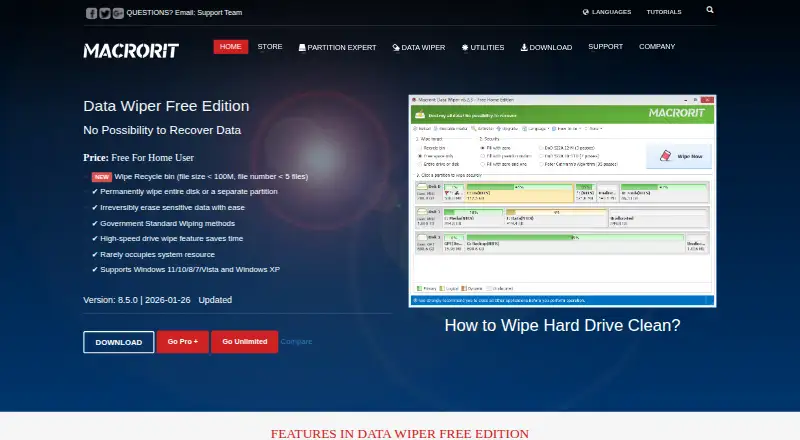
What Macrorit Data Wiper is
Macrorit Data Wiper is a Windows utility that overwrites storage sectors to make erased data harder to recover. The free edition wipes non-system disks, data partitions or volumes, external drives, and eligible Recycle Bin contents. Its Recycle Bin wiping is limited to files under 100 MB and fewer than five files. The software offers six wiping methods, and the maker says its overwriting process meets US government requirements including DoD 5220.22-M. Listed file systems include FAT16/32, NTFS, Ext2/3/4, ReFS, and Apple HFS+, among others. The free edition supports Windows 11, 10, 8, 7, Vista, and XP. Pro+ adds free-space wiping, system-partition wiping without bootable media, unlimited Recycle Bin wiping, and the option to erase multiple disks at once. Paid editions also offer bootable media; Pro+ permits commercial use and lists support for several disk types, USB drives, hardware RAID, and virtual disks. Optical discs must be pulverized rather than wiped with the software. Data Wiper Pro+ Edition costs $29.95, paid once; Data Wiper Unlimited Edition costs $99.95, paid once.
Good
- Free edition wipes non-system disks and external drives
- Six wiping methods are offered
- Supports Windows 11 through XP
- Pro+ includes bootable media
Watch out
- Free Recycle Bin wiping has strict file limits
- Free edition cannot wipe system partitions
- Optical media must be destroyed physically
Who it suits
It suits Windows users who need to wipe non-system disks, partitions, volumes, or external drives. The paid editions add options for system partitions, free space, multiple disks, and commercial use.
Verdict
The free edition covers common non-system storage wiping, while Pro+ and Unlimited add broader wiping and deployment options. Check the Recycle Bin limits and edition scope before choosing.
Plans and prices
From Macrorit Data Wiper's own pricing page, checked 4 Oct 2026.
| Plan | Price | What it gives you |
|---|---|---|
| Data Wiper Free Edition | Free | Free for home users · recycle-bin wipe limited to files under 100 MB and fewer than 5 files · wipes non-system disks |
| Data Wiper Pro+ Edition | $29.95, paid once | One license for one computer · home and business user options · lifetime free upgrades · from $29.95 |
| Data Wiper Unlimited Edition | $99.95, paid once | One license for multiple computers in one company · options for 5, 30, or unlimited computers · lifetime free upgrades · from $99.95 |
The facts
Each one read from Macrorit Data Wiper's own pages, with the date it was checked.
What it does
- Bootable media
- Pro+ includes an option to make bootable media.checked 4 Oct 2026
- Commercial use
- Pro+ permits commercial use and charged technical services for clients.checked 4 Oct 2026
- Download formats
- The Pro+ page offers an install package, a portable edition, or both, and lists 32-bit and 64-bit application versions.checked 4 Oct 2026
- File systems
- The maker lists support for FAT16/32, NTFS, Ext2/3/4, ReFS, Apple HFS+, and other file systems.checked 4 Oct 2026
- Hardware support
- The Pro+ page lists support for IDE, SCSI, SATA, GPT and uEFI disks, USB flash drives, hardware RAID, and virtual disks in VMware, VirtualBox, and Virtual PC.checked 4 Oct 2026
- Paid edition features
- Pro+ adds free-space wiping, system-partition wiping without bootable media, unlimited Recycle Bin wiping, and the ability to erase multiple disks at once.checked 4 Oct 2026
- Purpose
- Macrorit Data Wiper overwrites storage sectors to erase data and prevent recovery.checked 4 Oct 2026
- Security limitation
- The maker says optical media such as CDs and DVDs must be destroyed by pulverizing rather than wiped with the software.checked 4 Oct 2026
- Support and refund
- The maker advertises premium support and a 30-day money-back guarantee for paid editions.checked 4 Oct 2026
- Wiping methods
- The product offers six wiping methods, and the maker says its storage-overwriting process complies with US government requirements including DoD 5220.22-M.checked 4 Oct 2026
The company
- Company
- Macrorit identifies itself as Macrorit from Bada Technology Co., Ltd. and says it was founded at the end of 2012.checked 4 Oct 2026
- Founded
- 2012checked 28 Sep 2026
Money
- Free edition features
- The free edition wipes non-system disks, data partitions or volumes, external drives, and qualifying Recycle Bin contents.checked 4 Oct 2026
Where it runs
- Windows support
- The free edition supports Windows 11, 10, 8, 7, Vista, and XP.checked 4 Oct 2026
The full review of Macrorit Data Wiper
Macrorit Data Wiper is a Windows utility for overwriting entire disks, partitions and other storage so deleted data is difficult to recover. It suits home users, repair shops and technicians preparing drives for reuse or disposal, rather than people who need to shred individual files. The free edition covers routine non-system erasure, while paid editions matter when system disks, simultaneous jobs or commercial deployment are involved.
Overview
The free edition can wipe non-system disks, data partitions or volumes, external drives and qualifying Recycle Bin contents. Six wiping methods let users match an erasure procedure to their own policy, and Macrorit says its sector-overwriting process complies with US government requirements including DoD 5220.22-M. That makes it more suitable for documented storage disposal than a basic delete operation, though it remains a drive-focused tool rather than a file-and-folder shredder.
Support includes FAT16/32, NTFS, Ext2/3/4, ReFS, Apple HFS+ and other file systems. Optical media is outside its remit: CDs and DVDs should be destroyed by pulverizing them instead of being wiped in software.
Key features
- Whole-drive and partition wiping: Free users can clear non-system disks, data volumes and external drives. This is practical for a secondary hard disk or USB device being handed to someone else, but it cannot erase the active Windows partition.
- Six overwrite methods: The range accommodates different internal or organisational erasure rules. The maker's stated DoD 5220.22-M compliance will matter to readers whose disposal process calls for a recognised government method.
- Pro+ expansion: Pro+ adds free-space wiping, system-partition wiping without bootable media, unlimited Recycle Bin wiping and simultaneous erasure of multiple disks. These additions address the free edition's most consequential restrictions.
- Hardware and virtual-disk coverage: Pro+ lists IDE, SCSI, SATA, GPT and uEFI disks, USB flash drives, hardware RAID, and virtual disks in VMware, VirtualBox and Virtual PC. It also includes a bootable-media creation option, useful when Windows cannot be used to erase the target system disk.
- Deployment formats: Pro+ is offered as an install package, a portable edition, or both, with 32-bit and 64-bit application versions. Commercial users may provide charged technical services to clients under that edition.
Pricing
| Plan | Price and terms | What it fits |
|---|---|---|
| Data Wiper Free Edition | free | Free for home users; wipes non-system disks. Recycle Bin wiping is limited to files under 100 MB and fewer than five files. |
| Data Wiper Pro+ Edition | $29.95, paid once, billed from $29.95 | One license for one computer; home and business options; lifetime free upgrades. |
| Data Wiper Unlimited Edition | $99.95, paid once, billed from $99.95 | One license for multiple computers in one company, with options for 5, 30 or unlimited computers; lifetime free upgrades. |
The Free Edition is a strong starting point for occasional home disposal, but its Recycle Bin quota is restrictive and it excludes system partitions, free-space wiping and multi-disk work. Pro+ is the sensible purchase for one workstation, a technician or a business that needs those capabilities, while Unlimited is aimed at organisations deploying the utility across several company computers. Paid editions include premium support and a 30-day money-back guarantee.
Platforms
Macrorit Data Wiper runs on Windows 11, 10, 8, 7, Vista and XP. The broad version range helps maintain older PCs, while Pro+'s listed 32-bit and 64-bit packages cover common Windows installations. Macrorit identifies itself as Macrorit from Bada Technology Co., Ltd., founded at the end of 2012.
Who it's for
Choose it for clearing secondary drives, partitions, removable storage or Recycle Bin data before resale, reuse or disposal. Pro+ is better for support technicians, small businesses and anyone needing system-disk, free-space, bootable-media or concurrent-drive erasure. Unlimited fits a company managing multiple computers under one licence. It is not the right choice when the job is selective file shredding, or when optical discs are the media being retired.
Pros and cons
- Pros: Free whole non-system-drive wiping; six overwrite methods; broad file-system support; Pro+ supports system and free-space wiping, multiple disks, bootable media and virtual disks; lifetime upgrades on paid licences; commercial-service rights with Pro+.
- Cons: The free plan's Recycle Bin limit is under 100 MB and fewer than five files; free users cannot wipe system partitions or free space; file-and-folder shredding is not provided; optical media requires physical destruction; Unlimited licensing is restricted to computers within one company.
Alternatives
For a wider comparison, see File Shredder Software. Pick Active@ KillDisk instead if Linux or macOS support matters and a personal one-time licence at 64.95 USD is acceptable. BleachBit is the better fit for free, open-source cleaning across Linux, macOS and Windows. Choose HDShredder for Linux support and a private-use free tier covering drives up to 4 TB. R-Wipe & Clean suits readers seeking Windows or macOS trace-cleaning with a free trial. nwipe is a free Linux, self-hosted, command-line and ncurses option. Alternate File Shredder is a free, open-source Windows alternative. Autoruns is for controlling startup entries, not storage wiping. CBL Data Shredder is another free Windows choice for low-level drive formatting and custom wipe methods.
Verdict
Macrorit Data Wiper is a good choice for Windows users who need recognised, whole-storage overwriting, especially when the free edition's non-system scope is enough. Buy Pro+ for system, free-space or multi-drive work on one computer, and Unlimited for company-wide deployment. Look elsewhere if you need individual file shredding, macOS or Linux support, or a tool for optical discs.
Alternatives to Macrorit Data Wiper
- 1
Active@ KillDisk
Free planLinuxmacOSWindows7.6$64.95 one-time - 2

BitRaser File Eraser
Free planAPILinuxmacOSWindows7.4From $39.99 a year - 3

BleachBit
Free planOpen sourceLinuxmacOSWindows7.4Free plan - 4
HDShredder
Free planLinuxmacOSSelf-hostedWindows7.4€19.90 one-time - 5

R-Wipe & Clean
Free planmacOSWindows7.4$28.99 one-time - 6

D-Secure File Eraser
WebAPILinuxmacOS7.2From $40 a year