Lockpad
Lockpad is a self-hosted notes app that runs on hardware you own.
What Lockpad is
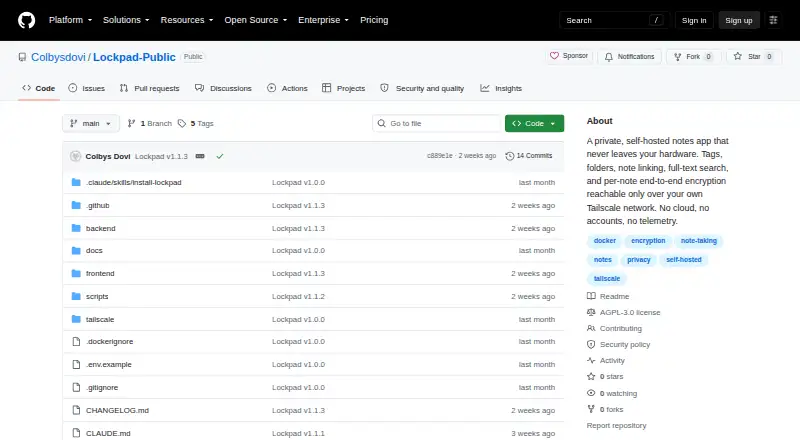
Lockpad is a self-hosted notes app that runs on hardware you own. It requires Docker and is used through the web, with installation instructions for Docker Compose and source builds. Notes can be filed in folders, tagged, pinned or linked to other notes with backlinks. The rich-text editor supports headings, lists, checklists, code blocks, images and Markdown shortcuts, while Postgres powers full-text search. Individual notes can be encrypted in the browser with Argon2id and AES-GCM; the key and plaintext remain in the browser tab. Lockpad imports from Google Keep, Standard Notes, HTML, Markdown and CSV. Libraries export as JSON, and individual notes as Markdown or PDF, though locked notes cannot be exported while locked. The project states that it makes no outbound network requests and has no analytics or telemetry. It is free and open source under GNU AGPL-3.0. Lockpad is designed for one person, with one password for an installation and no user accounts or real-time collaboration.
Good
- Free and open source under GNU AGPL-3.0.
- Imports from Google Keep and Standard Notes.
- Supports folders, tags, backlinks and pinned notes.
- Per-note browser encryption is available.
- The project reports no telemetry or outbound requests.
Watch out
- Requires Docker and self-hosting.
- Designed for one person, with no user accounts.
- No real-time collaboration.
- Locked notes cannot be exported while locked.
Who it suits
Lockpad suits an individual who wants a self-hosted web notes app with import and export options. It may also fit someone who wants per-note browser encryption and is comfortable deploying Docker.
Verdict
Lockpad offers a broad set of note organization, search, encryption and export functions for a single-person installation. It requires Docker, and private remote access guidance recommends Tailscale Serve rather than port forwarding or Tailscale Funnel.
Plans and prices
From Lockpad's own pricing page, checked 9 Oct 2026.
| Plan | Price | What it gives you |
|---|---|---|
| Lockpad | Free | Self-hosted · single-person app · AGPL-3.0 |
The facts
Each one read from Lockpad's own pages, with the date it was checked.
What it does
- Backups
- The backup script retains the last 14 database dumps, and locked notes cannot be exported while locked.checked 9 Oct 2026
- Deployment
- Lockpad requires Docker and runs as a self-hosted web app, with installation instructions for Docker Compose and source builds.checked 9 Oct 2026
- Encryption
- Notes can be encrypted in the browser per note using Argon2id and AES-GCM; the key and plaintext stay in the browser tab.checked 9 Oct 2026
- Import and export
- It imports from Google Keep, Standard Notes, HTML, Markdown, and CSV, and exports libraries as JSON or individual notes as Markdown or PDF.checked 9 Oct 2026
- Integrations
- The README lists imports from Google Keep and Standard Notes and describes Tailscale for private remote access.checked 9 Oct 2026
- License
- Lockpad is provided under the GNU AGPL-3.0 license.checked 9 Oct 2026
- Limits
- Lockpad is a single-person app with one password for the whole installation and no user accounts.checked 9 Oct 2026
- Organization
- It supports folders, tags, note-to-note links with backlinks, and pinned notes.checked 9 Oct 2026
- Privacy
- The README says Lockpad makes no outbound network requests and has no analytics or telemetry.checked 9 Oct 2026
- Purpose
- Lockpad is a self-hosted notes app that runs on hardware you own.checked 9 Oct 2026
- Real-time collaboration
- Nochecked 21 Sep 2026
- Remote access
- The project recommends Tailscale Serve for private HTTPS access from personal devices and warns against port forwarding or Tailscale Funnel.checked 9 Oct 2026
- Search
- Full-text search across notes is powered by Postgres.checked 9 Oct 2026
- Security reporting
- Security vulnerabilities should be reported privately by email or through a private GitHub security advisory, not as a public issue.checked 9 Oct 2026
- Support
- The project states that it has no support contract, uptime commitment, or on-call operator.checked 9 Oct 2026
- Writing
- The editor supports rich text, including headings, lists, checklists, code blocks, images, and Markdown shortcuts.checked 9 Oct 2026
Money
- Free plan
- Yeschecked 21 Sep 2026
Where it runs
- Supported platforms
- webchecked 21 Sep 2026
Alternatives to Lockpad
- 1
Cryptee
Free planOpen sourceAndroidiOSWebLinux8.6From €3 a month - 2
PrivacyNotes
Free planOpen sourceAndroidiOSWebAPI8.4Free plan - 3
Turtl
Free planOpen sourceAndroidAPIExtensionLinux8.4From $3 a month - 4
Notesnook
Free planAndroidiOSWebLinux8.0From $1.99 a month - 5

Dash
Free planAndroidiOSWebmacOS7.7Free plan - 6

Joplin
AndroidiOSWebExtension7.6From €2.99 a month