
LivingWriter
LivingWriter is writing software for drafting and organizing manuscripts, with chapters and subchapters in its editor.
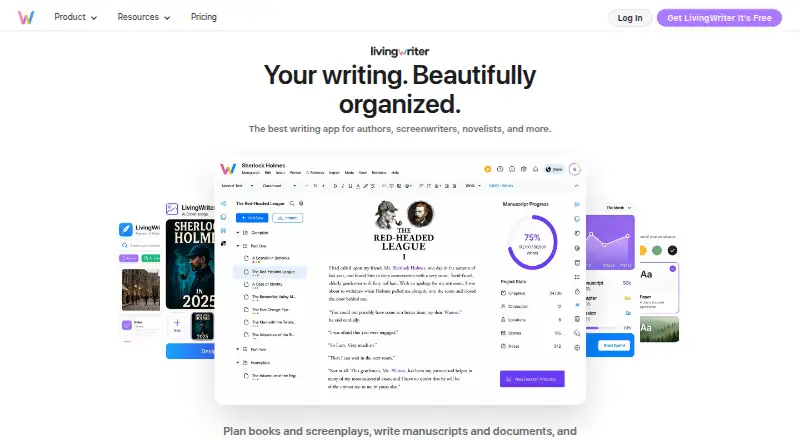
What LivingWriter is
LivingWriter is writing software for drafting and organizing manuscripts, with chapters and subchapters in its editor. Its Free plan supports one manuscript of up to 25,000 words and includes PDF export plus three AI requests per month. The listed platforms are web, Windows, macOS, iOS, and Android, with mobile apps available. Publishing tools, real-time collaboration, and version history are listed features, but the service does not offer offline mode. The Pro plan adds unlimited manuscripts and word count, Word import, DOCX and print export, writing goals, a Stash, a Research Board, Canva and Google Drive integration, sharing, collaboration, and 25 AI requests monthly. Pro + AI includes Pro features and unlimited AI requests, along with AI tools for outlines, rewriting, analysis, summaries, screenplay conversion, chat, and image creation. LivingWriter is made by a company headquartered in Albany, New York. Its pricing model is freemium, with a seven-day trial listed.
Good
- Free plan includes one manuscript.
- Free plan allows up to 25,000 words.
- Exports PDF on the Free plan.
- Supports real-time collaboration and version history.
- Mobile apps are available.
Watch out
- No offline mode.
- Free plan is limited to one manuscript.
- Free plan has a 25,000-word cap.
- Free plan includes three AI requests per month.
Who it suits
LivingWriter may suit writers who want a manuscript editor with chapters and subchapters, publishing tools, and collaboration. The Free plan fits a single manuscript within its 25,000-word limit; users needing offline access may want to note that it is unavailable.
Verdict
LivingWriter provides manuscript organization across desktop, web, and mobile platforms, with a free tier and paid tiers that add capacity and tools. Its lack of offline mode and the Free plan's manuscript and word limits are worth considering.
Plans and prices
From LivingWriter's own pricing page, checked 19 Sep 2026.
| Plan | Price | What it gives you |
|---|---|---|
| Free | Free | One manuscript · Up to 25,000 words · Full editor with chapters and subchapters · Export to PDF · 3 AI requests per month |
| Pro | — | Unlimited manuscripts and word count · Import from Word and export to DOCX and print · Goals, Stash, and Research Board · Canva and Google Drive integration · Sharing and collaboration · 25 AI requests per month |
| Pro + AI | — | Everything in Pro · Unlimited AI requests across all features · AI outlines and element generation · AI rewrite, analysis, and summarization · AI screenplay conversion · AI chat and image creation |
The facts
Each one read from LivingWriter's own pages, with the date it was checked.
What it does
- Export formats
- extensivechecked 19 Sep 2026
- Offline mode
- Nochecked 19 Sep 2026
- Publishing tools
- Yeschecked 19 Sep 2026
- Real-time collaboration
- Yeschecked 19 Sep 2026
- Version history
- Yeschecked 19 Sep 2026
Money
- Free plan
- Yeschecked 19 Sep 2026
The company
- Headquarters
- Albany, New York, United Stateschecked 28 Sep 2026
Where it runs
- Mobile apps
- Yeschecked 19 Sep 2026
The full review of LivingWriter
LivingWriter is a manuscript-writing app for authors who want their chapters, planning, and publishing tools together across desktop, web, and mobile. It suits writers who work online and need room to grow beyond a single book; its capped free plan is useful for a modest project, but not a durable fit for a large manuscript.
Overview
LivingWriter combines a full editor with chapter and subchapter organization, publishing tools, version history, and real-time collaboration. The free tier makes it possible to write and export a short manuscript without paying, while Pro removes the manuscript and word-count caps and adds import, export, planning, and collaboration tools. The key trade-off is that LivingWriter has no offline mode, so writers who need to work without an internet connection should look elsewhere.
Key features
Manuscript organization and publishing
The Free plan includes the full editor, chapters, subchapters, and PDF export. That is enough for an author drafting one shorter book who wants a structured workspace and a basic way to share a finished copy. Pro adds Word import, DOCX and print export, plus Goals, Stash, and Research Board; those additions better suit authors who bring existing drafts into the app or need more planning and publishing options.
Collaboration and history
Real-time collaboration and version history support shared work and give writers a way to track changes. Collaboration is included in Pro, but not in the Free plan’s stated feature set, so authors choosing the free tier should not count on it as a team workspace.
AI tools
Free includes 3 AI requests per month, a small allowance for occasional use rather than a regular AI-assisted workflow. Pro raises that to 25 requests per month. Pro + AI removes the request cap and adds outlines, element generation, rewriting, analysis, summarization, screenplay conversion, chat, and image creation, making it the relevant tier for authors who expect to use AI across several stages of a project.
Pricing
LivingWriter uses a freemium model with a 7-day trial. The Free plan costs nothing and allows one manuscript of up to 25,000 words. It includes the full editor, chapter and subchapter organization, PDF export, and 3 AI requests each month. The manuscript and word limits make it a test bed or a home for shorter work, not a practical choice for multiple or long books.
Pro has custom pricing. It removes both manuscript and word-count limits and adds Word import, DOCX and print export, Goals, Stash, Research Board, Canva and Google Drive integration, sharing and collaboration, and 25 monthly AI requests. It is the sensible step up for authors managing multiple drafts or needing those workflow tools, though the price cannot be weighed against the feature set here.
Pro + AI also has custom pricing. It includes everything in Pro and unlimited AI requests, along with AI outlines and element generation, rewriting, analysis, summarization, screenplay conversion, chat, and image creation. Writers who do not need that broader AI toolkit can avoid paying for capabilities beyond Pro’s monthly allowance.
Platforms
LivingWriter is available on the web, Windows, macOS, iOS, and Android, with mobile apps as well as desktop access. That range suits authors who move between devices, but the lack of offline mode makes internet access a requirement rather than an optional convenience.
Who it's for
LivingWriter is a strong fit for authors who want one organized writing space, use multiple devices, and can work online. The Free plan suits a single project under 25,000 words; Pro is better for authors with multiple or longer manuscripts, collaborative work, or broader import and export needs. Pro + AI is aimed at writers who expect to rely on AI tools frequently. It is a weaker choice for anyone who needs offline writing or whose free project will exceed the plan’s caps.
Pros and cons
- Pro: The Free plan includes a full editor and PDF export, so a writer can complete and share a short, single manuscript without a subscription.
- Pro: Pro removes the manuscript and word-count ceilings and adds planning, collaboration, and wider import and export options for larger workflows.
- Pro: Web, desktop, and mobile availability supports moving between devices.
- Con: No offline mode rules it out for writers who need to draft without a connection.
- Con: Free is limited to one manuscript and 25,000 words, which can force an upgrade as a book grows.
- Con: Pro and Pro + AI have custom pricing, making it harder to compare their cost with alternatives.
Alternatives
For other options, browse Book Writing Software and Writing Apps.
Campfire is another freemium option with a free tier and apps across mobile, desktop, and web; consider it if you are comparing writing and worldbuilding tools.
Novlr has a free tier for up to two projects, with online syncing, notes, a planning grid, focus mode, writing sprints, and analytics; choose it if those tools and a two-project cap suit your needs.
Plot Factory offers a Basic plan with one story, one universe, and 250-word daily narrations; consider it if that bounded setup fits your project.
Dabble has a paid Writer plan at $19 a month, with unlimited manuscripts, cloud backup and sync, access on any device, goals, and stats; choose it if those features justify a paid plan from the outset.
bibisco offers a free Community Edition with unlimited projects and novel planning and organization tools; consider it if unlimited project capacity matters more than LivingWriter’s listed tier features.
NovelPad is a paid option with a $15 a month Pro Cloud Monthly plan, desktop and web access, cloud sync, and beta-reader sharing; consider it if those sharing tools fit your workflow.
Squibler has a free web plan with 1,000 AI credits per month for trying book and screenplay creation; consider it if experimenting with AI-assisted creation is the priority.
Atticus is a paid alternative with writing and formatting tools, EPUB, PDF, and DOCX export, and online and offline access; consider it if offline use and formatting are priorities.
Verdict
Choose LivingWriter if you want organized manuscript writing across devices, plan to work online, and value its combination of planning, collaboration, and publishing tools. Its free tier is a useful starting point for one shorter book, while Pro removes the limits that can obstruct a continuing writing practice. Look elsewhere if offline access is essential, or if you need to know a paid plan’s price before committing.
Alternatives to LivingWriter
- 1

Story Architect
Free planOpen sourceAndroidiOSLinuxmacOS9.2From $4.17 a month - 2

Overleaf
Free planOpen sourceWebAPIExtensionLinux9.1From $8.25 a month - 3

Celtx
Free planAndroidiOSWebExtension9.0From $11.24 a month - 4

Substack
Free planAndroidiOSWebAPI9.0$50 one-time - 5

WriterDuet
Free planAndroidiOSWebLinux9.0From $9.99 a month - 6

Calmly Writer
Free planAndroidWebLinuxmacOS8.6Free plan