Little Argyll GUI
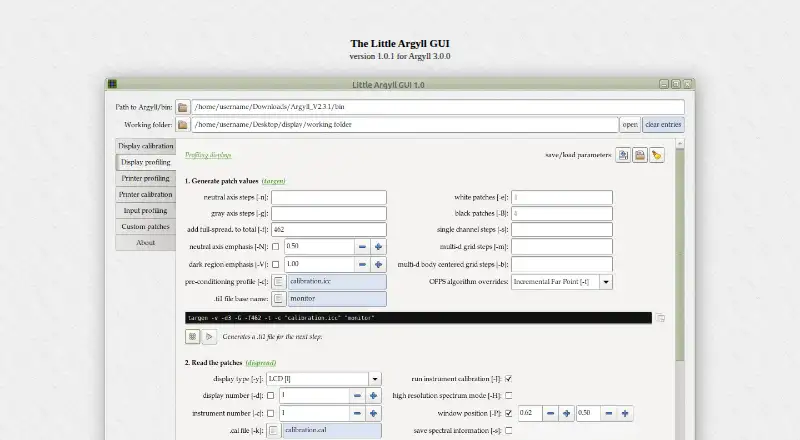
Little Argyll GUI is a graphical front end for ArgyllCMS, designed to make creating and using its commands more approachable through interface controls.
What Little Argyll GUI is
Little Argyll GUI is a graphical front end for ArgyllCMS, designed to make creating and using its commands more approachable through interface controls. Saved parameter sets support display and printer calibration and profiling, as well as profiling cameras and scanners. The program can create custom spectrum files for daylight series illuminants with selectable ultraviolet filtering. It can also create printer patch sets for grays, near-grays, or tones such as sepia. Links to Argyll documentation appear throughout the interface. Version 1.0.1 is a Python 3 script with a GTK 3 interface using PyGObject, and is an update for Argyll 3.0.0; some parameters are absent in older Argyll versions. Little Argyll GUI runs on Linux, macOS, and Windows, with setup instructions provided for each. The maker says most Linux users with Python 3 can run it out of the box. On the maker’s Windows 10 system using MinGW-w64, the background selector does not work, although everything else does. Use requires a color measurement device, such as an i1 Pro 3 or ColorChecker Studio. The software is released under the GNU General Public License and costs 5.00 USD as a one-time payment.
Good
- Supports display, printer, camera, and scanner profiling
- Creates custom spectrum files and printer patch sets
- Documentation links appear throughout the interface
- Runs on Linux, macOS, and Windows
Watch out
- Requires a color measurement device
- Windows background selector fails in the maker’s setup
- Some parameters are absent in older Argyll versions
- Costs 5.00 USD as a one-time payment
Who it suits
Little Argyll GUI suits users who need ArgyllCMS controls for calibration or profiling and have a color measurement device. It is available for Linux, macOS, and Windows.
Verdict
Little Argyll GUI adds a graphical interface for a range of ArgyllCMS calibration and profiling tasks. Check the Argyll version and platform notes, and plan for the required measurement device.
Plans and prices
From Little Argyll GUI's own pricing page, checked 4 Oct 2026.
| Plan | Price | What it gives you |
|---|---|---|
| Little Argyll GUI | $5, paid once | Download: 71.3 KB · version 1.0.1 for Argyll 3.0.0 · A one-time payment of $5.00 is requested |
The facts
Each one read from Little Argyll GUI's own pages, with the date it was checked.
What it does
- Argyll version
- Version 1.0.1 is an update for Argyll 3.0.0, and a few parameters are absent in older Argyll versions.checked 4 Oct 2026
- Custom patch sets
- It can create custom patch sets for grays, near-grays, or specific tones such as sepia, and add them to printer profile patch sets.checked 4 Oct 2026
- Custom spectra
- It can create custom spectrum files for daylight series illuminants with selectable ultraviolet filtering.checked 4 Oct 2026
- Documentation links
- Links to Argyll documentation are provided throughout the interface.checked 4 Oct 2026
- Hardware context
- The maker says use requires a color measurement device, giving an i1 Pro 3 and ColorChecker Studio as examples.checked 4 Oct 2026
- License
- The maker states that Little Argyll GUI is released under the GNU General Public License.checked 4 Oct 2026
- Profiling tasks
- Saved parameter sets can be used for display and printer calibration and profiling, and for profiling cameras and scanners.checked 4 Oct 2026
- Purpose
- Little Argyll GUI is a front end for the ArgyllCMS color management system that uses graphic elements to simplify creation and use of ArgyllCMS commands.checked 4 Oct 2026
- Technology
- Version 1.0.1 is a Python 3 script with a GTK 3 user interface using PyGObject.checked 4 Oct 2026
Where it runs
- Linux setup
- The maker says most Linux users with Python 3 installed should be able to run the script out of the box, with Argyll running in the built-in VTE terminal.checked 4 Oct 2026
- macOS setup
- The maker provides macOS instructions using Homebrew and says they were tested on the maker’s Mac mini.checked 4 Oct 2026
- Windows limitation
- On the maker’s Windows 10 system using MinGW-w64, the background selector does not work, while everything else does.checked 4 Oct 2026
- Windows setup
- The maker provides Windows installation instructions using MSYS2 and says the instructions were tested on Windows 10.checked 4 Oct 2026
Alternatives to Little Argyll GUI
- 1
ArgyllCMS
Free planOpen sourceAPILinuxmacOSSelf-hosted7.4Free plan - 2
EIZO ColorNavigator 7
Free planAPILinuxmacOSWindows6.8Free plan - 3
PatternSpace
Free planmacOS6.4$39.99 one-time - 4
QUBYX PerfectLum
LinuxmacOSWindows6.4$480 one-time - 5
ColourSpace
Free planmacOSWindows6.3Free plan - 6
DisplayCAL
Free planLinuxmacOSWindows6.2Free plan