ColourSpace
ColourSpace is display calibration software for Windows and macOS.
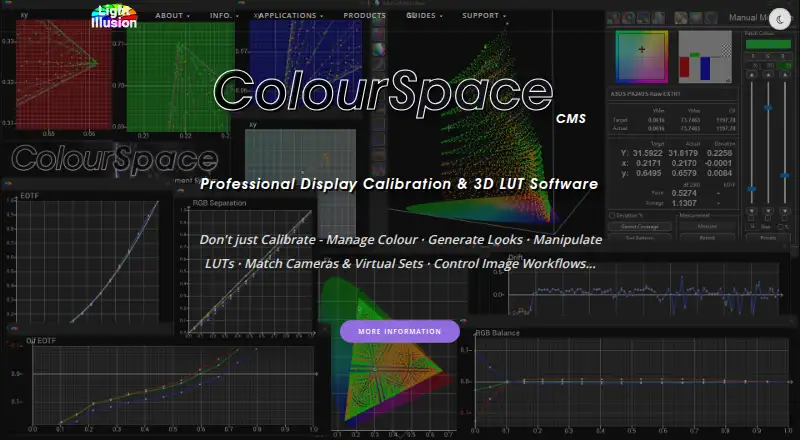
What ColourSpace is
ColourSpace is display calibration software for Windows and macOS. It supports LUT calibration, multi-monitor calibration and HDR calibration, giving users tools to calibrate individual displays or multi-screen setups and work with HDR displays. ICC profile export is not supported. ColourSpace is paid, with pricing from £125, and there is no free plan. It runs on Windows; macOS use is available through Windows emulation. The product is offered by Light Illusion, whose website is https://lightillusion.com/. Its headquarters are in Buntingford, Hertfordshire, United Kingdom. Those considering it should note the distinction between its listed platforms and supported use: Windows is supported directly, while macOS requires emulation. Its stated calibration features are LUT, multi-monitor and HDR calibration; the listed lack of ICC profile export may matter to workflows that require that output.
Good
- Supports LUT calibration.
- Supports multi-monitor calibration.
- Includes HDR calibration support.
- Available for Windows and macOS via emulation.
Watch out
- No free plan.
- Starts from £125.
- ICC profile export is not supported.
- macOS requires Windows emulation.
Who it suits
ColourSpace suits people who need LUT, multi-monitor or HDR display calibration on Windows. Mac users can consider it if Windows emulation works for their setup.
Verdict
ColourSpace covers LUT, multi-monitor and HDR calibration, but does not export ICC profiles. It is paid from £125, and macOS use depends on Windows emulation.
Plans and prices
From ColourSpace's own pricing page, checked 7 Oct 2026.
| Plan | Price | What it gives you |
|---|---|---|
| ColourSpace ZRO | Free | Manual calibration and display verification · no LUT capability · no Light Illusion support or customer downloads · cannot upgrade to another ColourSpace version |
| ColourSpace DPS | — | Manual calibration · volumetric 3D graphs · display characterisation · LUT generation for assessment · no direct Light Illusion support |
| ColourSpace Rental | — | XPT, PRO, CAL, LTE, HTP, or HTL options · Windows, or Mac via Windows emulation · no direct technical or operational support · compatible probe required · 5-day rental |
The facts
Each one read from ColourSpace's own pages, with the date it was checked.
Money
- Free edition limitation
- ColourSpace ZRO is limited to manual calibration and verification and does not provide LUT capability, 3D volumetric graphs, or calibration reports.checked 7 Oct 2026
- Trial limitation
- Rental licenses provide five days of use and do not include direct technical or operational support from Light Illusion.checked 7 Oct 2026
What it does
- Graphs
- ColourSpace includes interactive volumetric 3D graphs for assessing measured colour points and their errors.checked 7 Oct 2026
- Integrations
- The maker lists integrations with displays and video systems including ASUS ProArt, EIZO, BenQ, LG TVs, AJA ColorBox, Lumagen Radiance, and madVR Envy.checked 7 Oct 2026
- License checks
- Licensing requires internet access to reach Light Illusion's license servers for activation and periodic checks, with a grace period if a check cannot connect.checked 7 Oct 2026
- License limits
- Standard licenses are for one PC, are not floating licenses, and can be moved by the user through up to five deactivation and activation cycles.checked 7 Oct 2026
- LUT size
- Higher license levels support native LUT generation at 1024³ and beyond.checked 7 Oct 2026
- Operating system
- ColourSpace is a native Windows x64 application; the maker says it can run on Mac using full Windows emulation and describes a native macOS version as in development.checked 7 Oct 2026
- Privacy and encryption
- Light Illusion's privacy notice says it uses SSL certificates to verify its identity to browsers and encrypt data submitted to it.checked 7 Oct 2026
- Probe support
- Supported probes listed by the maker include Calibrite i1D3, Klein K10-A and K80, Jeti, X-Rite, and selected built-in ASUS, Dell, and EIZO probes.checked 7 Oct 2026
- Profiling and LUTs
- The software measures display performance through profiling and uses the profile to generate calibration LUTs.checked 7 Oct 2026
- Purpose
- ColourSpace provides display calibration and colour management for professional film, post-production and broadcast work, medical environments, Pro AV, and home cinema.checked 7 Oct 2026
- Support
- Direct purchases include a multi-level support contract with remote training, discussion forums, email, and phone support.checked 7 Oct 2026
- Test pattern generators
- ColourSpace supports pattern generation through direct HDMI, PGenerator on Raspberry Pi, Murideo, AccuPel, AJA ColorBox, and listed software generators.checked 7 Oct 2026
- Updates and maintenance
- Purchased license options include free software updates for the life of the product, with no annual maintenance or support fees stated for standard licenses.checked 7 Oct 2026
The company
- Headquarters
- Buntingford, Hertfordshire, United Kingdomchecked 28 Sep 2026
The full review of ColourSpace
ColourSpace is display-calibration and colour-management software for professional colour workflows and demanding home cinema setups. It is best for users who need measured profiling, LUTs and detailed colour analysis with compatible equipment. Choose it for that calibration depth; look elsewhere if you need ICC profile export or a native Mac application.
Overview
ColourSpace measures display performance through profiling and uses the resulting profile to generate calibration LUTs. Interactive volumetric 3D graphs show measured colour points and their errors, giving colour professionals a way to examine display behaviour as well as correct it. Higher licence levels support native LUT generation at 1024³ and beyond, which matters in workflows that call for very large LUTs.
The software targets film and post-production, broadcast, medical environments, Pro AV and home cinema. Its hardware support is a practical advantage if a setup already uses compatible equipment: integrations include ASUS ProArt, EIZO, BenQ, LG TVs, AJA ColorBox, Lumagen Radiance and madVR Envy. Supported probes include Calibrite i1D3, Klein K10-A and K80, Jeti, X-Rite and selected built-in ASUS, Dell and EIZO probes. Pattern generation options include direct HDMI, PGenerator on Raspberry Pi, Murideo, AccuPel, AJA ColorBox and software generators. Check that the specific devices in your workflow are supported before committing.
Key features
Profiling, analysis and calibration
Profiling provides the measurement basis for LUT generation, while the 3D graphs let users inspect colour points and errors. That combination suits users who need to assess and tune display performance rather than simply verify it. ColourSpace supports LUT, multi-monitor and HDR calibration, but does not export ICC profiles; users whose workflow depends on ICC output should choose another tool.
Hardware and connectivity
The range of supported displays, probes and pattern generators gives ColourSpace room to fit varied professional and home cinema setups. That flexibility is conditional on compatible hardware, so it is most compelling when the display and measurement chain match the supported ecosystem.
Pricing
ColourSpace is paid, from £125. The free ColourSpace ZRO edition provides manual calibration and display verification, but no LUT capability, 3D volumetric graphs or calibration reports. It also has no Light Illusion support or customer downloads and cannot be upgraded to another ColourSpace version. ZRO is a constrained way to handle manual calibration, not a free route into the full feature set.
ColourSpace DPS has custom pricing. It includes manual calibration, volumetric 3D graphs, display characterisation and LUT generation for assessment, but no direct Light Illusion support. It fits users who need those assessment tools and can work without direct support.
ColourSpace Rental is billed as a five-day rental; its options are XPT, PRO, CAL, LTE, HTP or HTL. It requires a compatible probe and offers no direct technical or operational support from Light Illusion. That short term may suit a time-limited calibration need, but is less suitable for ongoing work. Rental pricing is custom.
Direct purchases include a multi-level support contract with remote training, discussion forums, email and phone support. Purchased license options include free software updates for the life of the product, with no annual maintenance or support fees stated for standard licenses. Standard licenses cover one PC and are not floating licenses, though users can move them through up to five deactivation and activation cycles. Activation and periodic license checks require internet access to Light Illusion's servers, with a grace period if a check cannot connect.
Platforms
ColourSpace is a native Windows x64 application. On macOS it runs through full Windows emulation; a native macOS version is in development. That makes it a natural fit for Windows workstations, while Mac users must accept the extra emulation requirement.
Who it's for
ColourSpace is a strong fit for colourists, post-production and broadcast facilities, Pro AV specialists, medical environments and technically minded home cinema owners who need profiling and LUT-based calibration. It makes less sense for users who only need basic manual verification, need ICC export, or want native macOS software.
Pros and cons
- Pros: Profiling feeds LUT generation, with volumetric 3D graphs for inspecting measured colour and errors.
- Pros: Support spans a range of displays, probes and pattern generators, giving compatible professional setups multiple ways to build a calibration chain.
- Pros: Purchased license options include lifetime software updates and, for direct purchases, a multi-level support contract.
- Cons: The free ZRO edition omits LUTs and several analysis and reporting features, limiting it to manual calibration and verification.
- Cons: The main application is Windows-only; macOS use requires full Windows emulation.
- Cons: Standard licenses are restricted to one PC, require periodic online checks and do not provide ICC profile export.
Alternatives
For a free calibration tool, EIZO ColorNavigator 7 is free to download for compatible EIZO ColorEdge monitors; choose it if your display is in that range. ArgyllCMS is a free, open-source command-line option for users comfortable with command-line tools; commercial and non-GPL use requires a separate license. ASUS ProArt Calibration is free ASUS software for calibrating ProArt displays, making it the more focused choice for that hardware.
DisplayCAL is free software under GNU GPL version 3 or later, with optional financial contributions. OpenColorIO is a free, open-source color management solution. LG OnScreen Control is a free download from LG for supported monitor models on Windows or macOS.
Color Grabber offers a free plan where users choose one premium feature or feature set, with the selection changeable once every 24 hours. ColorThink is a paid option with free-plan availability and one-time purchase plans, including ColorThink 4 Photo at $249, paid once.
Browse more options in Color Management Software, Display Calibration Software and Video Color Grading Software.
Verdict
Choose ColourSpace if you need measured display profiling, LUT calibration and detailed colour analysis across a compatible professional or home cinema setup. Its range of hardware support and calibration tools is the central reason to pay for it. Look elsewhere if ICC export or a native Mac application is essential, or if manual verification is all you need.
Getting started
- Visit the Light Illusion website
- Choose a ColourSpace edition or rental option
- Install the Windows x64 application, or use Windows emulation on Mac
- Connect a compatible probe
- Connect a display or supported pattern generator
- Activate the licence with internet access
Limits worth knowing
ColourSpace ZRO is limited to manual calibration and verification and omits LUT capability, volumetric 3D graphs, and calibration reports. Rental licences provide five days and no direct technical or operational support; standard licences cover one PC and allow up to five deactivation and activation cycles.
Questions
What does ColourSpace cost?
Pricing starts at £125. The ZRO edition is free; listed DPS and Rental prices are not provided.
Is there a free edition?
Yes. ColourSpace ZRO is free for manual calibration and display verification, without LUTs, volumetric graphs, or calibration reports.
Which operating systems are supported?
ColourSpace is native on Windows x64. Mac use is through full Windows emulation, and a native macOS version is in development.
How long is the rental option?
Rental licences are billed as a five-day rental and do not include direct technical or operational support from Light Illusion.
Does ColourSpace generate LUTs?
Yes, paid capabilities generate calibration LUTs from display profiles; ZRO does not provide LUT capability.
What hardware can it integrate with?
Listed integrations include ASUS ProArt, EIZO, BenQ, LG TVs, AJA ColorBox, Lumagen Radiance, and madVR Envy.
Alternatives to ColourSpace
- 1
ArgyllCMS
Free planOpen sourceAPILinuxmacOSSelf-hosted7.4Free plan - 2
EIZO ColorNavigator 7
Free planAPILinuxmacOSWindows6.8Free plan - 3
PatternSpace
Free planmacOS6.4$39.99 one-time - 4
QUBYX PerfectLum
LinuxmacOSWindows6.4$480 one-time - 5
DisplayCAL
Free planLinuxmacOSWindows6.2Free plan - 6
QUBYX PerfectChroma
macOSWindows6.2$199 one-time