Listen
Listen turns articles and selected text into audio and summaries, with tools for saving articles and reading positions.
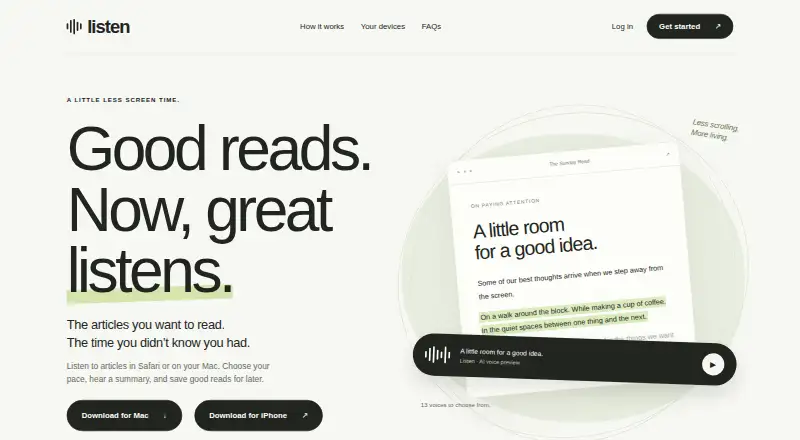
What Listen is
Listen turns articles and selected text into audio and summaries, with tools for saving articles and reading positions. Playback includes adjustable speed, passage highlighting, bookmarks, and 13 voices. On Mac, it can read pages from supported browsers or text selected in an app; on iPhone, the webpage Play button works in Safari. For Chrome or other iPhone browsers, users can copy an article URL into Listen. Saved articles and positions sync between iPhone and Mac when the same account is used. Listen Free costs nothing and includes 2,000 narrated words each week, article saving, and device sync. Listen Pro costs A$20 a month or A$194.99 a year and offers unlimited narrated words across devices. Mac use requires macOS 14 or later and a Mac with Apple Silicon. Narration and account sync need an internet connection, and bookmarks do not download complete audio files for offline use. Listen reads only accessible content and does not unlock paywalls or private posts. Text selected for AI narration and summaries is sent to Listen and OpenAI.
Good
- Offers adjustable playback speed and passage highlighting.
- Includes 13 voices, summaries, and bookmarks.
- Free plan includes 2,000 narrated words each week.
- Saved articles and positions sync across iPhone and Mac.
Watch out
- Narration and sync require an internet connection.
- Bookmarks do not provide complete offline audio files.
- Does not unlock paywalled or private content.
- Mac requires macOS 14 or later and Apple Silicon.
Who it suits
Listen may suit readers who want articles or selected text narrated and saved across iPhone and Mac. Mac users need macOS 14 or later and Apple Silicon; iPhone webpage playback is available in Safari.
Verdict
Listen pairs article narration with summaries and saved reading positions, with a weekly word allowance on its free plan. Check the browser, Mac, and internet requirements, and note that selected text for AI features is sent to Listen and OpenAI.
Plans and prices
From Listen's own pricing page, checked 11 Oct 2026.
| Plan | Price | What it gives you |
|---|---|---|
| Listen Free | Free | 2,000 narrated words each week · saves articles · syncs across devices |
| Listen Pro monthly | A$20 a month | Unlimited narrated words across your devices · A$20 / month |
| Listen Pro annual | A$194.99 a year | Unlimited narrated words across your devices · A$194.99 billed annually; save 19% |
The facts
Each one read from Listen's own pages, with the date it was checked.
What it does
- Account deletion
- Users can delete their account from the app's Account settings, which removes account records and stored narration through the service's deletion flow.checked 11 Oct 2026
- AI and data handling
- Text selected for AI narration and summaries is sent to Listen and OpenAI; the privacy policy says Listen does not send the entire browser history as part of narration.checked 11 Oct 2026
- Content access limit
- Listen can only read content the user can access and does not unlock paywalls or private posts.checked 11 Oct 2026
- Features
- The product offers adjustable playback speed, passage highlighting, summaries, bookmarks, and 13 voices to choose from.checked 11 Oct 2026
- Offline limit
- Narration and account sync require an internet connection, and bookmarking does not download a complete offline audio file.checked 11 Oct 2026
- Payments
- Apple processes in-app subscriptions and Polar handles website checkout; Listen says it does not receive card or bank account details.checked 11 Oct 2026
- Playback
- On Mac, Listen can read pages from supported browsers or selected text in an app; on iPhone, its webpage Play button works in Safari.checked 11 Oct 2026
- Support
- Listen provides support by email at [email protected] and asks users to include their device and iOS or macOS version.checked 11 Oct 2026
- Sync
- Signing into the same account on iPhone and Mac syncs saved articles and reading position.checked 11 Oct 2026
- What it does
- Listen turns articles and selected text into audio and summaries, and lets users save articles and reading positions.checked 11 Oct 2026
Where it runs
- Browser support limit
- On iPhone, the webpage Play button works in Safari; for Chrome or other browsers, users can copy an article URL into Listen.checked 11 Oct 2026
- Mac requirements
- Listen for Mac requires macOS 14 or later and a Mac with Apple Silicon.checked 11 Oct 2026
Alternatives to Listen
- 1

NewsBlur
Free planOpen sourceAndroidiOSWebAPI8.5From $36 a year - 2

ReadTheory
Free planAndroidiOSWebmacOS8.1From $40 a month - 3

BookFusion
Free planAndroidiOSWebAPI8.0From $2.99 a month - 4

FreshRSS
Free planOpen sourceAndroidiOSWebAPI7.9Free plan - 5

Inoreader
Free planAndroidiOSWebAPI7.9From €7.50 a month - 6

Reading Eggs
AndroidiOSWebmacOS7.9From $99.99 a year