Linguatec Voice Reader Studio
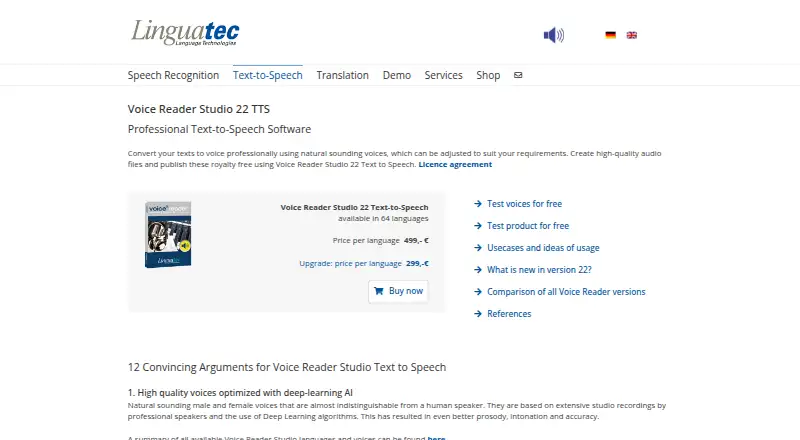
The facts below are what the maker publishes about Linguatec Voice Reader Studio, checked and dated. Our editors have not written about it yet.
Plans and prices
From Linguatec Voice Reader Studio's own pricing page, checked 20 Sep 2026.
| Plan | Price | What it gives you |
|---|---|---|
| Voice Reader Studio 22 | €499, paid once | 64 languages · One-time cost |
| Upgrade | — | Upgrade pricing for existing users |
| Voice Reader Studio 22 Update (per language) | €299, paid once | previous-version license key required · Update price per language; shop lists € 299,00 |
| Voice Reader Studio 22 (per language) | €499, paid once | one selected language · unlimited amounts of text/audio stated · One-time cost; shop lists € 499,00 |
The facts
Each one read from Linguatec Voice Reader Studio's own pages, with the date it was checked.
What it does
- Activation
- Internet access is listed for product activation, and manual activation is available for PCs without internet access.checked 12 Oct 2026
- Automation
- A separately licensed Command Line Utility converts text files to audio, supports batch processing and can be automated with scripts.checked 12 Oct 2026
- Commercial use
- Yeschecked 20 Sep 2026
- Export formats
- MP3,WAVchecked 20 Sep 2026
- Exports
- The software exports MP3 and WAV audio plus VTT and SRT subtitle files.checked 12 Oct 2026
- Intended users
- Linguatec categorizes Voice Reader Studio as text-to-speech software for professional users.checked 12 Oct 2026
- Languages
- Voice Reader Studio 22 is available in 64 languages with male and female voices.checked 12 Oct 2026
- Local processing
- Linguatec describes Studio as a local solution that does not require internet access for text-to-speech processing.checked 12 Oct 2026
- Office integrations
- Plugins provide integration with Microsoft Word, Outlook and PowerPoint, including Office 365 in offline mode.checked 12 Oct 2026
- Operating system
- The listed requirements are Windows 11, Windows 10 or Windows 8, in 32-bit or 64-bit versions.checked 12 Oct 2026
- Other integrations
- Voice Reader Direct reads selected text in programs, documents and web pages, and the voices are SAPI 5 compatible.checked 12 Oct 2026
- Pronunciation
- A pronunciation dictionary supports text-based and phonetic pronunciation adjustments.checked 12 Oct 2026
- Purpose
- Voice Reader Studio converts text into speech and creates audio files for professional use.checked 12 Oct 2026
- Support
- Written support is available to registered customers for 90 days after purchase or with a current support and maintenance contract.checked 12 Oct 2026
- Voice controls
- Voice Markups can change speakers, insert pauses, adjust pitch, timbre and volume, switch to spelling mode, and add WAV clips.checked 12 Oct 2026
- Voice quality
- The product offers natural sounding voices developed from studio recordings and deep-learning algorithms.checked 12 Oct 2026
The company
- Founded
- 1992checked 28 Sep 2026
- Headquarters
- Munich, Germanychecked 28 Sep 2026
Money
- Free plan
- Nochecked 20 Sep 2026
Where it runs
- Platforms
- windowschecked 20 Sep 2026
Alternatives to Linguatec Voice Reader Studio
- 1
iSpeech
Free planOpen sourceAndroidiOSWebAPI8.5Free plan - 2

Voicebox
Free planOpen sourceAndroidiOSWebAPI8.5From $12 a year - 3

Resemble AI
Free planAndroidiOSWebAPI8.3From $280 a month - 4

Speechify
Free planAndroidiOSWebAPI8.3From $10 a month - 5
Voice.ai
Free planAndroidiOSWebAPI8.3From $5 a month - 6

Fliki
Free planAndroidiOSWebAPI8.2From $28 a month