Lightfolio
Lightfolio is an online gallery and proofing service for photographers, with tools for clients to review and select images.
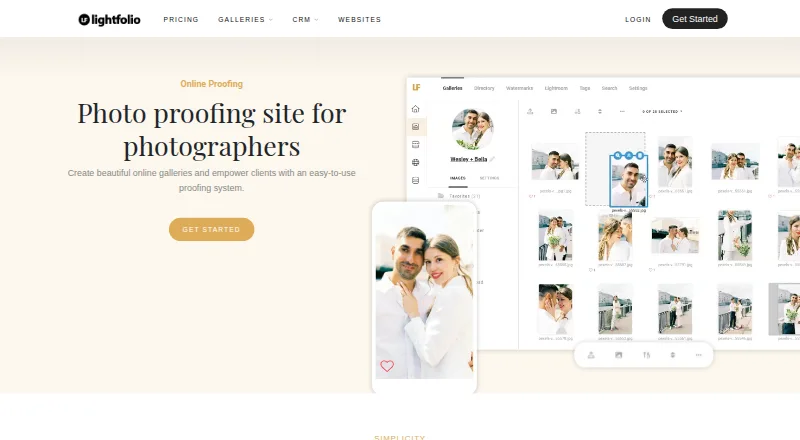
What Lightfolio is
Lightfolio is an online gallery and proofing service for photographers, with tools for clients to review and select images. Clients can mark favorites, sort choices into lists, collaborate, and comment or message on individual photos. Photographers can protect galleries with passwords, add text or image watermarks, arrange folders, and set download options. Galleries can also be used to sell prints, albums, and digital downloads. Paid plans have no sales commission; the free plan charges 15%. The free plan includes 3 GB of photo storage, 500 MB of video storage, and three galleries. Other listed plans range from 30 GB to unlimited photo storage, with unlimited galleries. Lightfolio supports JPG, GIF, PNG, and TIF files up to 70 MB; larger limits are available on request. Its proofing platform works on clients’ mobile devices. It lists a Lightroom Classic plug-in and print lab partners Bay Photo Lab and Loxley Colour. Email support and a knowledge base are available, with priority support on Pro plans.
Good
- Clients can organize favorites into selection lists.
- Galleries support passwords and optional watermarks.
- Sales include prints, albums, and digital downloads.
- Mobile-friendly proofing works on client devices.
Watch out
- Free plan limits galleries to three.
- Free plan charges a 15% sales commission.
- Free plan includes 3 GB photo storage.
- Supported photo files are limited to 70 MB unless requested.
Who it suits
Lightfolio suits independent photographers and small studios that want clients to select, discuss, and purchase images through online galleries. The free plan may fit photographers who can work within its storage, gallery, and commission limits.
Verdict
Lightfolio combines client proofing, gallery controls, and image sales in one service. Check the free plan’s gallery, storage, and commission limits against your needs.
Plans and prices
From Lightfolio's own pricing page, checked 29 Sep 2026.
| Plan | Price | What it gives you |
|---|---|---|
| Free | Free | 3 GB photo storage · 500 MB video storage · 3 galleries · 15% sales commission · No charge; free forever |
| Client Galleries — Free | Free | 3 GB photo storage · 500 MB video storage · 3 galleries · 15% sales commission · Proofing · Online sales · Free forever |
| Websites — Free | Free | 5 pages · 100 photos · 1 blog with 5 articles · SSL/TLS · Basic visitor analytics · Free forever |
| Studio Manager — Free | Free | 5 documents · 10 bookings · Unlimited projects · Unlimited contacts · 5 forms · 5 client portals · Free forever |
| Client Galleries — Lite | $7 a month | 30 GB photo storage · 3 GB video storage · Unlimited galleries · 0% commission · Custom domain · Billed yearly at $84; $11 billed month to month |
| Websites — Pro | $10 a month | Unlimited pages · 500 photos · 1 blog with unlimited articles · Custom domain · Remove Lightfolio branding · Billed yearly at $120; $14 billed month to month |
| Client Galleries — Starter | $12 a month | 100 GB photo storage · 10 GB video storage · Unlimited galleries · 0% commission · Custom domain · Remove Lightfolio branding · Billed yearly at $144; $18 billed month to month |
| Studio Manager — Lite | $12 a month | Unlimited documents · 10 bookings · Unlimited projects and contacts · Unlimited forms · 5 client portals · Billed yearly at $144; $15 billed month to month |
| Studio Manager — Pro | $15 a month | Unlimited documents · Unlimited bookings · Unlimited projects and contacts · Unlimited forms and client portals · Billed yearly at $180; $20 billed month to month |
| Client Galleries — Pro | $20 a month | 1000 GB photo storage · 30 GB video storage · Unlimited galleries · 0% commission · Priority support · Billed yearly at $240; $28 billed month to month |
| Client Galleries — Premium | $40 a month | Unlimited photo storage · 60 GB video storage · Unlimited galleries · 0% commission · Priority support · Billed yearly at $480; $50 billed month to month |
| Lite | $84 a year | 30 GB photo storage · 3 GB video storage · Unlimited galleries · 0% commission · $84 billed yearly at $7/mo; billed month to month at $11/mo |
| Starter | $144 a year | 100 GB photo storage · 10 GB video storage · Unlimited galleries · 0% commission · $144 billed yearly at $12/mo; billed month to month at $18/mo |
| Pro | $240 a year | 1000 GB photo storage · 30 GB video storage · Unlimited galleries · Priority support · $240 billed yearly at $20/mo; billed month to month at $28/mo |
| Premium | $480 a year | Unlimited photo storage · 60 GB video storage · Unlimited galleries · Priority support · $480 billed yearly at $40/mo; billed month to month at $50/mo |
The facts
Each one read from Lightfolio's own pages, with the date it was checked.
Where it runs
- Apps
- The reviewed official pages identify a web service and Lightroom Classic plug-in; no dedicated Lightfolio app-store listing was located in the searches performed.checked 21 Oct 2026
What it does
- Audience
- Lightfolio says it serves independent photographers and small studios across more than 140 countries.checked 29 Sep 2026
- Documentation
- The Help Center groups articles into galleries, accounts, store, studio management, subscriptions, and websites.checked 21 Oct 2026
- Downloads
- Gallery owners can permit full-gallery or single-image downloads and set the delivered resolution.checked 21 Oct 2026
- Extensibility
- The opened maker pages describe a Lightroom plug-in but do not document a public API or SDK.checked 21 Oct 2026
- File limits
- The feature page lists JPG, GIF, PNG, and TIF image uploads, with a 70 MB maximum file size and larger limits available on request.checked 21 Oct 2026
- Gallery access
- A gallery can require a password, PIN, or email-and-password authentication for viewing or downloads.checked 21 Oct 2026
- Gallery analytics
- Gallery analytics can report visits, geolocation, browser and device type, and whether images were viewed, downloaded, or favorited.checked 21 Oct 2026
- Gallery controls
- Galleries can use passwords, optional text or image watermarks, folders, and configurable downloads.checked 29 Sep 2026
- Gallery customization
- Photographers can customize gallery covers, thumbnail styles, fonts, layout, and color scheme.checked 21 Oct 2026
- Hosting model
- The maker presents Lightfolio as an online service and provides no self-hosted installation option on the pages reviewed.checked 21 Oct 2026
- Integrations
- Lightfolio advertises a Lightroom Classic plug-in and print fulfillment through Bay Photo Lab and Loxley Colour.checked 21 Oct 2026
- Licence
- No open-source licence is identified on the reviewed product or help pages; Lightfolio is presented as a hosted commercial service.checked 21 Oct 2026
- Limit: organization
- A Capterra reviewer says nested folders are missing, making categorization harder for large photo collections.checked 21 Oct 2026
- Limit: performance
- One G2 reviewer reports slow responses and delayed updates at times.checked 21 Oct 2026
- Limit: pricing
- Some Capterra reviewers characterize premium plans as relatively expensive and storage on the free plan as too limited.checked 21 Oct 2026
- Limit: storage
- Reviewers have complained that free-tier storage is limited and that larger storage needs require a paid tier.checked 21 Oct 2026
- Limit: support responsiveness
- Some Capterra reviewers report slow or absent support responses and difficulty getting help with technical or billing issues.checked 21 Oct 2026
- Messaging
- Photographers and clients can comment and message on individual images within the app.checked 29 Sep 2026
- Mobile access
- The proofing platform is described as mobile friendly and works on clients’ mobile devices.checked 29 Sep 2026
Money
- Billing
- Paid plans are offered monthly or annually, and annual plans are billed for the full year.checked 29 Sep 2026
The company
- Company identity
- The opened company page identifies the brand as Lightfolio but does not provide a separate legal entity name, employee count, or funding information.checked 21 Oct 2026
- Founded
- The reviewed official company page does not state a founding year.checked 21 Oct 2026
- Headquarters
- Lightfolio lists its base as St. Petersburg, Florida, USA.checked 21 Oct 2026
The full review of Lightfolio
Overview
Lightfolio is an online gallery and proofing service for photographers who need clients to review, discuss, and order images. It is a strong fit for independent photographers and small studios that want selection and sales in the same workflow. Its appeal weakens for regular sellers on the free plan, where a 15% commission joins tight gallery and storage caps.
Key features
Clients can favorite images, organize picks into lists, and collaborate on selections. Comments and messages attach to individual images, which keeps approval conversations tied to the work rather than scattered across separate channels. That is especially useful when a shoot involves revisions or several people choosing images.
Photographers can password-protect galleries, add text or image watermarks, create folders, and configure downloads. Those controls suit both private proofing and more deliberate delivery. JPG, GIF, PNG, and TIF files are supported up to 70 MB each; larger file limits can be requested, but photographers routinely handling larger files should confirm those limits before committing.
Galleries can sell prints, albums, and digital downloads. Paid plans carry no sales commission, while the free plan charges 15%, so the free tier is less compelling as a lasting sales channel than as a way to try the workflow. A Lightroom Classic plug-in and print lab partners Bay Photo Lab and Loxley Colour connect the service to editing and print fulfillment. The proofing platform is mobile friendly for clients.
Lightfolio serves independent photographers and small studios across more than 140 countries. Email support and a knowledge base are offered, with priority support on Pro. Its privacy policy identifies Lightfolio in St. Petersburg, Florida, as the company and GDPR data controller, while cautioning that absolute security cannot be guaranteed.
Pricing
Lightfolio offers a free plan and paid plans billed monthly or annually. Annual subscriptions are billed for the full year. Lite, Starter, Pro, and Premium have custom pricing.
| Plan | Storage and galleries | Best fit |
|---|---|---|
| Free | free; no charge, free forever; 3 GB photo storage, 500 MB video storage, 3 galleries, and 15% sales commission. | Photographers exploring proofing or managing a small number of galleries who can accept the commission. |
| Lite | 30 GB photo storage, unlimited galleries, 3 GB video storage. | Photographers who need more gallery capacity than Free allows. |
| Starter | 100 GB photo storage, unlimited galleries, 10 GB video storage. | Those with a larger photo archive and more video to accommodate. |
| Pro | 1000 GB photo storage, unlimited galleries, 30 GB video storage; priority support. | Higher-volume studios that value substantial storage and priority support. |
| Premium | Unlimited photo storage, unlimited galleries, 60 GB video storage. | Photographers whose photo storage needs exceed Pro’s stated capacity. |
The paid tiers remove sales commission, but their prices are custom pricing, so sellers should compare the quoted cost with the free plan’s 15% cut. Free also limits users to three galleries and 3 GB of photo storage; Lite raises photo storage to 30 GB and removes the gallery cap. Moving upward adds photo and video capacity, while every paid plan retains unlimited galleries.
Platforms
Lightfolio is available on Linux, macOS, the web, and Windows. Clients can use its mobile-friendly proofing platform on their mobile devices.
Who it's for
Lightfolio is most suited to independent photographers and small studios that need clients to select and discuss images, control gallery access, and sell finished work. Its free plan is a sensible starting point for occasional or low-volume use; photographers with ongoing sales or more than three active galleries are more likely to benefit from a paid plan. It is a weaker fit for anyone who needs a published price before requesting a quote or regularly handles files over 70 MB.
Pros and cons
- Pros: Image-level comments, favorites, and selection lists keep client approvals organized around the photographs.
- Pros: Passwords, watermarks, folders, and download controls give photographers meaningful control over gallery access and delivery.
- Pros: Unlimited galleries on every paid tier avoid a gallery-count ceiling as client work grows.
- Cons: Free limits users to three galleries and 3 GB of photo storage, which may quickly constrain active client work.
- Cons: The free plan takes 15% of sales, a substantial trade-off for photographers who sell regularly.
- Cons: Paid plans use custom pricing, making cost comparisons less direct.
- Cons: The 70 MB per-file ceiling may not suit photographers with larger image files unless they can obtain a higher limit.
Alternatives
For another photography-focused option, FolioHD offers a free Starter plan with 36 uploads and limited features, plus a Basic plan at $6 a month with 200 uploads and 10 galleries. Consider it if those stated upload and gallery limits better match your needs; Lightfolio instead emphasizes client proofing, gallery controls, and sales commission-free paid tiers.
Browse Photo Proofing Software for more proofing options, or Photography Website Builders if building a photography site is the priority.
Verdict
Choose Lightfolio if you are an independent photographer or small studio that wants client selections, image-level feedback, protected galleries, and image sales under one roof. The free plan makes it possible to start without a subscription, but its three-gallery cap and 15% commission are meaningful constraints. Look elsewhere if you need predictable published pricing or want to avoid a sales cut without first requesting a paid-plan quote.
Getting started
- Visit https://www.lightfolio.com/photo-proofing.
- Choose the free plan or a paid tier.
- Select monthly or annual billing for a paid plan; annual plans are billed for the full year.
- Use Lightfolio on the web or on Linux, macOS, or Windows.
- Create galleries and configure client selections, discussion, and download controls.
Limits worth knowing
The free plan includes 3 GB of photo storage, 500 MB of video storage, and three galleries, and charges a 15% sales commission. Lite, the listed lowest paid tier, includes 30 GB of photo storage, unlimited galleries, and 3 GB of video storage; paid plans have zero sales commission.
Questions
Is Lightfolio free?
Yes. Its free plan costs nothing and is described as free forever.
What does the free plan include?
It includes 3 GB of photo storage, 500 MB of video storage, and three galleries. Sales on the free plan incur a 15% commission.
What platforms does Lightfolio support?
The listed platforms are web, Linux, macOS, and Windows. The proofing platform is also described as mobile friendly for clients.
Can Lightfolio galleries sell products?
Yes. Galleries can sell prints, albums, and digital downloads. Paid plans have zero sales commission; the free plan charges 15%.
What integrations does Lightfolio list?
It lists a Lightroom Classic plug-in and print lab partners Bay Photo Lab and Loxley Colour.
What are Lightfolio’s paid plans?
The listed plans are Lite, Starter, Pro, and Premium. Paid plans are offered monthly or annually, but no paid-plan prices are provided here.
Alternatives to Lightfolio
- 1
ShootCal Websites
Free planAndroidiOSWebmacOS8.1From $5 a month - 2

LentloSites
Free planAndroidiOSWebAPI8.0Free plan - 3

SmugMug
AndroidiOSWebAPI7.8From $20 a month - 4
Zarla
Free planAndroidiOSWebAPI7.8From $10.99 a month - 5

Zenfolio
iOSWebmacOSWindows7.7From $84 a year - 6

Pixieset Website
Free planAndroidiOSWeb7.6From $12 a month