LeoScape
LeoScape is a browser-based landscape business tool that combines design, estimating, client proposals, and crew scheduling.
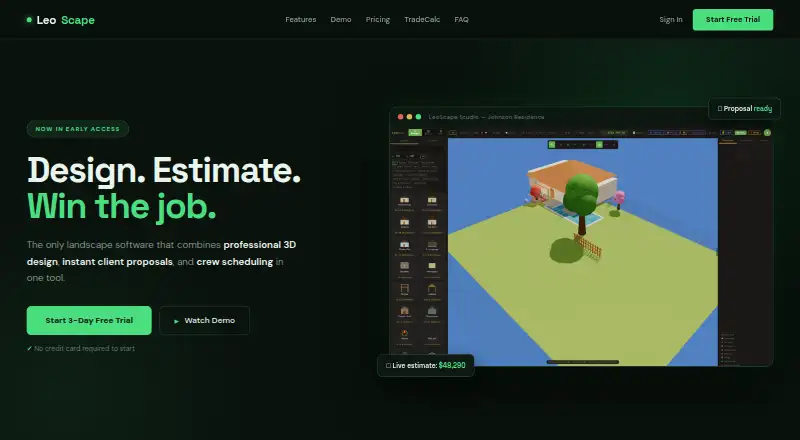
What LeoScape is
LeoScape is a browser-based landscape business tool that combines design, estimating, client proposals, and crew scheduling. Its 3D canvas contains more than 300 plants, trees, hardscape items, and structures, with before-and-after scene switching. You can search an address, trace a lot boundary on satellite imagery, and import that boundary to scale as a design base. Placed assets feed a live cost estimate, while 27 material calculators support planning. For clients, LeoScape creates branded PDF proposals containing a cover page, plant schedule, cost breakdown, and signature line. Crew features include a weekly scheduling board, work orders, a roster, and labor totals per job. The 2D plan view adds dimensions, a north arrow, scale bar, and irrigation overlays, with PNG and print export. The Professional plan is $19.99 a month, billed monthly, with unlimited projects and no per-seat fees. A 3-day trial is available, but there is no free plan.
Good
- 3D library with over 300 landscape items
- Satellite boundaries imported to scale
- Live estimates and 27 calculators
- Branded PDF proposals with signatures
- Crew scheduling and work orders
Watch out
- No free plan
- Design work best suited to desktop or laptop
- One account per person
- Professional plan costs 19.99 USD monthly
Who it suits
LeoScape suits landscape contractors, landscapers, hardscapers, tree crews, and home trades needing design and job coordination in one browser tool. It is aimed primarily at desktop or laptop design work, with tablet support through Field Mode.
Verdict
LeoScape brings landscape design, estimating, proposals, and crew operations together in a web workspace. Its paid Professional plan includes unlimited projects and the full tool, while the browser-first workflow favors contractor teams working mainly on computers.
Plans and prices
From LeoScape's own pricing page, checked 7 Oct 2026.
| Plan | Price | What it gives you |
|---|---|---|
| Professional | $19.99 a month | Unlimited projects · no per-seat fees · full tool included · per month — cancel anytime |
The facts
Each one read from LeoScape's own pages, with the date it was checked.
What it does
- Account limit
- The terms say there is one account per person and accounts may not be shared with others without written permission.checked 7 Oct 2026
- Crew management
- Crew tools include a weekly scheduling board, work orders, a crew roster, and labor cost totals per job.checked 7 Oct 2026
- Data handling
- The privacy policy says LeoScape does not sell user data or use it for ads or AI training, and canceled accounts’ data is retained for 90 days before deletion.checked 7 Oct 2026
- Design
- Its 3D canvas includes more than 300 plants, trees, hardscape items, and structures, with before-and-after scene switching.checked 7 Oct 2026
- Estimates
- Placed assets update a live cost estimate, and the product includes 27 material calculators.checked 7 Oct 2026
- Integrations
- LeoScape lists Supabase for database and authentication, Stripe for payments, Netlify for hosting, Google for optional sign-in, and ESRI for satellite imagery.checked 7 Oct 2026
- Intended users
- The site describes LeoScape as professional landscape software built for contractors and highlights landscapers, hardscapers, tree crews, and home trades.checked 7 Oct 2026
- Proposals
- Users can generate a branded PDF proposal with a cover page, plant schedule, cost breakdown, and signature line.checked 7 Oct 2026
- Purpose
- LeoScape combines landscape design, estimating, client proposals, and crew scheduling in one browser-based tool.checked 7 Oct 2026
- Satellite import
- Users can search an address, trace a lot boundary on satellite imagery, and import it to scale as a design base.checked 7 Oct 2026
- Security and privacy
- Its privacy policy states that data is transmitted over HTTPS/TLS, passwords are hashed, and database access uses Row-Level Security; it says payment card data is handled by Stripe.checked 7 Oct 2026
- Support
- The site directs users to contact [email protected] for questions and support.checked 7 Oct 2026
- TradeCalc
- TradeCalc is free and provides 58 calculators across landscaping, electrical, masonry, carpentry, construction, and tiling.checked 7 Oct 2026
The company
- Headquarters
- United Stateschecked 28 Sep 2026
Money
- Plans and exports
- The 2D plan view includes dimension lines, a north arrow, scale bar, and irrigation overlays, with PNG or print export.checked 7 Oct 2026
Where it runs
- Platform
- LeoScape runs in a modern browser with nothing to install; the site says it is best suited to desktop or laptop design work and supports tablet use through Field Mode.checked 7 Oct 2026
Alternatives to LeoScape
- 1

Planner 5D
Free planAndroidiOSWebAPI8.4From $4.99 a month - 2
iScape
Free planAndroidiOSWebmacOS8.2Free plan - 3
Terragen
Free planAPILinuxmacOSWindows7.6From $96 a year - 4

World Machine
Free planLinuxmacOSWindows7.6$119 one-time - 5
Garden Sketchbook
Free planWeb7.4From $39 a year - 6

AIGardenPlanner
Free planWeb7.3Free plan