
LeanLaw
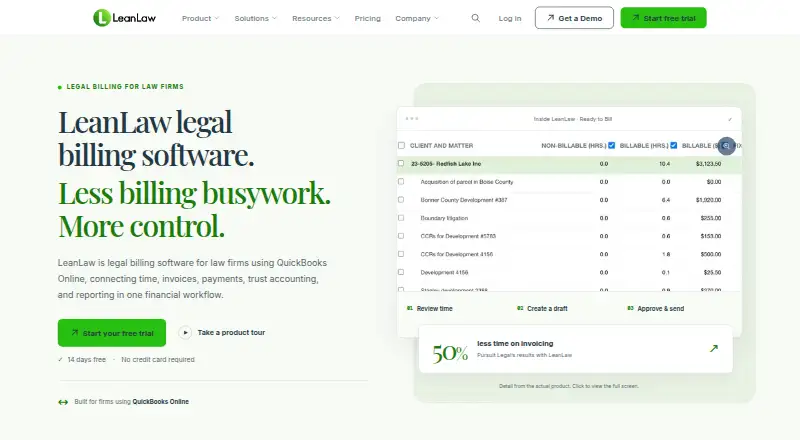
LeanLaw provides law firms with timekeeping, billing, trust accounting, payments, and financial reporting connected to QuickBooks Online.
What LeanLaw is
LeanLaw provides law firms with timekeeping, billing, trust accounting, payments, and financial reporting connected to QuickBooks Online. It supports hourly, flat-fee, and contingency billing. Trust-accounting tools include three-way reconciliation, transfers from trust to operating accounts, sub-ledgers, and IOLTA reporting. The Core plan is $55 a month per user and includes time and expense tracking, e-payments, reporting, trust accounting, professional invoices, and two-way QuickBooks Online sync. Pro costs $75 a month per user and adds invoice templates, LEDES files, permissions, and matter-based accounting. Contingency and Elite pricing is custom. An active QuickBooks Online subscription is required; QuickBooks Desktop is not supported. LeanLaw's 14-day trial does not require a credit card, though migration and QuickStart onboarding start with a paid subscription. Its mobile app shows matter details but cannot create or edit matters. The public REST API supports access to clients, matters, time entries, expenses, invoices, users, and codes.
Good
- Supports hourly, flat-fee, and contingency billing.
- Includes three-way trust reconciliation and IOLTA reporting.
- Public REST API covers clients, matters, and invoices.
- 14-day trial does not require a credit card.
Watch out
- Requires an active QuickBooks Online subscription.
- QuickBooks Desktop is not supported.
- Mobile app cannot create or edit matters.
- Migration and QuickStart onboarding require a paid subscription.
Who it suits
LeanLaw suits modern, mid-sized law firms seeking connected financial workflows, particularly firms that need trust accounting alongside billing. It requires QuickBooks Online.
Verdict
LeanLaw brings legal billing and trust accounting together with QuickBooks Online workflows. Check the QuickBooks requirement and mobile editing limit against your firm's needs.
Plans and prices
From LeanLaw's own pricing page, checked 15 Oct 2026.
| Plan | Price | What it gives you |
|---|---|---|
| Core | $55 a month | time and expense tracking · e-payments · reporting dashboard · trust accounting (IOLTA) · professional invoices · two-way QuickBooks Online sync · per user / month |
| Pro | $75 a month | Core features · three custom invoice templates · LEDES files · precise user permissions · matter-based accounting · per user / month |
| Contingency | Priced on request | Settlement Wizard · lien management and tracking · automated settlement statements · Contingency Insights · native QuickBooks Online sync · custom |
| Elite | Priced on request | Core, Pro and Contingency features · unlimited invoice templates · priority support · dedicated manager · custom reporting · compensation tracking · custom |
The facts
Each one read from LeanLaw's own pages, with the date it was checked.
What it does
- API
- LeanLaw offers a public REST API supporting programmatic reads and writes for clients, matters, time entries, expenses, invoices, users and LEDES codes.checked 15 Oct 2026
- API endpoint
- The documented API base endpoint is https://api.leanlaw.io and examples use Bearer API-key authentication over HTTPS.checked 15 Oct 2026
- Compensation tracking
- Reports can track origination, responsible-attorney and working-attorney allocations, plus matter profitability.checked 15 Oct 2026
- Desktop installation
- A lightweight Windows and Mac Desktop Tracker can be installed from LeanLaw settings for time entry and timers.checked 15 Oct 2026
- Desktop limitation
- Desktop Tracker synchronization requires an active network connection and does not support offline entries.checked 15 Oct 2026
- Developer documentation
- The developer portal provides interactive endpoint documentation, authentication guidance, examples and a test function for API requests.checked 15 Oct 2026
- Documentation and support
- The knowledge base covers setup, clients, time, expenses, billing, payments, trust accounting, reporting, administration, integrations and API topics.checked 15 Oct 2026
- E-payments
- LeanLaw supports payment links, ACH and credit-card payments, with payment activity reconciled to QuickBooks Online.checked 15 Oct 2026
- Expense tracking
- The product records matter expenses on desktop or mobile and can generate filtered expense reports.checked 15 Oct 2026
- Funding
- Owler reports $7.0 million total funding, including a $4 million Series A in March 2023 and a $625,000 debt round in June 2026.checked 15 Oct 2026
- Integration limit
- The NetDocuments integration requires a Pro or Elite LeanLaw subscription and an active NetDocuments account.checked 3 Oct 2026
- Integrations
- LeanLaw describes its NetDocuments integration as syncing client and matter data, and its integrations page also names Confido Legal and Billables.ai.checked 3 Oct 2026
- Intended customers
- LeanLaw describes its platform as designed for modern, mid-sized law firms seeking connected financial workflows.checked 3 Oct 2026
- Limit: mobile scope
- An Apple reviewer says the mobile app is mainly for timekeeping and has much less functionality than the web product.checked 15 Oct 2026
- Limit: QuickBooks navigation
- A GetApp reviewer says the QuickBooks integration can be difficult to navigate and invoice changes may need to be made in QuickBooks Online.checked 15 Oct 2026
- Limit: setup complexity
- A G2 reviewer reports that initial setup can be challenging and time-consuming for people new to legal billing systems.checked 15 Oct 2026
- Limit: Zapier directionality
- LeanLaw's Zapier connector is action-only, so LeanLaw cannot initiate a Zap.checked 15 Oct 2026
Money
- Billing and invoicing
- Billing supports WIP review, bulk rate edits, LEDES formatting, split billing and client-portal delivery.checked 15 Oct 2026
- Billing models
- The product supports hourly, flat-fee and contingency billing workflows.checked 15 Oct 2026
- Billing workflows
- The product supports hourly, flat-fee, and contingency billing workflows.checked 3 Oct 2026
The company
- Company founded
- Stanford CodeX lists LeanLaw as founded in 2014.checked 15 Oct 2026
- Company headquarters and size
- LinkedIn lists headquarters in Boise, Idaho and company size of 11–50 employees.checked 15 Oct 2026
- Company legal name
- A funding database identifies LeanLaw's legal name as UserFirst Software Inc.checked 15 Oct 2026
- Headquarters
- Boise, Idaho, United Stateschecked 28 Sep 2026
The full review of LeanLaw
Overview
LeanLaw is a legal-finance platform that ties timekeeping, billing, trust accounting, payments, and reporting to QuickBooks Online. It suits mid-sized firms that want one connected financial workflow, especially those handling several fee arrangements and active IOLTA accounts. The trade-off is substantial: QuickBooks Online is mandatory, QuickBooks Desktop is unsupported, and the mobile app cannot create or edit matters.
Key features
Hourly, flat-fee, and contingency billing are handled in the same system, making LeanLaw practical for firms with mixed engagement types. Time and expense tracking, professional invoices, reporting, and client payment collection cover the core billing cycle. ACH and card payments are supported, so firms can offer common payment methods without moving collections to a separate product.
Trust accounting is a major reason to choose LeanLaw. Three-way reconciliation, automated trust-to-operating transfers, sub-ledger management, and audit-ready IOLTA reporting provide controls suited to firms with significant trust activity. A practice that only needs a timer and basic invoices may be paying for accounting depth it will not use.
The public REST API exposes clients and matters, time entries, expenses, invoices, users, and codes for programmatic integrations. LeanLaw also names NetDocuments, Confido Legal, and Billables.ai integrations. NetDocuments synchronization of client and matter data is restricted to Pro or Elite subscribers with an active NetDocuments account, so it is not a Core-level integration benefit.
QuickBooks Online is a hard dependency. Core includes two-way QuickBooks Online sync, while QuickBooks Desktop users must change accounting platforms before adopting LeanLaw. The mobile app is useful for viewing matter details but cannot create or edit matters, limiting mobile administration.
Pricing
Core
Core costs $55 per user per month and includes time and expense tracking, e-payments, a reporting dashboard, IOLTA trust accounting, professional invoices, and two-way QuickBooks Online sync. It is the sensible entry point for firms needing integrated billing and trust functions without advanced customization.
Pro
Pro costs $75 per user per month. It adds three custom invoice templates, LEDES files, precise user permissions, and matter-based accounting. Firms with electronic billing requirements, differentiated staff access, or matter-level accounting are the audience; smaller practices can avoid the premium if Core's standard invoicing is sufficient.
Contingency
Contingency uses custom pricing and adds Settlement Wizard, lien management and tracking, automated settlement statements, Contingency Insights, and native QuickBooks Online sync. It is aimed at practices whose work is centered on settlement matters rather than ordinary hourly billing.
Elite
Elite also uses custom pricing and is for larger firms. It combines Core, Pro, and Contingency, then adds unlimited invoice templates, priority support with a dedicated manager, custom reporting, and compensation tracking. The package makes sense when scale and tailored administration justify a negotiated contract.
There is no free plan. A 14-day trial requires no credit card, but migration and QuickStart onboarding begin with a paid subscription, so firms should budget for implementation after the trial.
Platforms
LeanLaw supports Android, iOS, macOS, Windows, web, and API access. The broad device coverage is useful for distributed teams, while the mobile matter-editing restriction means substantive matter maintenance remains a desktop or web task.
Who it's for
LeanLaw is best for modern, mid-sized law firms already committed to QuickBooks Online and needing legal billing, trust accounting, payments, and financial reporting in a coordinated workflow. It is a weaker choice for QuickBooks Desktop users, firms wanting mobile matter editing, or small practices that need only inexpensive time tracking and invoicing.
Pros and cons
- Pro: Three-way reconciliation, automated transfers, sub-ledgers, and IOLTA reporting address demanding trust-account obligations.
- Pro: Hourly, flat-fee, and contingency workflows cover varied practices, with ACH and card collection built in.
- Pro: The REST API provides access to core financial and matter records for custom connections.
- Con: An active QuickBooks Online subscription is required, and QuickBooks Desktop is not supported.
- Con: Mobile users can view matters but cannot create or edit them.
- Con: NetDocuments requires both Pro or Elite and a separate NetDocuments account.
Alternatives
Compare broader category choices in Legal Billing Software, Legal Time Tracking Software, Legal Trust Accounting Software, Legal Payments Software, and Trust Accounting Software.
CaseFox is the better starting point for a solo user who can work within its free plan, which covers four cases and adds two users, while paid Professional costs $45 a month.
Bill4Time suits firms prioritizing general time and billing tools, with a 49.00 USD monthly Time & Billing plan and a free plan.
Choose Orion ePay when you want a payment-focused option and are comfortable contacting Orion for pricing.
RTG Bills is a lower-cost billing alternative, starting at $15.95 a month for one user, with pricing varying by user count.
CosmoLex is worth considering for its 49.00 USD monthly Launch plan combining time tracking, invoicing, online payments, trust accounting, and ledgers.
PCLaw and Aderant Expert Sierra use customized or unpublished pricing, so they are alternatives for firms prepared to request a quote.
Bilr starts at $33.99 a month per user on Basic for dashboards, fees, expenses, timers, and multiple fee arrangements; choose it when those billing essentials matter more than LeanLaw's trust-accounting depth.
Verdict
Choose LeanLaw if your mid-sized firm runs QuickBooks Online and needs legal billing joined to serious trust accounting, payments, and reporting. Its API and mixed-fee support add flexibility, but firms on QuickBooks Desktop, needing mobile matter editing, or seeking a lightweight low-cost timer should look elsewhere.
Alternatives to LeanLaw
- 1
Clio Accounting
AndroidiOSWebAPI7.8From $49 a month - 2

CosmoLex
AndroidiOSWeb7.8From $49 a month - 3
Rocket Matter
AndroidiOSWebAPI7.7From $39 a month - 4
PantherPayments
AndroidiOSWebAPI7.6From $49 a month - 5

LegalClaw
Free planOpen sourceWebAPILinuxmacOS7.4Free plan - 6

AcuminEvolution by Dexco
AndroidiOSWebAPI7.3From $156 a month