
Le Biniou
Le Biniou is a free, open-source visual tool that creates live visuals from audio performances or recorded tracks.
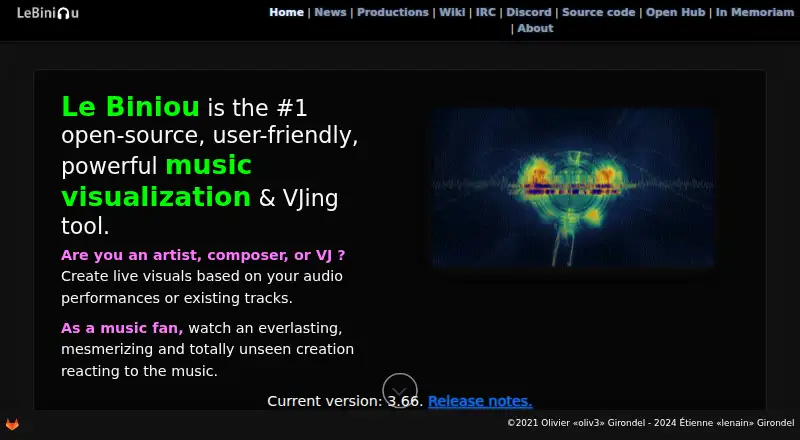
What Le Biniou is
Le Biniou is a free, open-source visual tool that creates live visuals from audio performances or recorded tracks. It is aimed at artists, composers, VJs, and music fans. The software has more than 100 plugins for visual effects, including more than 40 that react to sound. Users can arrange plugins into sequences, save them in banks, or have the software generate sequences in schemes mode.
Audio sources include JACK Audio, ALSA, PulseAudio, Open Sound System, Sndio, audio files, and OSC. For output, Le Biniou can record MP4 video, save PNG images, stream through RTMP, or send video to a V4L2 loopback device, including for compatible software such as OBS. It handles live cameras and media supported by FFmpeg or ImageMagick. A web interface lets users control a running instance over the network from another computer, tablet, or mobile device. The project lists Linux, macOS, and Windows among its platforms, with installation options including Flatpak and packages for several Linux distributions.
Good
- More than 100 visual-effects plugins are listed.
- Over 40 plugins react to sound.
- Can record MP4 video and save PNG images.
- Network web interface supports remote control.
- V4L2 output can feed compatible video software.
Watch out
- Windows support is listed for Windows 10 with WSL2.
- Maximum resolution is listed as 1080p.
Who it suits
Le Biniou suits artists, composers, VJs, and music fans who want to create visuals from audio. Its network web interface may also suit users who want to control an instance from another device.
Verdict
Le Biniou pairs audio-reactive effects with several recording and output options. Its plugin sequences and network control may be useful for live visual setups.
Plans and prices
From Le Biniou's own pricing page, checked 4 Oct 2026.
| Plan | Price | What it gives you |
|---|---|---|
| Free | Free | Open-source audio visualizer and VJ tool |
The facts
Each one read from Le Biniou's own pages, with the date it was checked.
What it does
- Audio inputs
- Audio inputs include JACK Audio, ALSA, PulseAudio, Open Sound System, Sndio, audio files, and OSC.checked 4 Oct 2026
- Custom media
- Users can add images under a custom theme directory, and the documentation says themes can be selected in the web interface starting with version 3.54.0.checked 4 Oct 2026
- Downloads
- The maker lists Debian and derivative distributions, Arch Linux, GitLab packages, and Flatpak as installation options.checked 4 Oct 2026
- Effects
- The maker lists more than 100 plugins, including more than 40 that react to sound.checked 4 Oct 2026
- Integrations
- The V4L2 loopback output can feed video software that supports V4L2, such as OBS.checked 4 Oct 2026
- Interfaces
- The software includes an on-screen display, and its documentation describes a web interface starting with version 3.50.checked 4 Oct 2026
- Media
- It supports video types handled by FFmpeg, image types handled by ImageMagick, and live cameras.checked 4 Oct 2026
- Open source
- The maker describes Le Biniou as open-source.checked 4 Oct 2026
- Purpose
- Le Biniou creates live visuals from audio performances or existing tracks for artists, composers, VJs, and music fans.checked 4 Oct 2026
- Remote control
- Its web interface lets users control a running instance from another PC, tablet, or mobile device on the network.checked 4 Oct 2026
- REST API
- The project homepage lists REST API and WebSocket communications under connectivity and automation.checked 4 Oct 2026
- Sequences
- Users can arrange plugins into sequences, save them in banks, or let Le Biniou generate sequences in schemes mode.checked 4 Oct 2026
- Support
- The project wiki directs users to the #lebiniou channel on Libera.Chat for questions and comments.checked 4 Oct 2026
- Supported systems
- The project homepage lists GNU/Linux, Windows 10 with WSL2, Mac OS, FreeBSD, NetBSD, and OpenBSD as minimum system requirements.checked 4 Oct 2026
- Video output
- Le Biniou can record MP4 video, save PNG images, stream using RTMP, or output through a V4L2 loopback device.checked 4 Oct 2026
- Visual effects
- The project describes more than 100 plugins for producing graphic effects from sound or recorded audio.checked 4 Oct 2026
The company
- Founded
- 2018checked 28 Sep 2026
Where it runs
- Platforms
- The maker lists GNU/Linux, Windows 10 with WSL2, and Mac OS as minimum system requirements.checked 4 Oct 2026
The full review of Le Biniou
Overview
Le Biniou is a free, open-source visualizer and VJ tool for turning live audio or recorded tracks into graphics. It is best suited to performers who want to shape effects into sequences and route visuals into a live-video setup. Its range of audio inputs and output options is compelling, but installation and system requirements make it less straightforward than a browser-first visualizer.
Key features
More than 100 plugins produce graphic effects, with over 40 designed to react to sound. Users can build plugin sequences, save them in banks, or have schemes mode generate sequences.
Audio can enter through JACK Audio, ALSA, PulseAudio, Open Sound System, Sndio, audio files, or OSC. That breadth gives the software a place in varied audio setups, while users seeking a simple upload-and-render workflow may find the range of inputs unnecessary. Media support includes live cameras and video and image types handled by FFmpeg and ImageMagick.
Output options cover MP4 recording, PNG stills, RTMP streaming, and a V4L2 loopback device. V4L2 can feed compatible video software such as OBS, which is useful when Le Biniou is one part of a larger broadcast setup. The web interface can control a running instance from another computer, tablet, or phone on the same network. The project also describes REST API and WebSocket communications for connectivity and automation.
Users can add images under a custom theme directory; documentation describes selecting themes in the web interface from version 3.54.0. The software includes an on-screen display, and its web interface is documented from version 3.50.
Pricing
Le Biniou is free: its Free plan costs nothing and is described as an open-source audio visualizer and VJ tool. It includes waveform visuals and video export, with a maximum resolution of 1080p and web and desktop coverage. There are no paid tiers or seat limits to weigh against that offer, making it a low-cost fit for users who want its particular workflow rather than a commercial template service.
Platforms
Le Biniou is offered for Linux, macOS, Windows, and the web. The project's minimum requirements also name GNU/Linux, Windows 10 with WSL2, Mac OS, FreeBSD, NetBSD, and OpenBSD. Installation options include Debian and derivative distributions, Arch Linux, GitLab packages, and Flatpak. The operating-system range is broad, but Windows use is tied to WSL2 in the stated system requirements.
Who it's for
Le Biniou makes the most sense for VJs, artists, and composers who want audio-responsive effects, sequence-based visual sets, and flexible routing into recording or streaming software. Music fans can also use it to turn existing tracks into visuals. It is a poorer fit for someone who wants a simple mobile app or a template-led export service, since its strength is a configurable desktop-oriented production workflow.
Pros and cons
Pros
- More than 100 plugins, including over 40 sound-reactive effects, give performers a sizable palette for building visuals.
- Multiple audio inputs and four output paths cover live performance, capture, still images, streaming, and V4L2 routing.
- Free and open-source, with no paid plan needed for the listed 1080p video export.
- Network control and REST API and WebSocket connectivity can support remote operation and automation.
Cons
- Windows requires WSL2 under the stated minimum requirements, adding setup complexity for Windows users.
- The sequence-and-plugin model is better suited to users willing to configure a visual set than to those seeking a quick, template-based result.
- The remote web interface controls a running instance on the same network; it is not a substitute for a standalone mobile visualizer.
Alternatives
Fosfora is another free, open-source desktop option for Linux, macOS, and Windows, with 56 effects and an eight-layer stack; choose it if that more compact effect set and stack are a better match.
BeatVisualiser shares Linux, macOS, web, and Windows coverage. Its Pro plan is $16.99 a month for unlimited video exports, every visualiser and style, full-length YouTube videos, and 1080p; it is the alternative to consider for that export-focused package.
Renderforest Music Visualizer offers a free tier with watermarked HD videos and basic features, plus a Lite plan at $9 a month; choose it if a freemium video-making service better suits your workflow.
Music Waveform is a free Android, iOS, and web option with no account, watermark, or paywall. It is the simpler alternative for users who prioritize those terms over Le Biniou's plugin sequences and routing options.
Videobolt is a freemium option with a free trial and a Lite Unlimited plan at €9.99 a year, billed monthly billed annually; choose it if its template-based video service better fits your needs.
Specterr is a freemium web alternative.
WaveVisual is a web alternative with free access and paid plans, including a one-time Single order at 9.00 USD.
Neural Frames is a freemium web alternative with paid monthly tiers.
Verdict
Choose Le Biniou if you want a free, open-source tool for assembling audio-reactive visuals and routing them into a live production workflow. Its extensive plugin set and flexible inputs and outputs are the main reasons to pick it. Look elsewhere if you want a simpler, template-led or mobile-first visualizer rather than a configurable VJ tool.
Getting started
- Visit the Le Biniou website.
- Choose an installation option listed for your system, such as Flatpak or a suitable Linux package.
- Connect an audio source such as an audio file, JACK Audio, or OSC.
- Arrange plugins into a sequence, use a saved bank, or choose schemes mode.
- Select an output such as MP4 recording, PNG images, RTMP streaming, or V4L2.
Limits worth knowing
The free plan is listed as free. Maximum resolution is 1080p.
Questions
How much does Le Biniou cost?
The listed Free plan costs nothing.
Is Le Biniou open source?
Yes. The maker describes it as open-source software.
Which platforms does it support?
The listed platforms are Linux, macOS, web, and Windows. The project also lists GNU/Linux, Windows 10 with WSL2, Mac OS, FreeBSD, NetBSD, and OpenBSD among its minimum system requirements.
What can Le Biniou output?
It can record MP4 video, save PNG images, stream through RTMP, or output through a V4L2 loopback device.
Can it work with OBS?
Its V4L2 loopback output can feed video software that supports V4L2, such as OBS.
How can I install it?
The maker lists Debian and derivative distributions, Arch Linux, GitLab packages, and Flatpak as installation options.
Alternatives to Le Biniou
- 1

AUDIOVIZOR
Free planWebWindows7.3From C$4.99 a month - 2
Renderforest Music Visualizer
Free planAndroidiOSWeb7.3From $9 a month - 3
SongRender
Free planWeb7.3From $15 a month - 4

dmn Visualiser
Free planAndroidiOSWeb7.2From $1.45 a month - 5

Music Waveform
Free planAndroidiOSWeb7.2Free plan - 6

SYQEL
AndroidiOSWebmacOS7.0From $60 a year