Lakka
Lakka is a free, lightweight Linux distribution that turns a small computer into a retrogaming console.
What Lakka is
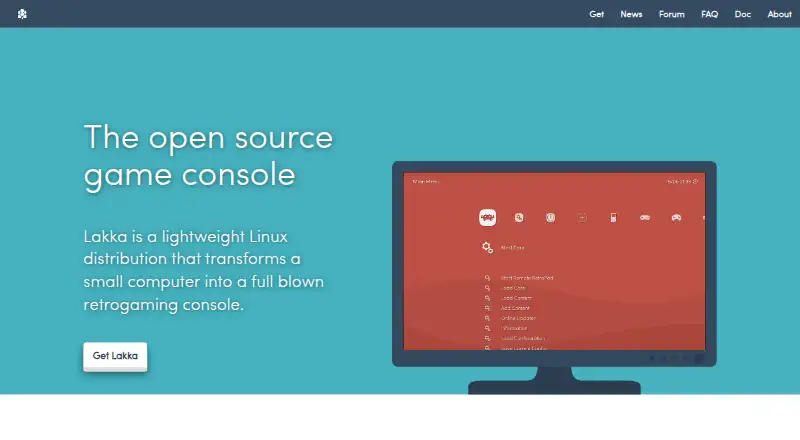
Lakka is a free, lightweight Linux distribution that turns a small computer into a retrogaming console. Based on LibreELEC and RetroArch, it uses RetroArch as its graphical interface, with unified emulator configuration and joypad autoconfiguration. Listed features include automatic controller recognition, rewinding, netplay, and shaders. Official builds target Raspberry Pi, Allwinner, iMX6, Amlogic, and 32-bit and 64-bit PC systems. Installation uses USB images specific to the target hardware; the PC build is intended for dedicated hardware and does not support virtualization, dual boot, or CD and DVD installation. Users supply their own ROMs, and documentation also covers BIOS files. Netplay requires the same ROM on both sides, and cores without savestate support cannot use it. The project says development is ongoing, so bugs, missing features, or unsupported hardware may occur. Lakka is community-driven and open source; required hardware is not included.
Good
- Free and open-source community project.
- Supports automatic joypad recognition and autoconfiguration.
- Includes rewinding, netplay, and shaders.
- Official builds target several hardware families.
Watch out
- Required hardware is not included.
- PC build does not support virtualization or dual boot.
- Users must provide their own ROMs.
- Development may involve bugs or missing features.
Who it suits
Lakka suits people who want to dedicate a compatible small computer or PC to retrogaming. It is less suitable for someone who needs virtualization, dual boot, or a console with hardware included.
Verdict
Lakka packages a RetroArch-based interface and multiple retrogaming features as a dedicated Linux system. Confirm that your hardware has a matching image and that its installation and ROM requirements fit your setup.
Plans and prices
From Lakka's own pricing page, checked 1 Oct 2026.
| Plan | Price | What it gives you |
|---|---|---|
| Lakka OS | Free | hardware not included · user obtains required hardware |
The facts
Each one read from Lakka's own pages, with the date it was checked.
What it does
- Architecture
- Lakka is based on LibreELEC and supports development boards, embedded or mobile systems, tiny PCs, and 32-bit and 64-bit PCs.checked 1 Oct 2026
- Controller support
- Common USB joypads are preconfigured and work automatically when plugged in, according to the hardware support documentation.checked 30 Sep 2026
- Core integration
- Lakka's graphical interface is directly coded in RetroArch, providing unified emulator configuration and RetroArch joypad autoconfiguration.checked 1 Oct 2026
- Development status
- Lakka is still under heavy development, with possible bugs, missing features and unsupported hardware.checked 30 Sep 2026
- Emulation base
- Lakka is built on RetroArch and can emulate a wide variety of systems.checked 1 Oct 2026
- Features
- Features include automatic joypad recognition, rewinding, netplay, shaders, savestates, and wireless joypad support.checked 1 Oct 2026
- Game files
- Users must provide their own ROMs, and Lakka documentation separately covers ROMs and BIOS files.checked 30 Sep 2026
- Installation
- Lakka provides USB images and says the image is specific to the target hardware.checked 30 Sep 2026
- Installation environments
- The installation tutorial provides instructions for GNU/Linux, Windows, and MacOS.checked 1 Oct 2026
- Licensing
- Lakka is community-driven open source, while its bundled emulators are protected by a non-commercial license and the name and logo are registered trademarks.checked 30 Sep 2026
- Multiplayer limit
- Lakka supports games with up to five players.checked 1 Oct 2026
- Netplay
- Netplay requires the same ROM on both sides, and cores without savestate support do not support netplay.checked 30 Sep 2026
- Notable limits
- PC images are USB images; CD or DVD installation, virtualization, and dual boot are unsupported, and hardware compatibility is not guaranteed.checked 1 Oct 2026
- PC limitation
- The PC build does not support virtualization or dual boot and is intended for real dedicated hardware.checked 30 Sep 2026
- Privacy
- The Lakka website says it uses no cookies, does not track browsing and does not provide navigation information to third-party analytics.checked 30 Sep 2026
- Project model
- Lakka is a community-driven open-source project with contributors including coders, designers, gamers, testers, and documentation writers.checked 1 Oct 2026
- Purpose
- Lakka is a lightweight Linux distribution that transforms a small computer into a retrogaming console.checked 30 Sep 2026
- RetroArch integration
- Lakka uses RetroArch directly as its graphical interface and provides unified emulator configuration and RetroArch autoconfiguration for joypads.checked 30 Sep 2026
- Security design
- Its LibreELEC-based filesystem is a 300 MB read-only filesystem that cannot be broken even with root access.checked 1 Oct 2026
- Support
- Users can get help through the documentation, FAQ, forums, IRC, Discord, and the GitHub bug tracker.checked 1 Oct 2026
- Supported hardware
- Officially supported computers include 32-bit and 64-bit PCs, Raspberry Pi 0 through 3, Cubieboard, Banana Pi, Cubox-i, Hummingboard, UDOO Quad, Odroid, and WeTek Play.checked 1 Oct 2026
- Updates
- The whole operating system can be updated or downgraded with a single download.checked 1 Oct 2026
- What it does
- Lakka is a lightweight Linux distribution that transforms a small computer into a game console.checked 1 Oct 2026
The company
- Maker status
- Lakka states that it is not a company and does not sell hardware.checked 1 Oct 2026
The full review of Lakka
Lakka is a lightweight Linux distribution that turns compatible small computers into a dedicated retrogaming console. It suits people who can set aside supported hardware for gaming and supply their own game files. Its unified RetroArch interface and console-focused features make it appealing, but hardware limits and ongoing development make it a poor fit for a virtual machine or dual-boot setup.
Overview
Built on LibreELEC, RetroArch and the libretro ecosystem, Lakka is a complete operating system rather than just an emulator or front end. RetroArch is also its graphical interface, bringing emulator configuration and joypad setup together instead of asking users to manage those pieces separately. That dedicated design is the point: Lakka turns a compatible computer into a console, not a general-purpose desktop system.
Common USB joypads are preconfigured and are intended to work when plugged in. Automatic joypad recognition, rewind, shaders and save states add useful options for solo play, while netplay supports games for up to five players. Netplay has a practical caveat: both sides need the same ROM, and cores without savestate support cannot use it.
Key features
- Unified RetroArch interface: Emulator configuration and joypad autoconfiguration are handled through RetroArch itself, giving the system a consistent control layer.
- Gaming tools: Rewinding, shaders, save states and cheat support provide ways to adjust and manage play without changing the system’s console focus.
- Netplay: Up to five players are supported, but multiplayer depends on matching ROMs and a core with savestate support.
- System updates: The whole operating system can be updated or downgraded with a single download, a simpler scope than updating a collection of separate applications.
- Read-only system: The LibreELEC-based filesystem is 300 MB and read-only, and Lakka says it cannot be broken even with root access.
Lakka is still under heavy development, so bugs, missing features and unsupported hardware remain real possibilities. Its community forum, IRC, Discord and GitHub bug tracker offer routes for support, but this is a community project, not a company selling a finished appliance.
Pricing
| Plan | Price | What it includes |
|---|---|---|
| Lakka OS | free | Free operating system; hardware not included, so users obtain the required hardware themselves. |
There is no paid tier or free-trial period. The no-cost software does not remove the cost or compatibility work of finding a suitable computer, and users must supply their own ROMs. The bundled emulators are protected by a non-commercial license; Lakka itself is community-driven open source, while its name and logo are registered trademarks.
Platforms
Lakka runs as a Linux distribution, with official builds targeting Raspberry Pi, Allwinner, iMX6, Amlogic and 32-bit and 64-bit PC systems. Its supported-platform range also includes Cubieboard, Banana Pi, Cubox-i, Hummingboard, UDOO, Odroid and PC. Images are USB images specific to their target hardware, and compatibility is not guaranteed.
The PC build is for real, dedicated hardware: it does not support virtualization or dual boot, and installation from CD or DVD is unsupported. Installation tutorials cover GNU/Linux, Windows and MacOS, but that refers to installation guidance, not a promise that Lakka runs as a desktop application on those systems. Users also need to provide ROMs; Lakka’s documentation treats ROMs and BIOS files separately.
Who it's for
Lakka is best for someone willing to dedicate a compatible computer to retrogaming and comfortable choosing the matching image, supplying game files and accepting an actively developed system. It is less suitable for anyone who needs to keep using a PC normally, wants virtualization or dual boot, or expects assured support for every device in a hardware family.
The project’s website says it uses no cookies, does not track browsing and does not provide navigation information to third-party analytics. That may appeal to privacy-conscious visitors, though it does not change the system’s hardware and game-file requirements.
Pros and cons
- Pro: RetroArch is the interface itself, so emulator settings and joypad autoconfiguration share a unified setup.
- Pro: Automatic recognition for common USB joypads reduces controller setup work, while rewind, shaders and save states add meaningful play options.
- Pro: A single download can update or downgrade the whole OS, and the read-only filesystem is a deliberate security feature.
- Con: Hardware-specific USB images and unguaranteed compatibility make device selection part of the setup rather than an afterthought.
- Con: PC users cannot install it alongside another OS or run it in a virtual machine; it requires dedicated real hardware.
- Con: Users must obtain their own ROMs, and netplay is restricted by ROM matching and core savestate support.
- Con: Heavy development means possible bugs, missing features and unsupported hardware.
Alternatives
If the dedicated-operating-system approach is not right, RetroArch is the closest alternative: it is free, open source and runs on Android, iOS, Linux, MacOS, web and Windows, so it suits readers looking for broader platform coverage. For other options, browse Emulation Frontends or, for Sega-focused choices, Sega Genesis Emulators.
- MAME is a free option for readers looking for an emulator available on Android, Linux, MacOS and Windows; ROMs and copyrighted software are generally not included.
- BlastEm is another free option, with Linux, MacOS, web and Windows platforms.
- ClownMDEmu is free software under AGPLv3 or later and supports Linux, MacOS, self-hosted, web and Windows platforms.
- Genesis Plus GX is free, runs on Linux and Windows, and also has a standalone GameCube/Wii build; its source code uses a specific non-commercial license.
- Manic EMU is a free option spanning Android, iOS, Linux, MacOS, web and Windows.
- ares is a free, open-source multi-system emulator for Linux, MacOS and Windows.
- higan is free software for Linux, MacOS and Windows and comes with no warranty.
Verdict
Choose Lakka if you want a free, RetroArch-based system for a dedicated, compatible retrogaming machine and value unified emulator controls, controller autoconfiguration and console-focused features. Look elsewhere if you need dual boot, virtualization, guaranteed hardware support or an all-in-one source of games: Lakka’s dedicated-hardware model, development risks and requirement to supply ROMs are decisive constraints.
Getting started
- Visit the Lakka website.
- Choose the USB image for the target hardware.
- Use the installation tutorial for GNU/Linux, Windows, or MacOS.
- Provide compatible hardware and your own ROMs.
- Connect a common USB joypad for its preconfigured controller setup.
Limits worth knowing
The free Lakka OS plan costs nothing, with hardware not included; users obtain the required hardware. PC images do not support virtualization, dual boot, or CD/DVD installation, and hardware compatibility is not guaranteed.
Questions
How much does Lakka cost?
The Lakka OS plan is free. Hardware is not included.
Is Lakka open source?
Lakka is a community-driven open-source project. Its bundled emulators are protected by a non-commercial license, and the name and logo are registered trademarks.
What devices does it support?
Official builds target Raspberry Pi, Allwinner, iMX6, Amlogic, and 32-bit and 64-bit PCs. Other listed platforms include Cubieboard, Banana Pi, Cubox-i, Hummingboard, UDOO, and Odroid.
Can I install it in a virtual machine or alongside another PC operating system?
No. The PC build does not support virtualization or dual boot and is intended for dedicated hardware.
Does Lakka include games?
Users must provide their own ROMs. Lakka documentation separately covers ROMs and BIOS files.
What does netplay require?
Both sides need the same ROM, and cores without savestate support cannot use netplay. Games can support up to five players.
Alternatives to Lakka
- 1

ES-DE Frontend
Free planOpen sourceAndroidLinuxmacOSWindows8.3$6.50 one-time - 2

GameEx
Free planAndroidLinuxmacOSWindows7.8$17 one-time - 3
LaunchBox
Free planAndroidAPIWindows7.8$30 one-time - 4
RetroArch
Free planAndroidiOSWebLinux7.7Free plan - 5

Attract-Mode
Free planOpen sourceAPILinuxmacOSSelf-hosted7.5Free plan - 6
EmulatorJS
Free planAndroidiOSWebSelf-hosted6.8Free plan