Genesis Plus GX
Genesis Plus GX is a free, open-source emulator for Sega 8-bit and 16-bit systems.
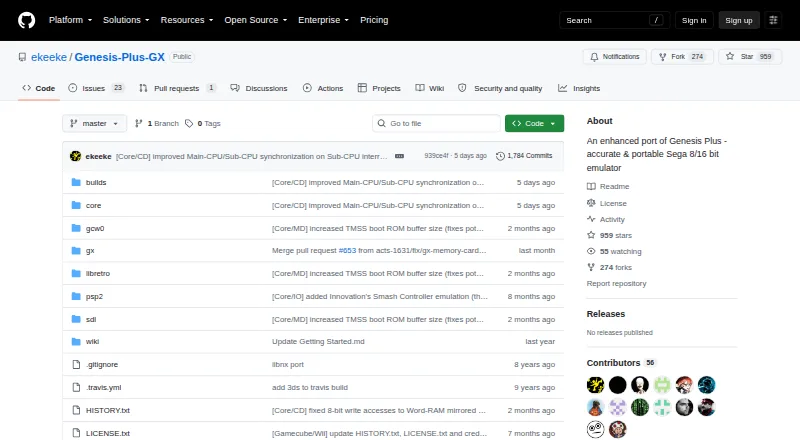
What Genesis Plus GX is
Genesis Plus GX is a free, open-source emulator for Sega 8-bit and 16-bit systems. It covers SG-1000, Mark-III, Master System, Game Gear, Genesis/Mega Drive, and Sega/Mega CD hardware, including backward-compatibility modes. The project describes its CPU and video emulation as highly accurate and its sound emulation as sample-accurate, with cycle-accurate CPU and sound synchronization. It supports raw and interleaved ROMs, plus CUE+BIN, ISO+WAV, and ISO+OGG CD images. Emulated peripherals include several Sega pads, multitaps, a mouse, and light guns, along with cartridge hardware such as SVP DSP, EEPROMs, Game Genie, Action Replay, and Lock-On. Save states, shaders, netplay, and cheat support are listed. Standalone GameCube and Wii builds are available, while RetroArch, BizHawk, and OpenEmu provide frontend options on other platforms. The project claims compatibility with released software for the listed systems but says it cannot test every game from start to finish; some Master System titles also depend on specific hardware or modes. The multi-platform core source has a non-commercial license.
Good
- Supports six listed Sega system families.
- Reads ROM files and several CD image formats.
- Emulates Sega controllers, multitaps, mouse, and light guns.
- Save states, shaders, netplay, and cheat support are listed.
- Standalone GameCube and Wii builds are available.
Watch out
- Multi-platform core source has a non-commercial license.
- Some Master System games require particular hardware or modes.
- PICO emulation is preliminary.
- Backup RAM and CD RAM carts have listed caps.
Who it suits
It suits players seeking emulation of the listed Sega systems through supported builds or frontends. Users who need to redistribute or use the multi-platform core commercially should note its license restriction.
Verdict
Genesis Plus GX covers a broad set of Sega systems and lists support for varied media, peripherals, and features. Check the platform build and license terms that apply to your intended use.
Plans and prices
From Genesis Plus GX's own pricing page, checked 29 Sep 2026.
| Plan | Price | What it gives you |
|---|---|---|
| Genesis Plus GX | Free | source code under specific non-commercial license · standalone GameCube/Wii build |
The facts
Each one read from Genesis Plus GX's own pages, with the date it was checked.
What it does
- Accuracy
- Its feature list describes highly accurate CPU and video emulation, sample-accurate sound-chip emulation, and cycle-accurate CPU and sound synchronization.checked 29 Sep 2026
- Builds
- The repository provides standalone GameCube and Wii DOL builds and a Win32 libretro core DLL.checked 28 Sep 2026
- Cartridge hardware
- The emulator supports extra cartridge hardware including the SVP DSP, J-Cart, backup RAM, EEPROMs, mappers, Game Genie, and Action Replay.checked 29 Sep 2026
- Compatibility
- The project describes compatibility with released software for SG-1000, Master System, Game Gear, Genesis/Mega Drive, and Sega/Mega CD, while noting that it cannot test every game from start to finish.checked 29 Sep 2026
- Compatibility claim
- The project describes its emulation as having 100% compatibility with released software for the listed Sega systems, including known unlicensed or pirate dumps.checked 28 Sep 2026
- Downloads
- The repository links to the latest official standalone GameCube/Wii port and compiled GameCube/Wii and RetroArch builds, with the latter noted as Windows 32-bit only.checked 29 Sep 2026
- Emulated systems
- It emulates SG-1000, Mark-III, Master System, Game Gear, Genesis/Mega Drive, and Sega/Mega CD hardware, including backwards compatibility modes.checked 28 Sep 2026
- Frontend integrations
- The project says it is available through frontends including RetroArch (libretro), BizHawk, and OpenEmu.checked 29 Sep 2026
- Frontends
- The project lists RetroArch (libretro), BizHawk, and OpenEmu as frontends through which it is available on other platforms.checked 28 Sep 2026
- GameCube/Wii build
- The standalone GameCube/Wii port includes SD/SDHC and DVD loading, zipped ROM support, save-state handling, and configurable video and audio options.checked 29 Sep 2026
- Getting started
- The maker’s guide says GameCube and Wii applications are distributed as DOL files and describes launching the Wii version through the Homebrew Channel.checked 28 Sep 2026
- Known limits
- Some Master System games require particular hardware or VDP modes and are listed as incompatible with certain systems or modes.checked 29 Sep 2026
- License
- The repository license says redistribution may not be sold or used in a commercial product or activity, and modified-source redistributions must include the complete source code subject to stated conditions.checked 29 Sep 2026
- License restriction
- The multi-platform core source code is provided under a specific non-commercial license.checked 28 Sep 2026
- Media formats
- It supports raw and interleaved ROM files, several Sega/Mega CD image formats, and external SUB subcode files.checked 29 Sep 2026
- Notable limit
- The features page lists PICO emulation as preliminary and caps Backup RAM at 64 KB and Sega/Mega CD RAM carts at 512 KB.checked 28 Sep 2026
- Peripherals
- Supported peripherals include 2-, 3-, and 6-button pads, multitaps, Sega Mouse, light guns, and other console accessories.checked 29 Sep 2026
- Product
- Genesis Plus GX is an open-source Sega 8/16-bit emulator focused on accuracy and portability.checked 29 Sep 2026
- Security and compliance
- The project pages opened provide no security certification or compliance claim.checked 29 Sep 2026
- Support
- The project directs users to its manual, startup guide, FAQ, and issue reporting for games that do not run accurately.checked 29 Sep 2026
- Systems
- It emulates SG-1000, Mark-III, Master System, Game Gear, Genesis/Mega Drive, and Sega/Mega CD hardware, including backward compatibility modes.checked 29 Sep 2026
- Wii features
- The Wii version supports up to eight players, Wii Remote, Nunchuk, Classic and Wii U Pro controllers, and Wiiflow plugin compatibility.checked 28 Sep 2026
The full review of Genesis Plus GX
Genesis Plus GX is a free emulator for Sega’s 8-bit and 16-bit systems, from the SG-1000 through Mega CD. It suits players who want broad Sega coverage and hardware-aware emulation; it is a less straightforward choice if you need a commercial-use license or a build for a specific platform beyond Windows and its console ports.
Overview
The emulator covers SG-1000, Mark-III, Master System, Game Gear, Genesis/Mega Drive, and Sega/Mega CD, including backward-compatibility modes. That range makes it a practical single choice for a Sega-focused library rather than a tool limited to one console generation.
Its emphasis is accuracy: the project describes highly accurate CPU and video emulation, sample-accurate sound, and cycle-accurate CPU and sound synchronization. It claims compatibility with released software for the supported systems, including known unlicensed or pirate dumps, while acknowledging it cannot test every game from start to finish. Some Master System titles depend on particular hardware or VDP modes and remain incompatible with certain systems or modes, so broad compatibility is not a guarantee for every setup.
Key features
Media, peripherals, and cartridge hardware
Genesis Plus GX accepts raw and interleaved ROMs, along with CUE+BIN, ISO+WAV, and ISO+OGG CD images. Its peripheral support spans 2-, 3-, and 6-button pads, multitaps, the Sega Mouse, light guns, and other Sega and third-party devices. Emulation of add-on cartridge hardware includes the SVP DSP, J-Cart, EEPROMs, Game Genie, Action Replay, and Sonic & Knuckles Lock-On. That breadth is useful for libraries that rely on more than standard controllers or basic cartridges.
Build features and limits
The standalone GameCube and Wii port supports SD/SDHC and DVD loading, zipped ROMs, save states, and configurable video and audio. The Wii version supports up to eight players, Wii Remote, Nunchuk, Classic and Wii U Pro controllers, and Wiiflow plugins. Save states, shaders, netplay, and cheats are also supported. PICO emulation is preliminary, while Backup RAM is capped at 64 KB and Sega/Mega CD RAM carts at 512 KB.
RetroArch (libretro), BizHawk, and OpenEmu provide frontend integrations on other platforms. The repository also offers a Win32 libretro core DLL; this is a 32-bit Windows build, not a universal desktop package.
Pricing
Genesis Plus GX costs nothing. The free plan includes the source code and standalone GameCube/Wii build, with no free trial. The price is appealing for personal use, but the license is a material constraint: the multi-platform core source code is under a specific non-commercial license, and redistribution may not be sold or used in a commercial product or activity. Redistributing modified source requires including the complete source code under the stated conditions.
Platforms
Supported platforms include Windows, GameCube, Wii, and RetroArch-based platforms. The maker’s guide describes the GameCube and Wii applications as DOL files and explains launching the Wii version through the Homebrew Channel. RetroArch, BizHawk, and OpenEmu extend access through their own supported platforms, but the standalone port is specifically aimed at Nintendo’s GameCube and Wii.
Who it's for
This is a strong fit for Sega enthusiasts who want one emulator spanning several generations, support for CD images and unusual peripherals, and console-specific builds with save-state handling. It is less suitable for users who need a commercial-use license, expect every Master System game to work in every mode, or want preliminary PICO emulation to be a mature part of the experience.
Pros and cons
- Pro: Broad Sega coverage from SG-1000 to Sega/Mega CD keeps several system libraries in one emulator.
- Pro: Detailed timing and sound emulation, plus support for varied controllers and cartridge hardware, target a more faithful experience than basic ROM playback.
- Pro: The GameCube/Wii port combines disc and SD loading with zipped ROMs and save states.
- Con: The non-commercial license rules out commercial use and places source obligations on modified-source redistribution.
- Con: Compatibility has specific exceptions, including Master System hardware or VDP-mode cases, and PICO support is preliminary.
- Con: The supplied compiled RetroArch build is Windows 32-bit only, which narrows that ready-made option.
Alternatives
For another free Sega emulator, consider BlastEm; it supports Linux, macOS, web, and Windows. RetroArch is the better fit when broader device reach matters, with builds for Android, iOS, Linux, macOS, web, and Windows, and an open-source project dating to 2012. Choose PicoDrive if its Linux, self-hosted, or Windows availability suits your setup; it is installed manually from release packages or ZIP archives.
OpenEmu is a free, open-source option for macOS only, intended for playing games you already own. Mega-Pi is a free Linux alternative. ares is a free, open-source multi-system emulator for Linux, macOS, and Windows. ClownMDEmu is free software under AGPLv3 or later, with Linux, macOS, self-hosted, web, and Windows platforms. MAME is a free option for Android, Linux, macOS, and Windows; ROMs and copyrighted software are generally not included.
Browse our Sega CD Emulators, Sega Genesis Emulators, Sega Master System Emulators, Game Gear Emulators, and Multi-System Emulators lists to compare by system.
Verdict
Choose Genesis Plus GX if you want a free, technically ambitious emulator that covers Sega’s classic systems and supports an unusually wide range of media, peripherals, and cartridge hardware. Its most important drawback is the non-commercial license; look elsewhere if you need commercial rights, and expect some system- and mode-specific compatibility limits.
Getting started
- Open the Genesis Plus GX GitHub repository
- Choose a Windows build, GameCube/Wii standalone build or supported frontend
- For Wii, place the DOL application where the Homebrew Channel can launch it
- Load a supported ROM or CD image format
- Configure controllers, video and audio options
- Enable save states, shaders, netplay or cheats as needed
Limits worth knowing
PICO emulation is listed as preliminary, Backup RAM is limited to 64 KB, and Sega/Mega CD RAM cartridges to 512 KB. Some Master System games require particular hardware or VDP modes, and the multi-platform core license is non-commercial.
Questions
How much does Genesis Plus GX cost?
It is free, with a free plan priced at 0.00 USD.
Which systems does it emulate?
It emulates SG-1000, Mark-III, Master System, Game Gear, Genesis/Mega Drive and Sega/Mega CD hardware, including backward-compatibility modes.
Which platforms are available?
Supported platforms include Windows, GameCube, Wii and RetroArch-based platforms. RetroArch, BizHawk and OpenEmu are listed as frontends.
What game image formats can it read?
It supports raw and interleaved ROMs, CUE+BIN, ISO+WAV and ISO+OGG CD images.
Is it open source and commercially usable?
The project is open source, but its multi-platform core source has a specific non-commercial license. Redistribution may not be sold or used in a commercial product or activity.
Alternatives to Genesis Plus GX
- 1
MasterGear
Free planAndroidLinuxmacOSSelf-hosted7.8$4.99 one-time - 2
ares
Free planOpen sourceLinuxmacOSSelf-hostedWindows7.5Free plan - 3

Emulicious
Free planLinuxmacOSWindows6.3Free plan - 4
PicoDrive
Free planLinuxSelf-hostedWindows6.2Free plan - 5
SMS
Free planLinux6.2Free plan - 6
BizHawk
Free planLinuxWindows6.1Free plan