KTouch
KTouch is a free typing trainer for Linux and Windows that helps learners develop touch-typing skills through lessons, practice, and performance review.
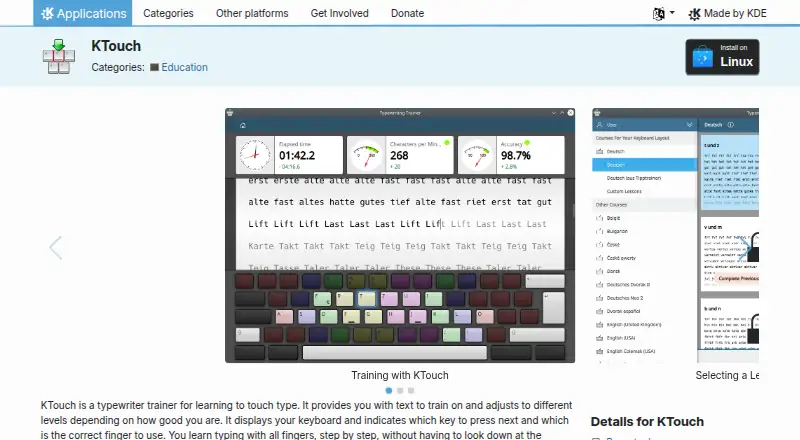
What KTouch is
KTouch is a free typing trainer for Linux and Windows that helps learners develop touch-typing skills through lessons, practice, and performance review. It presents an on-screen keyboard that shows which key to press and which finger to use, while training text adjusts to the learner’s skill level. The software includes dozens of courses in many languages and a course editor, and users can create or edit keyboard layouts. During practice, it records statistics; after each lesson, learners can review speed and accuracy and see errors by key. Courses and layouts can be imported or exported as XML files. KDE describes KTouch as suitable for all ages, schools, universities, and personal use. The application is open source under GPL-2.0+, and the page lists version 26.08.2 dated 2026-10-08 as the latest release shown. KDE provides links to documentation, community support, and bug reporting.
Good
- Available for Linux and Windows
- Dozens of courses in many languages
- Shows key and finger guidance
- Reviews speed, accuracy, and errors by key
- Free software under GPL-2.0+
Watch out
- No free trial is listed
- Practice statistics may require review by a learner or teacher
Who it suits
KTouch suits learners who want guided typing practice and feedback, as well as teachers reviewing learner progress. Its courses and custom layout tools may also fit schools or users with different keyboard layouts.
Verdict
KTouch combines guided instruction with adjustable practice and lesson-level feedback. It is a fit for learners or educators who want courses, keyboard-layout options, and progress statistics without a paid plan.
Plans and prices
From KTouch's own pricing page, checked 11 Oct 2026.
| Plan | Price | What it gives you |
|---|---|---|
| Free | Free | Free software under GPL-2.0+ · Linux distribution or AppStream installation |
The facts
Each one read from KTouch's own pages, with the date it was checked.
What it does
- Adaptive lessons
- It provides training text and adjusts to different levels based on the learner’s skill.checked 11 Oct 2026
- Courses
- KTouch ships with dozens of courses in many languages and includes a course editor.checked 11 Oct 2026
- Import and export
- Users can export courses and keyboard layouts to XML files and import previously exported files.checked 11 Oct 2026
- Intended users
- KDE describes KTouch as suitable for all ages and for schools, universities, and personal use.checked 11 Oct 2026
- Keyboard layouts
- It supports different keyboard layouts and lets users create and edit custom layouts.checked 11 Oct 2026
- License
- The KDE applications page lists KTouch under the GPL-2.0+ license.checked 11 Oct 2026
- On-screen guidance
- It displays a keyboard and indicates which key to press and which finger to use.checked 11 Oct 2026
- Performance review
- After a lesson, the results screen lets users review speed and accuracy statistics and see errors by key.checked 11 Oct 2026
- Progress statistics
- During training it collects statistics to help learners or teachers analyze progress.checked 11 Oct 2026
- Publisher organization
- KDE e.V. is a registered non-profit organization representing the KDE Community in legal and financial matters.checked 11 Oct 2026
- Purpose
- KTouch is a typewriting trainer for learning to touch type.checked 11 Oct 2026
- Release
- The KDE applications page lists version 26.08.2 dated 2026-10-08 as the latest release shown.checked 11 Oct 2026
- Support
- KDE links to the KTouch handbook, UserBase Wiki, KDE forum, kde-edu mailing list, and bug tracker for help or issue reporting.checked 11 Oct 2026
The company
- Founded
- 1999checked 28 Sep 2026
The full review of KTouch
KTouch is a desktop touch-typing tutor built around guided instruction, adaptive practice, and measurable improvement. It is best suited to learners, teachers, and families who need a free program that can accommodate different languages and keyboard layouts. Its desktop-only reach is the main reason to consider another service.
Overview
KTouch teaches touch typing by combining structured lessons with practice that responds to the learner’s current level. A visual keyboard identifies the next key and the finger intended to press it, giving beginners a concrete method for building muscle memory rather than merely recording words per minute. As ability changes, training text adjusts accordingly, and personalized drills keep practice focused on the learner’s needs.
The audience is broad: KDE describes the software as suitable for all ages, schools, universities, and personal use. It has been part of the KDE software ecosystem since 1999. The KDE applications page shows version 26.08.2, dated 2026-10-08, as the latest release shown, with KDE e.V. serving as the registered non-profit representing the KDE Community.
Key features
Guidance and diagnosis
On-screen key and finger prompts are particularly useful for beginners who need to learn correct technique, while adaptive lessons prevent practice from staying at an introductory level. During training, KTouch records statistics that a learner or teacher can use to track progress. After each lesson, the results screen reports speed and accuracy and identifies errors by key, making it easier to target a recurring weakness than a single overall score would.
Courses and editing
Dozens of courses in many languages make KTouch practical for multilingual learners and classrooms. The course editor allows lessons to be changed or created rather than forcing every user into one syllabus. Courses and keyboard layouts can be exported to XML and imported again, which is useful for sharing setups or preserving customized teaching material.
Keyboard flexibility
KTouch supports different keyboard layouts and lets users create and edit custom layouts. That matters for schools with varied hardware, multilingual households, and anyone whose physical keyboard does not match a standard preset. The combination of editable layouts and course exchange gives educators more control than a fixed, one-size-fits-all tutor.
Pricing
| Plan | Price | Includes |
|---|---|---|
| Free | free | Free software under GPL-2.0+; Linux distribution or AppStream installation |
There is no paid tier or free trial. The zero-cost plan includes the guided lessons, adaptive practice, diagnostics, personalized drills, courses, layout tools, and progress reporting described above. GPL-2.0+ licensing also makes KTouch open-source software. This is a strong fit for individuals and educational organizations that want capable instruction without subscriptions; readers seeking a browser or mobile deployment will need a different product.
Platforms
KTouch is available on Linux and Windows. Its distribution model is desktop-oriented, with the free plan referring to a Linux distribution or AppStream installation. There is no Android, iOS, or web version identified, so it is not the natural choice for learners who expect to continue lessons from a phone or browser.
Who it's for
Choose KTouch for a self-directed learner who wants finger-by-finger guidance, for teachers who need lesson statistics and editable courses, or for families and institutions sharing different keyboard layouts. Its multilingual course library and XML import/export are especially useful when one standard curriculum or layout will not fit everyone. Look elsewhere if cross-device, browser-first access is essential.
Pros and cons
Pros
- Explicit technique coaching: The on-screen keyboard shows both the key and the recommended finger, helping beginners establish touch-typing habits.
- Practice that adjusts: Adaptive lessons, diagnostics, and personalized drills keep exercises aligned with changing ability.
- Useful feedback: Post-lesson speed, accuracy, and per-key error reporting gives learners and teachers actionable targets.
- Flexible teaching material: Dozens of multilingual courses, a course editor, custom layouts, and XML exchange support classroom and household variation.
- No subscription barrier: The complete program is free, open source, and GPL-2.0+ licensed.
Cons
- Desktop reach only: Linux and Windows support excludes users who need web, Android, or iOS lessons.
- Setup responsibility: Custom courses and layouts offer control, but educators must manage those adaptations instead of relying on a single hosted curriculum.
Alternatives
For a wider comparison, see Typing Tutor Software.
- TIPP10 is the better pick if you want a free tutor across Linux, macOS, web, and Windows, with donations accepted.
- TypeTastic suits K-12 users needing Android, iOS, and web access, a free curriculum, and a free trial.
- Touch Typer is an option for Linux, macOS, and Windows users who want free core tests with statistics and streaks.
- KeyBlaze fits users who prefer a free version and are willing to upgrade for additional lessons, professional exercises, and custom features.
- Klavaro is another free, downloadable option spanning Linux, macOS, and Windows.
- Tux Typing is a free alternative developed by an international volunteer group focused on children.
- TypingClub is preferable for web or iOS learning; its individual edition is free, while the School Edition costs $120 a year with a minimum purchase of 20 seats.
- GNU Typist is a free GPL-licensed alternative for Linux and Windows.
Verdict
KTouch is a strong choice for learners and educators who want guided, adaptive touch-typing instruction with detailed lesson feedback, multilingual courses, and editable layouts at no cost. Choose it when desktop coverage and customization matter most; look elsewhere when mobile or browser access is a requirement.
Alternatives to KTouch
- 1
Touch Typer
Free planOpen sourceLinuxmacOSSelf-hostedWindows7.7From $2.39 a month - 2
TypeTastic
Free planAndroidiOSWeb7.4From $680 a year - 3
Avidemux
Free planOpen sourceWebLinuxmacOSWindows7.3Free plan - 4
Typing Instructor
WebmacOSWindows7.3From $29.95 a year - 5
Typesy
AndroidiOSWebmacOS6.9From $72 a year - 6
TypingClub
Free planiOSWeb6.9From $120 a year